Teachable pricing, checked: Starter, Builder and Growth, monthly vs yearly, the 7.5% fee on Starter, and the 30-day refund window
Last updated 2026-10-05 · By Smart Pick Desk editors · Prices read on Teachable's pricing page with Monthly and with Yearly selected on 2026-10-05; help centre read the same day · We have not used Teachable · How we checked ↓
The short answer
Teachable is a platform for selling online courses, coaching and digital downloads: it hosts the lessons, runs the checkout and handles student accounts. It has no free plan now, three published paid plans and a custom plan for large businesses. Starter is $39 a month billed monthly or $29 billed annually, Builder $89 or $69, and Growth $189 or $139. Starter also takes 7.5% of each sale; the other two do not.
- Starter, $39 or $29 a month: up to 5 products, one admin, and a 7.5% transaction fee on sales.[1]
- Builder, $89 or $69 a month: up to 10 products, a 0% transaction fee, and an affiliate program for people who promote your courses.[1]
- Growth, $189 or $139 a month: up to 50 products, five admins, course certificates and no Teachable branding.[1]
If you want one sentence: the lowest-priced plan costs the least in total only while sales are small, because the 7.5% fee grows with every sale, and a plan bought today can be refunded within 30 days.
On this page
At a glance
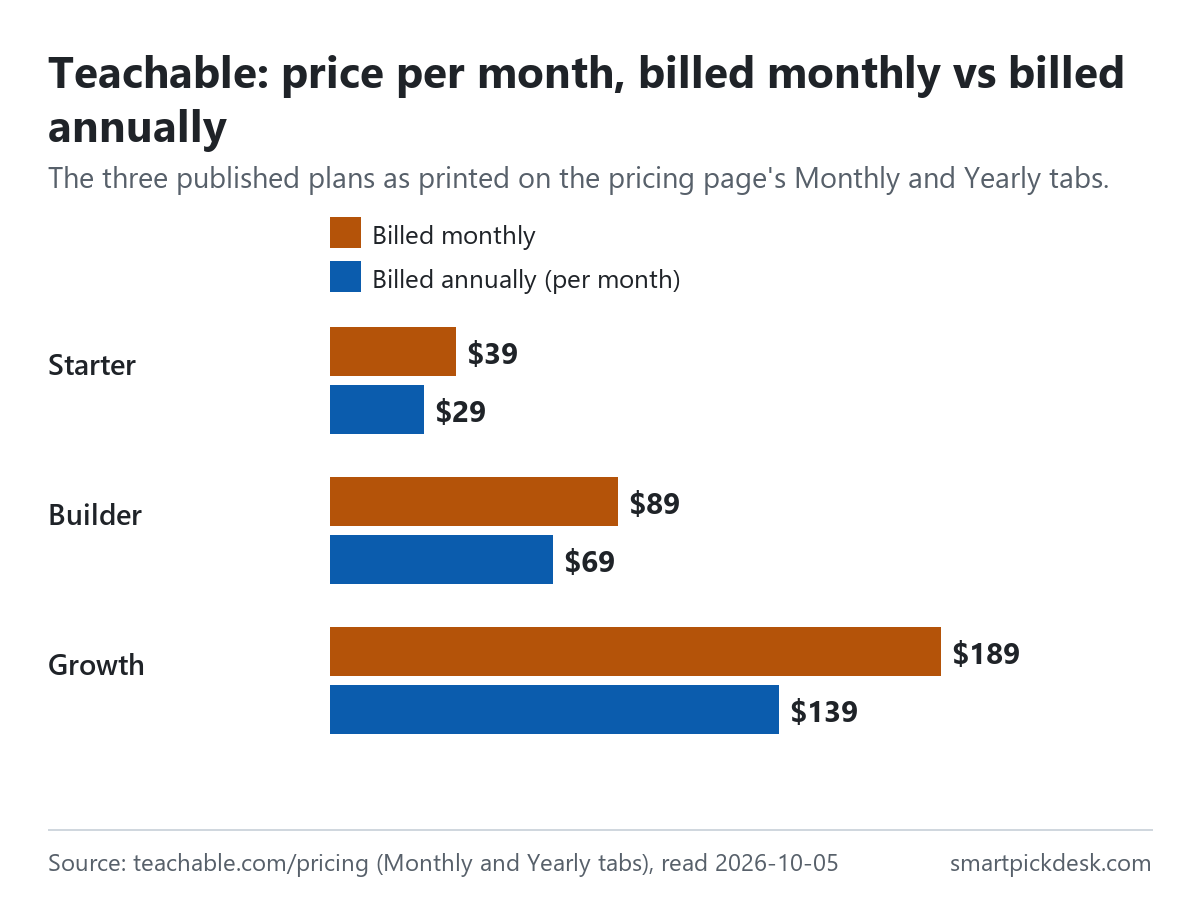
| Plan | Billed monthly | Billed annually, per month | Products | Admins | Transaction fee |
|---|---|---|---|---|---|
| Starter | $39 | $29 | 5 | 1 | 7.5% |
| Builder | $89 | $69 | 10 | 1 | 0% |
| Growth | $189 | $139 | 50 | 5 | 0% |
| Custom | Contact sales | Flexible | Flexible | 0% | |
Teachable's pricing page, read on 2026-10-05 with Monthly selected and with Yearly selected, including the comparison table under the plan cards.[1]
On the Yearly tab each card shows the monthly price next to the annual one, with “Billed annually” and a saving in dollars for the year: $120 on Starter, $240 on Builder and $600 on Growth.[1] Those savings match twelve months of the difference, by our arithmetic. Under the table, the page states the main renewal rule: “You may cancel at any time; cancellation takes effect at the end of the current billing cycle.”[1]
How we checked this (and what we did not check)
Last updated 2026-10-05 (first version). Every number and quotation here comes from Teachable's own pages. Prices change — confirm on Teachable's own page before you sign up.
What we did. On 2026-10-05 we opened teachable.com/pricing in a browser with no account, saved the page text, then pressed the Monthly and Yearly tabs and saved the visible text each time. The same day we saved six help-centre articles: the June 2025 plan change, requesting a refund on your school, cancelling your plan, billing information and history, Teachable Pay, and deleting your school. Wording in quotation marks is copied from those saved pages word for word, and a script checks every quotation against the saved text.
What we did not do. We have not used Teachable. There is no account, no screenshot of the product and no view here on how well its course player, checkout or apps work. Every image is a chart or summary we drew from the saved text; none shows Teachable's logo or screens. Two help articles — the one on Teachable's fees and the one on student refunds — showed a security check instead of the article when we opened them, so we could not read them. That means card processing rates are not on this page: the pricing page lists “Processing fees” only as a heading, and we did not quote rates we could not read.
What that leaves. The three published plans in both billing modes, the transaction fee, the refund window, and the billing, payout and cancellation rules, as published.
No free plan: the trial and the refund window
The pricing page has a button that says “Start for free”, but that starts a trial of a paid plan. The help article on cancelling is direct about it: “Please note that Teachable no longer offers a free plan.”[3]
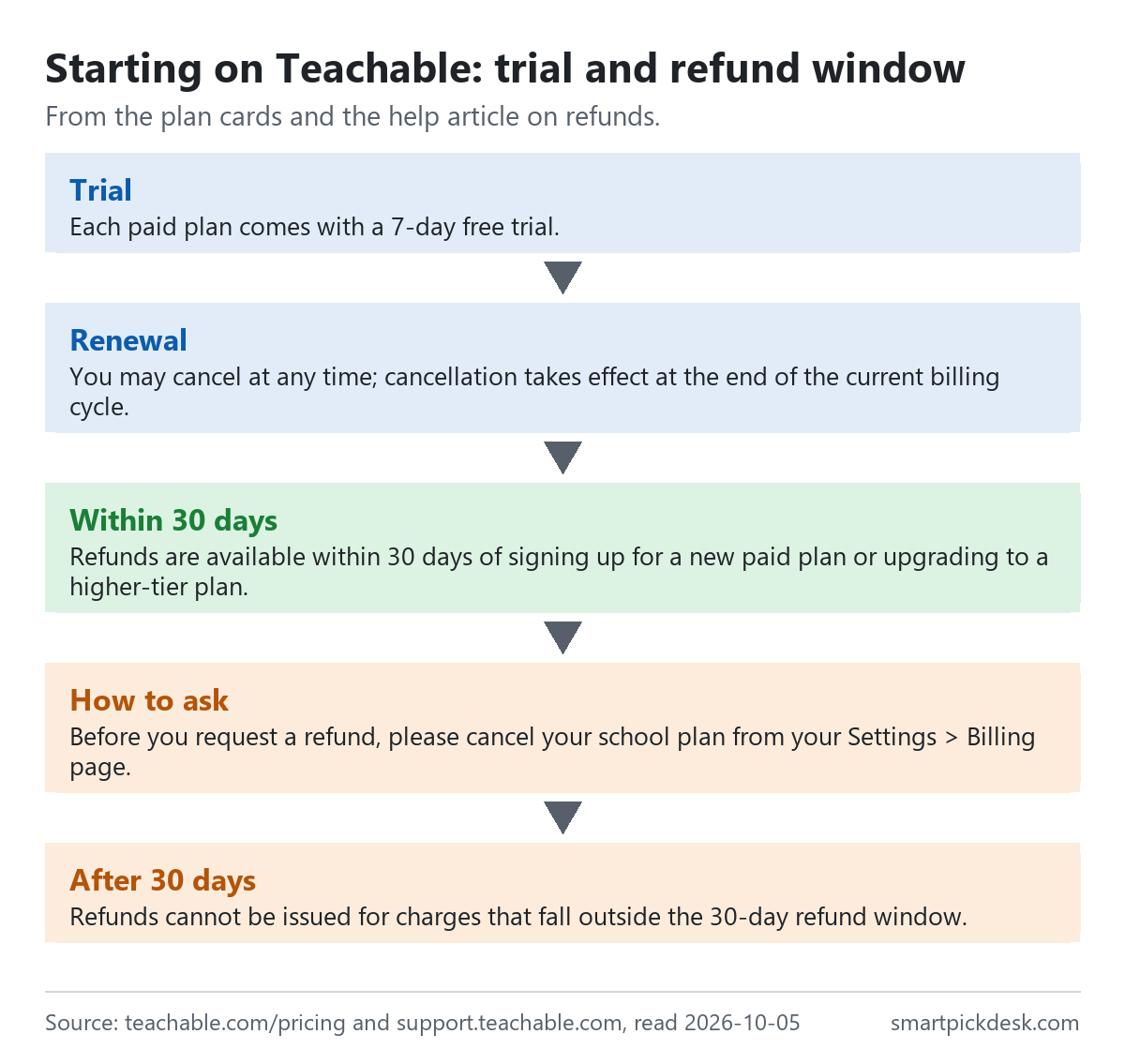
- The trial. Each plan card says it comes with a 7-day free trial.[1]
- The refund window. “Refunds are available within 30 days of signing up for a new paid plan or upgrading to a higher-tier plan.” And: “This applies to both monthly and annual Teachable subscriptions.”[2]
- Trial charges too. The same article says refunds are also available for charges during trial periods if you decide not to continue.[2]
- How to ask. “Before you request a refund, please cancel your school plan from your Settings > Billing page.” Requests are made in writing to support, with the school URL and billing date.[2]
- The limit. “Refunds cannot be issued for charges that fall outside the 30-day refund window.” Teachable can also refuse repeated requests across schools or months.[2]
In everyday terms: the trial is a week, and the refund window gives roughly another three weeks to change your mind about a first purchase or an upgrade — including an annual one. After that, money already paid stays paid.
What each plan includes
The plan guide in the help centre says that since June 2025 many features that were limited to higher plans are on every plan, so the differences between plans are now mostly about limits and a few business tools.[4]
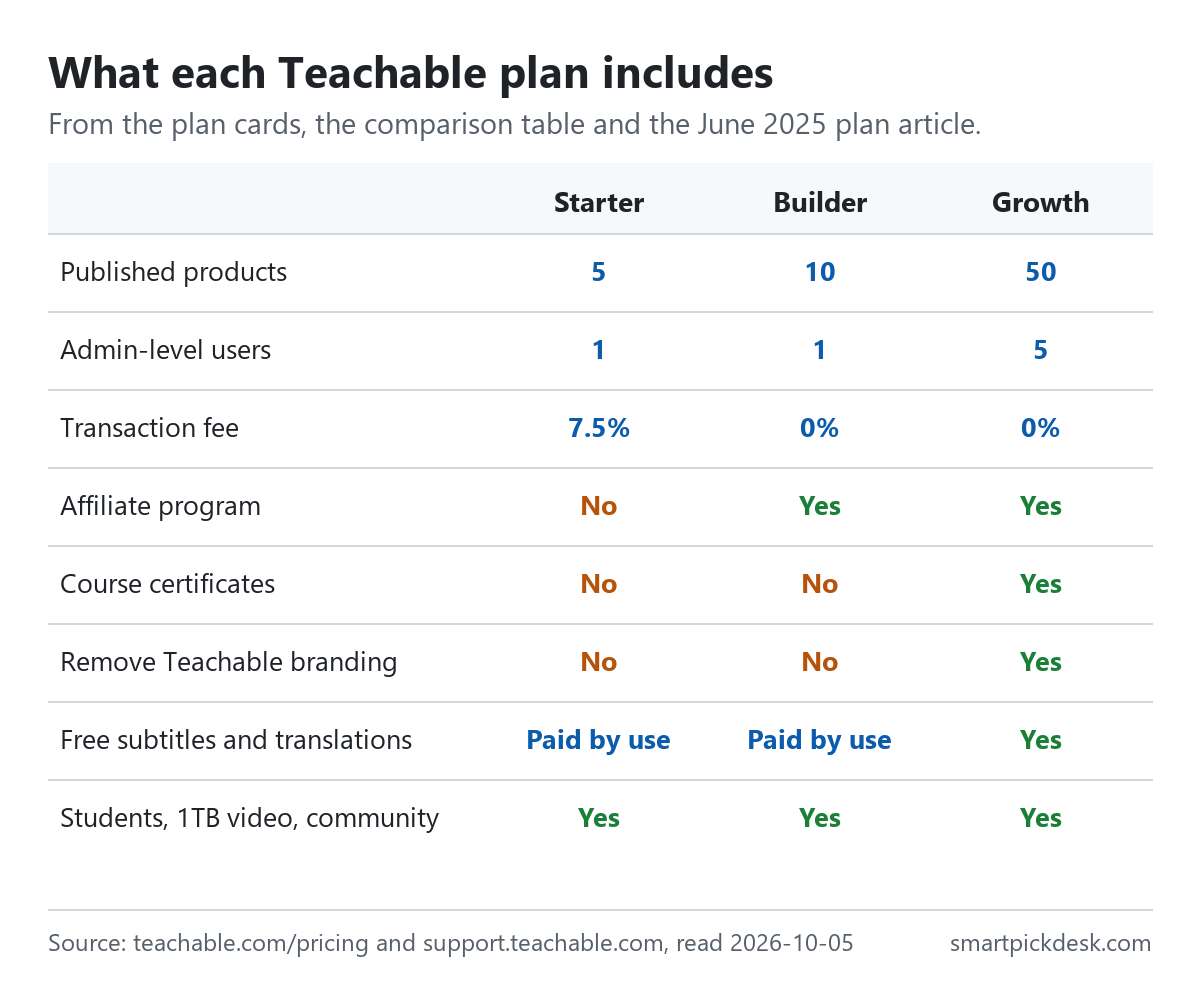
| Feature | Starter | Builder | Growth |
|---|---|---|---|
| Published products | 5 | 10 | 50 |
| Admin-level users | 1 | 1 | 5 |
| Students through Teachable checkout | Unlimited | Unlimited | Unlimited |
| Video storage | Up to 1TB | Up to 1TB | Up to 1TB |
| Transaction fee | 7.5% | 0% | 0% |
| Affiliate program | No | Yes | Yes |
| Course certificates | No | No | Yes |
| Remove Teachable branding | No | No | Yes |
| Free subtitles and translations | Paid by use | Paid by use | Included |
The plan cards and comparison table on the pricing page,[1] and the June 2025 plan article.[4]
On every plan the help article lists community spaces, memberships, unlimited bundles, coupons, order bumps, upsell funnels, abandoned cart emails and automatic US sales tax, VAT and GST handling.[4] One feature has a cost outside the plan price: “AI-powered captions and translations are available on the Starter and Builder plans for an additional usage cost.”[4] The article does not give that cost. If you also need a separate email list, Kit pricing, checked covers a dedicated email tool.
The steps between plans are therefore about three things: how many products you sell, whether you pay a share of each sale, and whether you need tools for a team, partners or certificates. Systeme.io pricing, checked covers a course tool that also has a free plan.
The 7.5% fee on Starter
The plan article explains the reason for the fee: “Our Starter plan includes a 7.5% base transaction fee, which supports creators early in their business journey by keeping upfront subscription costs low.”[4] The question is when the fee costs more than the step up to Builder.
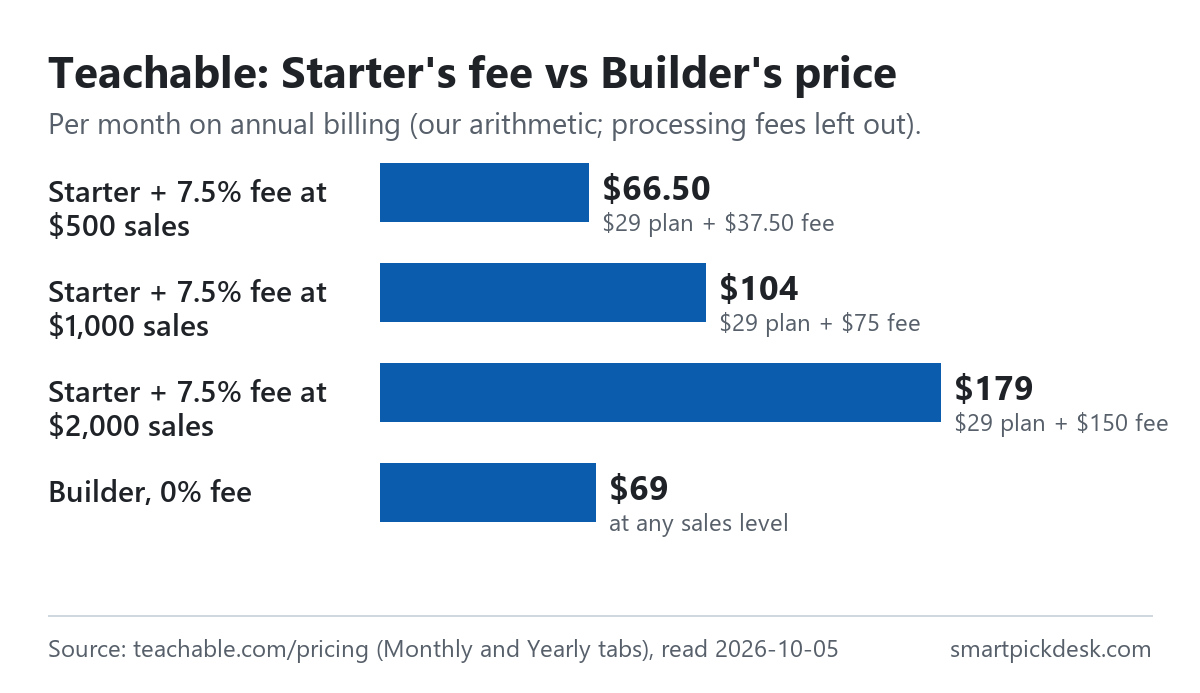
| Sales in a month | 7.5% fee on Starter | Starter, annual price + fee | Builder, annual price (0% fee) |
|---|---|---|---|
| $500 | $37.50 | $66.50 | $69 |
| $1,000 | $75 | $104 | $69 |
| $2,000 | $150 | $179 | $69 |
Our arithmetic from the annual per-month prices and the transaction fees on the pricing page.[1] Processing fees, which apply on every plan, are left out because we could not read them.
By our arithmetic, Builder costs $40 a month more than Starter on annual billing, and 7.5% of sales passes $40 when sales pass $533.33 a month. On monthly billing the gap is $50, so the point moves to $666.67 of sales a month. Below those amounts Starter costs less in total; above them, Builder does. The help article adds that card and PayPal processing fees may still apply on every plan: “Payment processing and commerce service fees—like credit card fees or PayPal charges—may still apply”.[4]
The comparison table on the pricing page marks the 0% on Builder and Growth with an asterisk, and the page also says “Charges are subject to change and additional fees may apply.”[1] We did not find the text the asterisk refers to in what we could read.
Monthly or yearly
The Yearly tab carries a badge that reads “22% OFF”.[1] The actual saving differs by plan.
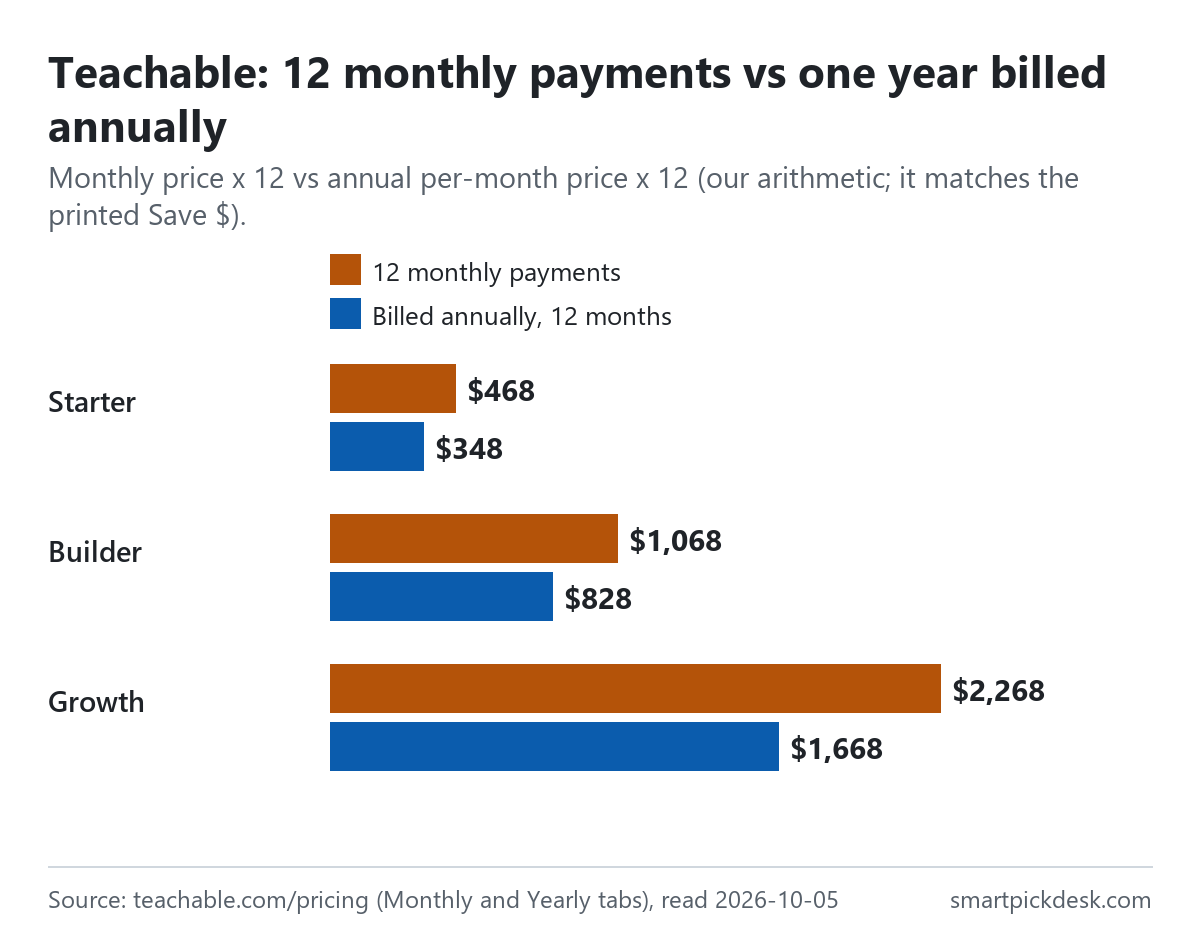
| Plan | Monthly price | 12 monthly payments | Billed annually, 12 months | Less over a year |
|---|---|---|---|---|
| Starter | $39 | $468 | $348 | $120 |
| Builder | $89 | $1,068 | $828 | $240 |
| Growth | $189 | $2,268 | $1,668 | $600 |
Prices from the pricing page in each billing mode;[1] the 12-month columns and the difference are our arithmetic and match the printed “Save” amounts.
By our arithmetic the annual price is 25.6% lower on Starter, 22.5% on Builder and 26.5% on Growth. The “22% OFF” badge is close to the Builder figure and below the other two.
Because refunds apply to annual plans within 30 days, the risk of choosing annual billing is concentrated in the first month: inside the window you can still change your mind, outside it the year is paid. If you are not sure the course will sell, a month or two on monthly billing costs $10 to $50 a month more, depending on the plan.
How products are counted
Each plan has a product limit, and the June 2025 article defines what counts: “Only courses, coaching products, and digital downloads count toward the published product limit on each plan.”[4]
- The limit is a total. It is across all product types, not a separate limit for courses and for downloads.[4]
- Not counted. Community, memberships and bundles do not count toward the limit, and bundles are unlimited on every plan.[4]
- Above 100 products. The article points businesses that need more than 100 published products to a custom plan through sales.[4]
For a creator with one flagship course, a short course and a download, Starter's five-product limit is not the constraint; the fee is. For a catalogue of a dozen courses, the limit pushes you to Growth.
A practical way to use this: count what you would publish in the first year, not today. If that number is above five, Starter's limit will force an upgrade during the year, though the refund article does cover upgrades within 30 days as well as new plans.[2] If it is above ten, Builder has the same problem. Since bundles and memberships are not counted, packaging several courses as one bundle does not use up extra slots, but the courses inside a bundle are still courses, which the article says do count.
Payments, payouts and paying for the plan
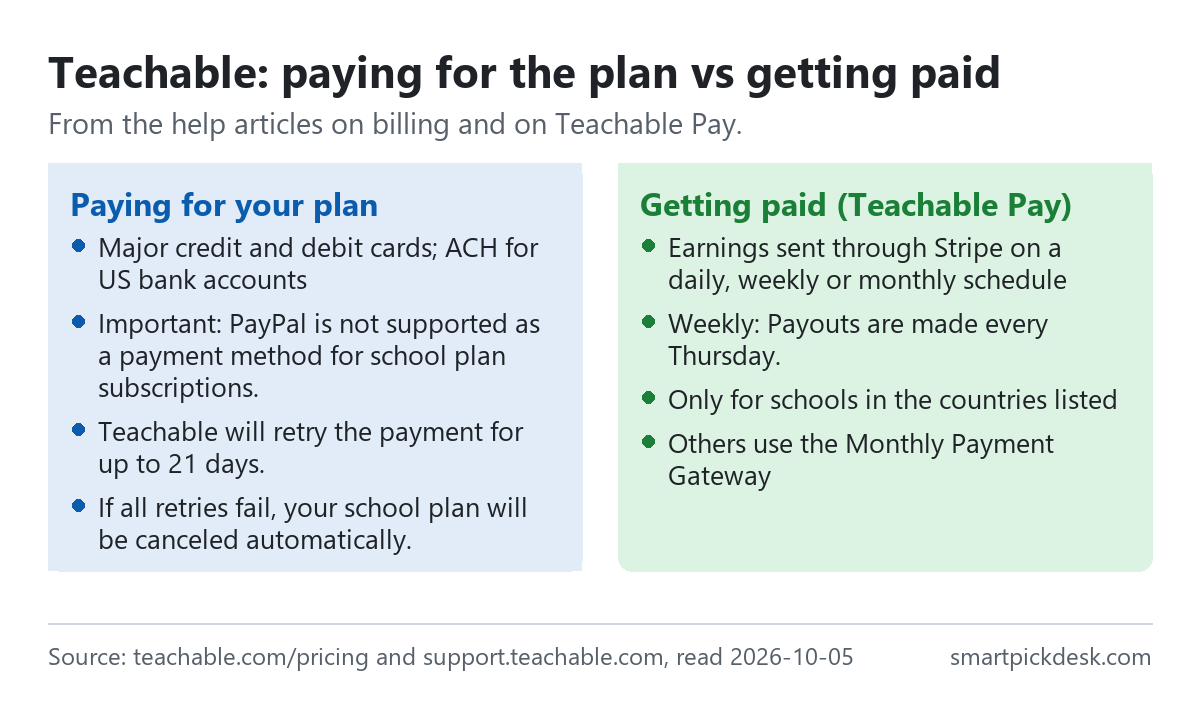
- Paying Teachable. Major credit and debit cards and ACH direct debit for US bank accounts. “Important: PayPal is not supported as a payment method for school plan subscriptions.”[5]
- Failed payments. Teachable tries a backup card first, then: “Teachable will retry the payment for up to 21 days.” And: “If all retries fail, your school plan will be canceled automatically.”[5]
- Getting paid. With Teachable Pay, earnings go to your bank account through Stripe on a daily, weekly or monthly schedule. “Weekly: Payouts are made every Thursday.”[6]
- Who can use it. Teachable Pay is limited to schools in the countries the article lists; others use the Monthly Payment Gateway.[6]
- Tax on your plan. The billing article has a field for your tax ID and notes that addresses are collected for tax compliance.[5]
Cancelling and what happens to students
Cancelling a Teachable plan affects your students as well as you, so it is worth reading before the first sale.
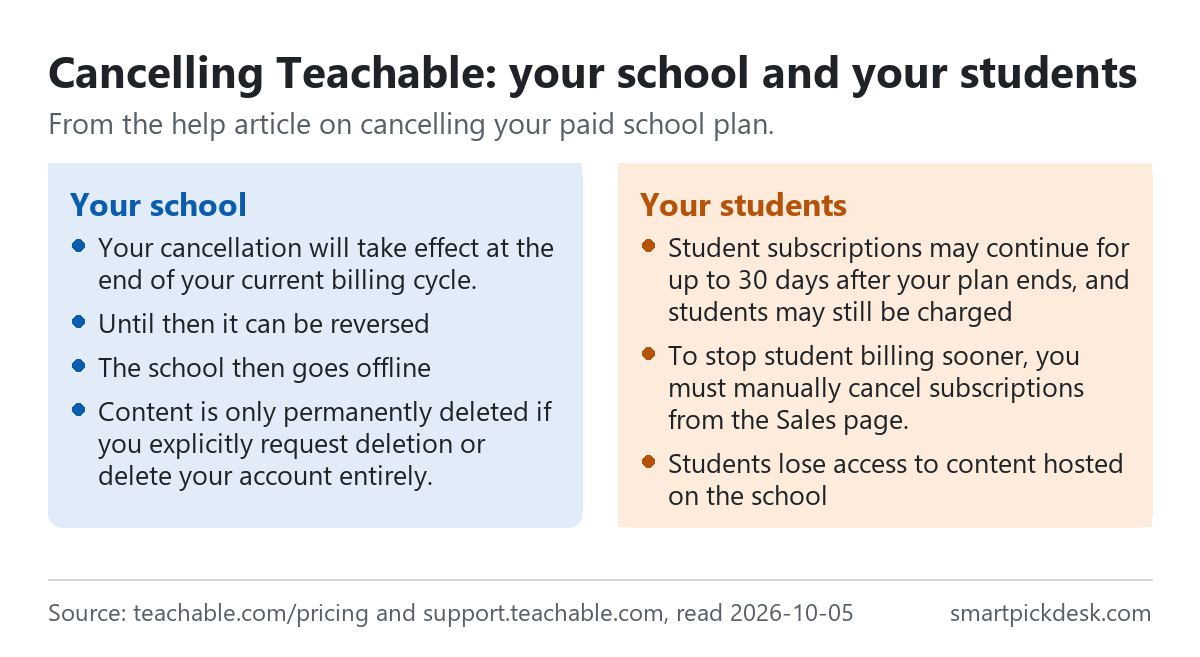
- When it ends. “Your cancellation will take effect at the end of your current billing cycle.” Until then, paid features stay on and the cancellation can be reversed.[3]
- The school goes offline. Students lose access to content hosted on your school, and you cannot add or edit products.[3]
- Student subscriptions continue. “Student subscriptions may continue for up to 30 days after your plan ends, and students may still be charged”. “To stop student billing sooner, you must manually cancel subscriptions from the Sales page.”[3]
- Your content is kept, for now. “Content is only permanently deleted if you explicitly request deletion or delete your account entirely.” The same article advises saving your materials before cancelling.[3]
- Deleting is different. “It’s important to note that deleting a school is a permanent action and cannot be undone.” “NOTE: Deleting a school does not automatically refund any sales made.”[7]
Older plans and the Advanced plan
The current plans started in June 2025. The help article on the change says the Basic, Pro and Pro+ plans were retired and four new plans introduced: Starter, Builder, Growth and Advanced.[4]
| Plan | Monthly price | 12 monthly payments | Billed annually, 12 months | Less over a year |
|---|---|---|---|---|
| Advanced (help centre) | $399 | $4,788 | $3,708 | $1,080 |
The plan table in the June 2025 article: $309 a month billed annually and $399 billed monthly;[4] the 12-month columns and the difference are our arithmetic.
- Advanced is not on the pricing page. The page we read shows Starter, Builder, Growth and Custom; Advanced appears only in the help centre.[1][4]
- Old Basic schools. The same article shows the old Basic plan at $39 a month billed annually or $59 billed monthly with a 5% fee, moving to Builder.[4]
- When old prices changed. Migrated schools kept their old price until their first renewal on or after June 29, 2025.[4]
Where Teachable's pages disagree
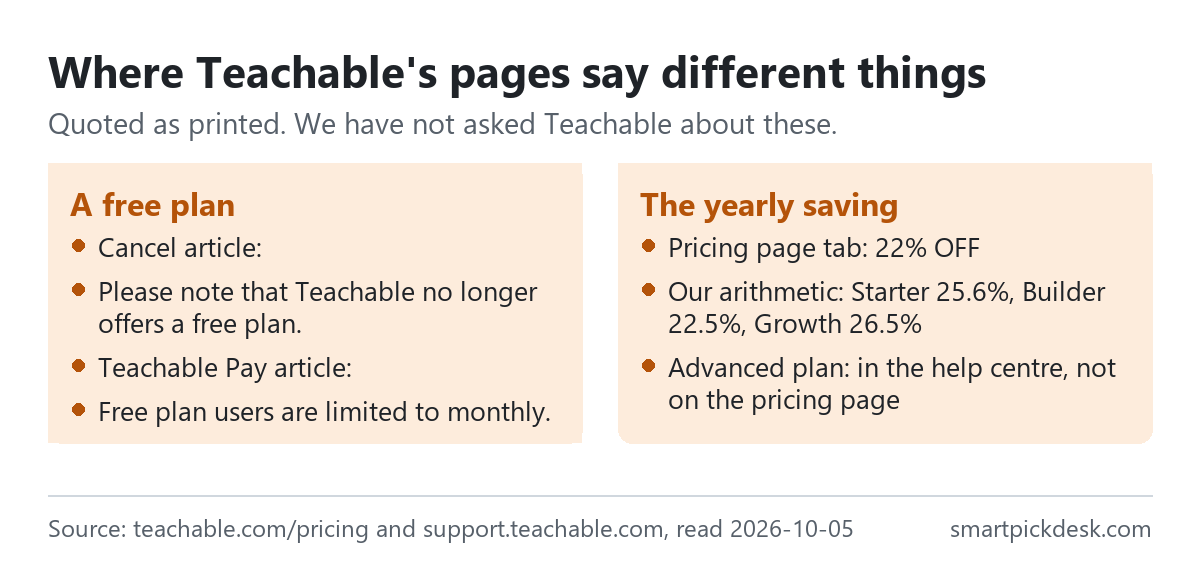
- A free plan, or not. The cancel article says Teachable no longer offers a free plan.[3] The Teachable Pay article still sets rules for free schools: “Free plan users are limited to monthly.”[6] We read the second as left over from an older plan line-up, but the pages do not say so.
- The yearly saving. “22% OFF” on the tab; 25.6%, 22.5% and 26.5% by plan, by our arithmetic.[1]
- The plan list. Four plans in the help centre, three priced plans and a custom plan on the pricing page.[1][4]
We have not asked Teachable about these. The prices on the pricing page are what we used throughout.
Which plan fits which situation
| If you are… | Look at | Why, from Teachable's pages | Watch out for |
|---|---|---|---|
| Testing a first course | Starter, monthly | $39 a month, 5 products[1] | 7.5% of each sale[1] |
| Selling about $600 a month or more | Builder | 0% transaction fee[1] | Processing fees still apply[4] |
| Working with promoters | Builder or Growth | Affiliate program[1] | Not on Starter[1] |
| A team or many courses | Growth | 50 products, 5 admins[1] | $139 a month even on annual[1] |
| Not sure yet | The 7-day trial | Refund window of 30 days[2] | There is no free plan[3] |
| Paying with PayPal | A card or ACH instead | Cards and US ACH accepted[5] | PayPal not supported for plans[5] |
See Teachable's own pricing page
Related pages on this site: Kajabi pricing, checked and Podia pricing, checked cover two other course platforms, and Gumroad fees, checked covers selling downloads without a monthly plan. For booking coaching calls, Calendly pricing, checked covers a booking tool with a free plan. Every price guide is on Pricing.
Questions people ask
Is Teachable free?
No; there is a 7-day trial and a 30-day refund window on plan purchases.[1][2][3]
How much does Teachable cost?
Starter $39 or $29 a month, Builder $89 or $69, Growth $189 or $139.[1] See the table.
Does Teachable take a cut of my sales?
7.5% on Starter; 0% on Builder and Growth. Processing fees may apply on all plans.[1][4]
Can I get a refund from Teachable?
Within 30 days of a new paid plan or an upgrade, monthly or annual.[2]
What happens to my students if I cancel Teachable?
The school goes offline; student subscriptions may continue for up to 30 days unless you cancel them.[3]
Can I pay for Teachable with PayPal?
Not for the school plan; cards and US ACH are accepted.[5]
Do you get paid if I sign up?
Not from this page — it has no affiliate links today. If that changes, it will say so at the top, and each link will be marked.
Sources and check log
| # | Source | URL | Checked | How |
|---|---|---|---|---|
| 1 | Teachable, Plans and pricing (Monthly and Yearly tabs) | teachable.com/pricing | 2026-10-05 | Opened in a browser with no account; page text saved on each tab |
| 2 | Teachable help, Request a Refund on Your School | support.teachable.com › refund on your school | 2026-10-05 | Page text saved |
| 3 | Teachable help, Cancel Your Paid School Plan | support.teachable.com › cancel your plan | 2026-10-05 | Page text saved |
| 4 | Teachable help, New Teachable plans in June 2025 | support.teachable.com › new plans | 2026-10-05 | Page text saved |
| 5 | Teachable help, Billing Information and History | support.teachable.com › billing | 2026-10-05 | Page text saved |
| 6 | Teachable help, Teachable Pay | support.teachable.com › Teachable Pay | 2026-10-05 | Page text saved |
| 7 | Teachable help, Delete Your School | support.teachable.com › delete your school | 2026-10-05 | Page text saved |
Change log
- 2026-10-05 — First version. The pricing page on both tabs and six help articles read on 2026-10-05. The fees article and the student refunds article could not be opened (security check).
- Previous check: none for this page.
- What we will re-check: the plan prices in both modes, the transaction fees, the product limits, the refund window and the processing fees if the fees article can be read.
Who writes this
Smart Pick Desk is an independent site that compares tools for people who work online. We are not employed by, or partnered with, Teachable, and we do not run Teachable in our own business. What we do is read what each company publishes, write down the date we read it, and say plainly which parts we could not check. More: who the editors are and how we check a page.
We do not promise results. Nothing here is a prediction about what a tool will do for your courses or sales.