Kit pricing, checked: the free plan, Creator vs Pro at every list size, monthly vs yearly
Last updated 2026-09-25 · By Smart Pick Desk editors · Prices read on Kit's pricing page on 2026-09-20 and re-read on 2026-09-25; help centre and terms read on 2026-09-25 · We have not used Kit · How we checked ↓
The short answer
Kit has three self-serve plans: Free, Creator and Pro. What you pay is set by two things: which of the three you pick, and how many subscribers you have. Emails sent do not change the price.
- Free covers a large list but no automation. The pricing page lists “Free—up to 10,000 subscribers”.[1] Kit's help article puts visual automations and email sequences on the paid plans.[4] If you plan to send one newsletter at a time, Free goes a long way.
- Creator starts at $33 a month billed yearly, $39 billed monthly. That is the price at 1,000 subscribers; at 10,000 it is $116 a month billed yearly.[1] Creator is where automations and sequences start.
- Before you pay, read the refund lines. The help centre describes a 30-day refund policy for all plans.[2] The Terms of Service say fees already paid are not refunded if you cancel early.[5] We quote both below.
If you want one sentence: Kit's price follows your subscriber count, not your sending, and the free plan's limit is automation rather than list size.
On this page
At a glance
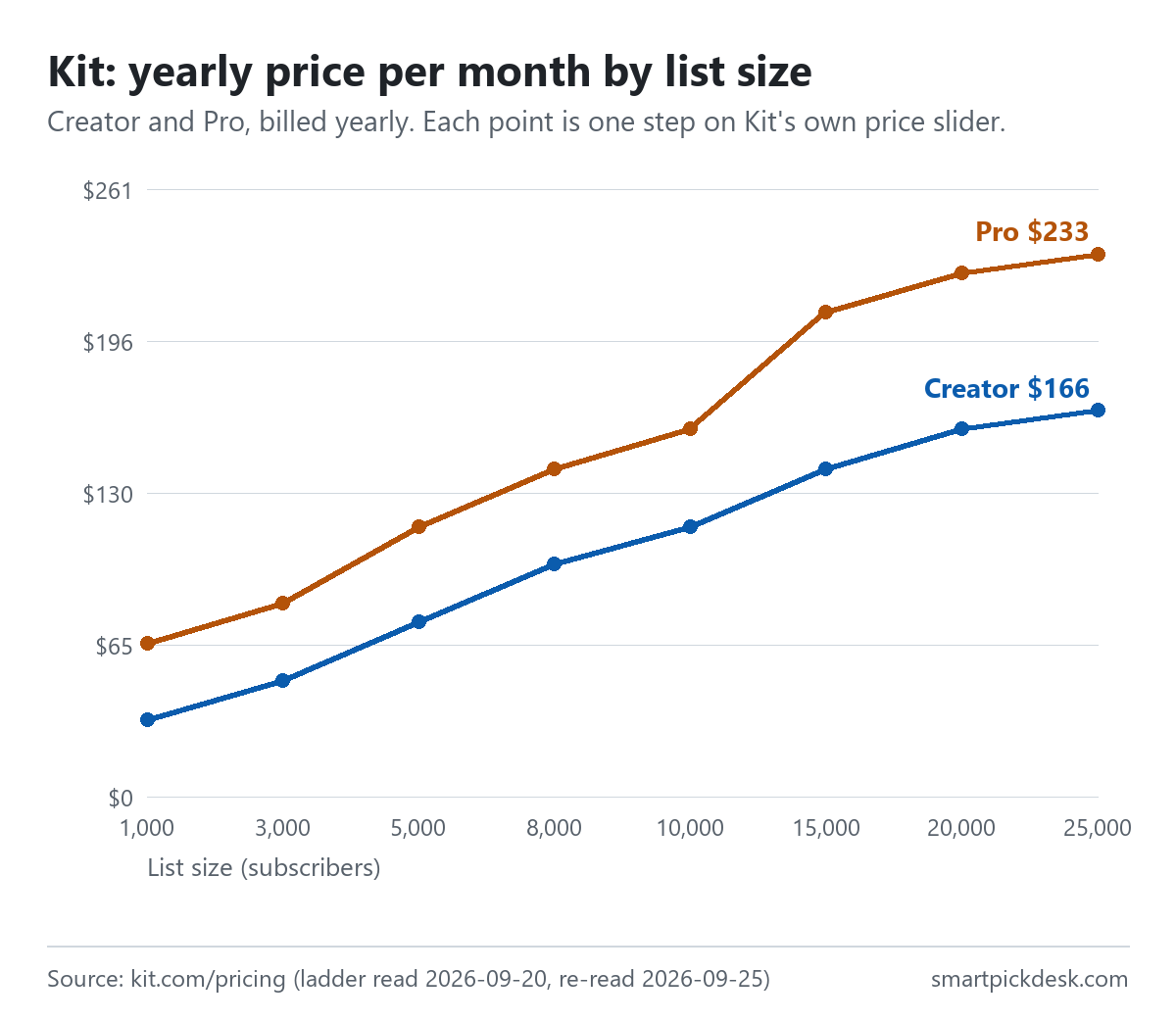
| Subscribers | Creator, billed yearly (per month) | Creator, billed monthly | Pro, billed yearly (per month) | Pro, billed monthly |
|---|---|---|---|---|
| 1,000 | $33 | $39 | $66 | $79 |
| 3,000 | $50 | $59 | $83 | $99 |
| 5,000 | $75 | $89 | $116 | $139 |
| 8,000 | $100 | $119 | $141 | $169 |
| 10,000 | $116 | $139 | $158 | $189 |
| 15,000 | $141 | $169 | $208 | $249 |
| 20,000 | $158 | $189 | $225 | $269 |
| 25,000 | $166 | $199 | $233 | $279 |
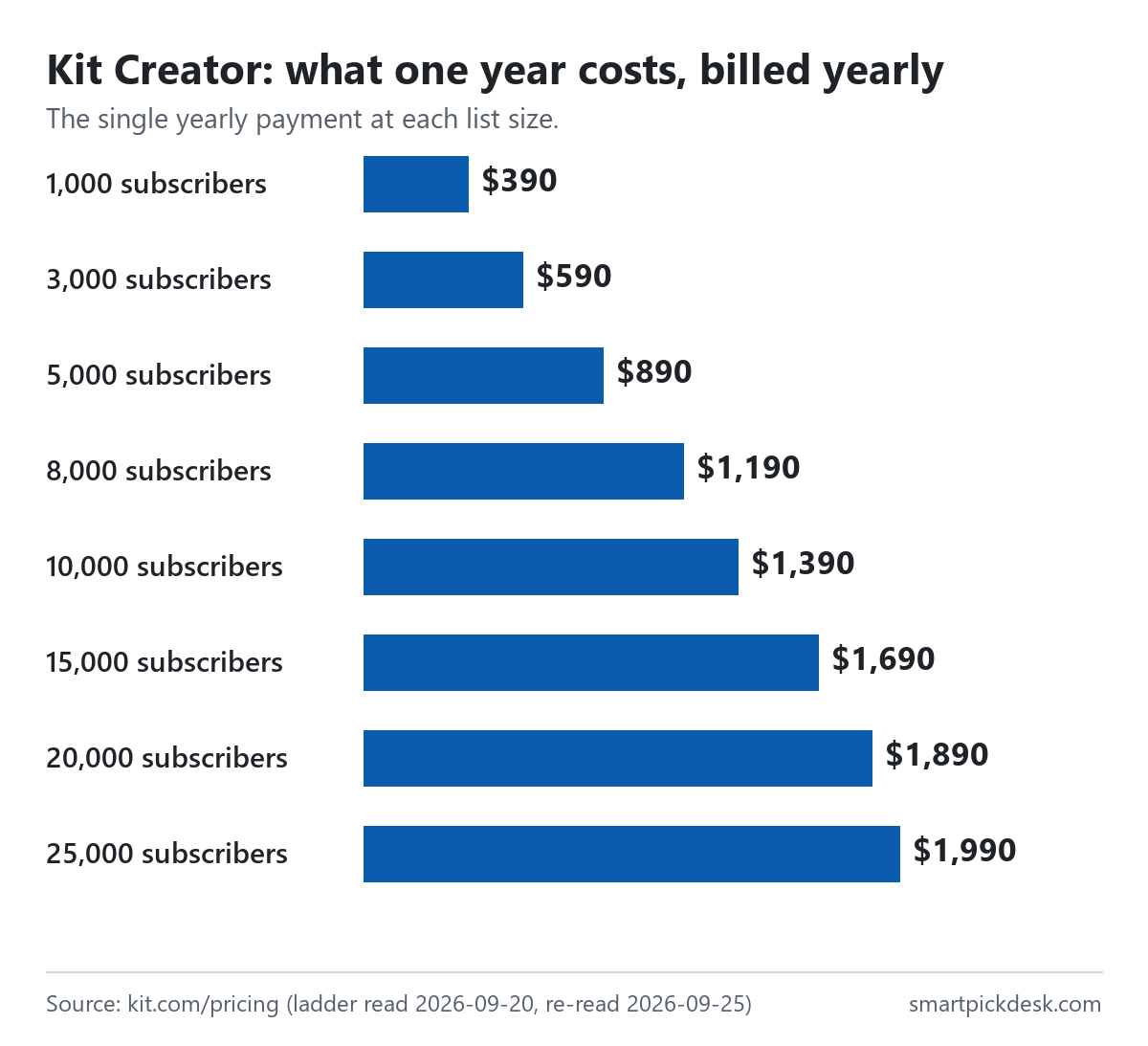
Each row is a step on Kit's price slider, read with the billing switch in both positions on 2026-09-20.[1] On 2026-09-25 we re-read the default view (1,000 subscribers, yearly) and it was unchanged: Creator $33 a month with “$390 billed yearly—Save $78 per year”, Pro $66 with “$790 billed yearly—Save $158 per year”.[1] Free is $0 at every size up to 10,000.
Two things the table shows that the pricing page does not say in words. First, the slider's first paid step is 1,000 subscribers; there is no smaller Creator price for a list of 200. Second, the steps are not evenly spaced: 1,000, 3,000, 5,000, 8,000, 10,000, then 15,000 and up. A list of 1,001 is priced at the 3,000 step, as Kit's own billing example shows further down.
How we checked this (and what we did not check)
Last updated 2026-09-25 (first version). Every number and quotation here comes from Kit's own pages. Prices change — confirm on the official page before you sign up.
What we did. On 2026-09-20 we opened kit.com/pricing in a browser with no account and recorded the price at every step of the subscriber slider in both billing positions. On 2026-09-25 we opened it again and saved the page text, including the FAQ answers, and checked the default step against the earlier record. The same day we saved three articles from Kit's help centre (billing, plan upgrades and downgrades, and the Free plan) and Kit's Terms of Service. Wording in quotation marks is copied from those saved pages word for word, and a script checks every quotation on this page against the saved text.
What we did not do. We have not used Kit. There is no account, no screenshot of the product and no opinion here about the editor, deliverability or support speed. We did not ask Kit about the places where its pages disagree. Several rows of Kit's comparison table are shown as tick marks, and our method reads text, so for those rows we only report what is written in words.
What that leaves. What Kit charges and how its billing rules read on one date, in one place, including two places where Kit's own pages say different things.
What the Free plan includes
Kit's help article on the Free plan opens with its main line: “The Free plan costs $0 per month for as long as you stay under 10,000 subscribers.”[4] The pricing page card calls it “For creators just starting out” and lists four key features.[1]
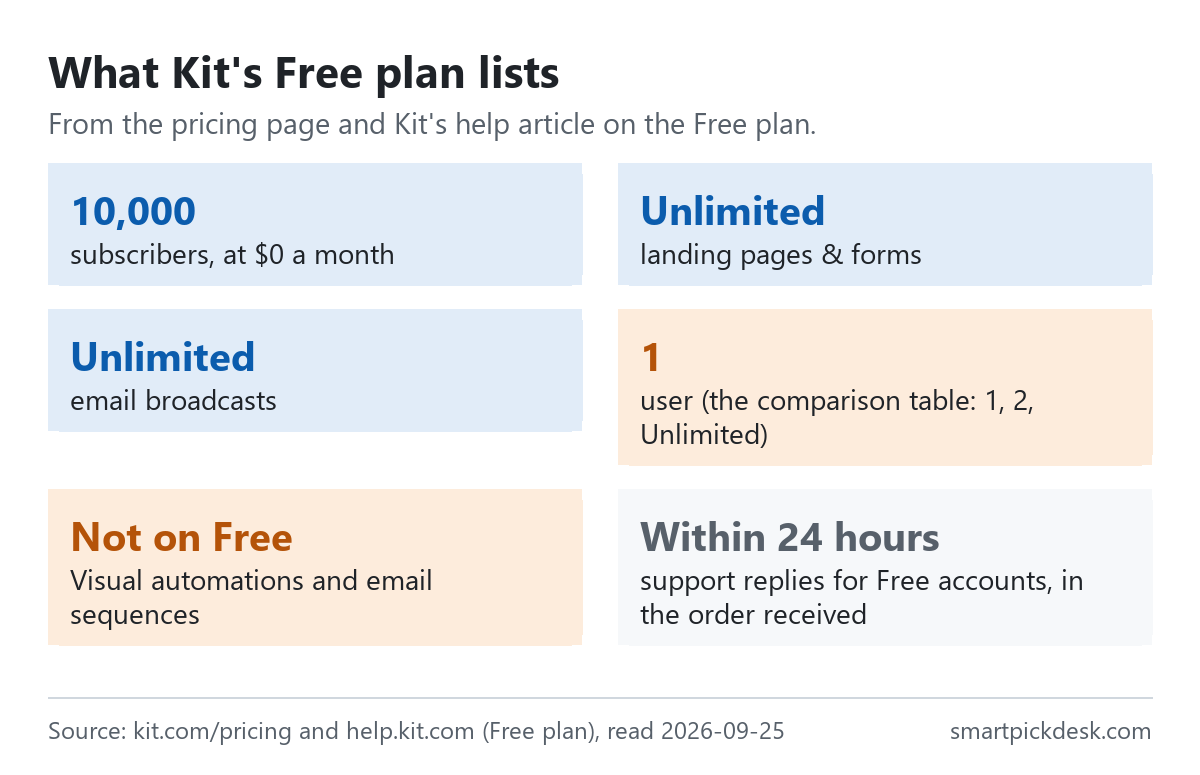
- List size: up to 10,000 subscribers.[1]
- Pages and forms: “Unlimited landing pages & forms”.[1] A landing page on Kit is hosted by Kit, which is why you can build a list on Free without a website of your own (our step-by-step guide covers that route).
- Sending: “Unlimited email broadcasts”.[1] The pricing FAQ adds: “There are no sending limits on any of our plans at Kit.”[1]
- Organising and selling: “Audience tagging & segmentation” and “Sell digital products & subscriptions”.[1]
- Users: the comparison table lists 1 user on Free, 2 on Creator and Unlimited on Pro.[1]
- Support: “Requests from Free plan accounts are answered in the order they're received within 24 hours.”[4]
- Recommendations: the help article says free accounts are enrolled in Kit's Creator Network and “You get five Smart Recommendation slots”; it also says paid plans get priority.[4]
In practice, that makes Free a plan for collecting subscribers and sending broadcasts to them. A list of a few thousand people who get one newsletter a week fits inside it with room to spare, on the numbers Kit prints.
Where the Free plan stops
The help article is direct about what is not on Free. Under its heading on what needs a paid plan it lists, among others, “Visual automations and the automation template library”, email sequences, and “Rules and RSS campaigns”.[4]
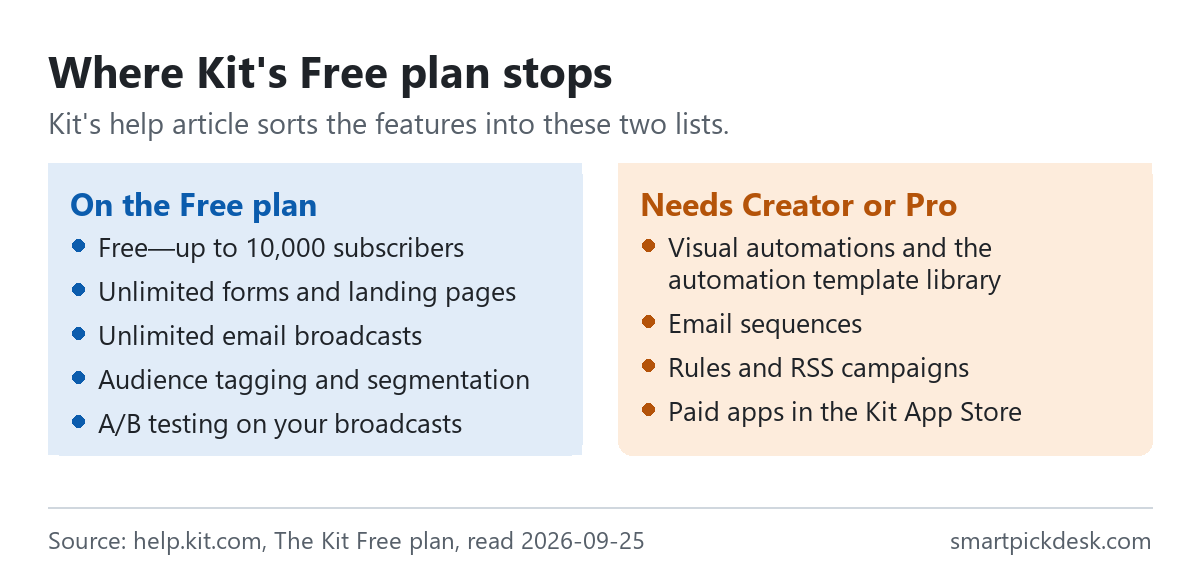
The pricing page says the same thing from the other side: “Unlimited Visual Automations” and “Unlimited email sequences” appear under the Creator card, and “Remove Kit branding” is there too.[1] The comparison table describes that row as “Toggle off the Kit branding on landing pages, emails, and product pages.”[1] So on Free, Kit's branding stays on those three things.
The second stop is the list size. The help article says that when you pass 10,000 subscribers “You'll need to upgrade to a paid plan to keep sending.”[4] It does not describe a grace period.
What this means if you are deciding now: if your first plan is a welcome email that goes out automatically when someone joins, that is an email sequence, and it needs Creator. If you only need to send issues by hand, Free does not stop you until the list reaches 10,000.
Creator vs Pro: what the extra money buys
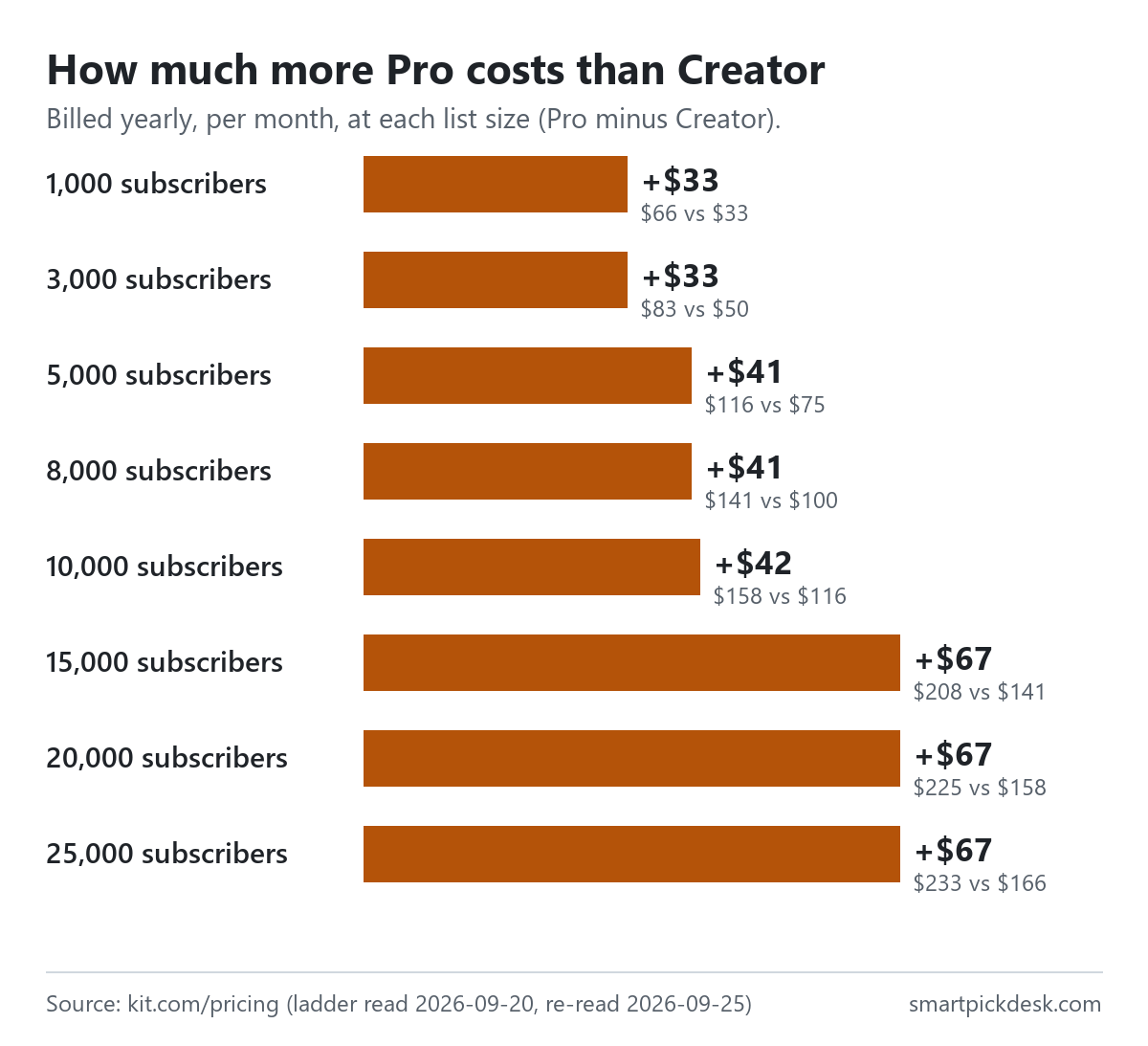
Creator is described on the card as “For growing creators” and Pro as “For scaling creators”.[1] The gap between them, billed yearly, is $33 a month at 1,000 subscribers and grows with the list.
What the Pro card adds under “Everything in Creator plan, plus:” includes Subscriber Signals, engagement analytics, unlimited users, an insights dashboard, deliverability reporting, subscriber engagement scoring, collaborative editing, “A/B test subject lines & content”, Facebook custom audiences, a newsletter referral system and “Edit links in sent broadcasts”.[1]
| Row in Kit's comparison table | Free | Creator | Pro |
|---|---|---|---|
| Subscribers (at the 1,000 setting) | Up to 10,000 | 1,000 | 1,000 |
| Users | 1 | 2 | Unlimited |
| A/B split testing | 2 subject lines | 2 subject lines | 5 subject lines |
| Low transaction fees (selling) | 3.5% + 30c | 3.5% + 30c | 3.5% + 30c |
| Paid Recommendations fees | not offered | 23.5% | 23.5% |
| Email support | The table prints “24/7 support (email & chat)” and “24/7 priority support (email & chat)”; the Creator and Pro cards list them respectively | ||
Values as printed on 2026-09-25.[1] The Paid Recommendations fee row reads “Kit’s fee for any earnings paid through Paid Recommendations.” and shows a dash for Free.
The newsletter referral system row describes it this way: “Get a free SparkLoop plan (worth $99/mo) to build a reward referral program to drive newsletter growth.”[1] We have not checked SparkLoop's own terms, so we only report the line.
Put simply: Creator is the plan that unlocks automation. Pro adds reporting, more testing and more people on the account. If you work alone and do not plan to run a referral scheme, the pricing page gives you no reason to start on Pro.
A naming note. The pricing page calls the top plan Pro. Kit's help centre calls it Creator Pro in several places, for example under “Upgrade from the Creator plan to the Creator Pro plan”.[2] We read both as the same plan.
Monthly or yearly: twelve months for the price of ten
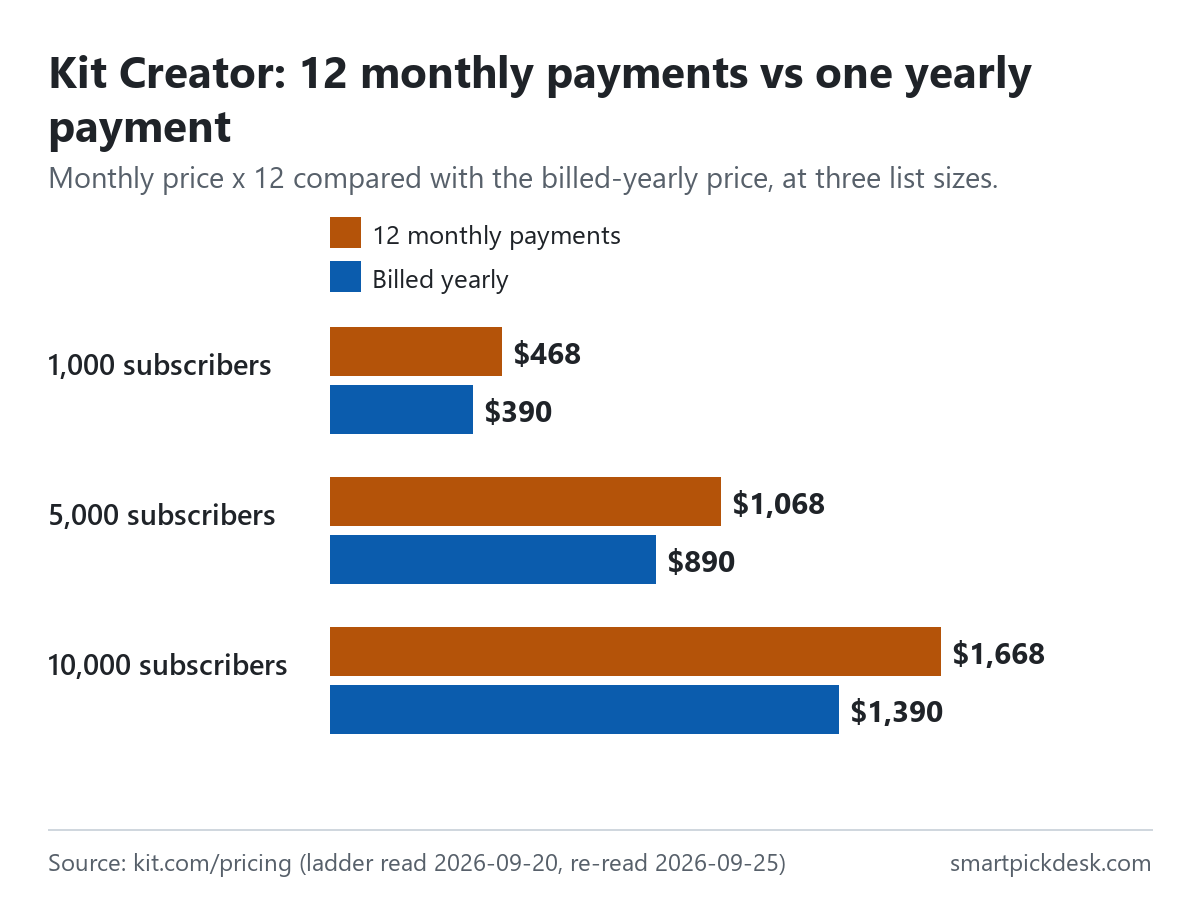
The pricing page says “Pay yearly—save 17%”,[1] and the billing help article puts it differently: “Our annual plans offer 12 months for the price of 10.”[2] The two agree within rounding. At 1,000 subscribers, twelve Creator payments of $39 come to $468 and the yearly bill is $390: $78 less, which is 16.7% of $468.
| Plan and list size | Monthly price | 12 monthly payments | Billed yearly | Less over a year |
|---|---|---|---|---|
| Creator, 1,000 | $39 | $468 | $390 | $78 |
| Creator, 5,000 | $89 | $1,068 | $890 | $178 |
| Creator, 10,000 | $139 | $1,668 | $1,390 | $278 |
| Creator, 25,000 | $199 | $2,388 | $1,990 | $398 |
| Pro, 1,000 | $79 | $948 | $790 | $158 |
| Pro, 5,000 | $139 | $1,668 | $1,390 | $278 |
| Pro, 10,000 | $189 | $2,268 | $1,890 | $378 |
Monthly and yearly prices from the pricing page.[1] The 12-month and difference columns are our arithmetic (monthly price × 12, then minus the yearly bill).
Three billing rules sit next to that discount in the help article:
- Refunds on annual plans. “Because of the bargain price, we do not offer refunds beyond our standard 30-day refund policy.”[2]
- Switching back to monthly. You ask through the in-app messenger, and “The switch will happen at the end of the annual billing cycle.”[2]
- Growing during a yearly plan. The upgrade article says that on annual plans “You'll be charged immediately for the prorated difference”, and the full annual price of the new tier at renewal.[3]
So the yearly price is lower, but a list that grows during the year is billed the difference straight away rather than at the end of the year.
How Kit counts subscribers
Two of Kit's pages describe the count. The pricing table says of its Subscribers row: “The total number of subscribers you can manage in your account. Subscribers are only counted if they are unique and active.”[1] The billing article says: “Your bill is based on your active subscribers, not on emails sent or features used.” and that Kit bills “on your number of confirmed subscribers”.[2]
Taken together, three practical points follow. Someone who has unsubscribed is not counted, on this wording. The same person on two of your forms is counted once. And sending more often does not change your price; the FAQ repeats that there are no sending limits on any plan.[1]
What the pages do not tell you is exactly when a person becomes confirmed if you do not use double opt-in. We did not find that on the pages we read, so we do not state it.
When your list grows: the automatic tier upgrade
The pricing FAQ: “When you go over your plan’s limit, we’ll automatically upgrade it to the next subscriber tier.”[1] The billing article works through what that costs, using the monthly Creator prices.
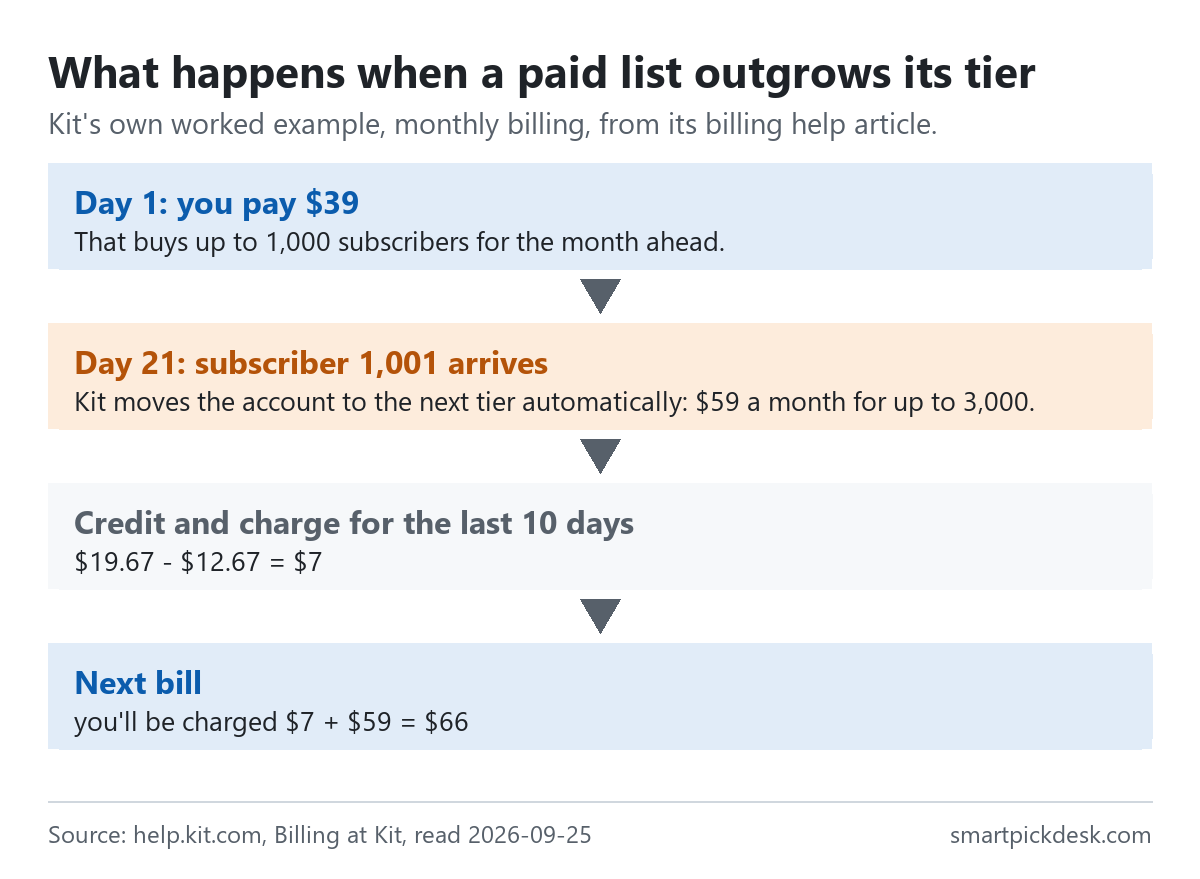
- You pay $39 on the first day of the billing period, for up to 1,000 subscribers.
- Ten days before the end of that period the list passes 1,000, and the account moves to the $59 tier (up to 3,000).
- Kit credits the unused ten days of the $39 tier and charges ten days of the $59 tier: “$19.67 - $12.67 = $7”.[2]
- On a monthly plan, the next bill is the new price plus that difference: “you'll be charged $7 + $59 = $66”.[2]
One more line in the upgrade article is worth knowing before you import an existing list: “If you are importing a new list of subscribers (from a giveaway or live event, for instance), your account may be temporarily suspended.”[3] The article asks you to tell Kit in advance. It does not give a number above which this applies.
When your list shrinks: two different instructions
Here the pricing page and the help centre describe the same situation differently, both on 2026-09-25.
- Pricing page FAQ: “At this time, our team has to manually downgrade plans. If you plan to delete subscribers, please email help@kit.com so we can adjust your subscription.”[1]
- Billing help article: after cleaning a list, go to Account & Billing and look for a link named “Switch to a lower tier.” It adds “The lower price starts on your next billing date after you switch”.[2]
We do not know which one reflects the product today, and we have not asked. The help article is marked as updated this week on the day we read it; the pricing FAQ carries no date. If you are about to clean a list to lower your bill, both routes are cheap to try: look for the link first, and email if it is not there.
Either way, the lower price is not immediate. The billing article's own example moves a Creator account from the $59 tier to the $39 tier on the next billing date, after the list drops from 1,200 to 800 subscribers.[2]
Refunds: the help centre and the terms say different things
This is the part of Kit's small print that matters most before paying yearly, and the two texts do not match.
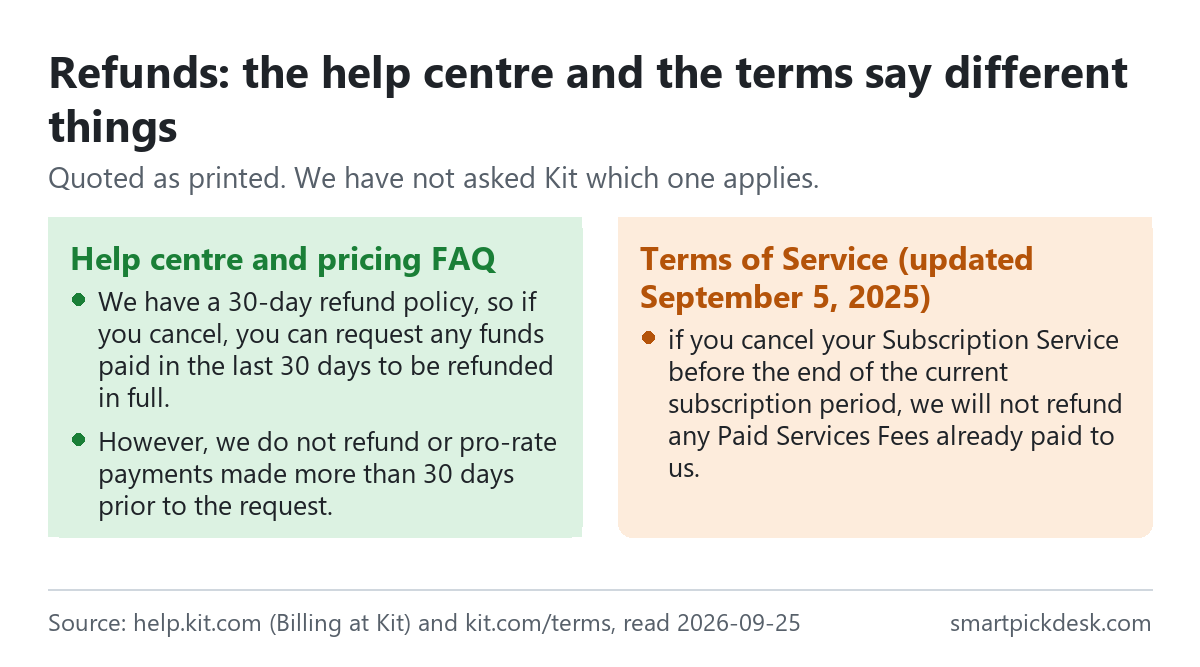
- Help centre: “We have a 30-day refund policy, so if you cancel, you can request any funds paid in the last 30 days to be refunded in full.” and “However, we do not refund or pro-rate payments made more than 30 days prior to the request.”[2] The same article says the policy applies to all plans, including annual ones.
- Pricing FAQ: Kit says it can give a refund “as long as you’re within the first 30 days of the date you signed up for your account”.[1] That ties the 30 days to your sign-up date, not to the payment date.
- Terms of Service (the page reads “Last Updated: September 5, 2025”): “if you cancel your Subscription Service before the end of the current subscription period, we will not refund any Paid Services Fees already paid to us.”[5]
Three texts, three different anchors: 30 days from a payment, 30 days from sign-up, and no refund of fees already paid. We cannot tell you which one Kit applies, and the terms say elsewhere that supplemental terms can control over them. What we can say is where to look: if a refund would change your decision, ask Kit in writing before paying for a year, and keep the reply.
On cancelling, the billing article says: “When you cancel your account, it will remain active until the last day of your billing period.”[2] The Free plan article adds that after moving to Free from a paid plan, “Visual automations and sequences stop running while you're on the Free plan, and you'll get them back when you upgrade again.”[4]
Tax, fees and the rest of the small print
- Tax is on top. The terms: “Unless otherwise stated, all Paid Services Fees are exclusive of any Taxes.”[5] The billing article gives a US sales tax example, “$39 (plan cost) + $2.34 (sales tax) = $41.34 total”, and asks customers outside the US to add a billing address and tax ID.[2]
- A $1 card check. “Whenever you add or change the credit card on file in your account, our payment partner Stripe will run a $1 verification charge.”[2] The article says it is removed after seven days.
- The trial needs a card to continue. Creator and Pro have a 14-day trial with no card to start; the FAQ says “Once your trial is over, you’ll need to add a credit card to continue using your Creator or Pro Plan.”[1] The Free plan article adds that on a trial, switching to Free ends paid features at once.[4]
- Price changes are notified before renewal. The terms: “Where a Paid Services Fee has increased, we will notify you of the relevant fee increase prior to the renewal of your Subscription Service.”[5] The billing article describes a 2025 increase as “This is our first price increase in 12 years.” and answers readers who found lower prices elsewhere with “Our pricing page always has the most current information.”[2] That is also why we do not quote prices from other articles.
- Fees when you sell. Every plan lists “3.5% + 30c” for digital products and subscriptions, described as inclusive of card processing, so that “Kit only takes 0.6% of the total fees”.[1]
- Your free Kit address can change. The terms say “Kit may change or terminate the Kit Provided Domains at any time, in its sole discretion.”[5] If your only sign-up page lives on a kit.com address, that is worth knowing.
- Moving in. “Kit offers a free migration service for any creator on one of our paid plans”.[1] It is not offered on Free, on this wording.
Which plan fits which situation
| If you are… | Look at | Why, from Kit's pages | Watch out for |
|---|---|---|---|
| Starting a newsletter and sending issues by hand | Free | Up to 10,000 subscribers, unlimited broadcasts, unlimited landing pages[1] | No automations or sequences; Kit branding stays on |
| Wanting a welcome email that sends itself | Creator, from $33 a month billed yearly | Visual automations and sequences are on paid plans[4] | The first paid step is priced for 1,000 subscribers whatever your list size |
| Working with a team or running A/B tests on content | Pro, from $66 a month billed yearly | Unlimited users, content A/B tests, reporting rows[1] | The gap to Creator reaches $67 a month from 15,000 subscribers |
| Thinking of paying yearly | Creator or Pro | 12 months for the price of 10[2] | The refund wording differs between the help centre and the terms[2][5] |
| Importing a large list on day one | Any plan | Imports are allowed[4] | Large imports may trigger a temporary suspension; tell Kit first[3] |
Comparing Kit with a specific alternative? Kit vs MailerLite and Kit vs beehiiv put the prices side by side, and our free-plan comparison covers eight free plans. For the other two price lists: beehiiv pricing, checked and MailerLite pricing, checked.
Questions people ask
Is Kit free?
Kit has a Free plan. The pricing page lists it as “Free—up to 10,000 subscribers”, and Kit's help article says “The Free plan costs $0 per month for as long as you stay under 10,000 subscribers.”[1][4] Visual automations and email sequences are not on it.
How much is Kit per month?
It depends on the plan and your list size. At 1,000 subscribers, Creator is $39 a month billed monthly or $33 a month billed yearly ($390 a year); Pro is $79 monthly or $66 a month billed yearly ($790 a year).[1] The full ladder is in the table above.
What happens when my list outgrows my Kit plan?
On a paid plan, Kit moves you to the next tier automatically and pro-rates the difference.[1][2] On Free, the help article says that past 10,000 subscribers you will need to upgrade to keep sending.[4]
Can I get a refund from Kit?
The help centre describes a 30-day refund policy for all plans, including annual ones; the Terms of Service say fees already paid are not refunded if you cancel before the end of the period.[2][5] The texts differ, and we have not asked Kit which applies.
Is yearly billing cheaper on Kit?
On the list price, yes: “Pay yearly—save 17%”.[1] At 1,000 subscribers, Creator is $390 billed yearly against $468 for twelve monthly payments.
Does Kit count unsubscribed people?
The pricing page says subscribers are only counted if they are unique and active, and the billing article says Kit bills on confirmed subscribers.[1][2]
Do you get paid if I sign up?
Not from this page — it has no affiliate links today. If that changes, it will say so at the top, and each link will be marked.
Sources and check log
| # | Source | URL | Checked | How |
|---|---|---|---|---|
| 1 | Kit, Pricing and plans (cards, slider, comparison table, FAQ) | kit.com/pricing | 2026-09-20 (every slider step, both billing positions); 2026-09-25 (default step and FAQ re-read) | Opened in a browser with no account; page text saved |
| 2 | Kit Help Center, Billing at Kit | help.kit.com › billing at Kit | 2026-09-25 | Page text saved |
| 3 | Kit Help Center, Account upgrade | downgrade FAQs | help.kit.com › upgrade/downgrade FAQs | 2026-09-25 | Page text saved |
| 4 | Kit Help Center, The Kit Free plan | help.kit.com › the Kit Free plan | 2026-09-25 | Page text saved |
| 5 | Kit, Terms of Service (Sections on Paid Services and Kit Provided Domains) | kit.com/terms | 2026-09-25 | Page text saved |
Change log
- 2026-09-25 — First version. Price ladder from 2026-09-20; the default step re-read unchanged on 2026-09-25; help centre and terms read on 2026-09-25.
- Previous check: none for this page (Kit's prices also appear in our comparison articles, checked 2026-09-20).
- What we will re-check: the full slider in both billing positions, the refund wording in all three places, and the downgrade instructions.
Who writes this
Smart Pick Desk is an independent site that compares tools for people who work online. We are not employed by, or partnered with, Kit, and we do not run Kit in our own business. What we do is read what each company publishes, write down the date we read it, and say plainly which parts we could not check. More: who the editors are and how we check a page.
We do not promise results. Nothing here is a prediction about what a tool will do for your list.