Kajabi pricing, checked: Basic, Growth and Pro, monthly vs annual, and what the 14-day trial asks of your card
Last updated 2026-10-04 · By Smart Pick Desk editors · Prices read on Kajabi's pricing page on both the Annual and the Monthly tab on 2026-10-04; help centre read the same day · We have not used Kajabi · How we checked ↓
The short answer
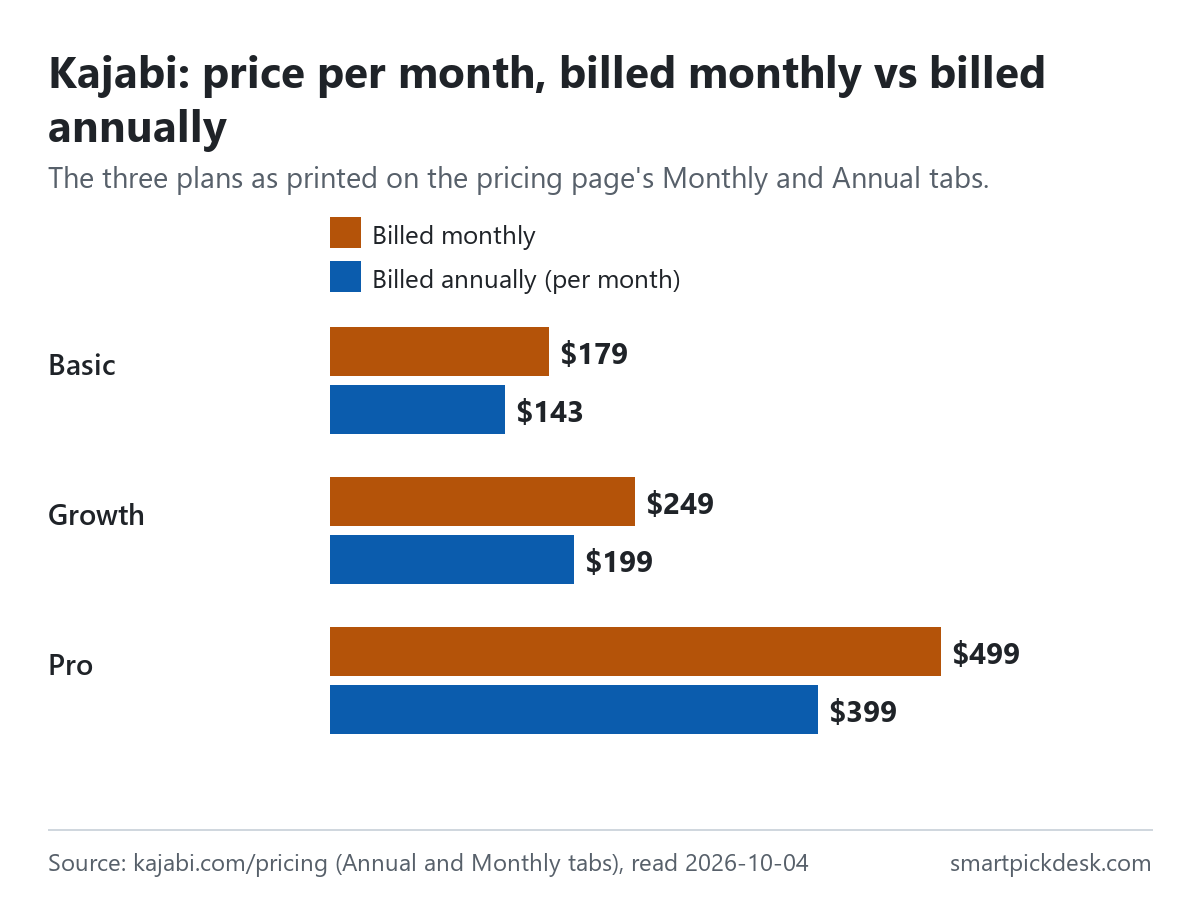
Kajabi is an all-in-one tool for selling online courses, coaching, communities and digital products, with the website, email marketing and checkout in the same account. It has three plans, Basic, Growth and Pro. There is no free plan — only a 14-day trial that needs a card — and the lowest plan is $143 a month if you pay for a year at once, or $179 a month if you pay monthly.
- Basic is $179 a month, or $143 a month billed annually, with 5 products, 2,500 contacts, 1 website and 2 admin users.[1]
- Growth is $249 or $199 a month, and Pro $499 or $399, with more products, contacts and admin users, and lower payment rates.[1]
- The price is not the whole bill. Card processing is charged on every sale, contacts above the plan's number cost extra, and pausing an account costs $29 a month.[1][4][5][11]
If you want one sentence: Kajabi's plan is chosen mainly by how many contacts and products you need, and the yearly price is about a fifth lower than the monthly one on all three plans.
On this page
At a glance
| Plan | Billed monthly | Billed annually (per month) | Saving printed on the page | Contacts | Products |
|---|---|---|---|---|---|
| Basic | $179 | $143 | $432 a year | 2,500 | 5 |
| Growth | $249 | $199 | $600 a year | 25,000 | 50 |
| Pro | $499 | $399 | $1,200 a year | 100,000 | Unlimited |
Kajabi's pricing page, read on 2026-10-04 on the Annual tab and on the Monthly tab.[1] On the Annual tab each card shows the per-month price, the words “Billed annually” and the monthly price in brackets. Kajabi does not print the yearly total; 12 × the annual per-month price is our arithmetic and matches the saving the page prints.
The page opens with “No hidden fees. No revenue sharing.” and puts an asterisk on every price, which leads to the line “Processing fees apply. Rates vary by country and payment provider.”[1] Both statements are true at the same time: Kajabi does not take a percentage as a platform fee, but each sale still pays a card processing fee, which this page covers in its own section below.
How we checked this (and what we did not check)
Last updated 2026-10-04 (first version). Every number and quotation here comes from Kajabi's own pages. Prices change — confirm on Kajabi's own page before you sign up.
What we did. On 2026-10-04 we opened kajabi.com/pricing in a browser with no account and saved the page text as it first appeared. We then pressed the Annual tab and the Monthly tab and saved the visible text each time. The same day we saved twelve help-centre articles on the trial, the card hold, managing a subscription, pausing, cancelling, what happens after cancelling, contact limits, AI credits, payment fees, tax and domains. Wording in quotation marks is copied from those saved pages word for word, and a script checks every quotation against the saved text.
What we did not do. We have not used Kajabi. There is no account, no screenshot of the product and no view here on its course player, site builder or email delivery. Every image is a chart or summary we drew from the saved text; none shows Kajabi's logo or screens. The Compare features table on the pricing page marks some features with ticks that do not come through as text, so we only use the rows that carry words or numbers. Payment rates outside the US are on separate country pages that we did not read.
What that leaves. Kajabi's three prices in both billing modes, what each plan includes in numbers, its payment rates for US businesses, its paid extras, and its trial, pause and cancellation rules, as published.
No free plan: the 14-day trial
Kajabi's way to try before paying is a trial. The trial article sets the length: “Kajabi offers a maximum free trial period of 14 days, and extensions are not available once this period ends.”[2]
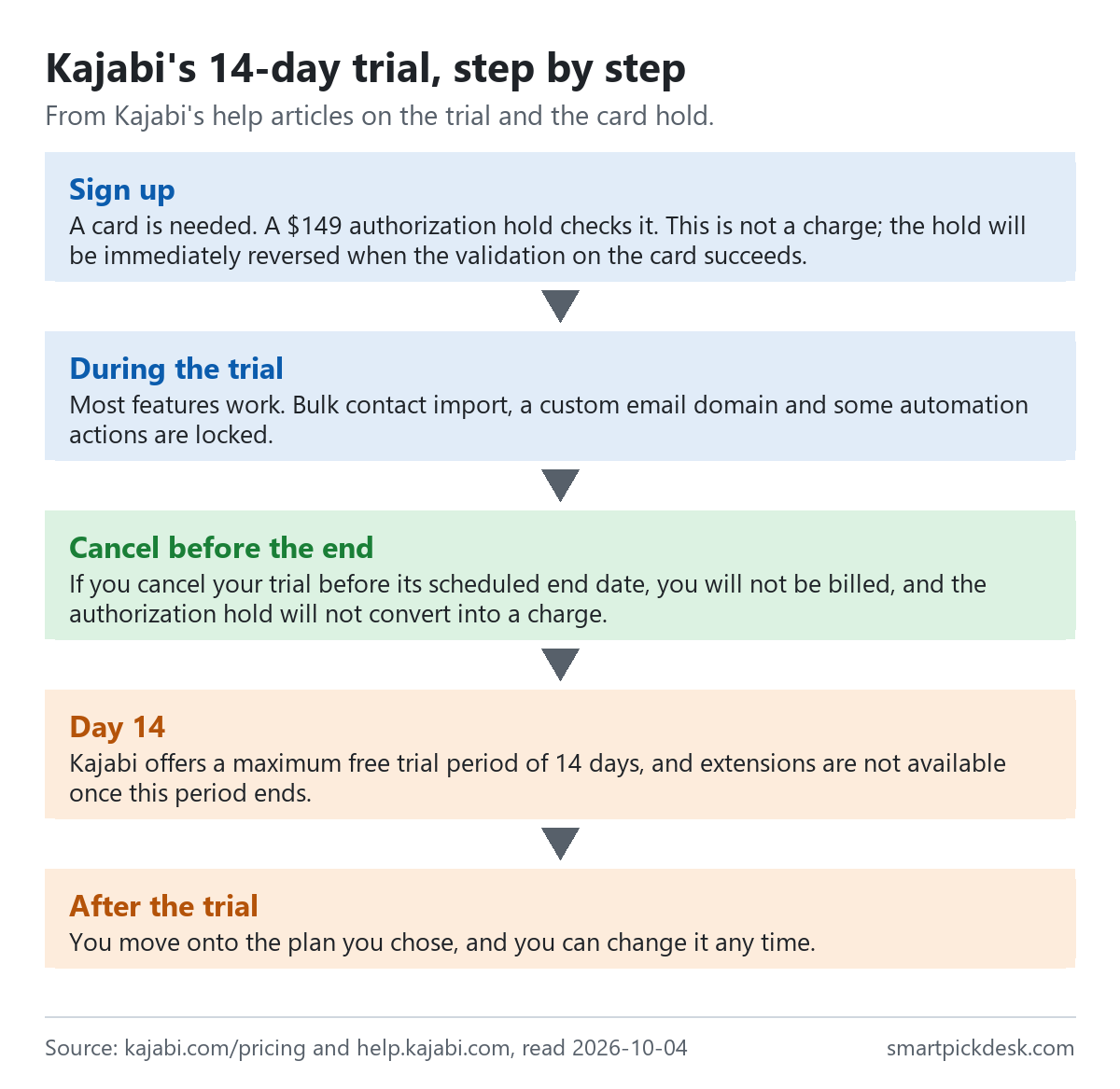
- A card, and a hold on it. When you sign up, Kajabi places a $149 authorization hold on your card. The help article explains: “This is not a charge; the hold will be immediately reversed when the validation on the card succeeds.” If the card is invalid or short of funds, the account is not created.[3]
- What is locked during the trial. Bulk importing contacts, setting up a custom email domain, editing site-wide email templates and some automation actions (sending a certificate, a single-use coupon, granting an offer, sending an email, registering to an event). Contacts can still arrive through forms.[2]
- Cancelling during the trial. “If you cancel your trial before its scheduled end date, you will not be billed, and the authorization hold will not convert into a charge.”[2]
- When the trial ends. The pricing page FAQ: “You move onto the plan you chose, and you can change it any time.”[1] In other words, unless you cancel, the trial turns into a paid plan on the card you entered.
- Ending the trial early. You can activate a plan at any time during the trial; doing so ends the trial and unlocks the restricted features.[2]
This is the opposite of tools where a trial falls back to a free plan. With Kajabi, the default at the end of 14 days is a charge, so the date in the banner on the Subscription & Billing page is worth noting on day one.[2]
What each plan includes
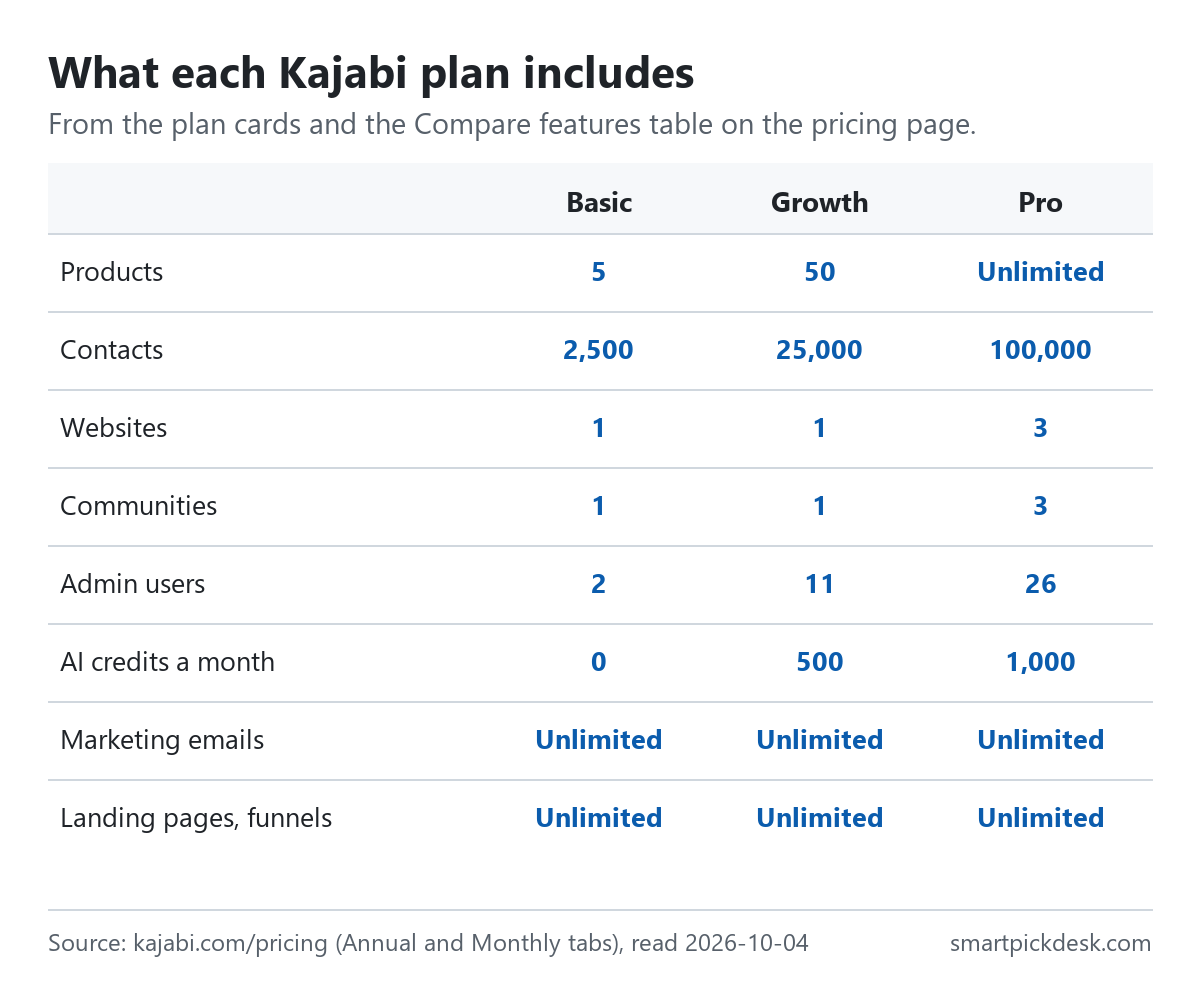
The three plan cards list the core numbers, and the Compare features table below them adds a few more. The rows that carry words or numbers are these.
| Included | Basic | Growth | Pro |
|---|---|---|---|
| Products | 5 | 50 | Unlimited |
| Contacts | 2,500 | 25,000 | 100,000 |
| Websites | 1 | 1 | 3 |
| Communities | 1 | 1 | 3 |
| Admin users | 2 | 11 | 26 |
| AI credits a month | 0 | 500 | 1,000 |
| Marketing emails, landing pages, funnels, access groups | Unlimited | Unlimited | Unlimited |
Plan cards and the Compare features table on the pricing page.[1] The Compare table also says a branded mobile app is included at a “$199/mo value” and the API at a “$25/mo value”, but the plan columns for those rows are ticks that we could not read as text, so we do not say which plans include them.
The pricing page FAQ gives Kajabi's own advice on where to start: Basic if you have not sold anything yet, Growth once revenue is coming in and your list is past a few thousand people, and Pro for more than one brand or your own app in the App Store.[1] That advice lines up with the contact numbers: 2,500 contacts on Basic is the first limit most people will meet.
Monthly or annual
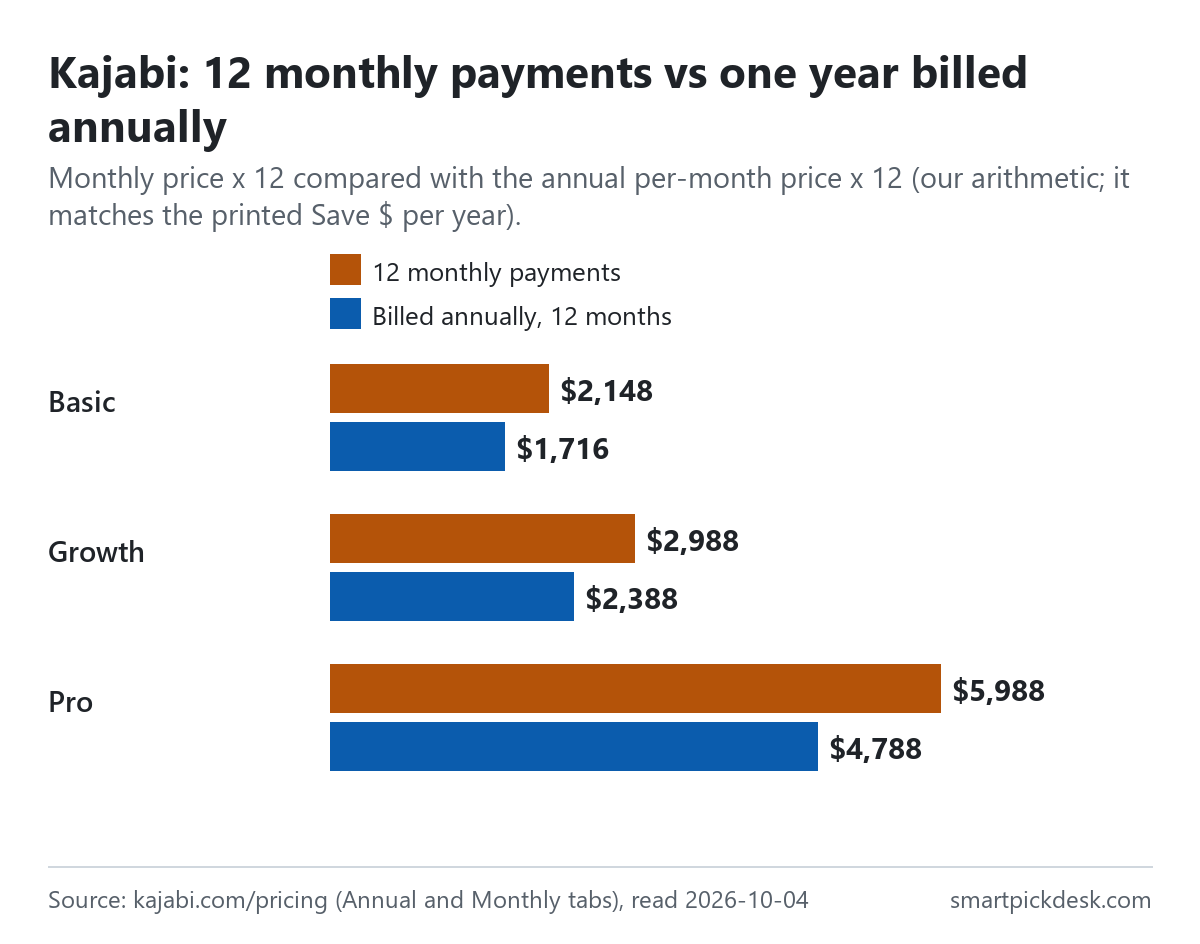
The tab at the top of the pricing page reads “Annual (Save 20%)” and “Monthly”. The saving is the same size on all three plans by our arithmetic: 20.1% on Basic, 20.1% on Growth and 20.0% on Pro.
| Plan | Monthly price | 12 monthly payments | Billed annually, 12 months | Less over a year |
|---|---|---|---|---|
| Basic | $179 | $2,148 | $1,716 | $432 |
| Growth | $249 | $2,988 | $2,388 | $600 |
| Pro | $499 | $5,988 | $4,788 | $1,200 |
Monthly and annual per-month prices from the pricing page;[1] the 12-month columns and the difference are our arithmetic. The difference equals the saving per year printed on each Annual card.
Two rules decide whether an annual plan suits you. First, from the subscription article: “Kajabi does not offer price locks or renewal discounts to offset price increases.” Annual pricing may change at renewal, and the next renewal amount is shown in Subscription & Billing before it is charged.[4] Second, if you later park the account, an annual plan's remaining months are lost (see below).[5]
Payment fees by plan
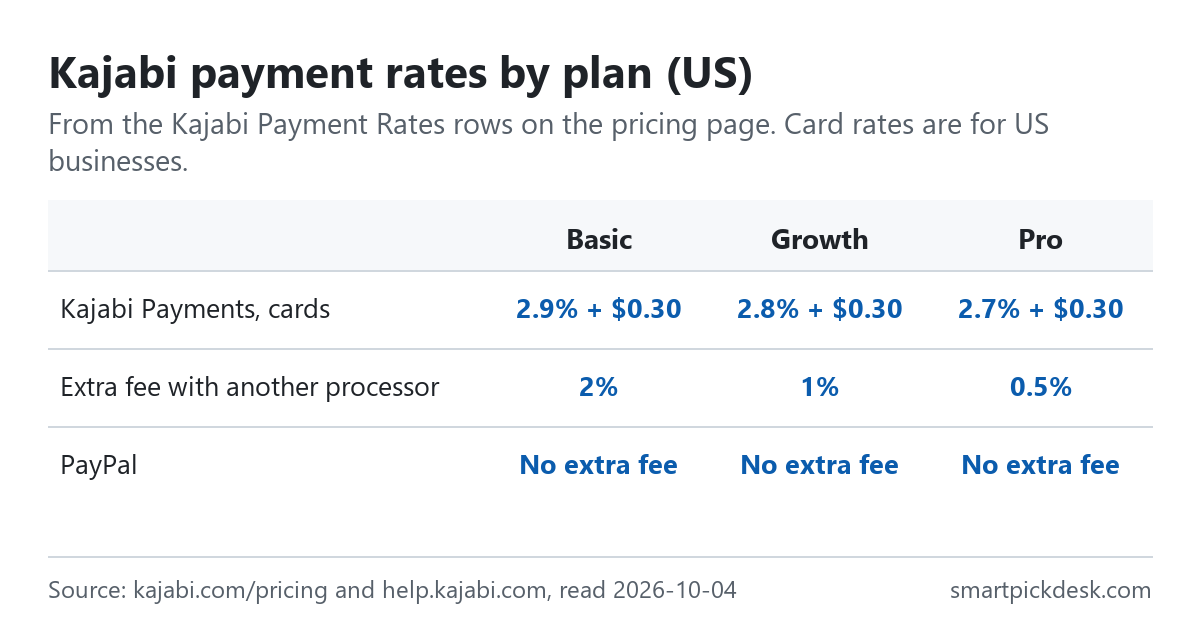
The pricing page FAQ says “Kajabi does not take a revenue share as a platform, you keep whatever you earn.”[1] What you do pay is a processing fee on each sale, and the rate depends on your plan.
| Fee | Basic | Growth | Pro |
|---|---|---|---|
| Kajabi Payments, cards (US businesses) | 2.9% + $0.30 | 2.8% + $0.30 | 2.7% + $0.30 |
| Extra fee when using another card processor | 2% | 1% | 0.5% |
Kajabi Payment Rates rows on the pricing page.[1] The page notes that card fees shown are for US entities only.
- Another processor costs extra. If you connect Stripe directly instead of using Kajabi Payments, Kajabi adds its own fee on top of that processor's fees. The help article adds: “PayPal is not subject to this fee.” The extra fee only applies in countries where Kajabi Payments is offered.[10]
- Other US fees. The US fee article lists a few that apply on top of the card rate: international cards +1.5%, subscriptions and payment plans +0.7% on every payment in the series, Kajabi Sales Tax at $0.15 per transaction where you switch it on, invoicing +0.4%, and a $15.00 fee per dispute that is not returned even if you win. ACH payments are 0.80%, capped at $5.00.[11]
- Where Kajabi Payments works. For businesses registered in the US, Canada, Australia, the United Arab Emirates, the United Kingdom and selected European countries.[10]
So “no revenue sharing” is accurate as a platform fee, but a recurring membership on Basic in the US pays the card rate plus 0.7% on every renewal, according to the fee article. Checking the country page for your own business is worth doing before you compare totals.
Contacts and plan limits
Contacts are the limit most people meet first, because everyone who joins a form or buys counts. The contact limits article explains what happens near and over the line.
- At 90% you see a notice in the app; at 100% you get an email as well.[8]
- After that: “You will be given 30 days to update or remove your contacts before your account is locked.” When locked, you can only log in to upgrade, but your customers' experience does not change.[8]
- Making room: the article suggests removing contacts who are not customers, are unsubscribed and were not added in the last 60 days, as well as bounced contacts.[8]
- Downgrading: “You cannot downgrade your current plan to a lower plan if your current plan usage exceeds the new plan limits.”[4]
Products, websites and admin users work the same way: the plan sets the number, and above it you either buy more or move up.
Paid extras and AI credits
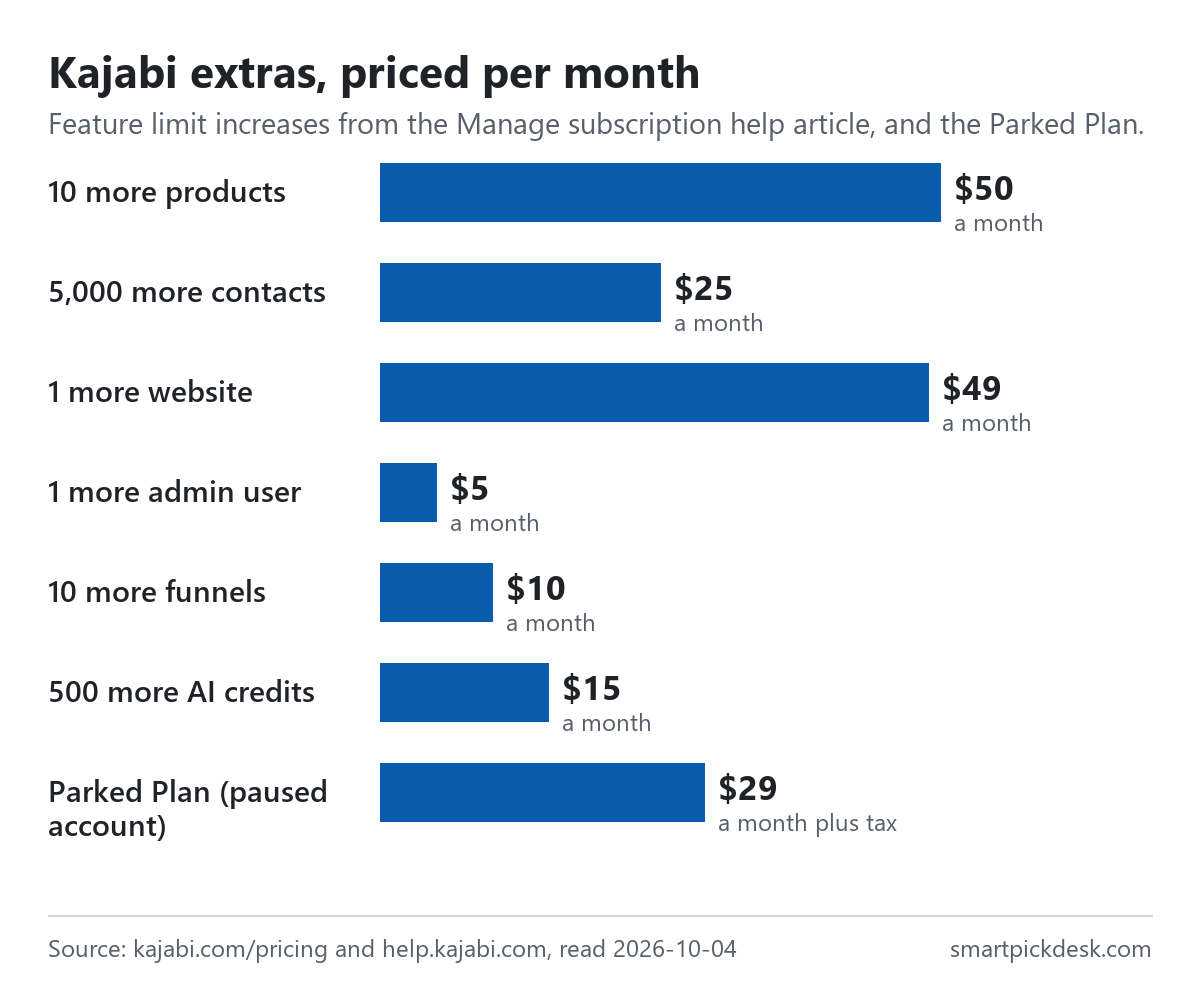
If you need a little more of one thing, the subscription article lists feature limit increases you can add without changing plans. The option appears once you reach 80% of a limit, and it is billed on the same cycle as your plan.[4]
| Extra | Increment | Price per month |
|---|---|---|
| Products | 10 | $50 |
| Contacts | 5,000 | $25 |
| Website | 1 | $49 |
| Admin users | 1 | $5 |
| Funnels | 10 | $10 |
| AI credits | 500 | $15 |
Feature limit increase pricing in the Manage subscription help article.[4]
AI credits. Growth includes 500 a month and Pro 1,000; Basic shows 0 on the pricing page.[1][9] Credits pay for transcription (1 credit a minute), translation (10 a minute) and dubbing (100 a minute), and “AI Credits reset on the 1st of every month (PST).” Extra credits are 500 for $15, either as a monthly bundle that does not roll over or as a one-time top-up.[9]
Discounts. “Kajabi offers a 10% discount for verified nonprofit organizations.” You ask support and send documentation; it applies to your Kajabi subscription only.[4]
Changing plans and renewals
- Upgrades and downgrades. Depending on the plan you choose, you are either charged a prorated amount and get the new features at once, or the change waits for the end of the billing cycle.[4]
- Legacy plans. Accounts that signed up under older plans keep their prices and limits. The article is plain about leaving one: “Switching off a legacy plan is permanent — you cannot switch back.”[4]
- Tax. “Tax will be calculated based on the billing address listed on your account.” It appears as its own line on the invoice; verified tax numbers can make some organisations exempt.[12]
- Domain. Each site gets a Kajabi subdomain (name.mykajabi.com), and you can connect your own domain; visitors can then reach the site at both addresses.[13]
Parking, cancelling and the 90 days
Kajabi has two ways to stop: park the account or cancel it. Both take your site offline for your customers.
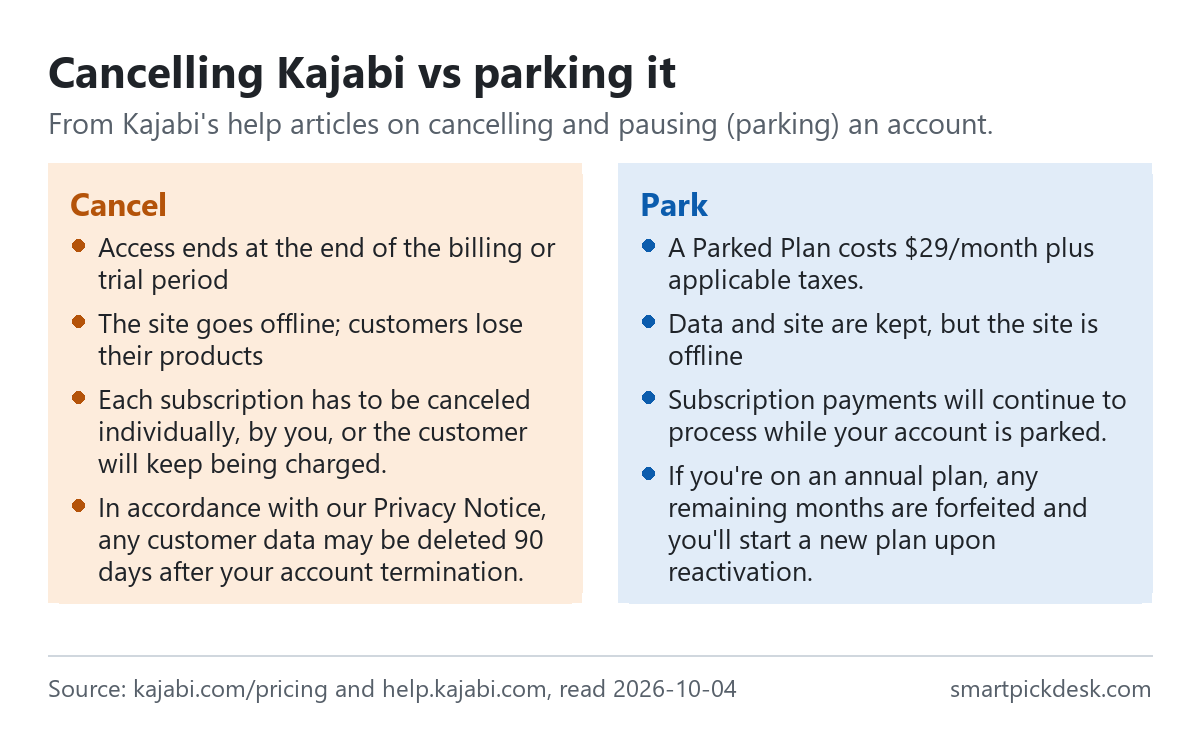
- Parking. “A Parked Plan costs $29/month plus applicable taxes.” Your data and site are kept, but the site is offline and customers cannot reach the products they bought. Discounts are cancelled and legacy plans are lost.[5]
- Your customers keep paying while you are parked. “Subscription payments will continue to process while your account is parked.” The article suggests pausing customer subscriptions before you park.[5]
- Annual plans and parking. “If you're on an annual plan, any remaining months are forfeited and you'll start a new plan upon reactivation.”[5]
- Cancelling. Access ends at the end of the current billing or trial period. On that date the site becomes inaccessible, customers lose the products they bought and any custom domain is disconnected. You can undo a cancellation before the cycle ends.[6]
- Customer subscriptions do not stop by themselves. “Each subscription has to be canceled individually, by you, or the customer will keep being charged.” You can still log in after cancelling to do this.[6][7]
- The 90 days. “In accordance with our Privacy Notice, any customer data may be deleted 90 days after your account termination.” Kajabi sends reminders 14 and 7 days before the deletion date.[6]
- Refunds of the plan itself. The pricing page FAQ says every plan comes with 30 days in which you can ask for your money back.[1] The help articles we saved do not set out how to request it, so ask support directly if you need it.
Where Kajabi's pages disagree
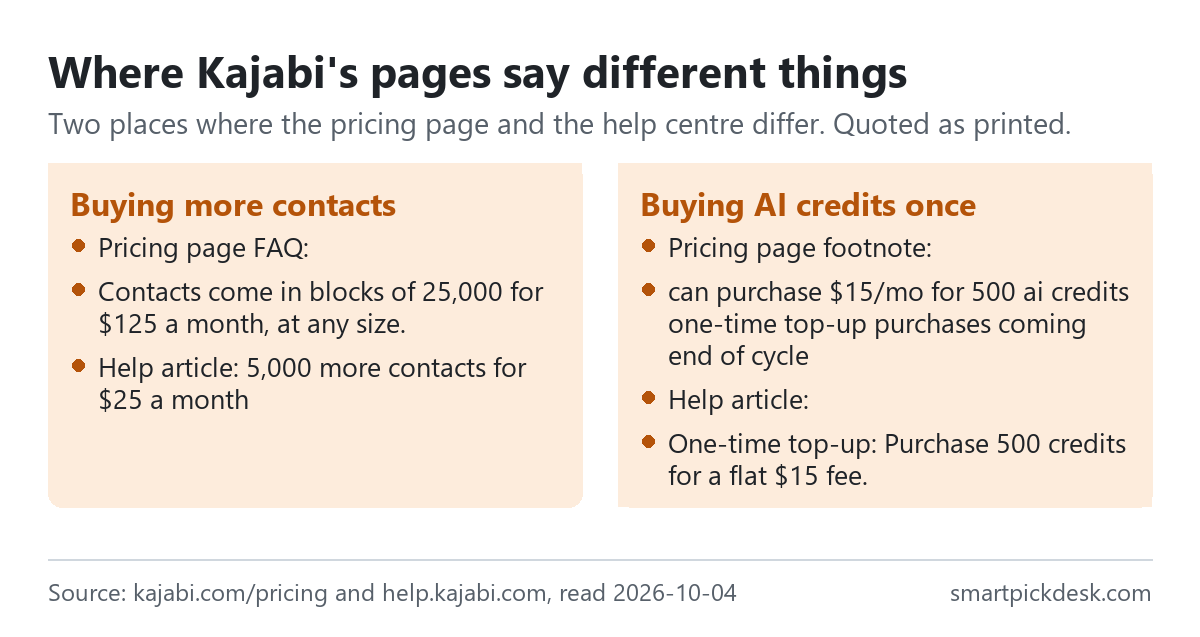
- The size of a contact add-on. The pricing page FAQ says “Contacts come in blocks of 25,000 for $125 a month, at any size.”[1] The subscription article lists contacts in increments of 5,000 for $25 a month.[4] The rate is the same ($5 per 1,000 by our arithmetic), but the block you have to buy is five times bigger on one page than the other.
- One-time AI credit top-ups. A footnote on the pricing page says “can purchase $15/mo for 500 ai credits one-time top-up purchases coming end of cycle”, which reads as not yet available.[1] The AI credits article already offers “One-time top-up: Purchase 500 credits for a flat $15 fee.”[9]
We have not asked Kajabi which wording is current. The prices on the plan cards are what we used throughout.
Which plan fits which situation
| If you are… | Look at | Why, from Kajabi's pages | Watch out for |
|---|---|---|---|
| Testing whether Kajabi suits you | The 14-day trial | Most features open; no bill if you cancel in time[2] | A card and a $149 hold; it turns into a paid plan[1][3] |
| Starting out, no sales yet | Basic, $143 a month billed annually | Kajabi's own FAQ points here[1] | 2,500 contacts and 5 products; highest card rate[1] |
| Selling, with a list past a few thousand | Growth, $199 | 25,000 contacts, 50 products, 500 AI credits[1] | Still one website and one community[1] |
| Running more than one brand | Pro, $399 | 3 websites, 3 communities, lowest payment rates[1] | 100,000 contacts is still a limit[1] |
| Just a little over a limit | A feature limit increase | Small add-ons such as 5,000 contacts for $25[4] | The pricing page describes larger blocks[1] |
| Taking a break | The Parked Plan | $29 a month keeps your work[5] | Site offline; customer billing continues[5] |
Related pages on this site: Podia pricing, checked covers another all-in-one course tool, with a Mover plan that takes a fee on each sale, and Systeme.io pricing, checked covers a tool with a free plan for courses and email.
Questions people ask
Does Kajabi have a free plan?
No. There is a 14-day trial; it needs a card and places a $149 hold that is reversed once the card checks out.[2][3]
How much does Kajabi cost?
Basic $179 a month or $143 billed annually; Growth $249 or $199; Pro $499 or $399.[1] See the table.
Does Kajabi take a cut of my sales?
No platform share, but card processing is charged on each sale, from 2.9% + $0.30 on Basic down to 2.7% + $0.30 on Pro for US businesses.[1]
How many contacts does each Kajabi plan include?
2,500 on Basic, 25,000 on Growth and 100,000 on Pro. Over the limit you have 30 days before the account locks.[1][8]
Can I pause Kajabi instead of cancelling?
Yes, by parking it for $29 a month plus tax. The site is offline while parked.[5]
What happens when I cancel Kajabi?
Access ends at the end of the period, customers lose their products, and you must cancel your customers' subscriptions yourself.[6][7]
Do you get paid if I sign up?
Not from this page — it has no affiliate links today. If that changes, it will say so at the top, and each link will be marked.
Sources and check log
| # | Source | URL | Checked | How |
|---|---|---|---|---|
| 1 | Kajabi, Pricing (plan cards on the Annual and Monthly tabs, Compare features, FAQ) | kajabi.com/pricing | 2026-10-04 | Opened in a browser with no account; page text saved on each tab |
| 2 | Kajabi help, Kajabi trial information | help.kajabi.com › trial information | 2026-10-04 | Page text saved |
| 3 | Kajabi help, Understand the $149 hold during a free trial | help.kajabi.com › trial hold | 2026-10-04 | Page text saved |
| 4 | Kajabi help, Manage subscription | help.kajabi.com › manage subscription | 2026-10-04 | Page text saved |
| 5 | Kajabi help, Pause a Kajabi subscription | help.kajabi.com › pause | 2026-10-04 | Page text saved |
| 6 | Kajabi help, Cancel a Kajabi account | help.kajabi.com › cancel | 2026-10-04 | Page text saved |
| 7 | Kajabi help, Manage services and customer payments after account cancellation | help.kajabi.com › after cancellation | 2026-10-04 | Page text saved |
| 8 | Kajabi help, Understand contact usage limits | help.kajabi.com › contact limits | 2026-10-04 | Page text saved |
| 9 | Kajabi help, AI Credits | help.kajabi.com › AI credits | 2026-10-04 | Page text saved |
| 10 | Kajabi help, Kajabi Payments Processing Fees | help.kajabi.com › processing fees | 2026-10-04 | Page text saved |
| 11 | Kajabi help, Kajabi Payments fees: United States | help.kajabi.com › fees, United States | 2026-10-04 | Page text saved |
| 12 | Kajabi help, Kajabi subscription tax FAQs | help.kajabi.com › tax | 2026-10-04 | Page text saved |
| 13 | Kajabi help, Kajabi default subdomain vs custom domain | help.kajabi.com › domains | 2026-10-04 | Page text saved |
Change log
- 2026-10-04 — First version. The pricing page on both tabs and twelve help articles read on 2026-10-04.
- Previous check: none for this page.
- What we will re-check: the three prices on both tabs, the payment rates by plan, the $149 trial hold, the Parked Plan price, and the size of the contact add-on.
Who writes this
Smart Pick Desk is an independent site that compares tools for people who work online. We are not employed by, or partnered with, Kajabi, and we do not run Kajabi in our own business. What we do is read what each company publishes, write down the date we read it, and say plainly which parts we could not check. More: who the editors are and how we check a page.
We do not promise results. Nothing here is a prediction about what a tool will do for your sales.