Podia pricing, checked: Mover, Shaker and Earthquaker, the 5% fee, and what the 14-day trial leaves you with
Last updated 2026-10-04 · By Smart Pick Desk editors · Prices read on Podia's pricing page in both billing modes on 2026-10-04; help centre and terms read the same day · We have not used Podia · How we checked ↓
The short answer
Podia is an all-in-one tool for selling online courses, digital downloads, coaching and a community, with a website, a blog and email included. It has three plans, Mover, Shaker and Earthquaker. There is no free plan — only a 14-day trial — and the lowest-priced plan, Mover, takes 5% of each sale.
- Mover is $49 a month, or $42 a month billed yearly ($504 a year), with a 5% transaction fee and 100 email subscribers included.[1]
- Shaker is $99 or $84 a month and Earthquaker $179 or $150, with no Podia transaction fee and 500 and 1,000 email subscribers included.[1]
- The rules around the price are strict on time. Refunds only within 72 hours of a charge, no pause, and when a plan or trial ends the site goes offline; content is deleted after 180 days.[2][3][4]
If you want one sentence: Podia's choice between its two lower plans comes down to how much you sell each month, because Mover's 5% fee and Shaker's higher price cross at a sales figure you can work out from the pricing page.
On this page
At a glance
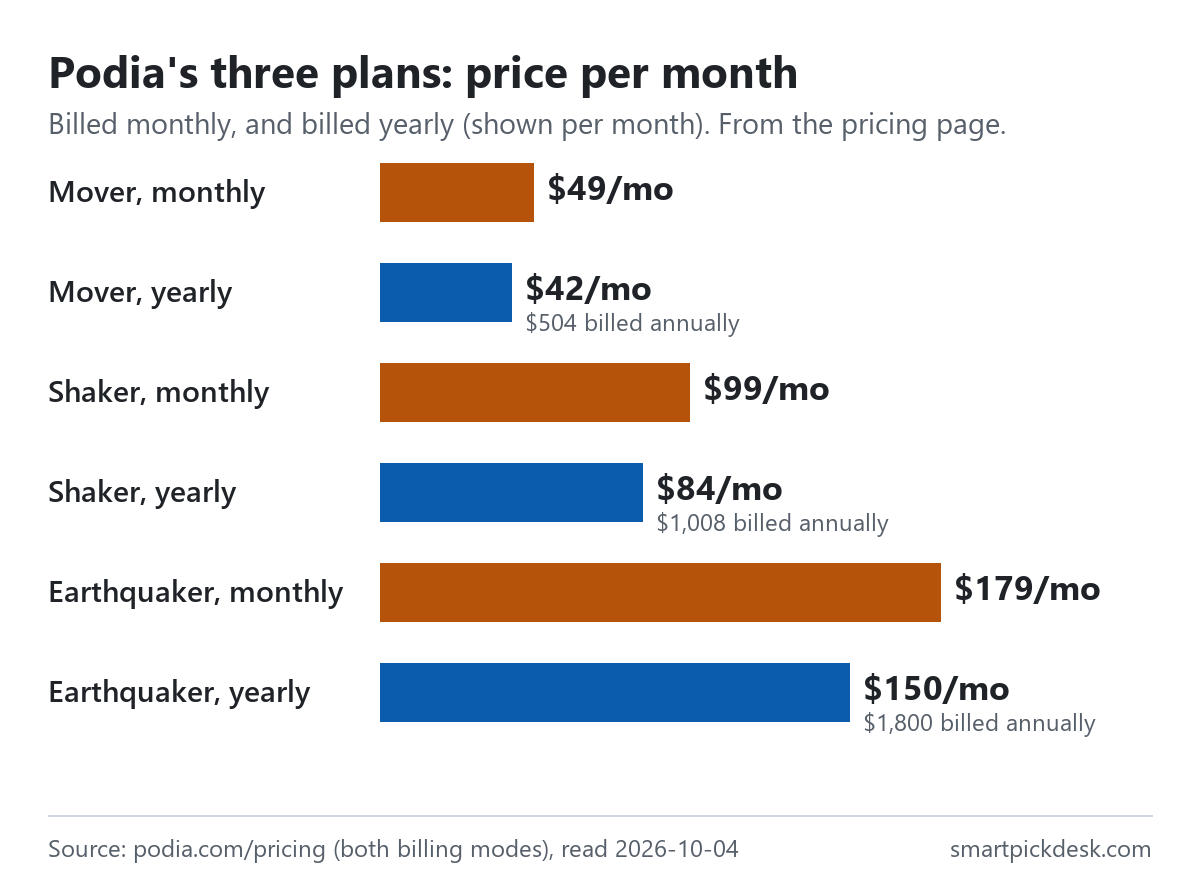
| Plan | Billed monthly | Billed yearly (per month) | Billed yearly (total) | Podia transaction fee | Email subscribers included |
|---|---|---|---|---|---|
| Mover | $49 | $42 | $504 | 5% | 100 |
| Shaker | $99 | $84 | $1,008 | None | 500 |
| Earthquaker | $179 | $150 | $1,800 | None | 1,000 |
Podia's pricing page, read on 2026-10-04 with the billing switch on yearly and on monthly.[1] Podia prints the yearly total (“billed annually”) as well as the per-month figure. There is no subscriber slider on the page; each plan's price includes the number of email subscribers shown.
The page headline is “Podia pricing: try everything free for 14 days”, and every plan lists “Unlimited customers”.[1] What changes between plans is the transaction fee, how many products, videos and community spaces you can have, how many email subscribers are included, and a few sales features.
How we checked this (and what we did not check)
Last updated 2026-10-04 (first version). Every number and quotation here comes from Podia's own pages. Prices change — confirm on Podia's own page before you sign up.
What we did. On 2026-10-04 we opened podia.com/pricing in a browser with no account, declined the optional cookies, saved the page text as it first appeared (billed yearly), switched the billing toggle and saved it again (billed monthly). The same day we saved fifteen help-centre articles on plans and pricing, transaction fees, plan limits, the trial, refunds, cancelling, plan changes, tax, pausing, email and websites, and the terms of service. Wording in quotation marks is copied from those saved pages word for word, and a script checks every quotation against the saved text.
What we did not do. We have not used Podia. There is no account, no screenshot of the product and no view here on its course player, site builder or email deliverability. Every image is a chart or summary we drew from the saved text; none shows Podia's logo or screens. Several help articles end with questions whose answers are collapsed; we did not open those, so we do not rely on them. The prices of larger email subscriber tiers are chosen in the account's billing page and are not printed on the pricing page, so we could not read them.
What that leaves. Podia's three prices in both billing modes, what each plan includes and limits, its transaction fee, and its trial, refund, cancellation and deletion rules, as published.
No free plan: the 14-day trial
Podia's offer before you pay is a trial: “Take Podia for a spin, no need to enter a credit card or pick a plan until you're ready.”[1] The plans FAQ confirms: “No credit card is needed to sign up for the 14-day trial.”[5]
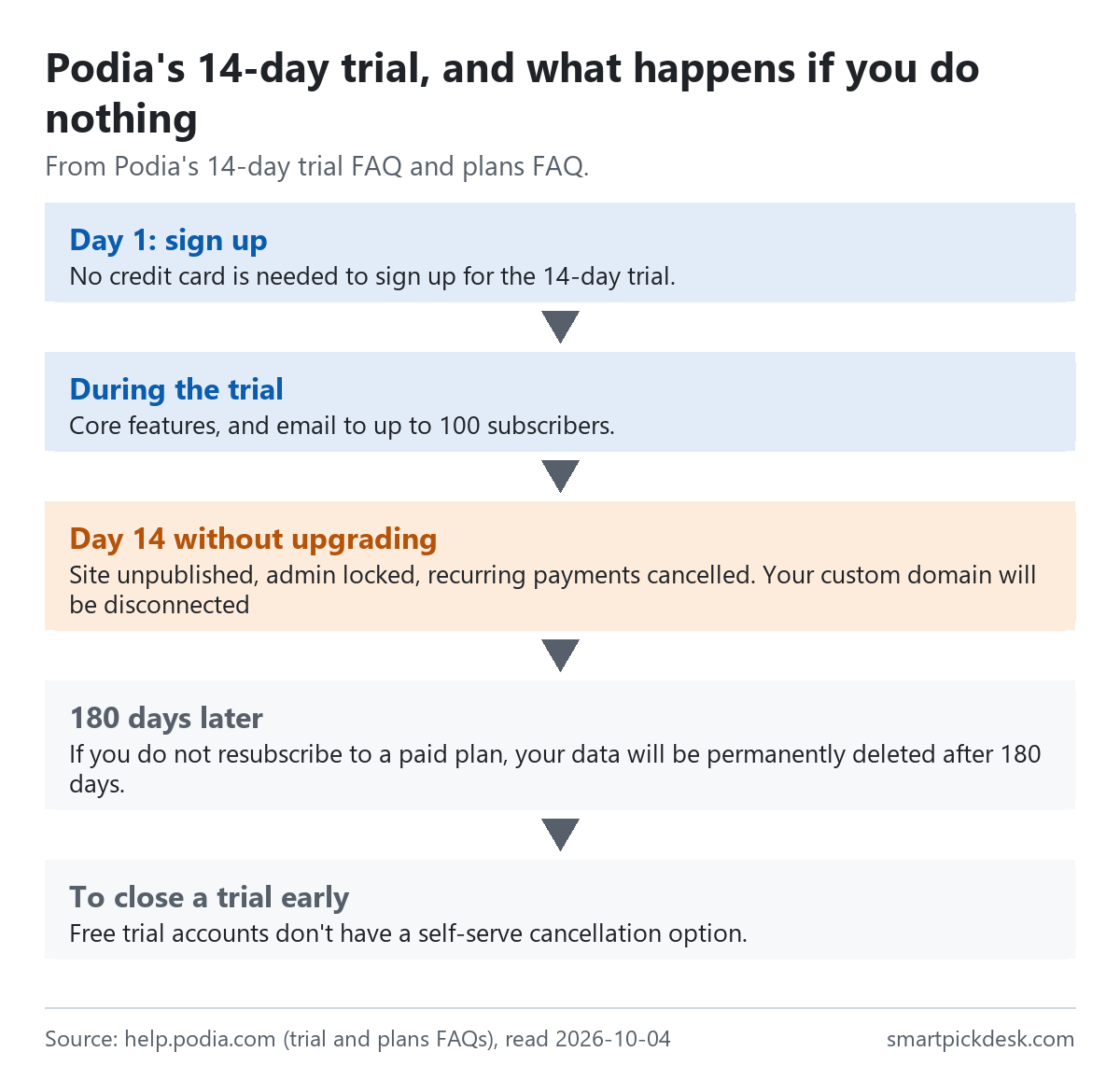
- During the trial. Core features including upsells, PayPal and affiliates, and email: “When it comes to email, the 14-day trial includes support for up to 100 subscribers”. Custom tracking codes are not available on a trial.[2]
- If the trial ends without a plan. “If you don't upgrade, your account will be canceled and content will be fully deleted after 180 days.” The trial FAQ lists what happens at once: the site is unpublished, you lose access to the admin dashboard, recurring subscriptions and payment plans are cancelled, and “Your custom domain will be disconnected”.[2]
- Extending the trial. “We typically don't extend trial periods beyond 14 days.” Podia says it considers requests case by case.[2]
- Closing a trial early. “Free trial accounts don't have a self-serve cancellation option.” You ask support, or simply stop using it and it is deleted after 180 days.[2]
So a trial does not quietly turn into a free account. If you build a course and sell it during the trial, those sales and any recurring payments stop on day 14 unless you choose a plan. Upgrading during the trial is immediate.[5]
What each plan includes
The plan limits article sets out the numbers, and adds a rule worth reading first: “To stay on your current plan, you'll need to remain within those limits, as it isn't possible to go over them.”[6]
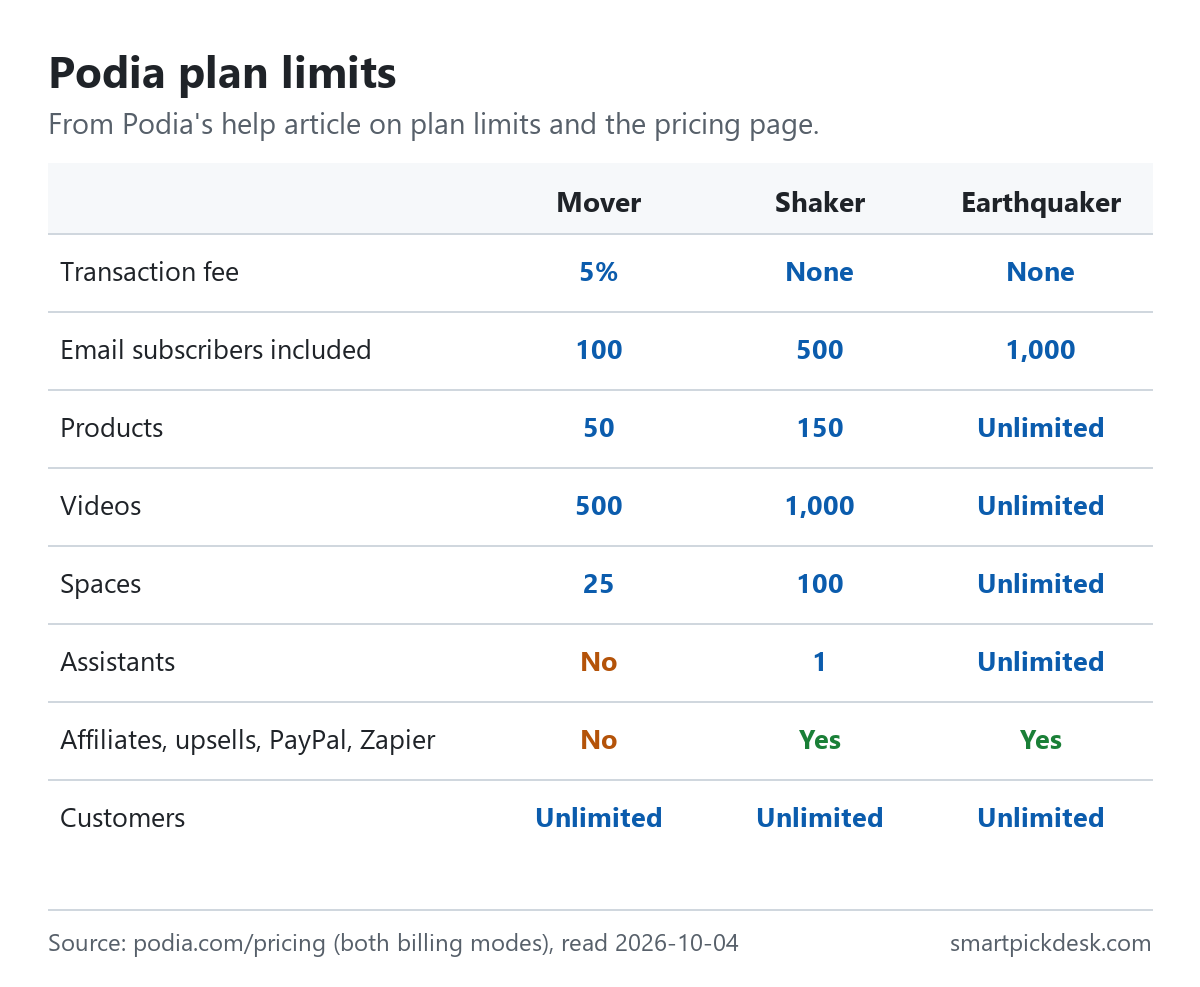
| Limit | Mover | Shaker | Earthquaker |
|---|---|---|---|
| Products | 50 | 150 | Unlimited |
| Videos | 500 | 1,000 | Unlimited |
| Community spaces | 25 | 100 | Unlimited |
| Assistants | None | 1 | Unlimited |
| Affiliate marketing, upsells, PayPal, Zapier | Not listed | Listed | Listed |
| Products migrated for you | Up to 50 | Up to 150 | Up to 150 |
Plan limits help article[6] and the plan cards and FAQ on the pricing page.[1]
Every plan lists the same core features under “Everyone gets”: community, online courses, digital downloads, coaching, events, a website and blog, a custom domain, landing pages, built-in checkout, sales tax handling in 230 countries and email and chat support.[1] Podia's website help says “Yes! You can use Podia as your primary website on the internet.”[13]
The limits note says “Note: These limits may differ for folks on Legacy plans.”, so older accounts may see different numbers.[6]
Mover's 5% fee against Shaker's higher price
The pricing page FAQ: “On the Mover plan, we charge a 5% transaction fee. There are no Podia fees on the Shaker or Earthquaker plans.”[1] The fee is taken from each sale, separately from the payment processor's fee: “Your payment processor (Stripe or PayPal) will charge a standard transaction fee of 2.9% + 30¢, which may vary based on your location.”[1][7]
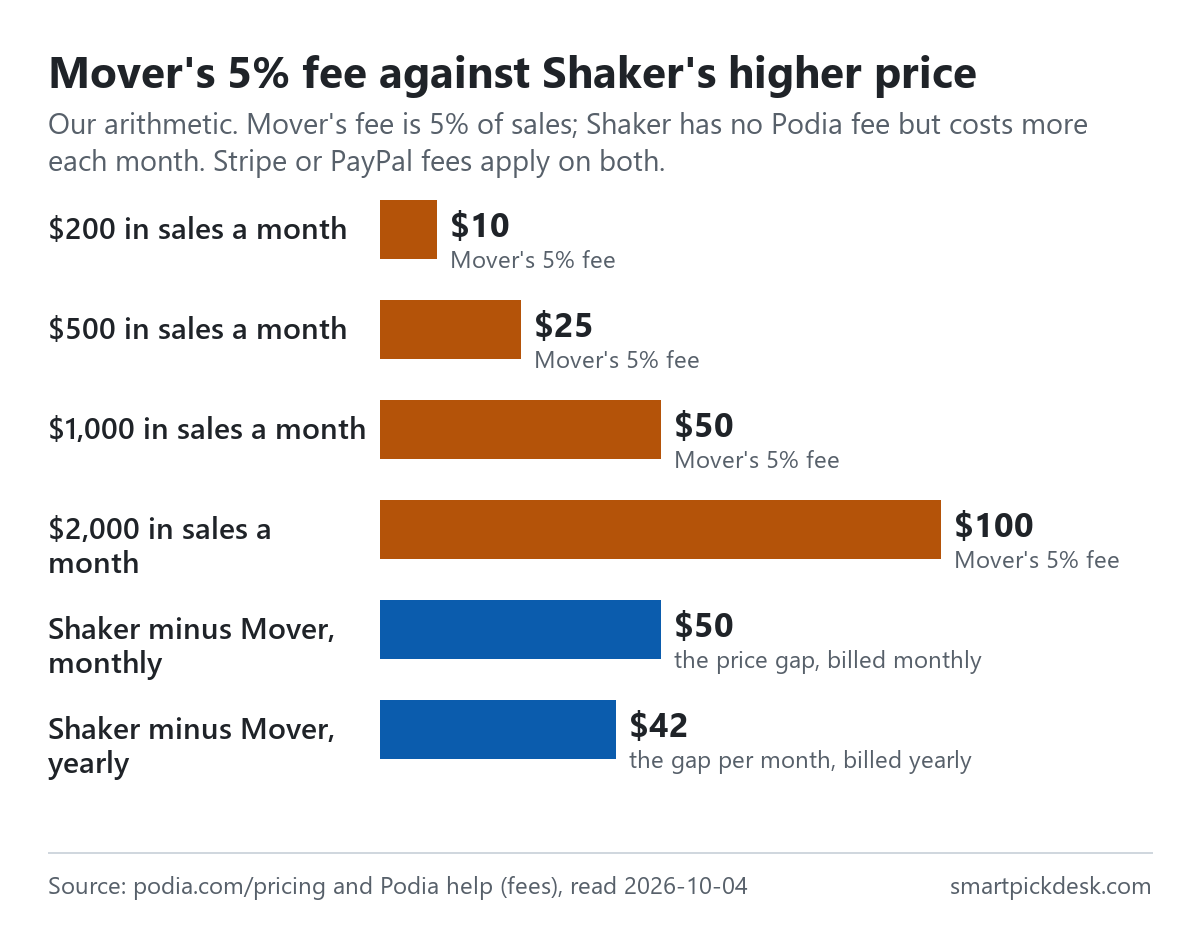
| Your sales in a month | Mover's 5% fee | Mover + fee, billed monthly | Shaker, billed monthly | Mover + fee, billed yearly (per month) | Shaker, billed yearly (per month) |
|---|---|---|---|---|---|
| $200 | $10 | $59 | $99 | $52 | $84 |
| $500 | $25 | $74 | $99 | $67 | $84 |
| $1,000 | $50 | $99 | $99 | $92 | $84 |
| $2,000 | $100 | $149 | $99 | $142 | $84 |
Our arithmetic from the plan prices and the 5% rate on the pricing page.[1] Stripe or PayPal's processing fee applies on both plans and is left out because it is the same either way. Sales tax is not included.
Where the lines cross. On monthly billing, Shaker costs $50 a month more than Mover, and 5% of sales equals $50 at $1,000 of sales a month. On yearly billing the gap is $42 a month, which 5% matches at $840 of sales a month. Below those amounts, Mover plus its fee costs less; above them, Shaker does — before you count Shaker's extra features. This is arithmetic from the published numbers, not a forecast of what you will sell.
The transaction fees article explains where the fee shows up: on each invoice in the Sales area, and in the invoices export.[7]
Monthly or yearly
The pricing page has a switch between billed monthly and billed yearly. Because the page prints the yearly total, the table below compares it directly with twelve monthly payments (12 × the monthly price is our arithmetic).
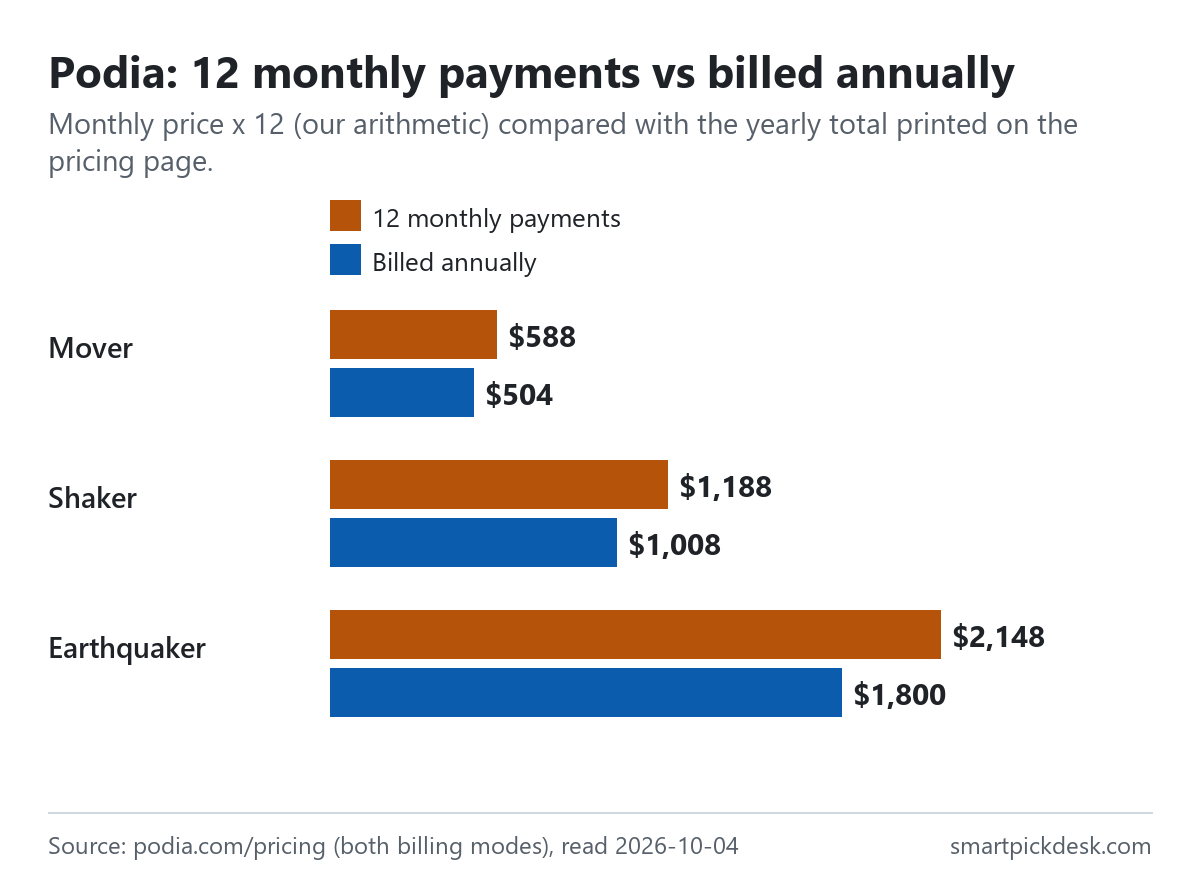
| Plan | Monthly price | 12 monthly payments | Billed annually | Less over a year |
|---|---|---|---|---|
| Mover | $49 | $588 | $504 | $84 |
| Shaker | $99 | $1,188 | $1,008 | $180 |
| Earthquaker | $179 | $2,148 | $1,800 | $348 |
Monthly prices and yearly totals from the pricing page;[1] the 12-month and difference columns are our arithmetic.
The billing rules matter more than the saving. From the plans FAQ: “Switching from annual to monthly will take effect after your annual plan expires. However, switching from monthly to annual starts immediately.”[5] And on refunds, the pricing page says Podia does not do partial refunds on annual plans (see below).[1] A yearly plan is therefore a full year's commitment once the 72-hour window has passed.
Email subscribers
Podia Email is built in, and each plan includes a number of subscribers. The email limits article: “All Podia accounts start out with a free Podia Email plan that lets you send unlimited emails to up to 100 active subscribers.”[8]
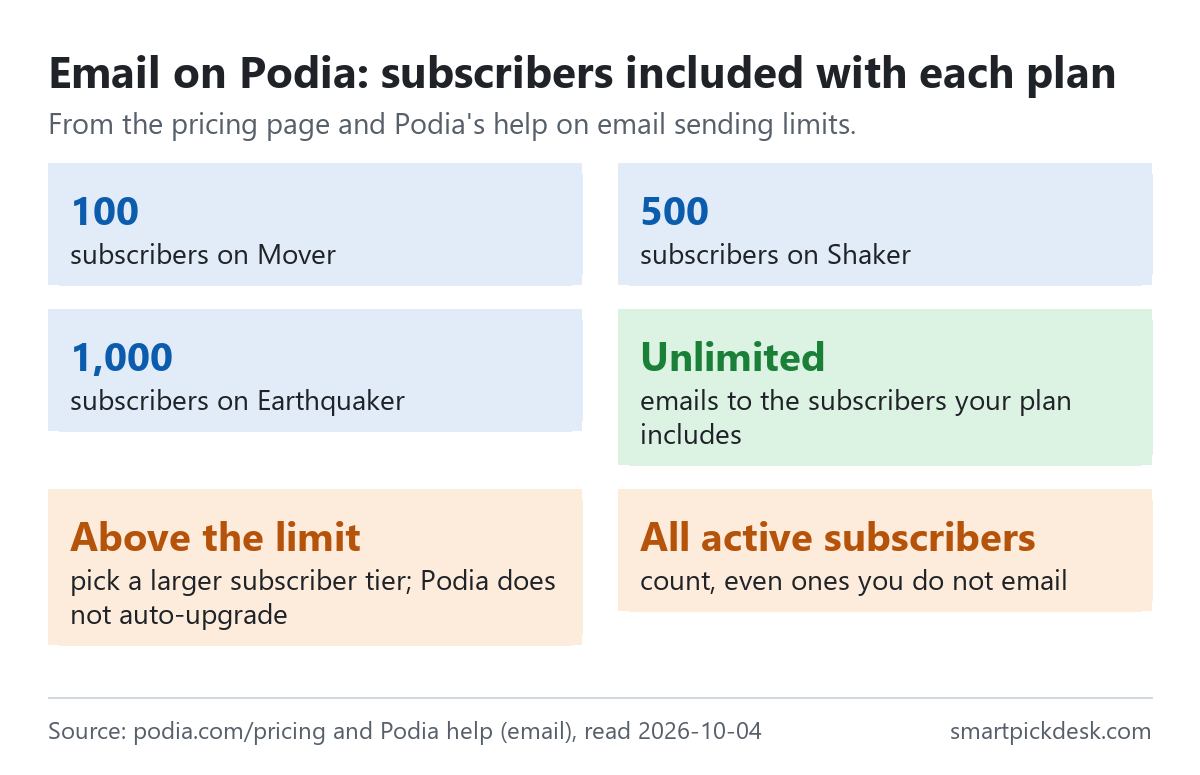
- Included with each plan: 100 on Mover, 500 on Shaker, 1,000 on Earthquaker; sending to them is unlimited.[1][8]
- Everyone active counts. If you have more than the included number, you need a larger email plan, and “This is true even if you don't plan to email all of them.”[8]
- No automatic upgrade. When you reach the limit, “We never auto-upgrade you.” Podia emails you as you get close, and you can move down again if the list shrinks.[1]
- After the trial. “You need a Mover, Shaker, or Earthquaker plan to use Podia Email after your 14-day free trial ends.”[1]
- Larger tiers. The plan change article says you choose a subscriber tier from a dropdown and the price updates; those prices are shown in the account, not on the pricing page.[9]
In practice, 100 included subscribers on Mover is small for a course business that also runs a newsletter, so if email matters, the subscriber tier you need may decide the bill more than the plan does.
Changing plans
- Upgrades take effect immediately; downgrades apply after the current billing cycle ends.[5]
- Over a limit. If you are above a lower plan's limits, you have to get under them before you can move to it, because the limits cannot be exceeded.[6]
- The billing date is set by the day you upgraded, and “At this time, adjusting the billing dates for your plan is not possible.”[5]
- Payment methods. The plans FAQ lists cards from the major brands, Google Pay and Apple Pay.[5]
- No pause. “At this time, Podia doesn't offer a way to pause your subscription.” Its suggested workaround is cancelling.[10]
Cancelling, refunds and the 180 days
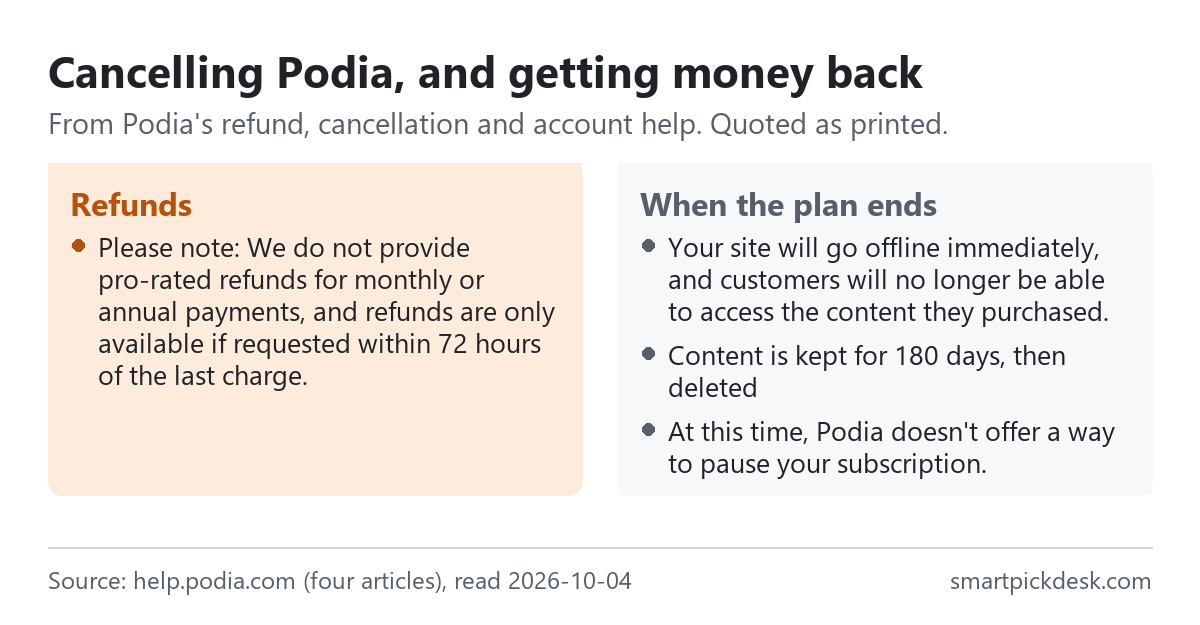
- Refunds. Podia refunds the most recent payment if you contact it within 72 hours of a monthly or annual renewal or upgrade. Then: “Please note: We do not provide pro-rated refunds for monthly or annual payments, and refunds are only available if requested within 72 hours of the last charge.” Refunds take 5 to 10 business days.[3]
- Cancelling. From the Billing page. The cancellation article says you can cancel immediately or at the end of the billing cycle, and if you cancel immediately you are not entitled to a refund for unused time.[11]
- What cancelling does. “Your site will go offline immediately, and customers will no longer be able to access the content they purchased.” Recurring subscriptions and payment plans you sell are cancelled, and “Once your account is canceled, subscriptions and payment plans cannot be reinstated.”[4]
- The 180 days. “If you cancel your subscription but decide to return, your content will be safely stored for 180 days.” After that it cannot be retrieved.[4]
- Failed payments. The same article says an account is also cancelled if Podia cannot collect payment after several attempts.[4]
Because your customers lose access when your plan ends, Podia's own article suggests downgrading instead of cancelling if you want to keep products available, and exporting your lists and files before you cancel.[4]
Tax and other costs
- Sales tax on your Podia plan. For US residents, Podia collects sales tax on what you pay Podia in nine states: Arizona, Connecticut, Hawaii, Maryland, New York, Ohio, Pennsylvania, Tennessee and Washington. This is about your subscription only, not the sales you make.[12]
- Payment processing. Stripe or PayPal fees apply to every sale on every plan, at 2.9% + 30¢ according to the pricing page, varying by location.[1]
- Domain. Each account gets a free Podia subdomain; a custom domain is connected with a CNAME record and is usually ready in 24 to 48 hours, with a free SSL certificate. You buy the domain from a registrar yourself.[14]
- Discounts. “Currently, we don't offer non-profit discounts.”[5]
- Renewal price. The terms say paid services renew for the same period “at the then-current non-promotional rate” unless you opt out of auto-renewal.[15]
Where Podia's pages disagree
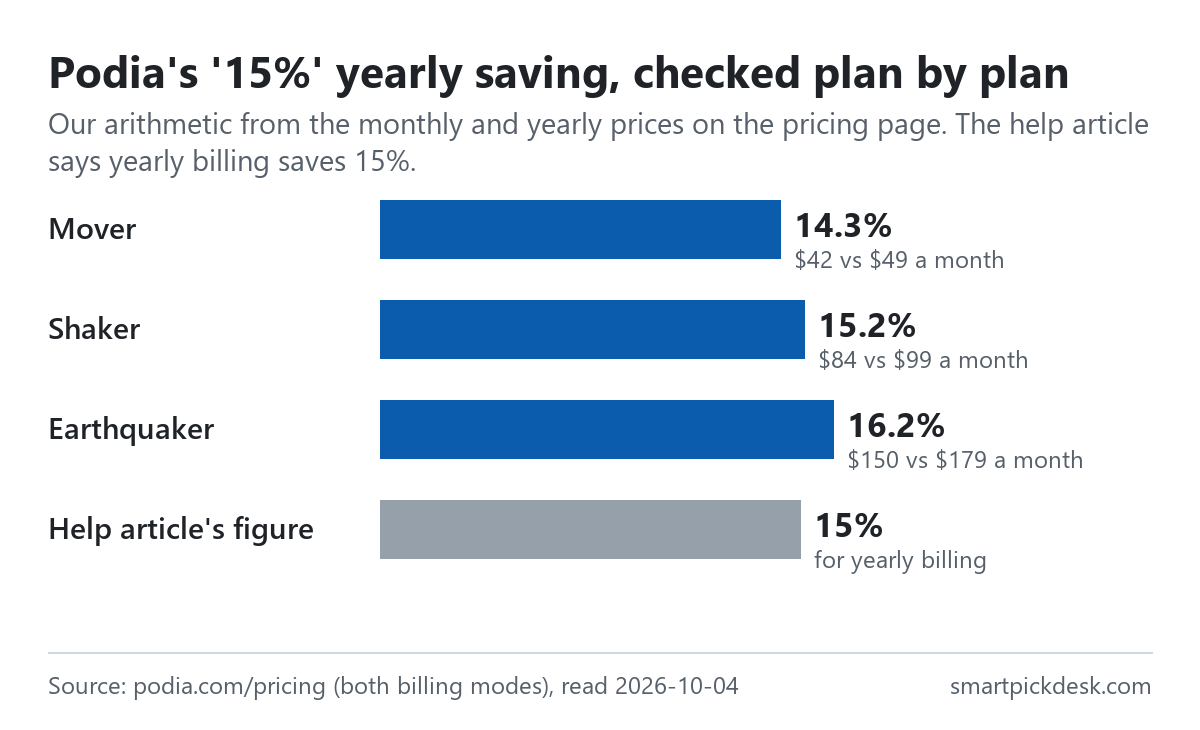
- The yearly saving. The plan change article says: “Use the Pay yearly option if you'd like to be billed annually and save 15% on your subscription.”[9] From the pricing page's own prices, yearly billing takes 14.3% off Mover ($42 against $49 a month), 15.2% off Shaker ($84 against $99) and 16.2% off Earthquaker ($150 against $179). The percentages are our arithmetic; 15% is close to the middle, not exact for any plan.
- When a cancellation takes effect. The plans FAQ says “Cancellations take effect at the end of your current billing cycle.”, while the cancellation article offers a choice of cancelling immediately or at the end of the cycle.[5][11] Both can be true if ending at the cycle is the default, but the two pages describe it differently.
We have not asked Podia which wording is current. The prices on the pricing page are what we used throughout.
Which plan fits which situation
| If you are… | Look at | Why, from Podia's pages | Watch out for |
|---|---|---|---|
| Testing whether Podia suits you | The 14-day trial | No card needed; core features and email to 100 subscribers[2][5] | The site is unpublished on day 14 without a plan[2] |
| Selling under about $1,000 a month | Mover, $42 a month billed yearly | Lowest price; up to 50 products[1][6] | 5% of each sale; only 100 email subscribers included[1] |
| Selling more each month, or using affiliates and upsells | Shaker, $84 | No Podia fee; affiliates, upsells, PayPal, Zapier[1] | 150 products and 1,000 videos maximum[6] |
| Running a large catalogue or a team | Earthquaker, $150 | Unlimited products, videos, spaces and assistants[6] | Product migration help still capped at 150[1] |
| Building a big email list | Any plan plus a larger subscriber tier | Unlimited sending to included subscribers[8] | Larger tier prices are not on the pricing page[9] |
| Thinking of paying yearly | Any plan | Lower total; printed on the page[1] | No partial refunds; 72-hour window only[1][3] |
Related pages on this site: Systeme.io pricing, checked covers another tool that combines courses, a website and email, and Ghost(Pro) pricing, checked covers a publishing tool with paid memberships.
Questions people ask
Does Podia have a free plan?
No. There is a 14-day trial with no card needed; without a plan at the end, the site is unpublished and the account is cancelled.[2][5]
How much does Podia cost?
Mover $49 a month or $504 a year; Shaker $99 or $1,008; Earthquaker $179 or $1,800.[1] See the table.
Does Podia take a transaction fee?
5% on Mover; none on Shaker or Earthquaker. Stripe or PayPal fees apply on all plans.[1]
How many email subscribers does Podia include?
100 on Mover, 500 on Shaker, 1,000 on Earthquaker, with unlimited sending to them.[1][8]
Can I get a refund from Podia?
Only if you ask within 72 hours of the last charge, and never pro-rated.[3]
What happens to my site if I cancel Podia?
It goes offline and customers lose access; content is kept for 180 days.[4]
Do you get paid if I sign up?
Not from this page — it has no affiliate links today. If that changes, it will say so at the top, and each link will be marked.
Sources and check log
| # | Source | URL | Checked | How |
|---|---|---|---|---|
| 1 | Podia, Pricing (plan cards in both billing modes and FAQ) | podia.com/pricing | 2026-10-04 | Opened in a browser with no account; page text saved billed yearly and billed monthly |
| 2 | Podia help, 14-day Trial FAQs | help.podia.com › trial FAQs | 2026-10-04 | Page text saved |
| 3 | Podia help, Can I get a refund for my Podia subscription? | help.podia.com › refunds | 2026-10-04 | Page text saved |
| 4 | Podia help, What happens when I cancel my account? | help.podia.com › after cancelling | 2026-10-04 | Page text saved |
| 5 | Podia help, Podia plans & pricing FAQs | help.podia.com › plans & pricing FAQs | 2026-10-04 | Page text saved |
| 6 | Podia help, Understanding Podia plan limits | help.podia.com › plan limits | 2026-10-04 | Page text saved |
| 7 | Podia help, Understanding Podia transaction fees | help.podia.com › transaction fees | 2026-10-04 | Page text saved |
| 8 | Podia help, Email sending limitations | help.podia.com › email limits | 2026-10-04 | Page text saved |
| 9 | Podia help, Changing your Podia plan | help.podia.com › changing plan | 2026-10-04 | Page text saved |
| 10 | Podia help, Can I pause my Podia subscription? | help.podia.com › pause | 2026-10-04 | Page text saved |
| 11 | Podia help, Canceling your Podia subscription | help.podia.com › canceling | 2026-10-04 | Page text saved |
| 12 | Podia help, Is sales tax collected on my Podia subscription? | help.podia.com › sales tax | 2026-10-04 | Page text saved |
| 13 | Podia help, Can I use Podia for my website? | help.podia.com › website | 2026-10-04 | Page text saved |
| 14 | Podia help, Setting up a custom domain | help.podia.com › custom domain | 2026-10-04 | Page text saved |
| 15 | Podia, Terms of Service (Paid Services, Auto-Renewal) | podia.com/terms | 2026-10-04 | Page text saved |
Change log
- 2026-10-04 — First version. The pricing page in both billing modes, fifteen help articles and the terms read on 2026-10-04.
- Previous check: none for this page.
- What we will re-check: the three prices in both modes, the 5% fee on Mover, the included email subscribers, the 15% wording, and the 72-hour refund window.
Who writes this
Smart Pick Desk is an independent site that compares tools for people who work online. We are not employed by, or partnered with, Podia, and we do not run Podia in our own business. What we do is read what each company publishes, write down the date we read it, and say plainly which parts we could not check. More: who the editors are and how we check a page.
We do not promise results. Nothing here is a prediction about what a tool will do for your sales.