Mailchimp alternatives with a free plan: where each one stops, checked on the pricing pages
Last updated 2026-09-25 · By Smart Pick Desk editors · Mailchimp's pricing page read on 2026-09-25; the other free plans read on 2026-09-20 and 2026-09-21 · We have not used these products · How we checked ↓
The short answer
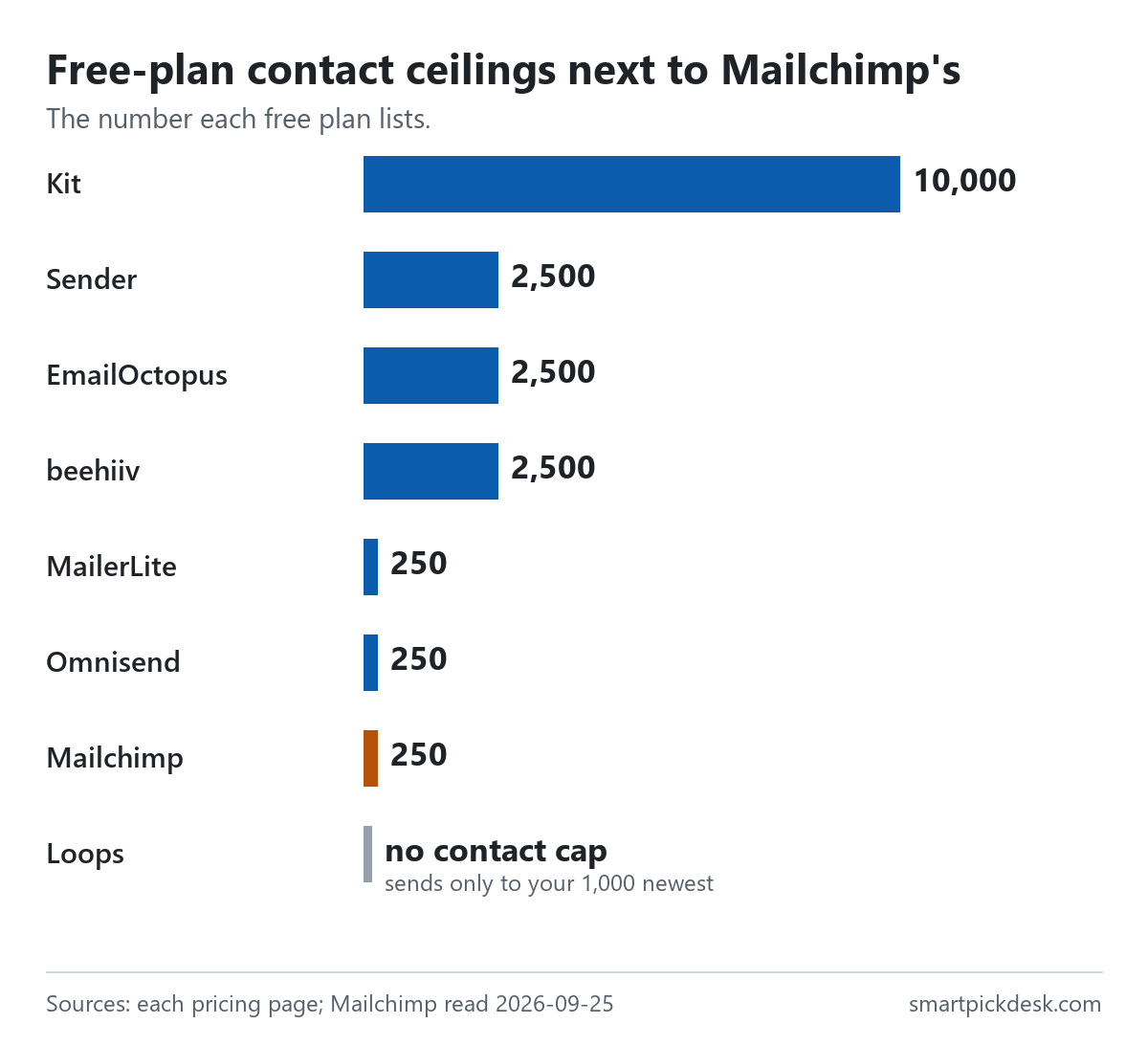
This page is for one situation: you are on Mailchimp's free plan, or about to be, and you want to know which free plans elsewhere would hold your list. Mailchimp's free plan is described as free under 250 contacts. Of the seven other free plans we read, three list a higher contact ceiling of 2,500, one lists 10,000, and they stop in different places: automations, monthly sends and branding.
- For a bigger list on a free plan: Kit lists up to 10,000 subscribers; beehiiv, Sender and EmailOctopus list 2,500.[2][3][4][5] Kit and beehiiv keep automations on their paid plans.
- For automations on a free plan: MailerLite lists 3 automations (on 250 subscribers), Sender lists email automation (on 2,500), and Loops says all features are included.[3][4][6]
- If you stay on Mailchimp and pay: the pricing page shows Essentials from $13 a month and Standard from $20.[1] The rest of this page puts those numbers next to the alternatives.
If you want one sentence: decide first whether you need a larger free list or free automations, because no free plan we read gives the most of both.
On this page
At a glance
| Free plan | Contacts | Emails a month | Automations on free | Branding on free emails |
|---|---|---|---|---|
| Mailchimp | “Under 250 contacts? It's free.” | Not printed | Not printed | Not printed |
| Kit | Up to 10,000 | Unlimited broadcasts | No (paid plans) | Stays on |
| beehiiv | Up to 2,500 | Unlimited sends | No (paid plans) | Stays on |
| Sender | “Up to 2 500 subscribers” | “Up to 15 000 emails/month” | Yes | “Contains Sender branding” |
| EmailOctopus | 2,500 | 10,000 | Not mentioned on the free plan | “EmailOctopus branding on emails” |
| MailerLite | Up to 250 | 2,500 | 3 | Stays on |
| Omnisend | 250 contacts | 500 | Yes (per its FAQ) | Not printed |
| Loops | Unlimited, sends to the 1,000 newest | 4,000 in any rolling 30 days | Yes (all features) | Small footer |
Mailchimp read on 2026-09-25.[1] Kit, MailerLite and beehiiv read on 2026-09-20 and re-read on 2026-09-25; Sender, EmailOctopus, Omnisend and Loops read on 2026-09-21.[2]–[6] The same eight plans, with every quotation, are in what free means on 8 email platforms; this page reads them from the point of view of leaving Mailchimp.
How we checked this (and what we did not check)
Last updated 2026-09-25 (first version). Every number and quotation here comes from the companies' own pricing pages. Prices change — confirm on the official page before you move a list.
What we did. On 2026-09-25 we opened Mailchimp's marketing pricing page in a browser with no account and saved the text as displayed at its default setting (0-500 contacts). We read one Mailchimp page only. The free plans of Kit, MailerLite and beehiiv were recorded on 2026-09-20 and re-read on 2026-09-25; Sender, EmailOctopus, Omnisend and Loops were recorded on 2026-09-21. Wording in quotation marks is copied from saved pages word for word, and a script checks every quotation.
What we did not do. We have not used any of these products, so nothing here says how easy a move is, how emails land, or how support answers. We did not read Mailchimp's help centre, so this page does not describe Mailchimp's export steps or its free-plan sending number. Mailchimp's FAQ answers did not open when we tried, and its prices for larger lists sit behind a contact selector we did not change. We show no company's logo or screens; the images are charts we drew from the numbers.
What that leaves. The limits each free plan prints, side by side, and Mailchimp's own starting prices, so you can see where each option stops before you move anything.
What Mailchimp's free plan says
Mailchimp's pricing page describes its free plan in three lines: “Under 250 contacts? It's free.”, “Use core features to manage early growth. Move to a paid plan as you scale.” and “Sending will be paused if contact or email send limit is exceeded.”[1]
What the page does not print is the free plan's monthly email limit. The last line mentions an email send limit, but no number appears next to it on the page as we saved it, on 2026-09-21 or on 2026-09-25. We do not fill that gap from other articles.
Two more lines describe how the free plan relates to the paid ones. The Standard offer says you can “Cancel or downgrade to our Essentials or basic Free plans at any time.”, and a later section says “If your business has fewer than 250 contacts, try our basic Free plan.”[1]
What this means for you: if your list is at or near 250 contacts, the free plan's limit is close. The question is whether to pay Mailchimp or move to a free plan with a higher ceiling.
Mailchimp's paid plans, for reference
At the default setting of 0-500 contacts, the page shows three paid plans.[1]
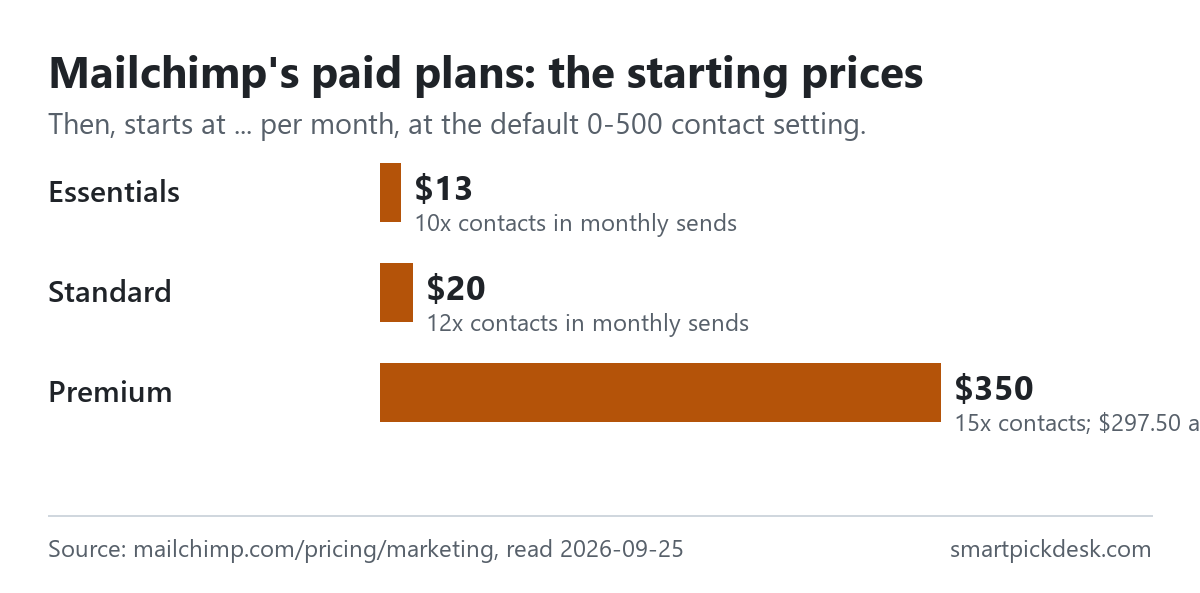
- Essentials: “Send the right content at the right time with testing and scheduling features.” Free for 14 days, then starts at $13 a month.[1]
- Standard: “Sell even more with automations, personalization, and optimization tools.” Free for 14 days, then starts at $20 a month; the page adds “Send up to 6,000 emails each month.”[1]
- Premium: “Our most advanced tools, unlimited contacts, and priority support; built for teams.” “$297.50 per month for 12 months”, then starts at $350 a month.[1]
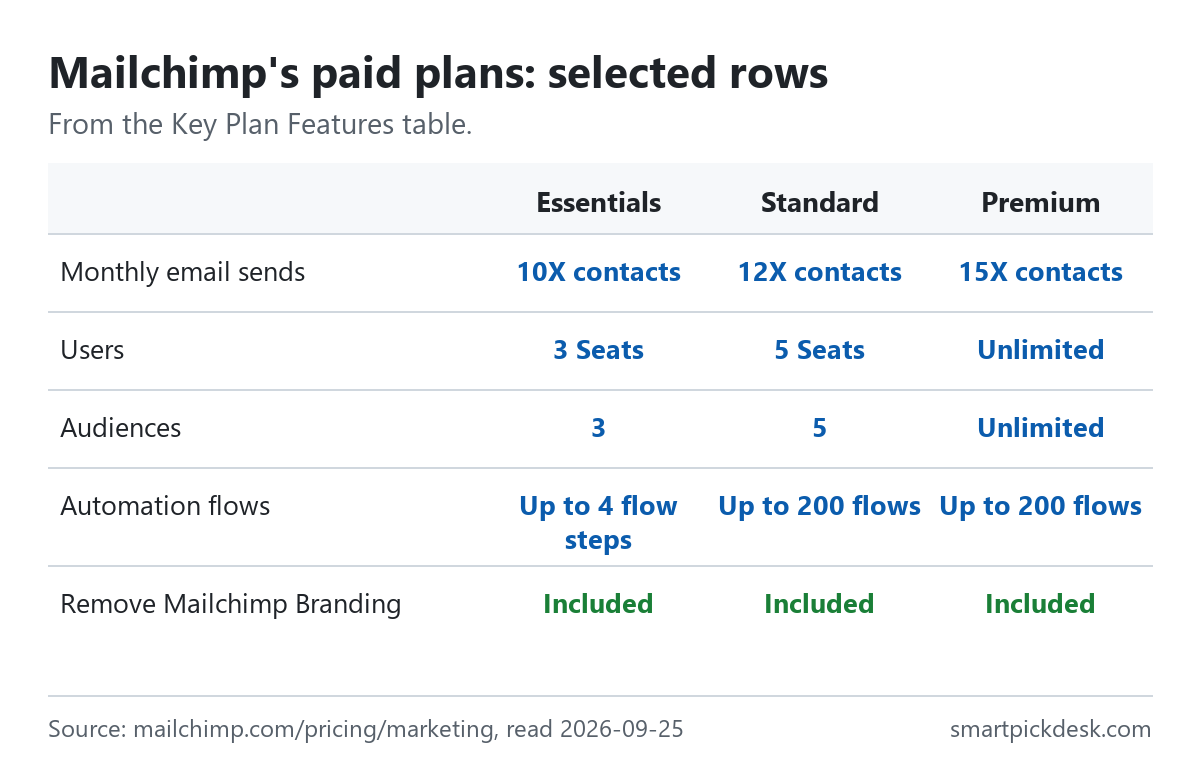
The Key Plan Features table sets each plan's monthly sends as a multiple of contacts: 10X on Essentials, 12X on Standard and 15X on Premium.[1] At 500 contacts, 12 × 500 is 6,000, which matches the Standard line above; by the same arithmetic, Essentials at 500 contacts would be 5,000 sends a month. The same table lists “Up to 4 flow steps” for automation on Essentials against “Up to 200 flows” on Standard and Premium, and “Remove Mailchimp Branding” as included on all three paid plans.
If you stay and pay, the gap between Essentials and Standard is wider than the $7 a month difference suggests. The same table marks Generative AI features, Branded Templates, Custom Reports and Dynamic Content as “Not included” on Essentials, lists custom-coded templates on Essentials as “Create — upgrade to send”, and gives Essentials 3 audiences and 3 seats against 5 and 5 on Standard.[1] Personalized onboarding is listed as 1 session on Standard, 4 sessions on Premium and not included on Essentials. Customer support is “24/7 Email & Chat Support” on Essentials and Standard, and “Phone & Priority Support” on Premium.[1]
Three other lines on the page matter when comparing costs:
- The trial terms say “Valid payment information must be provided at the time of enrollment.”[1]
- Every plan card carries: “Overages apply if contact or email send limit is exceeded.”[1]
- “For Premium and Standard 10,000+ contact plans, annual plans are available.” The page asks you to contact sales for those prices.[1] There is also a pay-as-you-go option: “Instead of paying a monthly or annually recurring charge, you can buy email credits as needed through our Pay As You Go plan.”
The page also shows “Save 15% on 10,000+ contacts” next to the plans, and says “Mailchimp offers a 15% discount to nonprofits and charities.”[1]
If you need a bigger list on a free plan
Four free plans list a higher contact ceiling than Mailchimp's 250.
- Kit: “Free—up to 10,000 subscribers”, with “Unlimited email broadcasts” and “Unlimited landing pages & forms”.[2] Automations and email sequences are on the paid Creator plan.
- beehiiv: “Up to 2,500 subscribers” with “Unlimited Email Sends” and a website; automations are listed as No on the free Launch plan.[3]
- Sender: “Up to 2 500 subscribers” and “Up to 15 000 emails/month”, with “Email automation” in the free plan's list.[4]
- EmailOctopus: “2,500 subscribers” and “10,000 emails per month”; its free plan list includes “Create 1 landing page and 1 form” and “Reports available for 30 days”.[5]
Loops is a special case: “The free plan includes unlimited contacts and up to 4,000 total emails to your 1,000 newest contacts”.[6] You can hold any number of contacts, but on its free plan you send only to the newest 1,000.
What this means if your Mailchimp list is 300 people: every plan in this section holds it for free. If it is 3,000, only Kit's free plan lists a ceiling that high, and only for broadcasts.
If you need automations on a free plan
On Mailchimp, the paid Essentials plan lists up to 4 flow steps.[1] The free page does not say what automation the free plan includes. If an automatic welcome email is the reason you are looking, these free plans list automation.
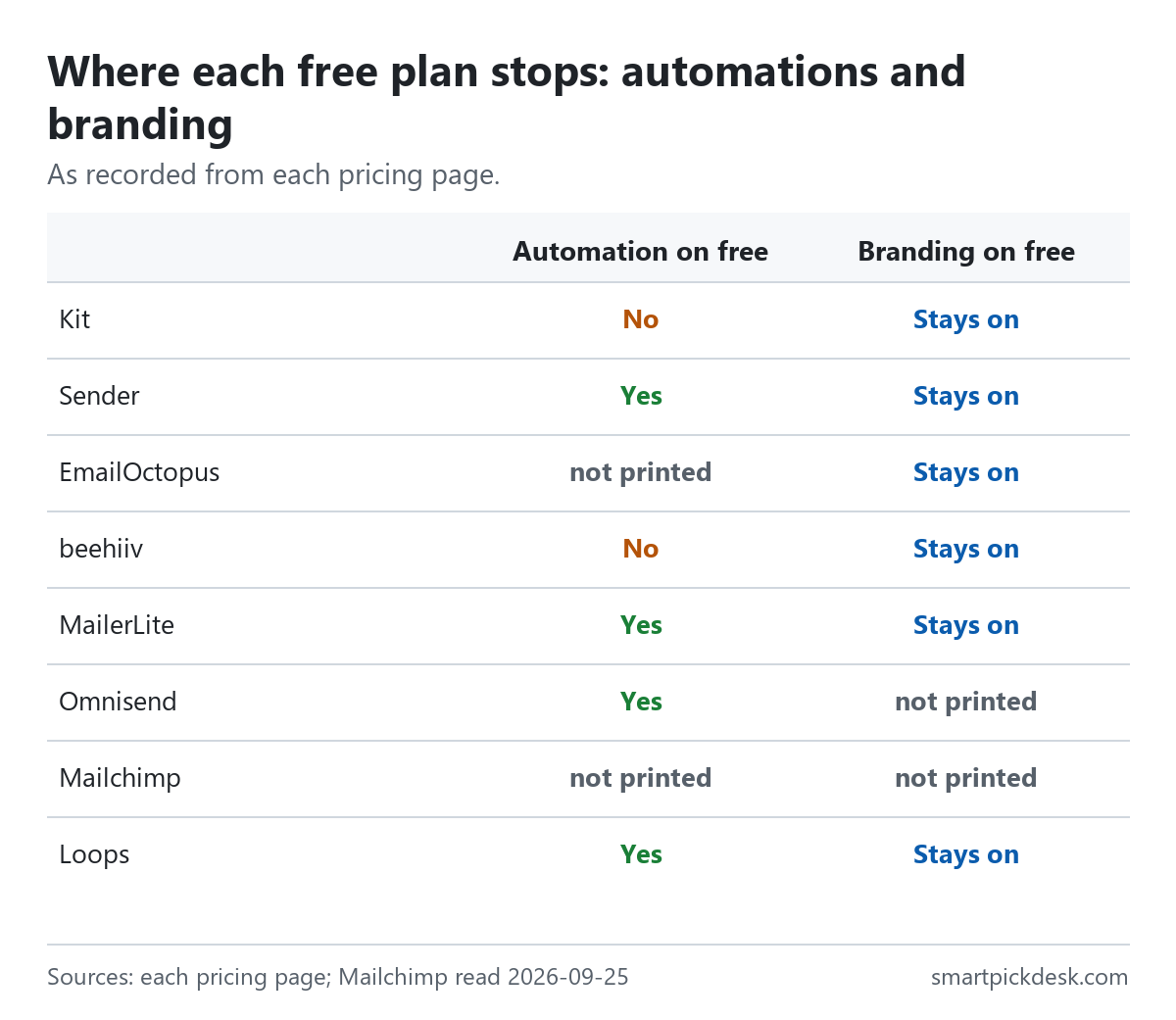
- MailerLite: “3 automations” on the free plan, with 250 subscribers and 2,500 emails a month.[3] MailerLite's help centre records that these limits were reduced on June 16, 2026.[3]
- Sender: “Email automation” on a free plan of 2,500 subscribers.[4]
- Loops: “All features included” on the free plan.[6]
- Omnisend: the free card does not list automation, but the FAQ on the same page says the free plan can “set up automations”.[6] Its free plan is 250 contacts and 500 emails a month.
Kit and beehiiv both put automation on their first paid plan.[2][3] EmailOctopus's free plan list does not mention automation, so we do not say either way.[5]
Monthly sending limits on free plans
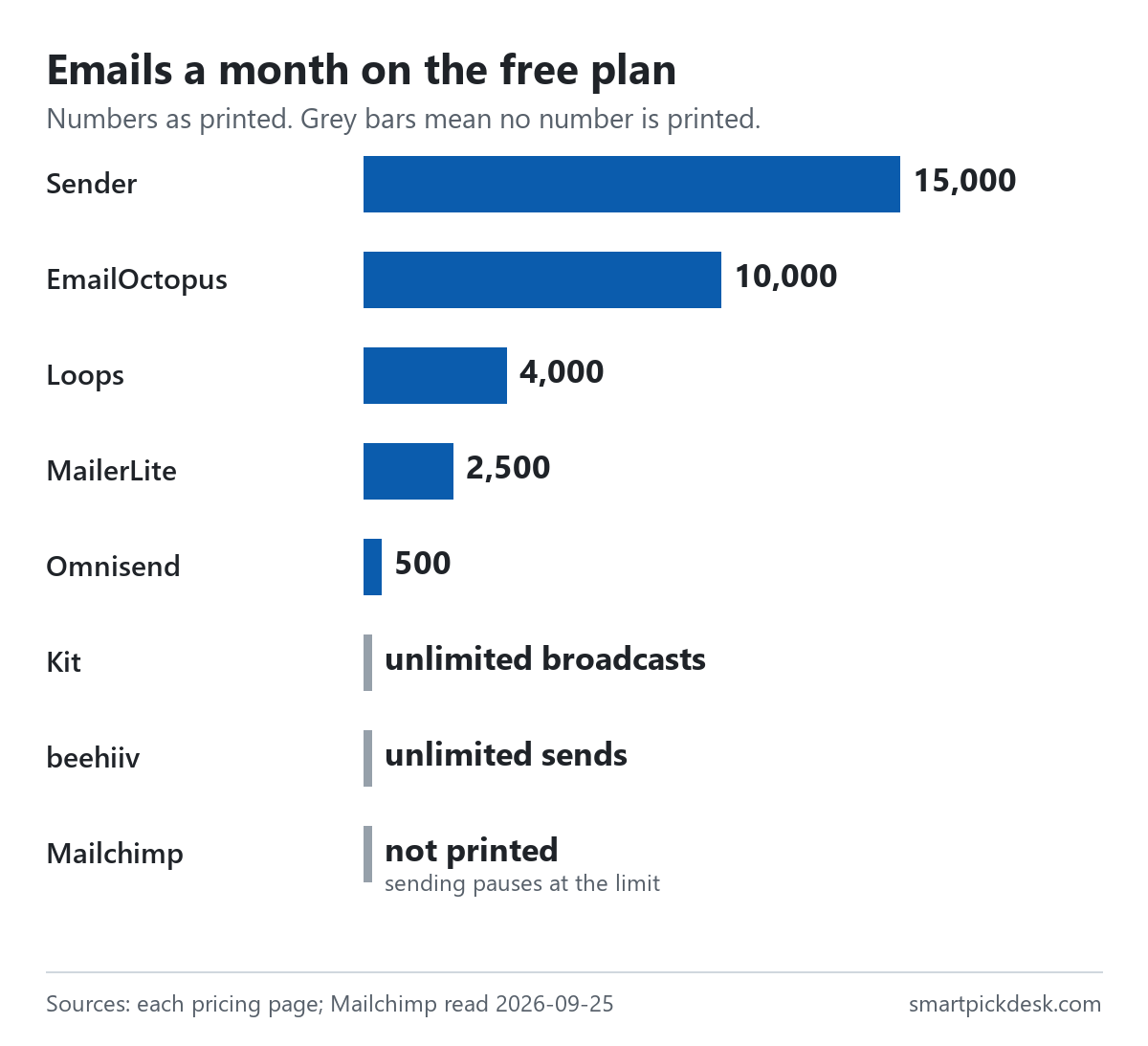
The useful number is not the monthly total but how many emails each subscriber can get. Dividing the monthly limit by the contact limit gives: Sender 6 per subscriber (15,000 ÷ 2,500), EmailOctopus 4 (10,000 ÷ 2,500), MailerLite 10 (2,500 ÷ 250) and Omnisend 2 (500 ÷ 250). Loops allows 4,000 sends to at most 1,000 recipients, which is 4 each. Kit and beehiiv print no sending limit on their free plans.[2][3]
A weekly newsletter needs about four to five sends per subscriber a month. On those numbers, a full Omnisend free list could not get a weekly email, while Sender, EmailOctopus, Loops and MailerLite could. This is our arithmetic on the printed limits, not a test.
Branding on free plans
Every free plan we read that says anything about branding keeps its own branding on free emails or pages. Kit lists “Remove Kit branding” under its paid Creator plan, MailerLite lists “Remove MailerLite logo” on the paid side, and beehiiv lists “Remove beehiiv Branding*” on Max, its second paid plan.[2][3] Sender's free plan says “Contains Sender branding”, EmailOctopus's “EmailOctopus branding on emails”, and Loops mentions a small footer.[4][5][6]
Mailchimp's pricing table lists branding removal as included on all three paid plans and does not say what the free plan shows.[1] Omnisend's page does not mention branding on its free plan.
What this means: if unbranded emails are a must, none of the free options on this page offers them on the pages we read. That becomes a paid-plan decision.
When you outgrow the free plan
Moving to a free plan is also choosing a paid plan for later. Here is each first paid step at the smallest tier its page shows, billed monthly.
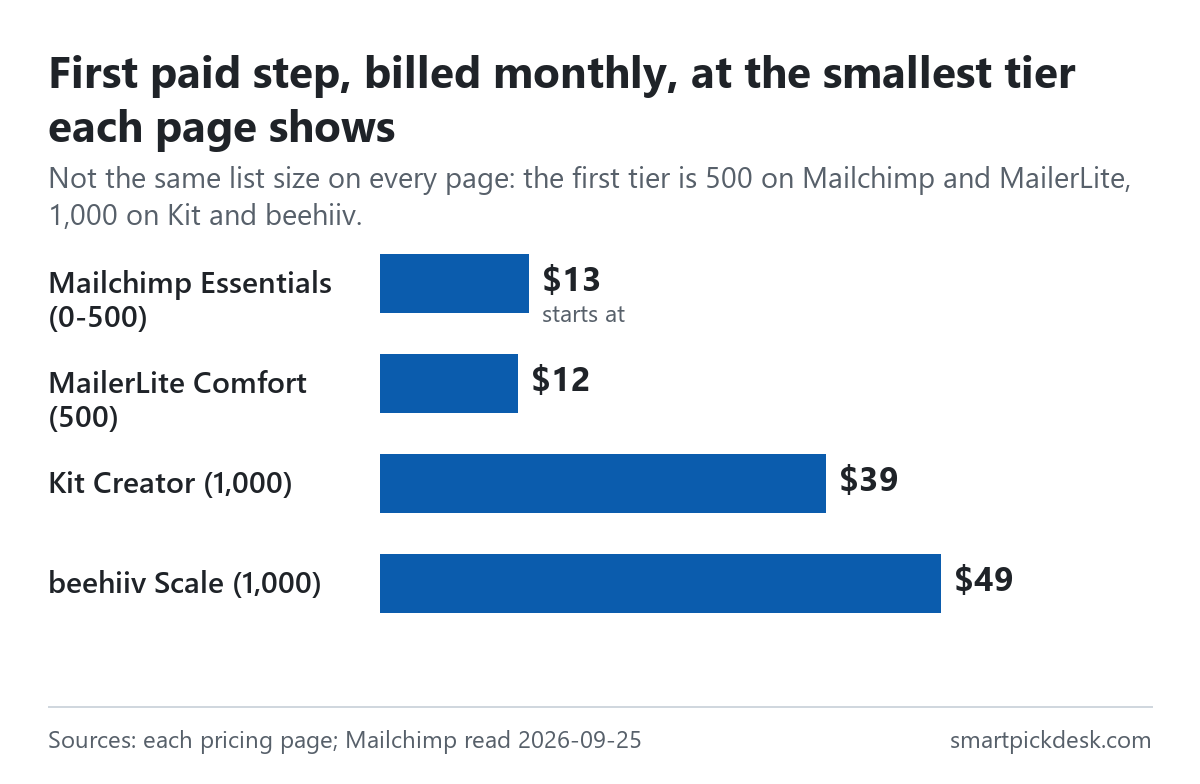
The tiers are not the same size: Mailchimp and MailerLite start at 500 contacts, Kit and beehiiv at 1,000.[1][2][3] So the chart answers what the smallest paid plan costs, not which is cheaper per subscriber. For the tools that print a yearly price, paying yearly lowers the bill:
| First paid plan and tier | Monthly price | 12 monthly payments | Billed yearly | Less over a year |
|---|---|---|---|---|
| MailerLite Comfort, 500 | $12 | $144 | $129.60 | $14.40 |
| MailerLite Comfort, 1,000 | $19 | $228 | $205.20 | $22.80 |
| Kit Creator, 1,000 | $39 | $468 | $390 | $78 |
| beehiiv Scale, 1,000 | $49 | $588 | $517 | $71 |
Prices from the Kit, MailerLite and beehiiv pricing pages, read on 2026-09-20 and re-read at their default tiers on 2026-09-25.[2][3] The 12-month and difference columns are our arithmetic. Mailchimp's page offers annual plans only for Standard and Premium at 10,000+ contacts, through sales, so there is no Mailchimp row.[1]
For the full price ladders, see Kit pricing, checked, beehiiv pricing, checked and MailerLite pricing, checked. We have not read the paid prices of Sender, EmailOctopus, Omnisend or Loops for this page.
Before you move a list
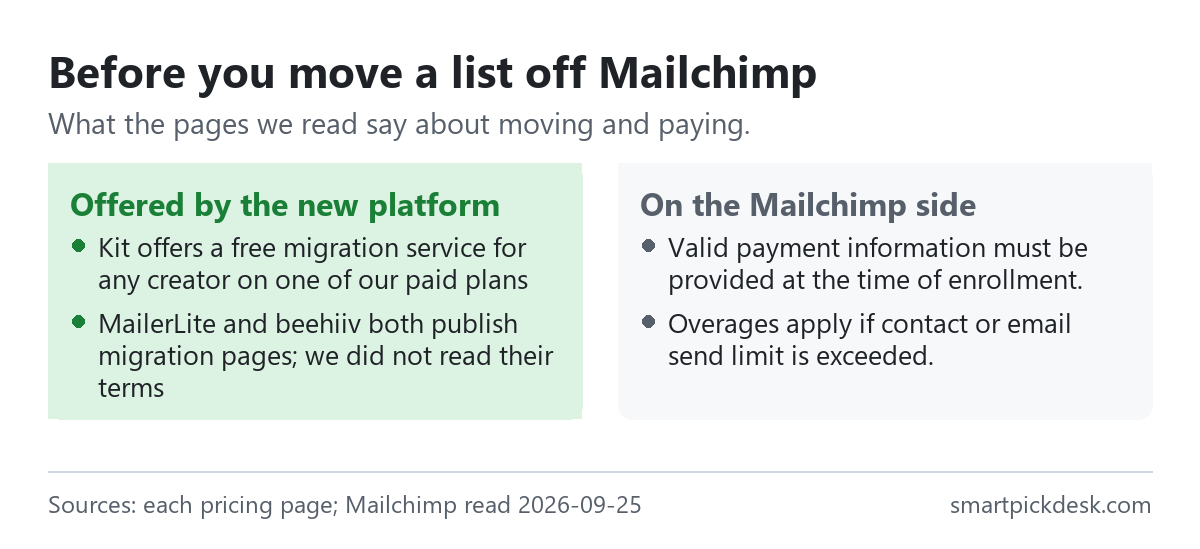
- Help with the move. Kit's pricing page says “Kit offers a free migration service for any creator on one of our paid plans”.[2] On Kit's own wording, that is not offered on its free plan. MailerLite's and beehiiv's sites link to migration pages; we did not read their terms.
- Importing a large list at once. Kit's help centre says “If you are importing a new list of subscribers (from a giveaway or live event, for instance), your account may be temporarily suspended.”, and asks you to tell Kit in advance.[2]
- Counting rules on the new side. MailerLite counts “any address that was active at any point during the cycle”, even if deleted later, so clean the list before importing rather than after.[3]
- Your address in every email. Wherever you send from, US law asks commercial emails to carry a postal address and an opt-out; our guide to starting a list without a website quotes the FTC's guide.
We have not read Mailchimp's export instructions, so this page does not describe how to take a list out of Mailchimp.
Which alternative fits which situation
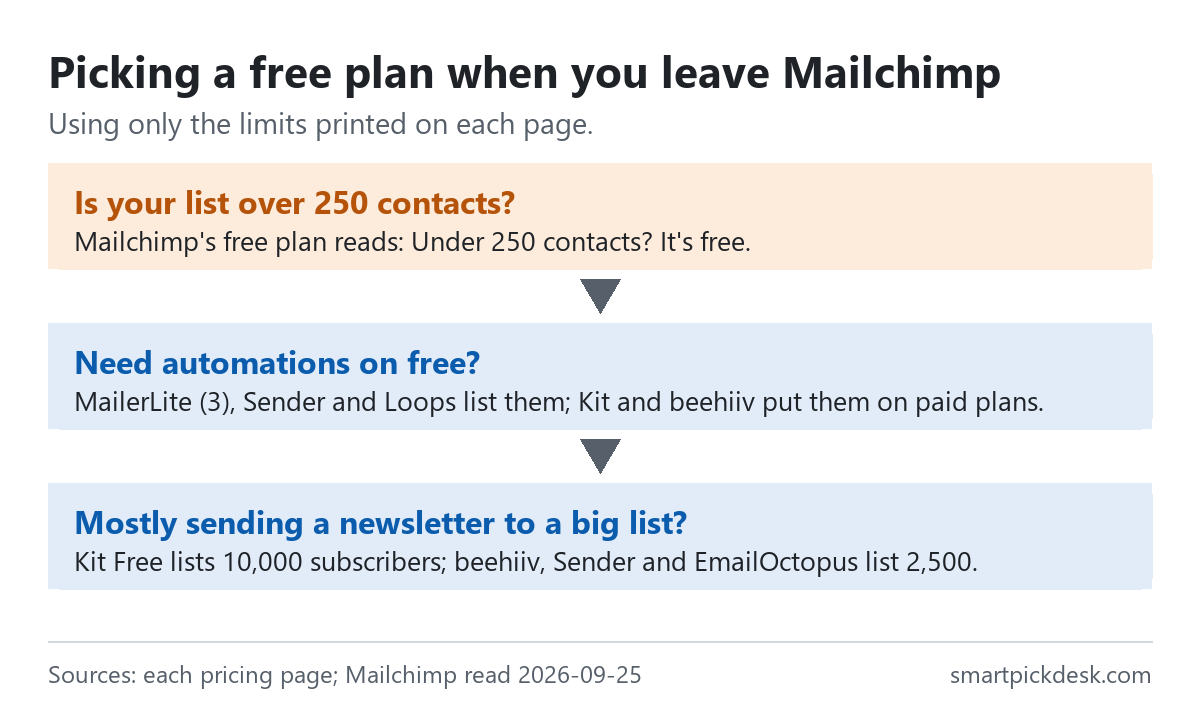
| If you… | Look at | Why, from the pricing pages | Watch out for |
|---|---|---|---|
| Send a newsletter to a list of a few thousand | Kit Free | Up to 10,000 subscribers, unlimited broadcasts[2] | No automations or sequences on free |
| Need a welcome sequence on a list of 250 or fewer | MailerLite Free | 3 automations[3] | 250 subscribers, 2,500 emails a month |
| Need automation and up to 2,500 contacts | Sender Free | Email automation, 15,000 emails a month[4] | Sender branding on free |
| Want a newsletter website as well | beehiiv Launch | 2,500 subscribers, web hosting, unlimited sends[3] | No automations on free |
| Keep adding contacts but mail only recent sign-ups | Loops Free | Unlimited contacts, sends to your 1,000 newest[6] | 4,000 sends in any rolling 30 days |
| Prefer to stay on Mailchimp | Essentials or Standard | From $13 or $20 a month at 0-500 contacts[1] | Payment details needed for the trial; overages apply |
All eight free plans with every quotation: what free actually means on 8 email platforms.
Questions people ask
How many contacts does Mailchimp's free plan allow?
The pricing page reads “Under 250 contacts? It's free.” and says sending will be paused if the contact or email send limit is exceeded.[1] It does not print the monthly email limit.
Which free email plan allows the most subscribers?
Of the free plans we read, Kit lists up to 10,000; beehiiv, Sender and EmailOctopus list 2,500; MailerLite and Omnisend list 250.[2]–[6] Loops has no contact cap but sends only to your 1,000 newest contacts.
Which free alternatives include automations?
MailerLite (3 automations), Sender, Loops and, per its FAQ, Omnisend. Kit and beehiiv put automations on paid plans.[2]–[6]
What do Mailchimp's paid plans cost?
At 0-500 contacts: Essentials from $13 a month, Standard from $20, Premium from $350 (with an offer of $297.50 a month for 12 months).[1]
Will a new platform move my list for me?
Kit says it offers a free migration service on its paid plans.[2] We did not read the other platforms' migration terms.
Do you get paid if I sign up?
Not from this page — it has no affiliate links today. If that changes, it will say so at the top, and each link will be marked.
Sources and check log
| # | Source | URL | Checked | How |
|---|---|---|---|---|
| 1 | Mailchimp, Marketing pricing (plan cards at 0-500 contacts, Key Plan Features, trial terms) | mailchimp.com/pricing/marketing | 2026-09-25 (also read 2026-09-21: free-plan wording the same) | Opened in a browser with no account; page text saved |
| 2 | Kit, Pricing (and Kit Help Center, upgrade/downgrade FAQs) | kit.com/pricing | 2026-09-20; re-read 2026-09-25 | Page text saved |
| 3 | MailerLite, Pricing (and MailerLite help, Free plan update); beehiiv, Pricing | mailerlite.com/pricing; beehiiv.com/pricing | 2026-09-20; re-read 2026-09-25 | Page text saved |
| 4 | Sender, Pricing | sender.net/pricing | 2026-09-21 | Page text saved |
| 5 | EmailOctopus, Pricing | emailoctopus.com/pricing | 2026-09-21 | Page text saved |
| 6 | Omnisend, Pricing; Loops, Pricing | omnisend.com/pricing; loops.so/pricing | 2026-09-21 | Page text saved |
Change log
- 2026-09-25 — First version.
- Previous check: none for this page (the eight free plans also appear in our free-plan comparison, checked 2026-09-20 and 2026-09-21).
- What we will re-check: Mailchimp's free-plan wording and starting prices, and each free plan's contact and sending limits.
Who writes this
Smart Pick Desk is an independent site that compares tools for people who work online. We are not employed by, or partnered with, Mailchimp or any company on this page, and we do not run their products in our own business. What we do is read what each company publishes, write down the date we read it, and say plainly which parts we could not check. More: who the editors are and how we check a page.
We do not promise results. Nothing here is a prediction about what a tool will do for your list.