AWeber pricing, checked: the Free plan, Lite and Plus at every subscriber tier, monthly vs annual, and the 14-day trial
Last updated 2026-10-05 · By Smart Pick Desk editors · Prices read on AWeber's pricing page at all 14 subscriber tiers in both billing modes on 2026-10-05; help centre read the same day · We have not used AWeber · How we checked ↓
The short answer
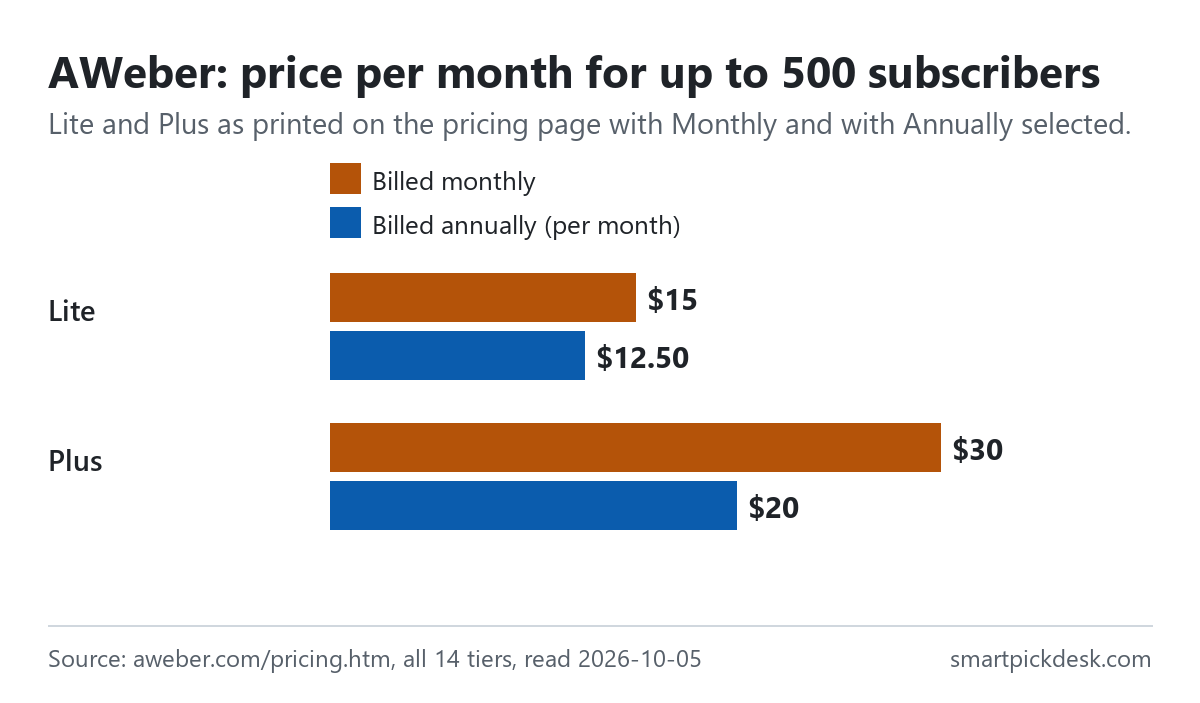
AWeber is an email marketing tool: you collect subscribers with sign-up forms and landing pages, then send newsletters and automated emails to them. It has a Free plan and two paid plans, Lite and Plus, whose price depends on how many subscribers you have. For up to 500 subscribers, Lite is $15 a month billed monthly or $12.50 billed annually, and Plus is $30 or $20. Above that, each tier costs more.
- Free: up to 500 subscribers and 3,000 emails a month, one list, one automation, no credit card.[6][2]
- Lite, from $15 or $12.50 a month: one list, three landing pages, three automations, three users, and sends up to ten times your subscriber count a month.[1]
- Plus, from $30 or $20 a month: unlimited lists, landing pages, automations and users, no AWeber branding, and sends up to twelve times your subscriber count.[1]
If you want one sentence: the Free plan covers a small list with one automation; on a paid plan the subscriber tier sets the bill, the tier rises by itself as the list grows, and it does not fall again unless you ask. If you have not yet decided which email tool to look at, start from how to choose an email marketing platform.
On this page
At a glance
| Plan | Billed monthly (up to 500 subscribers) | Billed annually, per month | Emails a month | Lists, landing pages, automations |
|---|---|---|---|---|
| Free | No charge | No charge | 3,000 | 1 list, 1 automation |
| Lite | $15 | $12.50 | 10 × subscribers | 1 list, 3 pages, 3 automations |
| Plus | $30 | $20 | 12 × subscribers | Unlimited |
| Unlimited | A flat $899 a month (help centre only) | 15 × subscribers | Unlimited | |
AWeber's pricing page, read on 2026-10-05 at the 0–500 tier with Monthly and with Annually selected,[1] and the help article on what AWeber costs.[6]
The page opens with the line “Try AWeber free with a 14-day trial.” and a banner that reads “Get up to 4 Months Free” above the billing switch.[1] By our arithmetic, four months is what Plus at the lowest tier saves on annual billing: twelve monthly payments of $30 are $360, against $240 for the year. At other tiers the saving is smaller, which the section on billing shows tier by tier.
How we checked this (and what we did not check)
Last updated 2026-10-05 (first version). Every number and quotation here comes from AWeber's own pages. Prices change — confirm on AWeber's own page before you sign up.
What we did. On 2026-10-05 we opened aweber.com/pricing.htm in a browser with no account and saved the page text. The page has a switch between Monthly and Annually and a slider labelled with your subscriber count. For each billing mode we moved the slider through its whole range and saved the visible text every time the tier changed: 14 tiers, from 0–500 to 100,001–150,000 subscribers. The same day we saved seven help-centre articles: pricing questions, how billing works, changing plans, the free trial, cancelling, what AWeber costs and which plan you are on. The help links on aweber.com now open on docs.aweber.com, which is AWeber's own help site. Wording in quotation marks is copied from those saved pages word for word, and a script checks every quotation against the saved text.
What we did not do. We have not used AWeber. There is no account, no screenshot of the product and no view here on deliverability or how well its editor works. Every image is a chart or summary we drew from the saved text; none shows AWeber's logo or screens. We did not open the Done For You service or the separate high-volume pricing page, and we did not contact sales about lists above 100,000.
What that leaves. The Free plan, Lite and Plus at every tier in both billing modes, the trial, and the billing, upgrade, downgrade and cancellation rules, as published.
The Free plan and the trial
AWeber has two ways to start without paying, and they behave very differently.
- The Free plan does not expire. The help centre lists it as “Lifetime access at no cost (upgrade optional)” with “Manage up to 500 subscribers, send 3,000 emails monthly”, a single list profile and a single workflow automation.[6]
- No card for Free. “For AWeber Free, a credit card is not required.” Lite, Plus and Unlimited need one.[2]
- The ceiling. “Exceeding 500 subscribers prompts an upgrade to a paid plan.”[6]
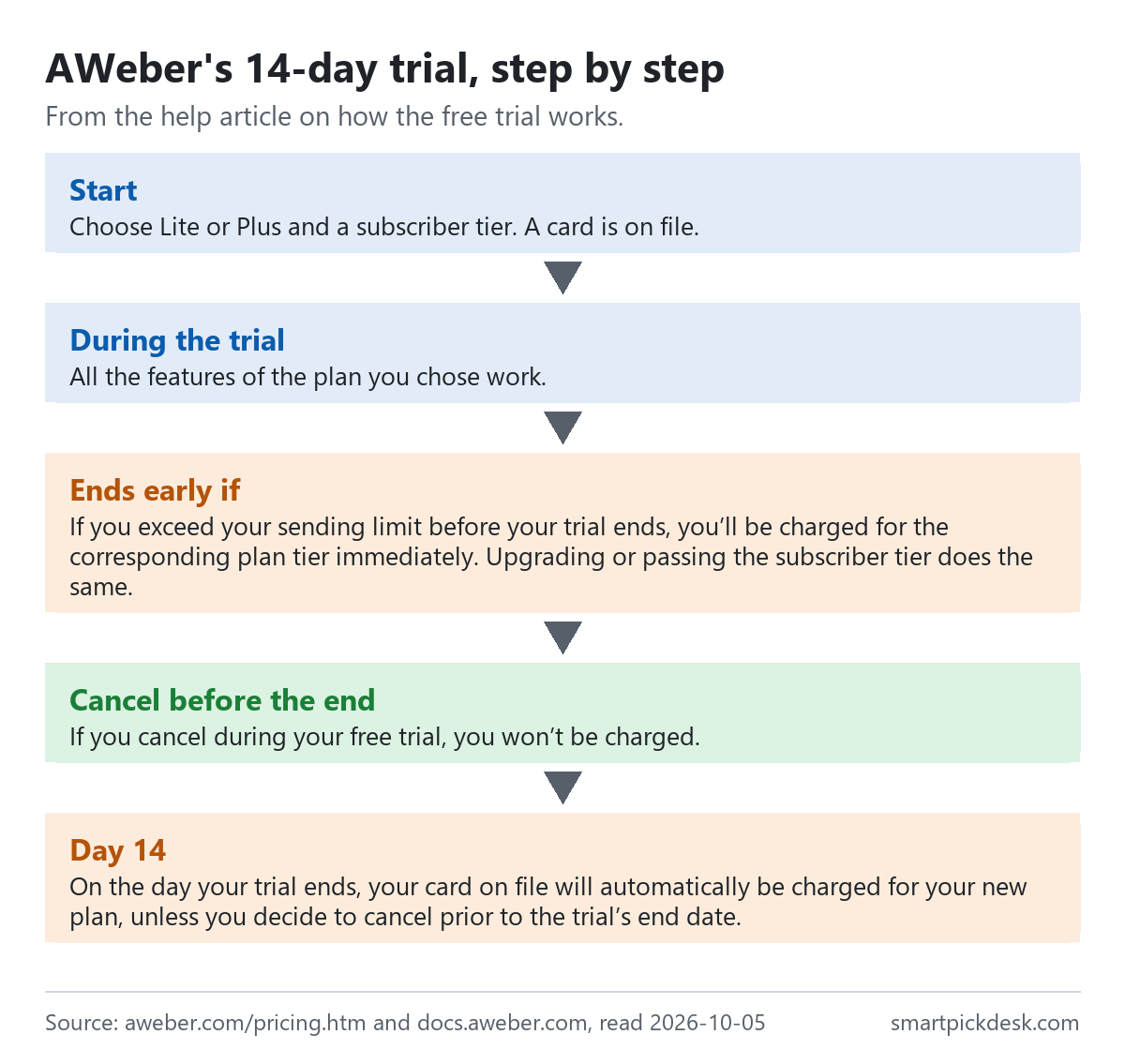
- The 14-day trial is of a paid plan. During it you have all the features of the plan you choose. It ends with a charge unless you cancel: “On the day your trial ends, your card on file will automatically be charged for your new plan, unless you decide to cancel prior to the trial’s end date.”[4]
- Things that end the trial early. “If you exceed your sending limit before your trial ends, you’ll be charged for the corresponding plan tier immediately.” The same applies if you pass the subscriber tier, or if you upgrade from Lite to Plus or change the tier during the trial.[4]
- Cancelling during the trial. “If you cancel during your free trial, you won’t be charged.” Access continues to the trial end date, after which the account is deactivated.[4]
In everyday terms: the Free plan is a small permanent plan, and the trial is a paid plan with the first two weeks free. If you import a large list on day one of the trial, the trial may end that day. If you are leaving another free plan because it has run out, Mailchimp alternatives with a free plan sets the free limits of several tools side by side.
What Lite and Plus add
The two paid plans cost different amounts at every tier and differ mostly in how many lists, pages, automations and people you can have.
| Feature | Free | Lite | Plus |
|---|---|---|---|
| Subscribers | Up to 500 | By tier | By tier |
| Emails a month | 3,000 | 10 × subscriber tier | 12 × subscriber tier |
| Email lists | 1 | 1 | Unlimited |
| Landing pages | 1 | 3 | Unlimited |
| Email automations | 1 | 3 | Unlimited |
| Users | 1 | 3 | Unlimited |
| Saved segments | – | 1 | Unlimited |
| Remove AWeber branding | No | No | Yes |
| Fee on sales through AWeber | – | 1.0% | 0.6% |
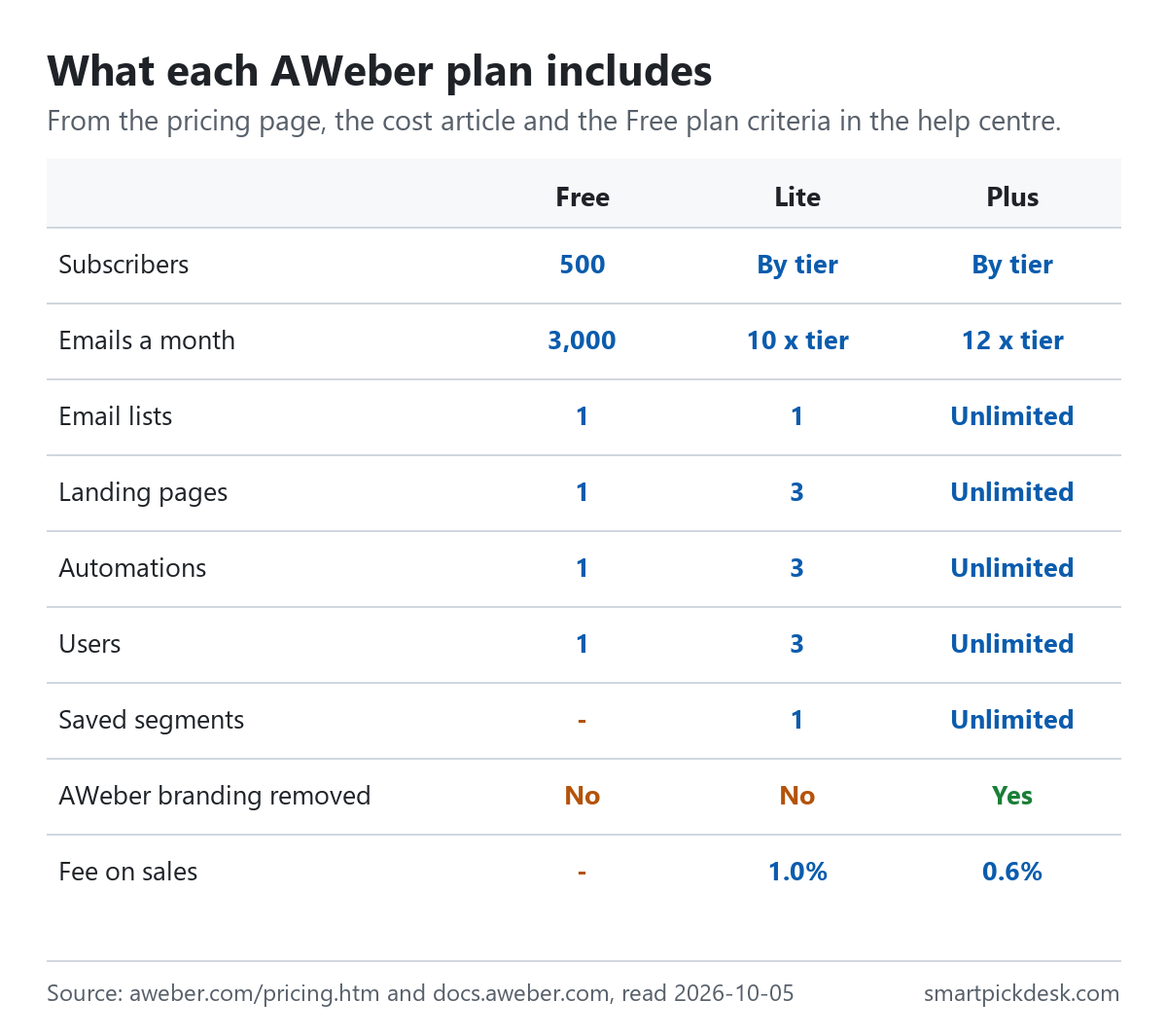
The plan cards and the comparison table on the pricing page,[1] the help article on what AWeber costs,[6] and the Free plan criteria in the article on changing plans.[3] The Free row for landing pages and users comes from those criteria.
The Lite card says “Send 10x subscriber max, monthly” and the Plus card “Send 12x subscriber max, monthly”.[1] So a Lite plan at the 0–500 tier allows 5,000 emails a month and Plus allows 6,000, which matches the help centre's table. If you write to your whole list once a week, both allowances leave room; if you send daily, they do not.
The step from Lite to Plus is about scale and separation: more than one list, more than three automations, more people on the account, and no AWeber branding. For one newsletter with a welcome sequence, the Lite limits may not be reached.
Price at every subscriber tier
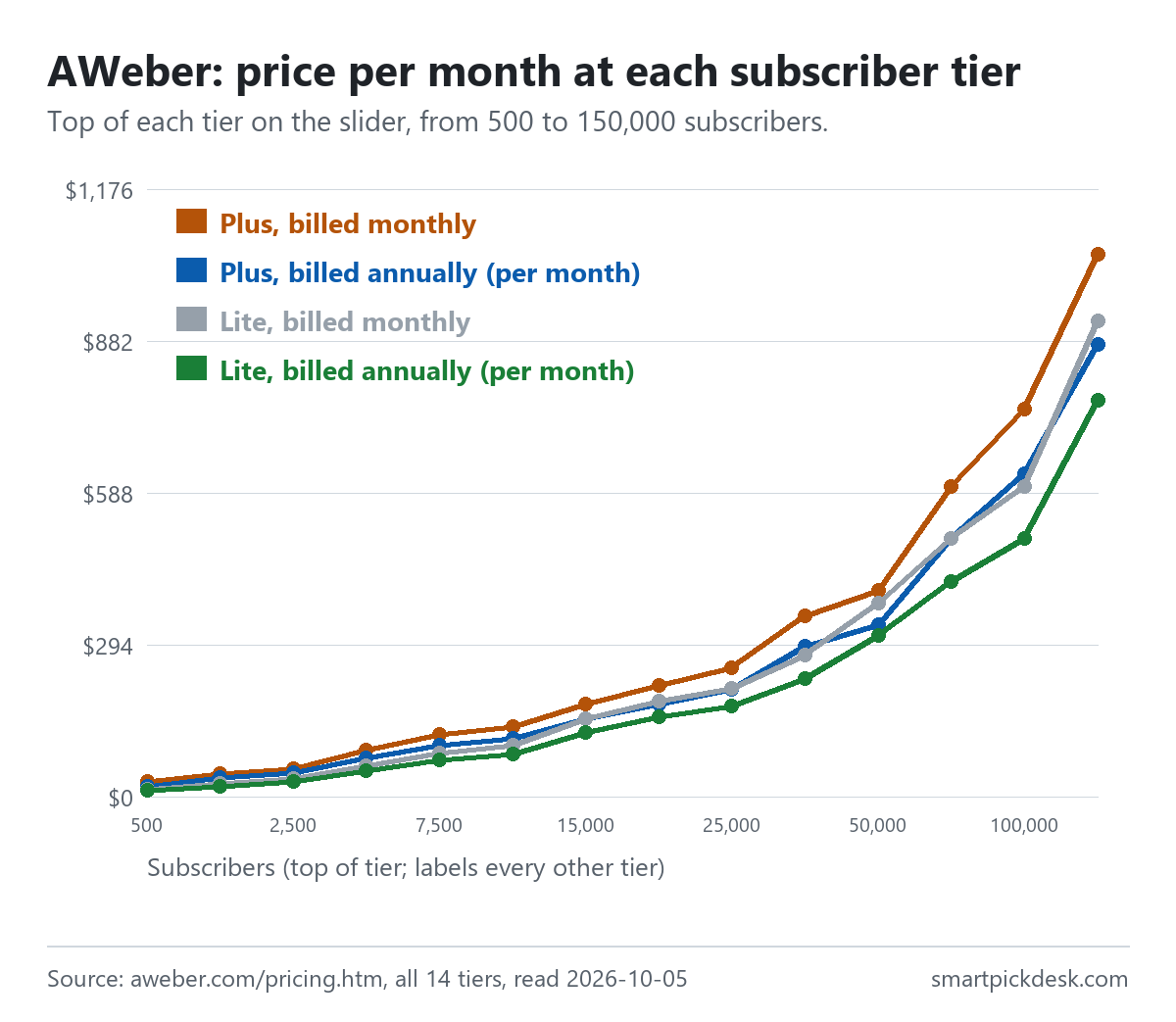
The slider on the pricing page has 14 positions. Each one is a range of subscribers, and the price applies to the whole range.
| Subscribers | Lite, billed monthly | Lite, billed annually (per month) | Plus, billed monthly | Plus, billed annually (per month) |
|---|---|---|---|---|
| 0–500 | $15.00 | $12.50 | $30.00 | $20.00 |
| 501–1,000 | $25.00 | $20.83 | $45.00 | $37.50 |
| 1,001–2,500 | $35.00 | $29.17 | $55.00 | $45.83 |
| 2,501–5,000 | $60.00 | $50.00 | $90.00 | $75.00 |
| 5,001–7,500 | $85.00 | $70.83 | $120.00 | $100.00 |
| 7,501–10,000 | $100.00 | $83.33 | $135.00 | $112.50 |
| 10,001–15,000 | $150.00 | $125.00 | $180.00 | $150.00 |
| 15,001–20,000 | $185.00 | $154.17 | $215.00 | $179.17 |
| 20,001–25,000 | $210.00 | $175.00 | $250.00 | $208.33 |
| 25,001–35,000 | $275.00 | $229.17 | $350.00 | $291.67 |
| 35,001–50,000 | $375.00 | $312.50 | $400.00 | $333.33 |
| 50,001–75,000 | $500.00 | $416.67 | $600.00 | $500.00 |
| 75,001–100,000 | $600.00 | $500.00 | $750.00 | $625.00 |
| 100,001–150,000 | $920.00 | $766.67 | $1,050.00 | $875.00 |
AWeber's pricing page at each slider position, read on 2026-10-05 with Monthly selected and with Annually selected.[1] Annual prices are shown per month and marked “Billed annually.” Tax is not shown on the page.
Two things stand out. The gap between Lite and Plus narrows as the list grows: $15 a month at the lowest tier on monthly billing, $30 at 2,501–5,000 and $25 at 35,001–50,000, by our arithmetic. And the tiers are wide at the bottom of each range: a list of 501 subscribers pays the same as a list of 1,000. GetResponse pricing, checked and Kit pricing, checked set out the same kind of ladder for two other email tools, if you want to see where their steps fall.
Monthly or annual
The annual price is lower at every tier, but not by the same share. The help centre's own table gives the annual price as a yearly total for the tiers up to 20,000 subscribers, and that is what we used for the year column below.
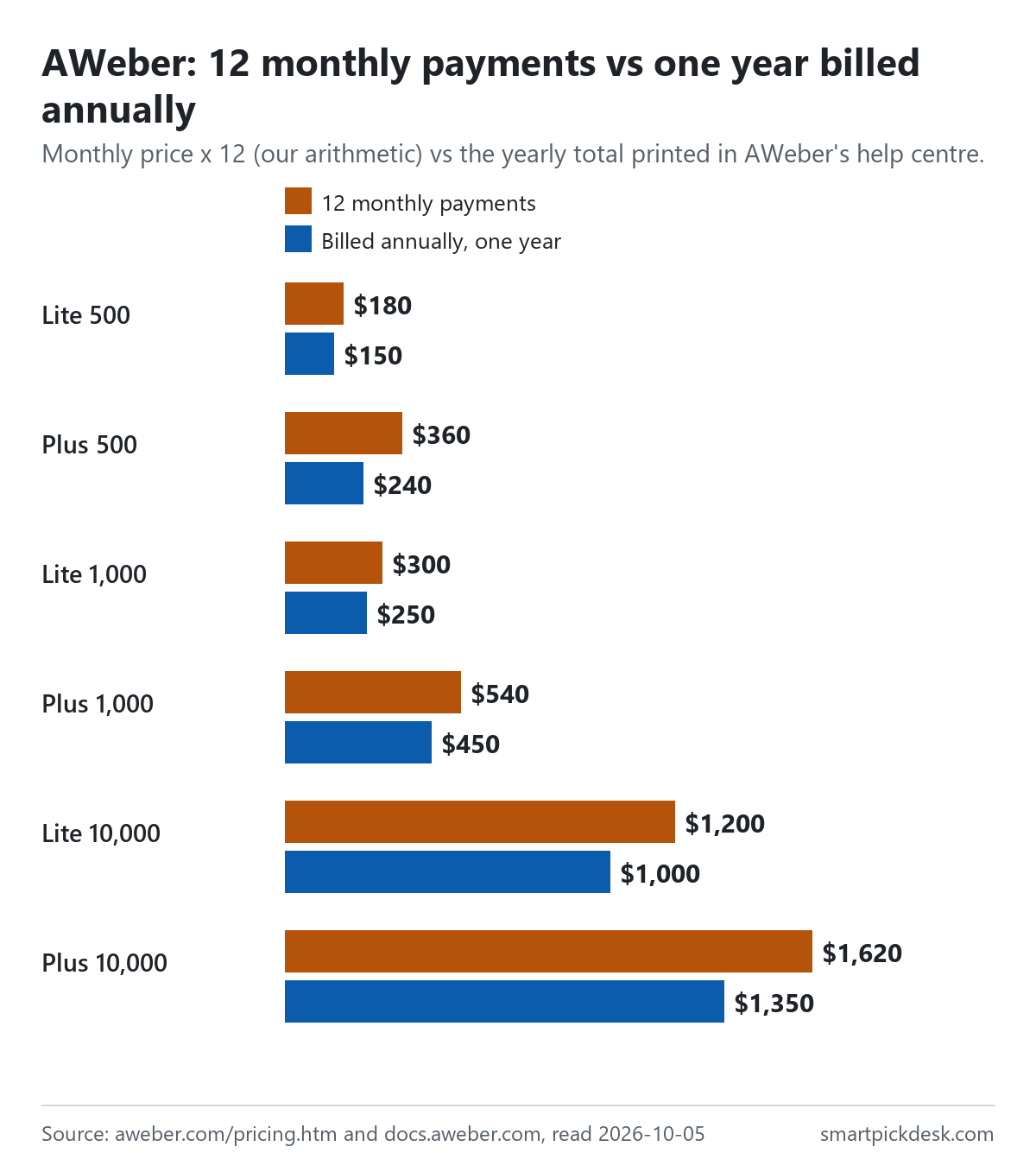
| Plan and tier | Monthly price | 12 monthly payments | Billed annually, one year | Less over a year |
|---|---|---|---|---|
| Lite, up to 500 | $15 | $180 | $150 | $30 |
| Plus, up to 500 | $30 | $360 | $240 | $120 |
| Lite, up to 1,000 | $25 | $300 | $250 | $50 |
| Plus, up to 1,000 | $45 | $540 | $450 | $90 |
| Lite, up to 10,000 | $100 | $1,200 | $1,000 | $200 |
| Plus, up to 10,000 | $135 | $1,620 | $1,350 | $270 |
Monthly prices and yearly totals from the help article on what AWeber costs;[6] the monthly prices match the pricing page.[1] The 12-month column and the difference are our arithmetic.
The help article prints the starting saving as “(16.7% savings)” for Lite and “(33.3% savings)” for Plus.[6] Those are true at the lowest tier only. By our arithmetic, Plus at the 501–1,000 tier saves 16.7% ($90 on $540), and at the 7,501–10,000 tier 16.7% again ($270 on $1,620). So the two months free that annual billing gives at most tiers is the more typical figure; four months is the largest saving on the page.
Annual billing also fixes the tier for the year in one direction only. If the list grows past the tier, the account moves up automatically (the next section). If it shrinks, nothing changes by itself. That makes the annual plan a better fit for a list whose size you can predict.
Sending limits and automatic upgrades
AWeber measures two things against your tier: how many subscribers you have and how many emails you send in a billing cycle.
- Going over moves you up. The pricing questions page says that when your subscriber count or sending exceeds your plan's limits, “your account is automatically upgraded to the next tier.”[2] It adds that you will be notified of the change in billing.
- Coming back down does not happen by itself. “Downgrades, however, are not automatic and require you to contact Customer Solutions to adjust your billing tier based on your actual subscriber count.”[2]
- Deleting subscribers is not enough. “When you delete subscribers, your billing tier does not automatically adjust”, so you have to ask for the lower tier.[2]
- Unused sends are lost. “Note: Email sends do not roll over between billing cycles.”[3]
Put together, the bill follows your peak, not your average. A list that grows to 1,100 subscribers for a month during a promotion and then shrinks back stays on the 1,001–2,500 tier until you contact AWeber.
Changing plans and downgrading
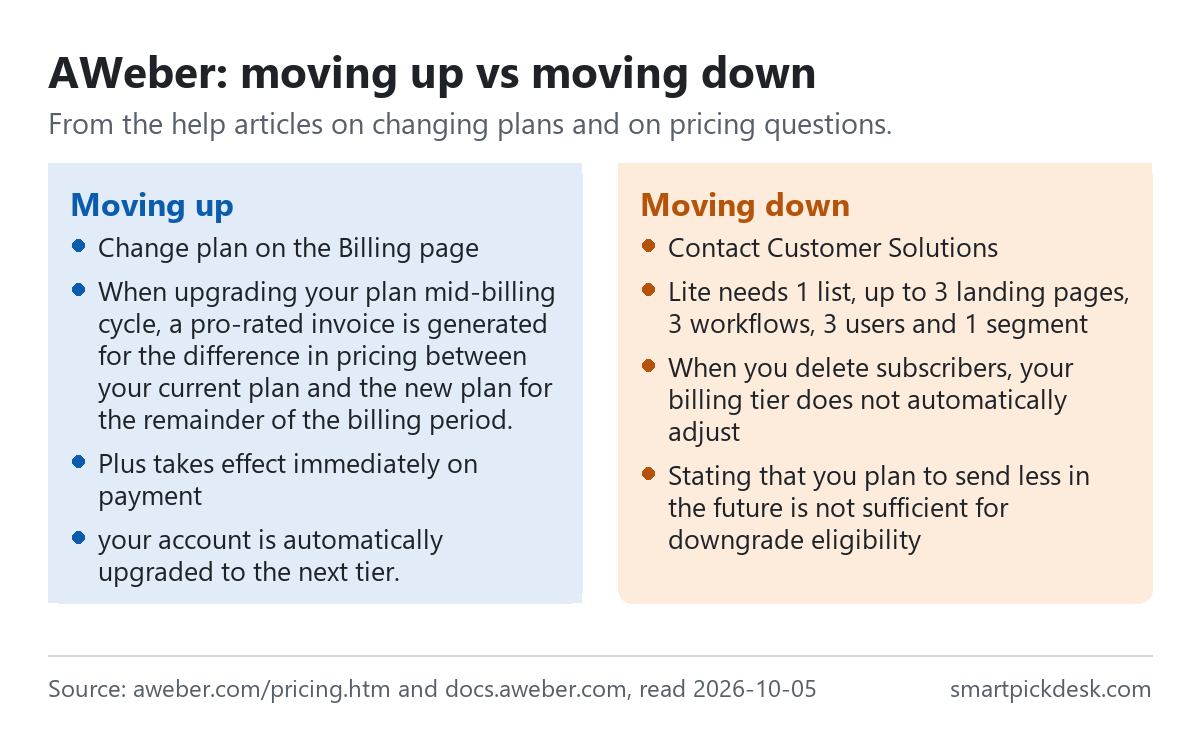
- Upgrading is self-service. On the Billing page you choose a billing term and subscriber tier. “When upgrading your plan mid-billing cycle, a pro-rated invoice is generated for the difference in pricing between your current plan and the new plan for the remainder of the billing period.”[3]
- Seeing where you are. The Billing page shows the name of your current plan — Free, Lite, Plus or Unlimited — and your account usage.[8]
- Downgrading goes through support. The same article says you can upgrade from the dashboard, but to downgrade you must contact Customer Solutions.[3]
- Plus to Lite has conditions. The account must already be within Lite's limits: one list, no more than three landing pages, three workflows, three users and one saved segment.[3]
- Plus to Free has tighter ones. One list, under 500 subscribers, and no more than one landing page, one workflow and one user.[3]
- A lower tier depends on your history. “Stating that you plan to send less in the future is not sufficient for downgrade eligibility”; AWeber looks at sending across recent billing cycles.[3]
This is the part of AWeber's pricing most worth reading before you commit. Moving up is quick and partly automatic; moving down takes a request and depends on what you have already sent.
Cancelling, pausing and your data
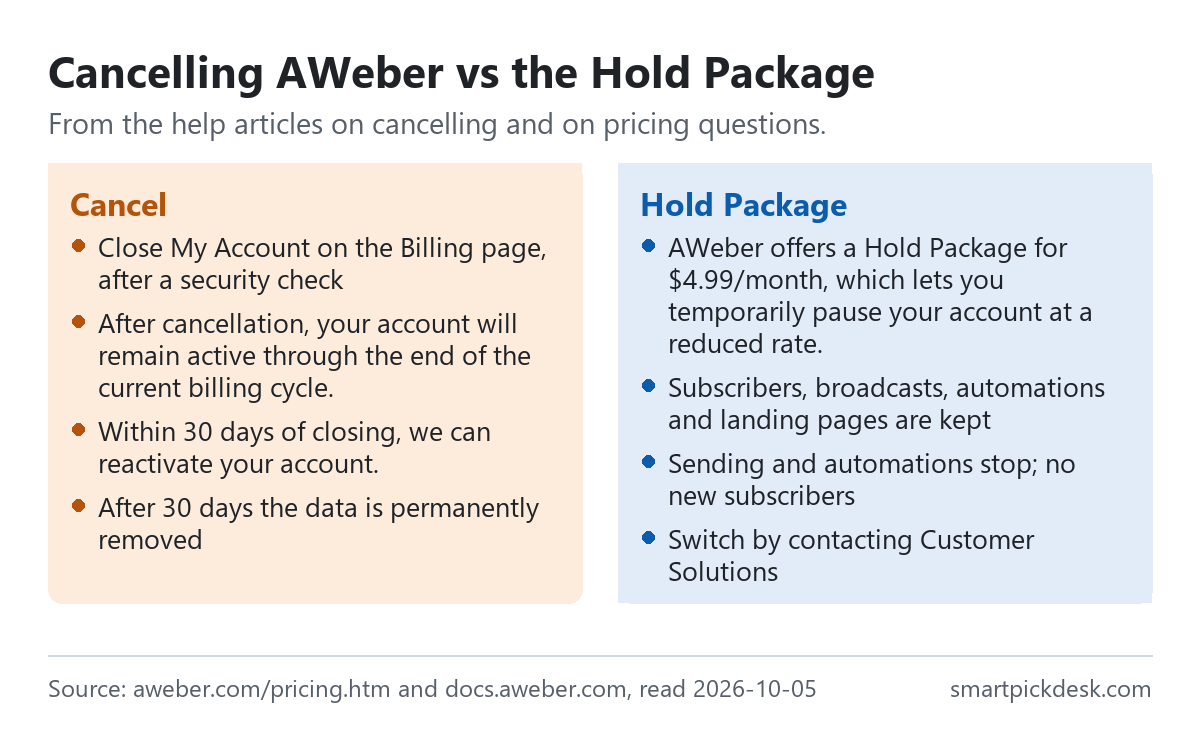
- How to cancel. In the Current Plan section of the Billing page you choose Close My Account, after a security check such as your login email and an invoice number.[5] The billing article adds that you can also cancel through Customer Solutions with your login email and your most recent invoice.[7]
- When it ends. “After cancellation, your account will remain active through the end of the current billing cycle.” The next bill then shows $0.00.[5]
- Changing your mind. “Within 30 days of closing, we can reactivate your account.” After 30 days, subscribers, broadcasts, automations and landing pages are permanently removed.[5]
- The Hold Package. “AWeber offers a Hold Package for $4.99/month, which lets you temporarily pause your account at a reduced rate.” Data is kept, but broadcasts and automations stop and new subscribers are not collected.[2]
- Overdue balances. If a payment is overdue, the options to change plan or close the account appear only after it is paid.[5]
- Free accounts. “Free AWeber accounts are not billed, so there's no risk of being charged if you keep your account open.”[5]
None of the pages we read describes a refund of a paid annual term. The pricing questions page says there are no long-term contracts, and cancelling stops the next renewal; we did not find a statement on money back for the time left.[2][5]
Discounts, payment and other costs
- Non-profits. Three months of service free on new accounts, then 25% off future invoices, with proof of status.[2]
- Students. “AWeber offers a 20% discount to current students with valid .edu or .ac email addresses on new accounts.”[2]
- Payment methods. Visa, Mastercard, American Express and Discover credit cards, and debit cards with a Visa or Mastercard logo.[2]
- Fees on sales. If you sell products through AWeber's ecommerce features, the comparison table lists a transaction fee of 1.0% on Lite and 0.6% on Plus.[1] Card processors charge their own fees on top, which the page does not list.
- Done For You. A separate setup service shown on the pricing page at the same monthly price as Plus plus a setup fee printed as $599 crossed out and $79 under a limited-time offer.[1] It is optional and not part of the plans above.
- Very large lists. The help centre describes AWeber Unlimited: “A flat rate of $899 per month”, for unlimited subscribers and up to 15 sends to each subscriber a month.[6]
Where AWeber's pages disagree
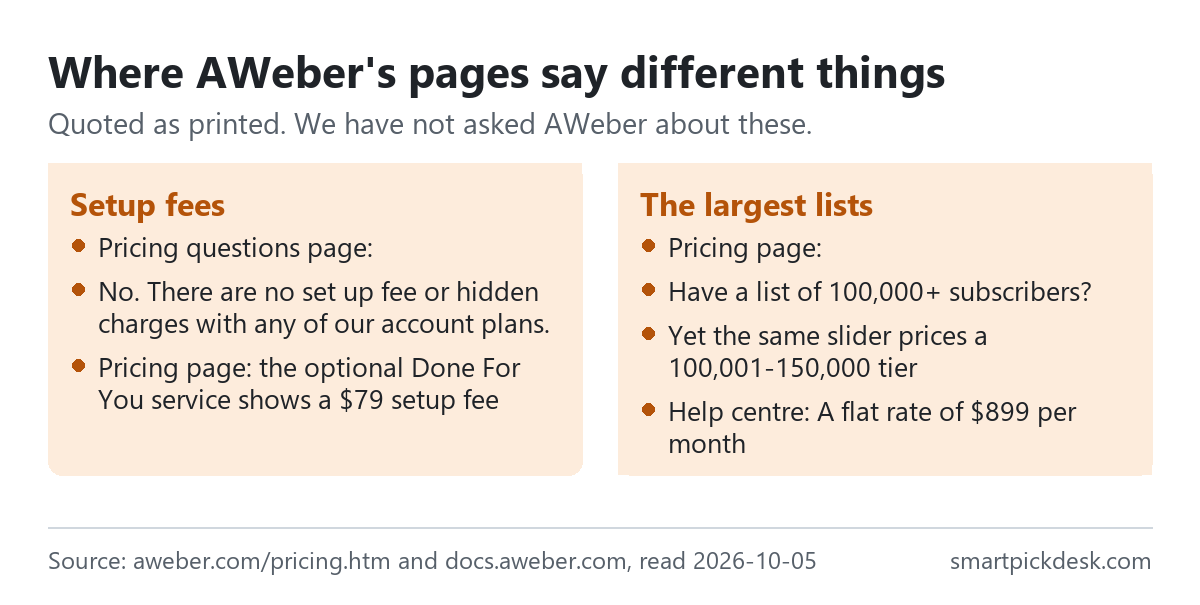
- Setup fees. The pricing questions page answers: “No. There are no set up fee or hidden charges with any of our account plans.”[2] The pricing page shows a setup fee for Done For You.[1] We read the first as being about the plans and the second as an extra service, but the pages do not draw that line.
- Lists above 100,000. The pricing page asks “Have a list of 100,000+ subscribers?” and points to sales, while the same page's slider prices a 100,001–150,000 tier.[1] The help centre adds a flat-rate Unlimited plan that the pricing page does not show.[6]
- Annual totals. The pricing page shows annual prices per month, rounded to the cent, such as $20.83 for Lite at 501–1,000. Twelve of those make $249.96, while the help centre prints $250.00 a year for the same tier.[1][6] We used the help centre's yearly totals in the table above.
- Contracts. “No. There are no long-term contracts with our plans.”[2] An annual plan is still paid a year at a time, and we did not find a refund rule for it.
We have not asked AWeber about these. The prices on the pricing page are what we used throughout, with the help centre's yearly totals for the twelve-month comparison.
Which plan fits which situation
| If you are… | Look at | Why, from AWeber's pages | Watch out for |
|---|---|---|---|
| Starting a first list | Free | No card, no end date[2][6] | 500 subscribers, 3,000 emails a month[6] |
| One newsletter with a welcome sequence | Lite | From $12.50 a month billed annually[1] | One list, three automations[1] |
| Several lists or a team | Plus | Unlimited lists, automations and users[1] | Downgrading later needs support[3] |
| A list that changes size a lot | Monthly billing | Shorter commitment[7] | Tiers rise automatically, not down[2] |
| Not sure yet | The 14-day trial | All features of the chosen plan[4] | The card is charged when it ends[4] |
| Taking a break | The Hold Package | $4.99 a month, data kept[2] | No sending while on hold[2] |
Related pages on this site: free email plans compared, Moosend pricing, checked and MailerLite pricing, checked. Every price guide on the site is listed on Pricing.
Questions people ask
Is AWeber free?
There is a Free plan for up to 500 subscribers and 3,000 emails a month, with no card.[2][6]
How much does AWeber cost?
Up to 500 subscribers: Lite $15 a month or $12.50 billed annually; Plus $30 or $20. See every tier.[1]
Does the AWeber trial charge my card?
Yes, on the day it ends, unless you cancel first.[4]
Does AWeber lower my price if my list shrinks?
Not by itself; you ask Customer Solutions, and your sending history decides.[2][3]
Can I pause an AWeber account?
Yes, with the Hold Package at $4.99 a month.[2]
What happens to my data if I cancel AWeber?
It can be reactivated within 30 days; after that it is removed.[5]
Do you get paid if I sign up?
Not from this page — it has no affiliate links today. If that changes, it will say so at the top, and each link will be marked.
Sources and check log
| # | Source | URL | Checked | How |
|---|---|---|---|---|
| 1 | AWeber, Pricing (both billing modes, all 14 slider tiers) | aweber.com/pricing.htm | 2026-10-05 | Opened in a browser with no account; visible text saved at each tier, Monthly and Annually |
| 2 | AWeber help, Pricing: Frequently Asked Questions | docs.aweber.com › pricing FAQ | 2026-10-05 | Page text saved |
| 3 | AWeber help, Can I change billing plans later? | docs.aweber.com › change plans | 2026-10-05 | Page text saved |
| 4 | AWeber help, How does AWeber's Free Trial work? | docs.aweber.com › free trial | 2026-10-05 | Page text saved |
| 5 | AWeber help, How do I cancel my account online? | docs.aweber.com › cancel | 2026-10-05 | Page text saved |
| 6 | AWeber help, How much does AWeber cost? | docs.aweber.com › cost | 2026-10-05 | Page text saved |
| 7 | AWeber help, How does the billing work? | docs.aweber.com › billing | 2026-10-05 | Page text saved |
| 8 | AWeber help, Which plan am I on? | docs.aweber.com › which plan | 2026-10-05 | Page text saved |
Change log
- 2026-10-05 — First version. The pricing page at 14 tiers in both billing modes and seven help articles read on 2026-10-05.
- Previous check: none for this page.
- What we will re-check: the tier prices in both modes, the Free plan limits, the trial wording, the downgrade rules and the Hold Package price.
Who writes this
Smart Pick Desk is an independent site that compares tools for people who work online. We are not employed by, or partnered with, AWeber, and we do not run AWeber in our own business. What we do is read what each company publishes, write down the date we read it, and say plainly which parts we could not check. More: who the editors are and how we check a page.
We do not promise results. Nothing here is a prediction about what a tool will do for your list or sales.