How to start an email list for free without a website
Last updated 2026-09-25 · By Smart Pick Desk editors · Help-centre, pricing and FTC pages read on 2026-09-25; free-plan limits read on 2026-09-20 · We have not used these products · How we checked ↓
The short answer
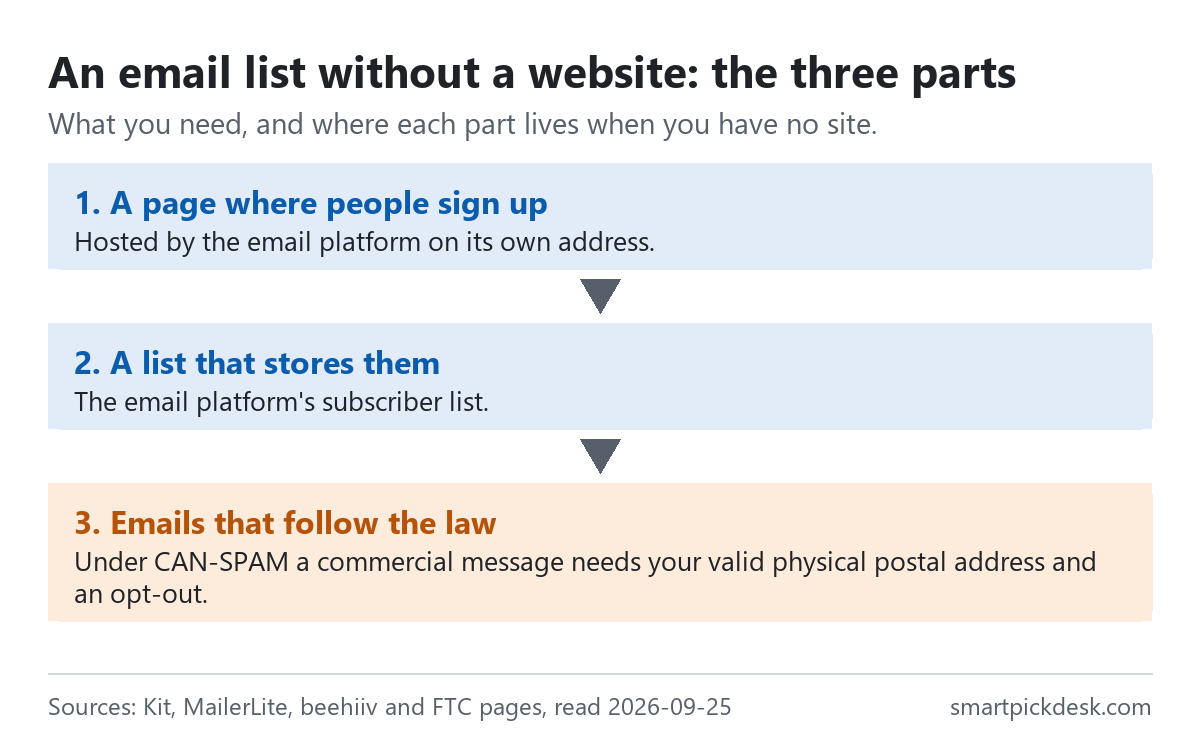
You do not need a website to collect email addresses. An email platform can host the sign-up page for you on its own address, store the list, and send the emails — all on a free plan. What you do need is a postal address to put in commercial emails, because US law asks for one.
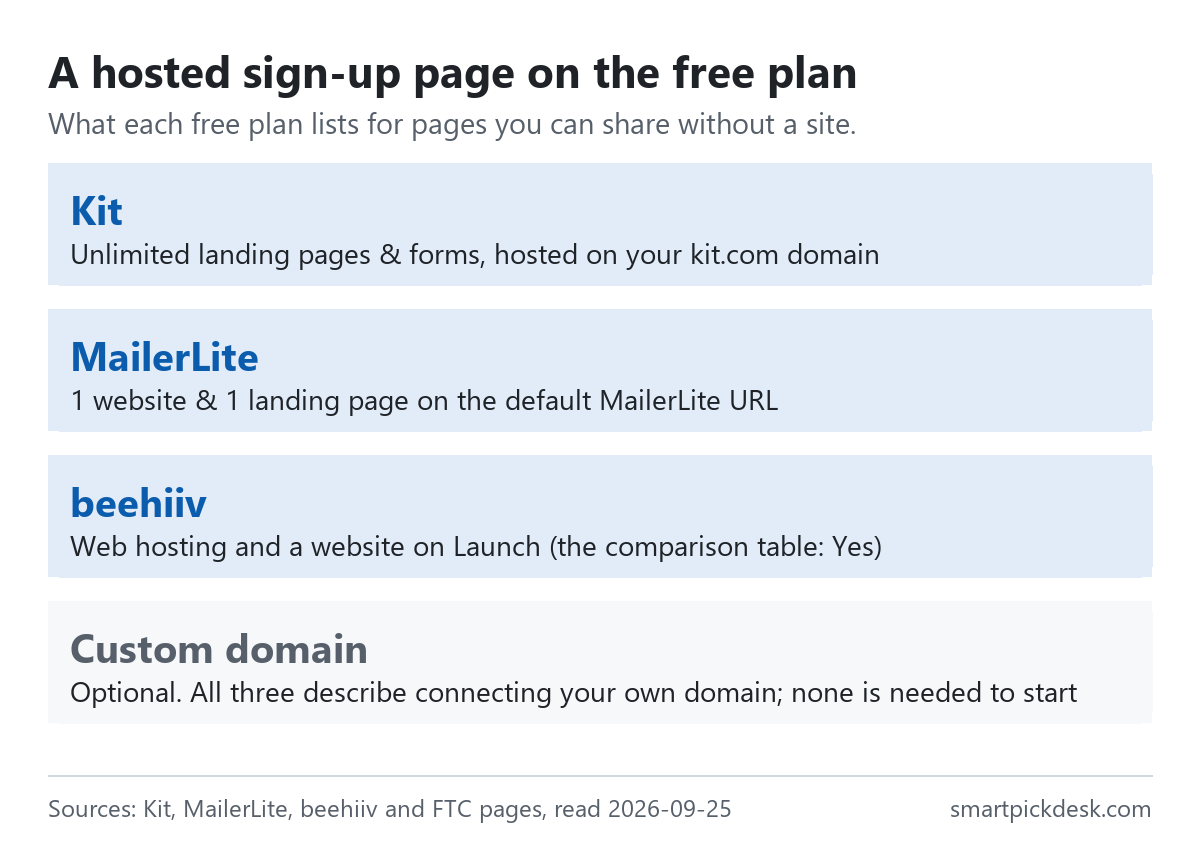
- The page is hosted for you. Kit's help centre: “You don't need a website or a blog to create and share a landing page.”[1] MailerLite's free plan lists “1 website & 1 landing page”, and beehiiv's free plan lists web hosting.[4][5]
- Pick the free plan by what you will send. One newsletter at a time to a growing list: Kit Free lists 10,000 subscribers.[3] Automatic welcome emails from day one: MailerLite Free lists 3 automations, on 250 subscribers.[4]
- Before the first email, one legal line. The FTC's guide to CAN-SPAM: “Your message must include your valid physical postal address.”[6] A registered post office box is one of the options it lists.
If you want one sentence: choose a free plan that hosts a sign-up page, share the address it gives you, and put a postal address and an unsubscribe link in every commercial email.
On this page
At a glance
| Free plan | Hosted sign-up page | Subscribers | Emails a month | Automations |
|---|---|---|---|---|
| Kit Free | “Unlimited landing pages & forms” | Up to 10,000 | “Unlimited email broadcasts” | Not on Free |
| MailerLite Free | “1 website & 1 landing page” | Up to 250 | 2,500 | 3 |
| beehiiv Launch | Web hosting and website templates: Yes | Up to 2,500 | “Unlimited Email Sends” | No |
From each pricing page (Kit, MailerLite and beehiiv, re-read 2026-09-25)[3][4][5] and Kit's help article on the Free plan.[3] More free plans side by side: what free means on 8 platforms.
The three plans answer the same question in different ways. Kit gives the most room for subscribers and pages but no automation. MailerLite gives automation on a small list. beehiiv gives a whole website with a newsletter, with 2,500 subscribers.
How we checked this (and what we did not check)
Last updated 2026-09-25 (first version). Every quotation here comes from the companies' own pages or the FTC's. Pages change — confirm on the official page before you rely on a step.
What we did. On 2026-09-25 we saved, with no account, two Kit help articles on landing pages, Kit's help article on its Free plan, the pricing pages of Kit, MailerLite and beehiiv, MailerLite's help articles on the free plan update, billing and cancelling, beehiiv's Terms of Use, and the FTC's CAN-SPAM compliance guide for business. The free-plan limits were first recorded on 2026-09-20 and match the pages we saved today. Wording in quotation marks is copied from those saved pages word for word, and a script checks every quotation against the saved text.
What we did not do. We have not built a page on any of these platforms. The steps below are the platforms' own instructions, not a walkthrough we recorded, and there are no screenshots. We are not lawyers; the legal section quotes the FTC's guide and nothing more, and we have not checked rules outside the United States. We do not show MailerLite's or beehiiv's logos or screens.
What that leaves. A route from no website to a working list, built only from what the platforms and the regulator publish.
Why no website is needed
A website does three jobs for an email list: it gives people a page to sign up on, it gives you an address to share, and it gives the page somewhere to live. Email platforms now do all three.
Kit's help article on landing pages opens with: “A landing page is a standalone opt-in you can share anywhere. You don't need a website or a blog to create and share a landing page.”[1] A second Kit article explains why: “Since we host your Kit Landing Pages, you don't need a website to share your Landing Page with the world—it can exist on its own!”[2]
MailerLite and beehiiv say the same thing through their plan lists rather than in a sentence. MailerLite's Free card lists a website and a landing page, and its help centre caps the free website at 5 pages.[4] beehiiv's comparison table prints Yes for web hosting, subscribe forms, website templates and link-in-bio on its free Launch plan.[5]
What that means for you: the decision is not whether you can start without a website. It is which platform's page you want to start on, and what its free plan lets you send.
Step 1: choose where the list lives
The list lives on the email platform, so choosing the platform comes first. On the free plans in this guide, two numbers decide the fit: how many subscribers you can hold, and what you can send to them.
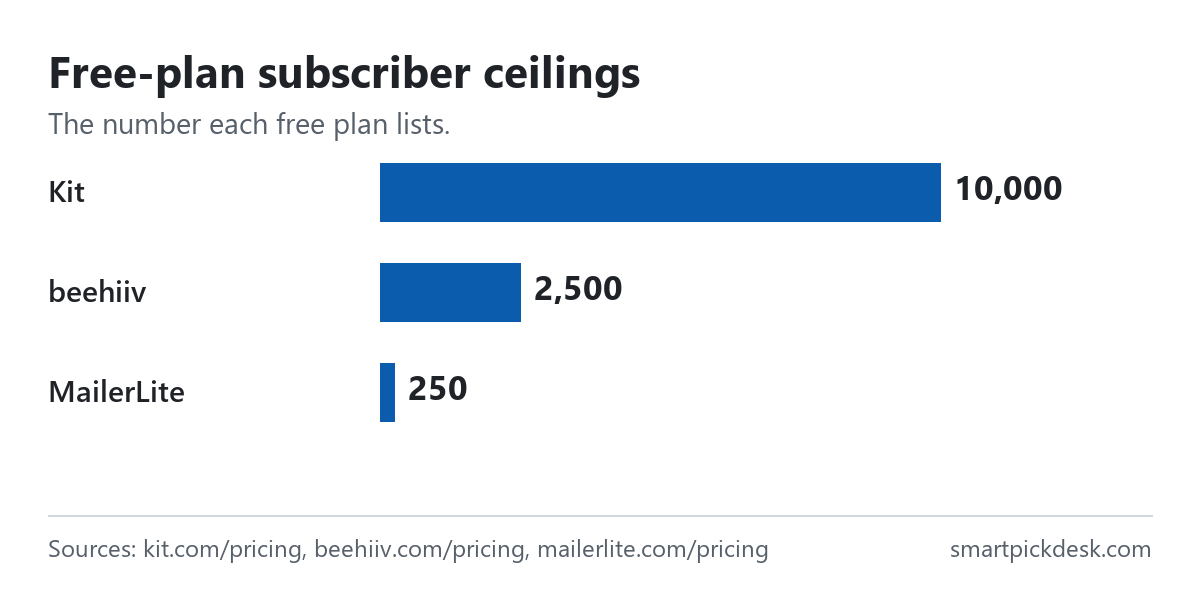
- Kit Free: “The Free plan costs $0 per month for as long as you stay under 10,000 subscribers.”[3] Broadcasts are unlimited, but automations and email sequences need a paid plan.
- MailerLite Free: “Up to 250 subscribers” and “2,500 monthly emails”, with 3 automations.[4] Its help centre says those limits were reduced on June 16, 2026, from 500 subscribers and 12,000 emails.[4]
- beehiiv Launch: “Up to 2,500 subscribers” and unlimited sends; automations are listed as No.[5]
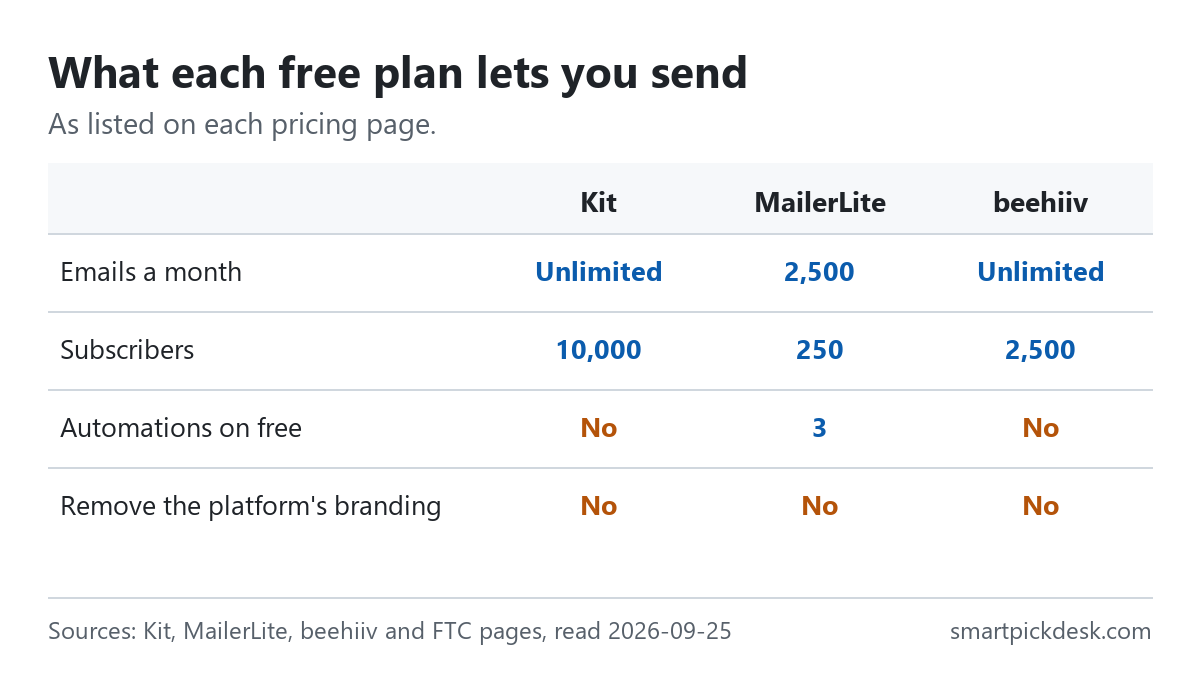
A quick way to decide. If the first thing you want is an email that goes out by itself when someone joins — for example, a welcome email with a download link — you need automation on the free plan, which points to MailerLite. If you will write each email by hand and want room to grow, Kit's 10,000 is the largest free ceiling of the three. If you want a small site with posts and a newsletter together, beehiiv's Launch plan is the one that lists web hosting as a feature.
One caution applies to all three: on each free plan, the platform's branding stays on. Removing it is listed on a paid plan in each case.[3][4][5]
Step 2: build the sign-up page
Kit's help centre gives the most detailed public instructions of the three, so we use it as the example. Its steps, in its words:
- “Go to Audience growth > Landing Pages & Forms in the navigation.”
- “Then, click the + New button.”
- Choose the Landing Page option, then a template.[1]
Two warnings sit in the same article. “It's not possible to change your Landing Page's template after choosing it.” And, near the end, “Your changes don't autosave”, so publish often.[1]
The settings that matter for a first page, as the article lists them:
- After sign-up: show a success message, send people to the built-in thank-you page, or send them to another page.[1]
- Extra fields: besides the email address, you can collect details and save them as custom fields or tags.[1]
- Bots: “Enable the Invisible reCAPTCHA setting to monitor for and prevent potential bot signups.” The article adds that “Using reCAPTCHA can reduce signups, but helps ensure your list consists of human subscribers.”[1]
- Search and social: the SEO & Analytics section sets the page's meta title, description and social share image.[1]
- Reports: visitors, subscribers and conversion rate over the last 90 days.[1]
On MailerLite, the free plan's one landing page and one website count as active items only when published: “The limits apply to active or published items; drafts are not counted.”[4] So you can draft more than one and publish the one you want. On beehiiv, the website and subscribe forms come with the Launch plan; custom webpages are listed as No on Launch.[5]
Step 3: the address you share
Without a domain of your own, the address you share is the platform's. Kit's help article shows what it looks like and how to tidy it.
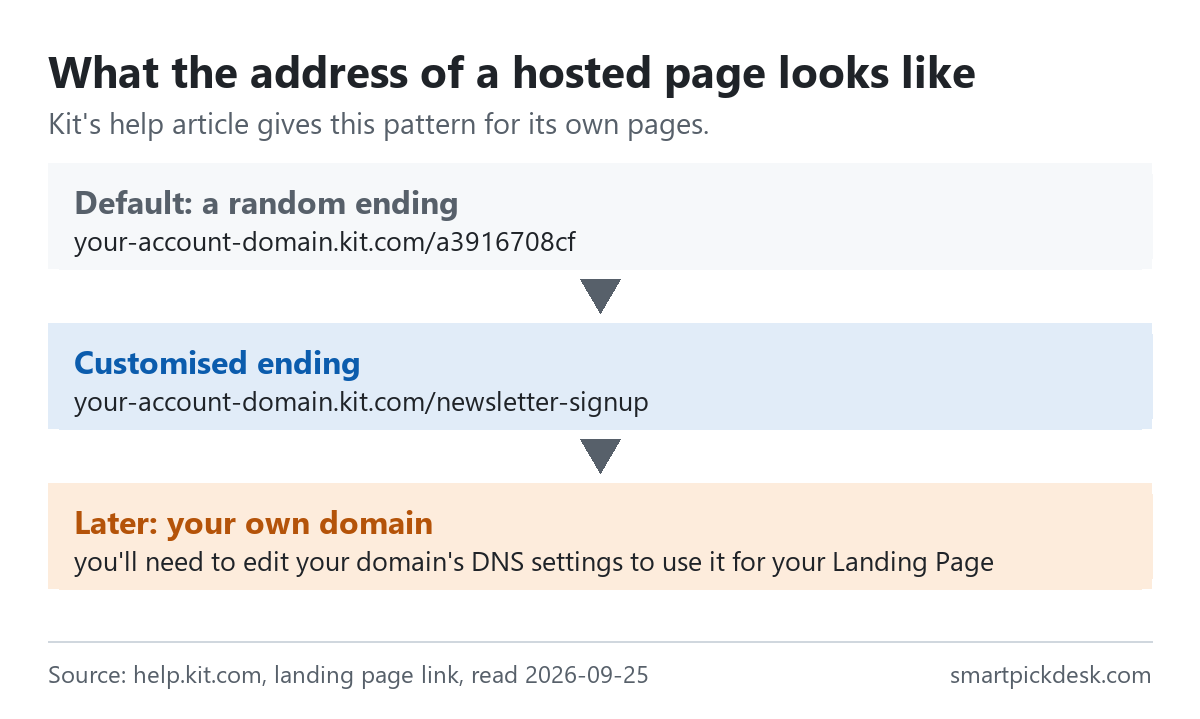
- Default: Kit's help says the part after the slash is at first a random combination of letters and numbers.[2]
- Customised: you can change it to something readable, for example “your-account-domain.kit.com/newsletter-signup”.[2]
- Account domain: you can also change the account part, and the article says “your last active domain will automatically redirect”.[2]
The landing-page article confirms the default: “If you haven't added any custom domains, your Landing Page will use your default Kit account domain.”[1] On MailerLite, sites without a custom domain use the default MailerLite URL; its cancel article says sites are still hosted there after a custom domain is removed.[4]
Where the address goes next is up to you. Kit's Share button offers copying the URL and posting it to X, Facebook or LinkedIn.[2] Any place you can paste a link — a social profile, a video description, a pin — works the same way.
Step 4: deliver what you promised
Many sign-up pages offer something in return, such as a checklist or a short guide. On Kit, delivery is a setting on the landing page itself.
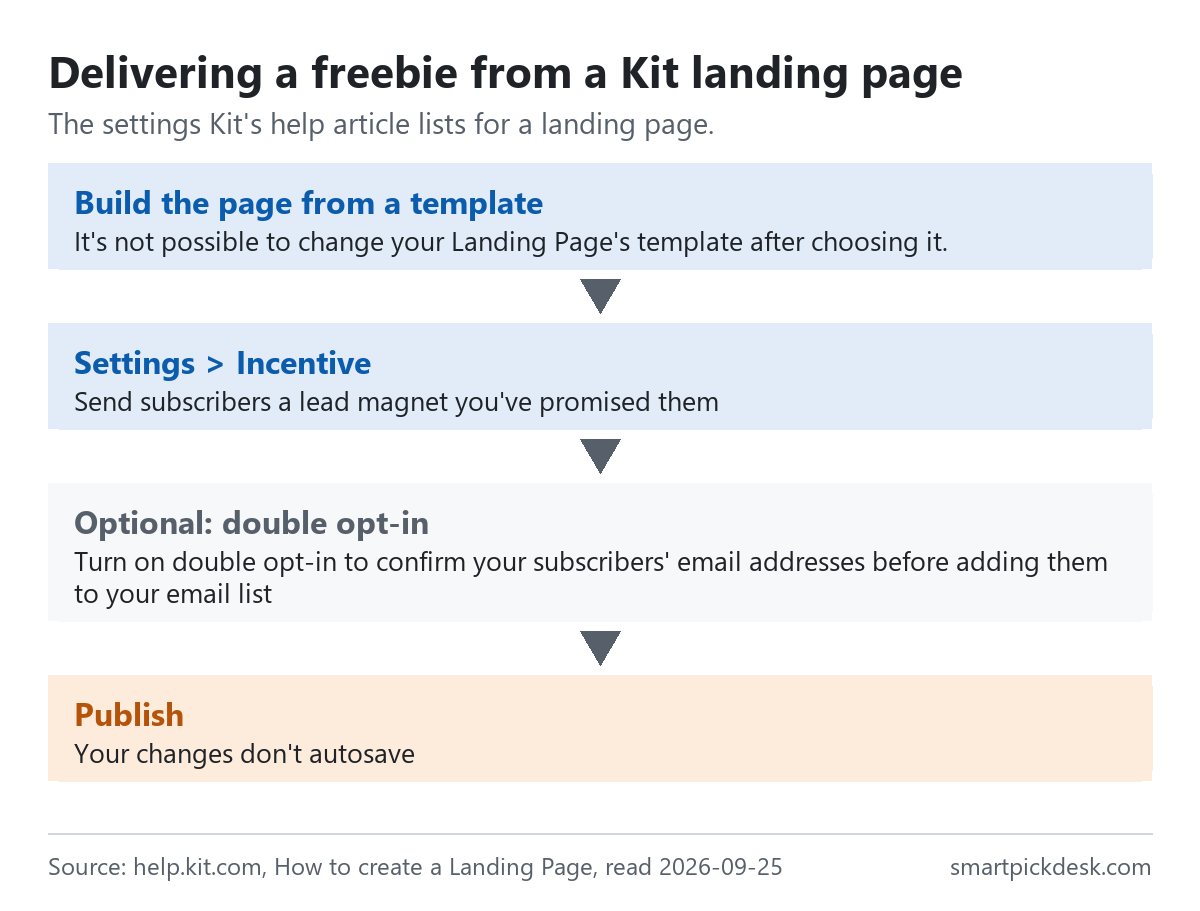
The help article describes the Incentive section: it “lets you choose whether to send subscribers a confirmation email”, and lists two uses: “Send subscribers a lead magnet you've promised them” and “Turn on double opt-in to confirm your subscribers' email addresses before adding them to your email list”.[1] Kit's pricing table lists “Deliver opt-in incentives” among its features, described as a freebie digital file delivered automatically on sign-up.[3]
This works on Kit's free plan because it is a confirmation email attached to the page, not an automation. On MailerLite, the free plan's 3 automations are the other route to an automatic first email.[4] On beehiiv, automations are listed as No on Launch.[5]
What we did not check: file size limits, which file types each platform accepts, and how the download link is presented. None of those were on the pages we read.
Step 5: the legal basics before your first email
This is where having no website catches people out. A website usually has a contact page with an address; a hosted sign-up page does not. The FTC's guide to the US CAN-SPAM Act lists what every commercial email needs.
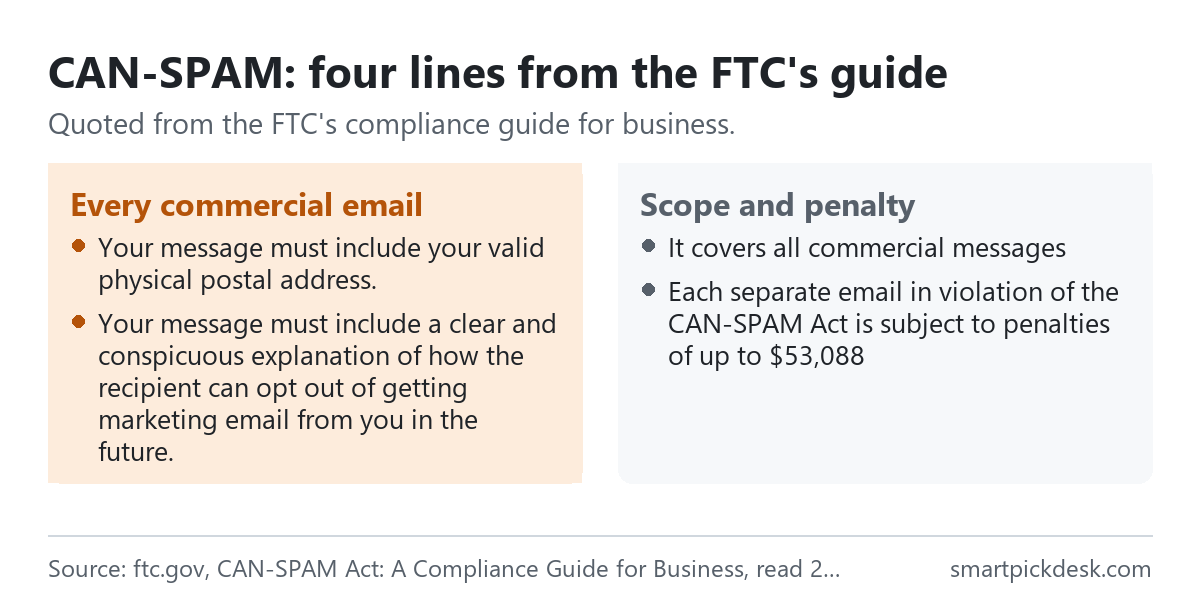
- A postal address. “Your message must include your valid physical postal address.” The guide continues: “This can be your current street address, a post office box you’ve registered with the U.S. Postal Service, or a private mailbox you’ve registered with a commercial mail receiving agency established under Postal Service regulations.”[6]
- A way out. “Your message must include a clear and conspicuous explanation of how the recipient can opt out of getting marketing email from you in the future.”[6] The guide adds that opt-outs must be honoured within 10 business days.
- Honest headers and subjects. “Don’t use deceptive subject lines.”, and your From and Reply-To details must identify who sent the message.[6]
- Say it is an ad, when it is. “Identify the message as an ad.” The guide says the law gives leeway in how you do this.[6]
Scope and stakes, from the same guide: “Despite its name, the CAN-SPAM Act doesn’t apply just to bulk email.”, and “Each separate email in violation of the CAN-SPAM Act is subject to penalties of up to $53,088”.[6] The guide also explains that a message's primary purpose decides whether it counts as commercial, and that messages which only update a customer on an existing transaction are treated differently.
What this means before you send: decide which postal address will appear in your emails. If you do not want your home address in every email, the guide's own list includes a registered post office box or private mailbox. We did not check where each platform asks for it or how it adds it to emails.
When you get a website later
Starting without a website does not lock you out of one. The platforms describe the route.
- Kit: you can use your own domain or a subdomain for landing pages. For WordPress there is a plugin; otherwise “you'll need to edit your domain's DNS settings to use it for your Landing Page”, which the article calls the most technical option.[2]
- beehiiv: the comparison table lists custom domains as Yes on the free Launch plan.[5]
- MailerLite: custom domains are on the paid side. The trial article lists “Custom domains” among paid features excluded from the free trial, and the cancel article says cancelling a paid plan removes access to them.[4]
The list itself moves with you: the subscribers stay on the platform whatever address the sign-up page uses.
Living on someone else's address: three things to know
- The platform's address is the platform's. Kit's Terms of Service: “Kit may change or terminate the Kit Provided Domains at any time, in its sole discretion.” The same section says Kit will use commercially reasonable efforts to give advance notice.[7]
- Quiet free accounts can be closed. beehiiv's Terms of Use: “If you have a free account, we may cancel your account and reclaim the subdomain after a period of inactivity.” beehiiv says it will generally give at least 30 days' notice by email.[8]
- Keep your own copy of the list. Kit's landing page reports include a download of the page's subscribers as a CSV; “A download link for the export file will be emailed to the Kit account owner. The link expires after five days.”[1]
None of this is a reason not to start. It is a reason to put the address you share somewhere you can update, such as a social profile, and to download the list now and then.
Which free plan to start on
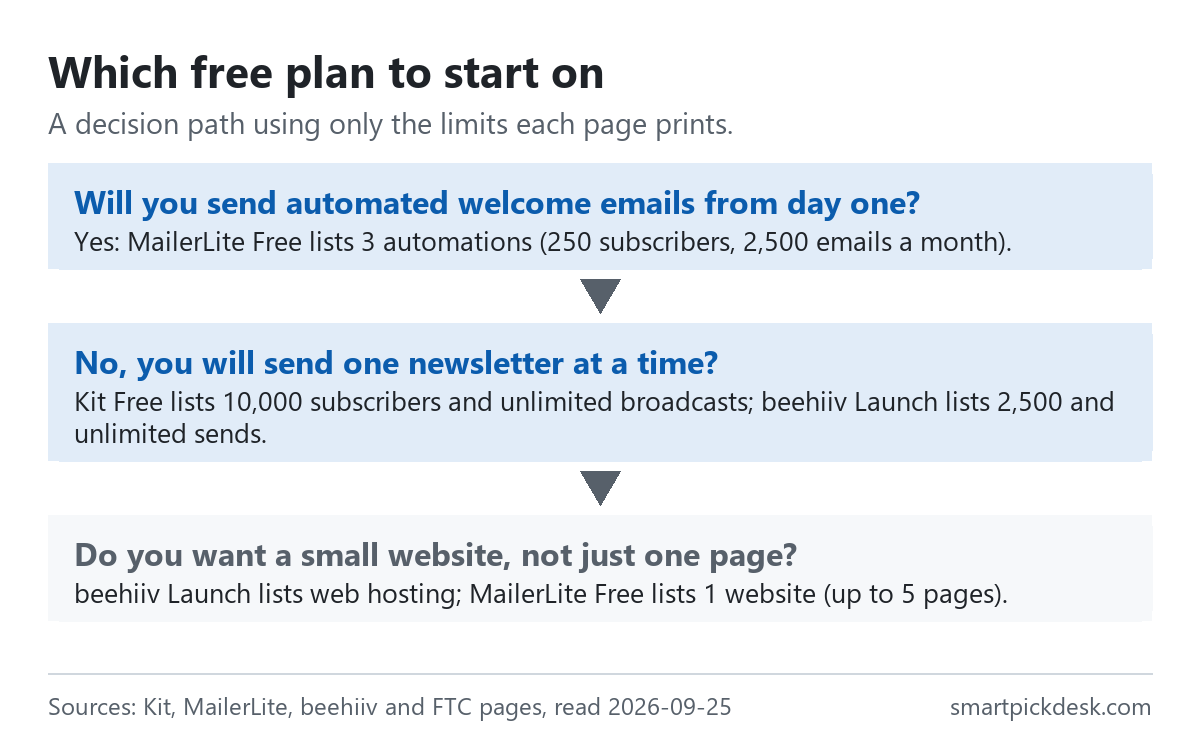
| If you… | Start on | Why, from the pages | Watch out for |
|---|---|---|---|
| Want an automatic welcome email with a download | MailerLite Free, or Kit Free with an incentive email | MailerLite lists 3 automations[4]; Kit's Incentive setting sends a lead magnet[1] | MailerLite locks sending above 250 active subscribers[4] |
| Expect the list to grow into the thousands | Kit Free | Up to 10,000 subscribers[3] | No sequences or automations until Creator |
| Want a small site with posts plus a newsletter | beehiiv Launch | Web hosting, templates and custom domains listed on Launch[5] | Free accounts inactive for a period may be closed[8] |
| Want to send often from the start | Kit Free or beehiiv Launch | Unlimited broadcasts or sends[3][5] | MailerLite Free is capped at 2,500 emails a month |
Once you know which one, the price lists show what happens when you outgrow the free plan: Kit pricing, checked, beehiiv pricing, checked and MailerLite pricing, checked. Moving from Mailchimp? See Mailchimp alternatives with a free plan.
Questions people ask
Can I start an email list without a website?
Yes, on the platforms we checked. Kit says “You don't need a website or a blog to create and share a landing page.”[1] MailerLite's free plan lists a website and a landing page, and beehiiv's Launch plan lists web hosting.[4][5]
Which free plan holds the most subscribers?
Of the three here: Kit Free 10,000, beehiiv Launch 2,500, MailerLite Free 250.[3][4][5]
What address do I share if I have no domain?
The platform's own address, such as “your-account-domain.kit.com/newsletter-signup” on Kit.[2]
Do I need a physical address to send emails?
For commercial email under CAN-SPAM, the FTC's guide says “Your message must include your valid physical postal address.”, and lists a registered post office box or private mailbox as options.[6] We have not checked other countries' rules.
How do I send a freebie to people who sign up?
On Kit, use the landing page's Incentive settings to “Send subscribers a lead magnet you've promised them”.[1]
Do you get paid if I sign up?
Not from this page — it has no affiliate links today. If that changes, it will say so at the top, and each link will be marked.
Sources and check log
| # | Source | URL | Checked | How |
|---|---|---|---|---|
| 1 | Kit Help Center, How to create a Landing Page | help.kit.com › create a landing page | 2026-09-25 | Page text saved, no account |
| 2 | Kit Help Center, How to find and customize your Landing Page link | help.kit.com › landing page link | 2026-09-25 | Page text saved |
| 3 | Kit, Pricing, and Kit Help Center, The Kit Free plan | kit.com/pricing; help.kit.com › Free plan | 2026-09-20 (limits); 2026-09-25 (re-read) | Page text saved |
| 4 | MailerLite, Pricing; help articles on the Free plan update, the 14-day trial, plan and billing, and cancelling | mailerlite.com/pricing; mailerlite.com/help | 2026-09-20 (limits); 2026-09-25 (re-read and help) | Page text saved |
| 5 | beehiiv, Pricing (Launch card and comparison table) | beehiiv.com/pricing | 2026-09-20 (limits); 2026-09-25 (re-read) | Page text saved |
| 6 | Federal Trade Commission, CAN-SPAM Act: A Compliance Guide for Business | ftc.gov › CAN-SPAM guide | 2026-09-25 | Page text saved |
| 7 | Kit, Terms of Service (Kit Provided Domains) | kit.com/terms | 2026-09-25 | Page text saved |
| 8 | beehiiv, Terms of Use (termination of accounts and subdomains) | beehiiv.com/tou | 2026-09-25 | Page text saved |
Change log
- 2026-09-25 — First version.
- Previous check: none (first version).
- What we will re-check: the three free plans' limits, Kit's landing page instructions, and the FTC guide's penalty figure.
Who writes this
Smart Pick Desk is an independent site that compares tools for people who work online. We are not employed by, or partnered with, Kit, MailerLite or beehiiv, and we do not run them in our own business. What we do is read what each company publishes, write down the date we read it, and say plainly which parts we could not check. More: who the editors are and how we check a page.
We do not promise results. Nothing here is legal advice or a prediction about what a list will do for you.