Kit vs MailerLite: where the free plans actually stop
Last updated 2026-09-23 · By Smart Pick Desk editors · Prices read on both official pricing pages on 2026-09-20 · We have not used either product · How we checked ↓
The short answer
These two tools are usually compared on features. The thing that actually decides it for most people is simpler: their free plans stop in completely different places, and so does the price you pay once you outgrow them.
- Choose Kit if you want to grow a list first and pay later. Kit's free plan is listed as “Free—up to 10,000 subscribers” with “Unlimited landing pages & forms” and “Unlimited email broadcasts”.[1] You can collect a large list and send to it without paying. What you do not get for free is automation: “Unlimited Visual Automations” and “Unlimited email sequences” are listed under the paid Creator plan.[1]
- Choose MailerLite if you need an automatic welcome sequence from day one, or if you expect to pay anyway. Its free plan is small — “Up to 250 subscribers” and “2,500 monthly emails” — but it lists “3 automations” on that free plan.[2] And at every list size we checked, its first paid plan is listed at a lower price than Kit's.
If you want one sentence: Kit is cheaper while your list is small and you are not automating; MailerLite is cheaper once you are paying at all.
On this page
At a glance
| What you need first | Kit | MailerLite | Which fits |
|---|---|---|---|
| A big free list | “Free—up to 10,000 subscribers”[1] | “Up to 250 subscribers”[2] | Kit, by a wide margin |
| An automatic welcome sequence without paying | Automations listed under Creator[1] | “3 automations” on Free[2] | MailerLite |
| Sending often to a small list | “Unlimited email broadcasts” on Free[1] | “2,500 monthly emails” on Free[2] | Kit |
| The lowest price once you are paying | Creator, from $33/mo billed yearly at 1,000 subscribers[1] | Comfort, from $10.80/mo billed yearly at 500 subscribers[2] | MailerLite at every size we checked |
| Landing pages and forms while free | “Unlimited landing pages & forms”[1] | “1 website & 1 landing page”, “3 signup forms”[2] | Kit |
| Selling something while free | “Sell digital products & subscriptions”[1] | “1 digital product or booking”[2] | Both list it; Kit's wording is not capped |
How we checked this (and what we did not check)
Last updated 2026-09-23 (a note added and one worked example corrected; see the change log). Every number on this page was read from the two official pricing pages in a browser on 2026-09-20. Prices change — confirm on the official page before you sign up.
What we did. On 2026-09-20 we opened kit.com/pricing and mailerlite.com/pricing in a browser and read the pages themselves. On each page we moved the subscriber slider through every step it offers and recorded the price shown at each one, with the billing switch in both positions. Every figure below comes from that reading. Feature wording in quotation marks is copied from those pages word for word.
What we did not do. We have not used either product. There are no screenshots of either tool on this page, no account, no test send and no opinion about how either one feels to use. We cannot tell you which editor you will prefer, how the deliverability compares, or how support answers, because we have not measured any of it. Anyone who tells you those things from a pricing page is guessing.
What that leaves. Numbers you can verify yourself in about two minutes, and the one comparison neither company makes for you: what the same list size costs on both sides on the same day.
Where the free plan stops
Both companies call their entry plan free. The word covers two very different offers.
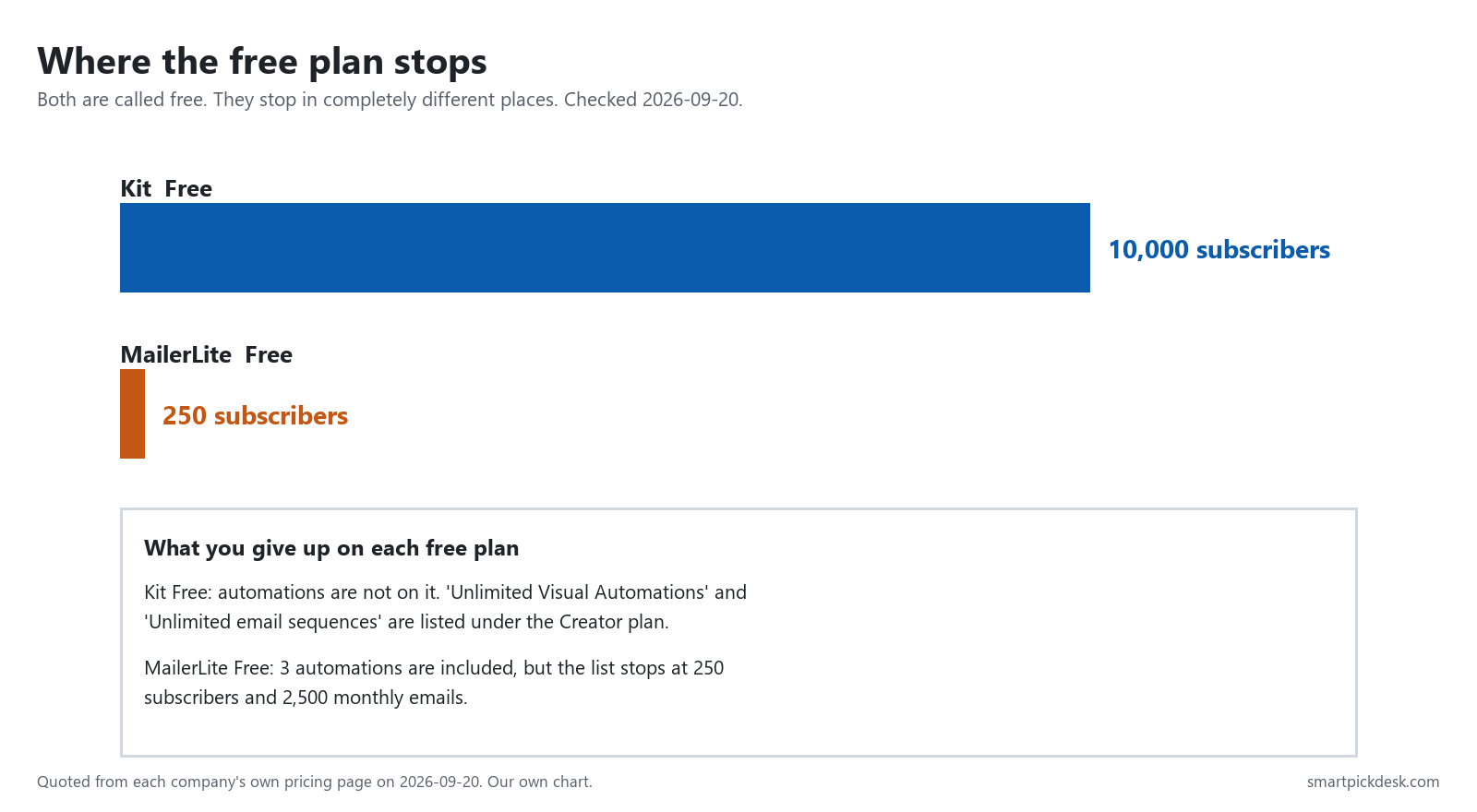
Kit's free plan carries forty times the subscribers of MailerLite's. That is not a small difference in degree; it changes what the free plan is for. Kit's free tier is a place a list can actually live. MailerLite's is a place to start one.
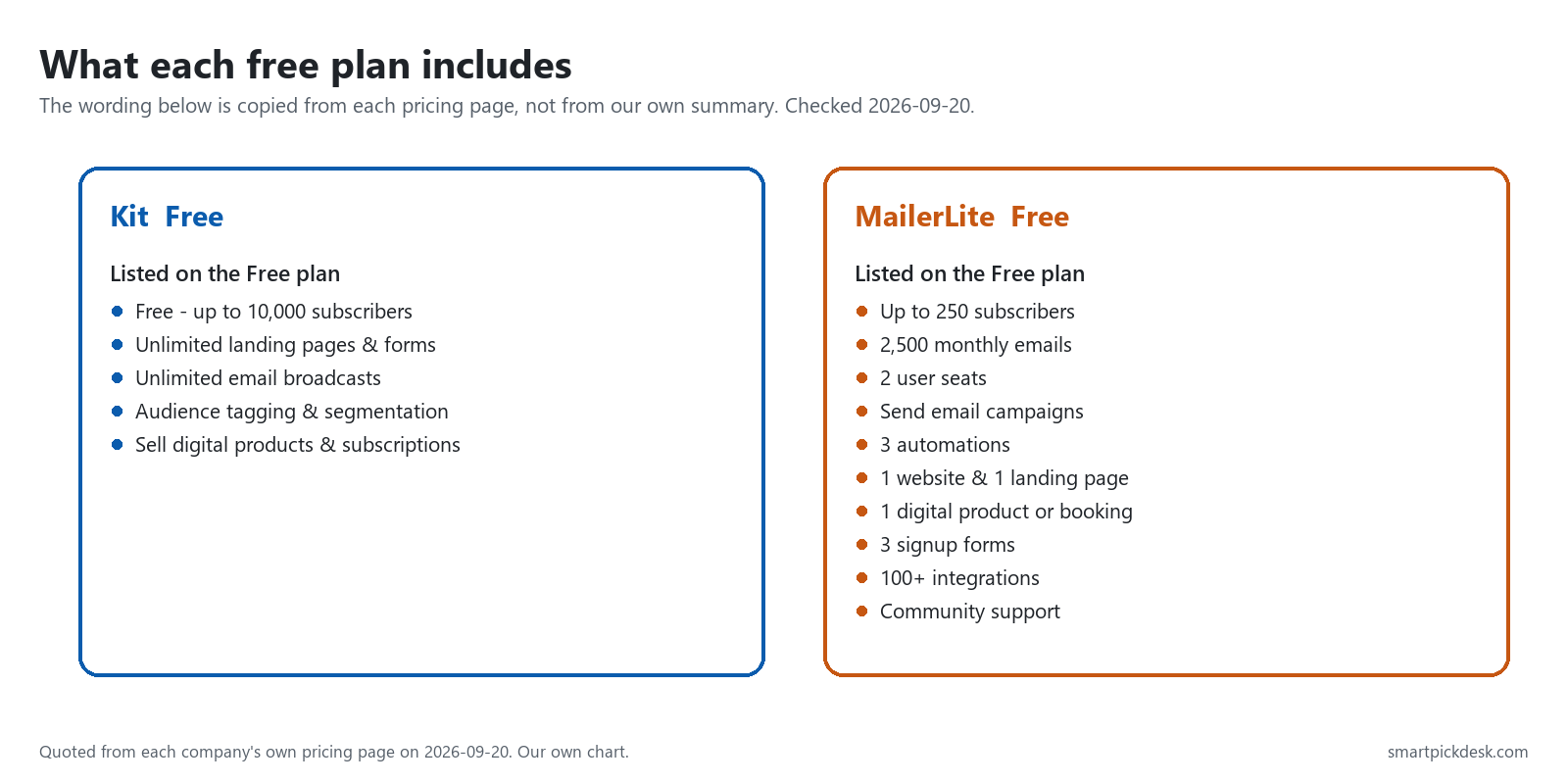
The trade runs the other way on what you can do with the list. Here is the wording each page uses, side by side:
| Limit type | Kit Free | MailerLite Free |
|---|---|---|
| Subscribers | up to 10,000[1] | up to 250[2] |
| Emails you can send | “Unlimited email broadcasts”[1] | “2,500 monthly emails”[2] |
| Automations | not listed on Free[1] | “3 automations”[2] |
| Landing pages and forms | “Unlimited landing pages & forms”[1] | “1 website & 1 landing page”, “3 signup forms”[2] |
| Seats | not listed on the Free plan[1] | “2 user seats”[2] |
| Support | not listed on the Free plan[1] | “Community support”[2] |
One limit is easy to miss. MailerLite's free ceiling is two numbers, not one: 250 subscribers and 2,500 monthly emails. A list of 200 people mailed three times a week uses about 2,600 emails a month (200 × 3 × 52 weeks ÷ 12 months) — already over the 2,500, so a list well under the subscriber limit can still hit the sending limit. Kit's free plan does not have that second ceiling; it lists email broadcasts as unlimited.
Automations: the line that decides most of this
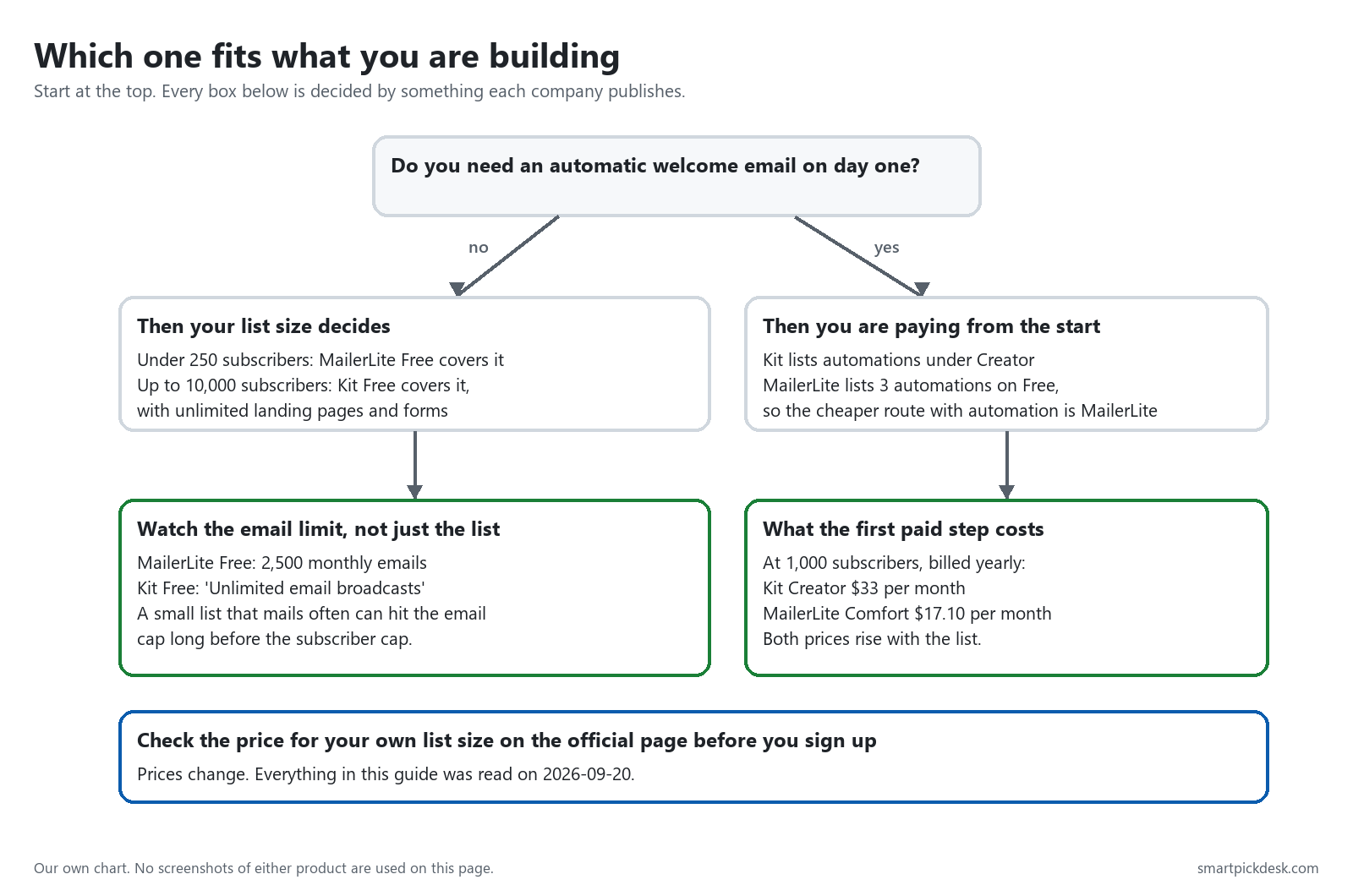
An automation is the thing that sends a welcome email by itself when somebody signs up, and then the next one three days later. If you want that from day one without paying, only one of these two offers it.
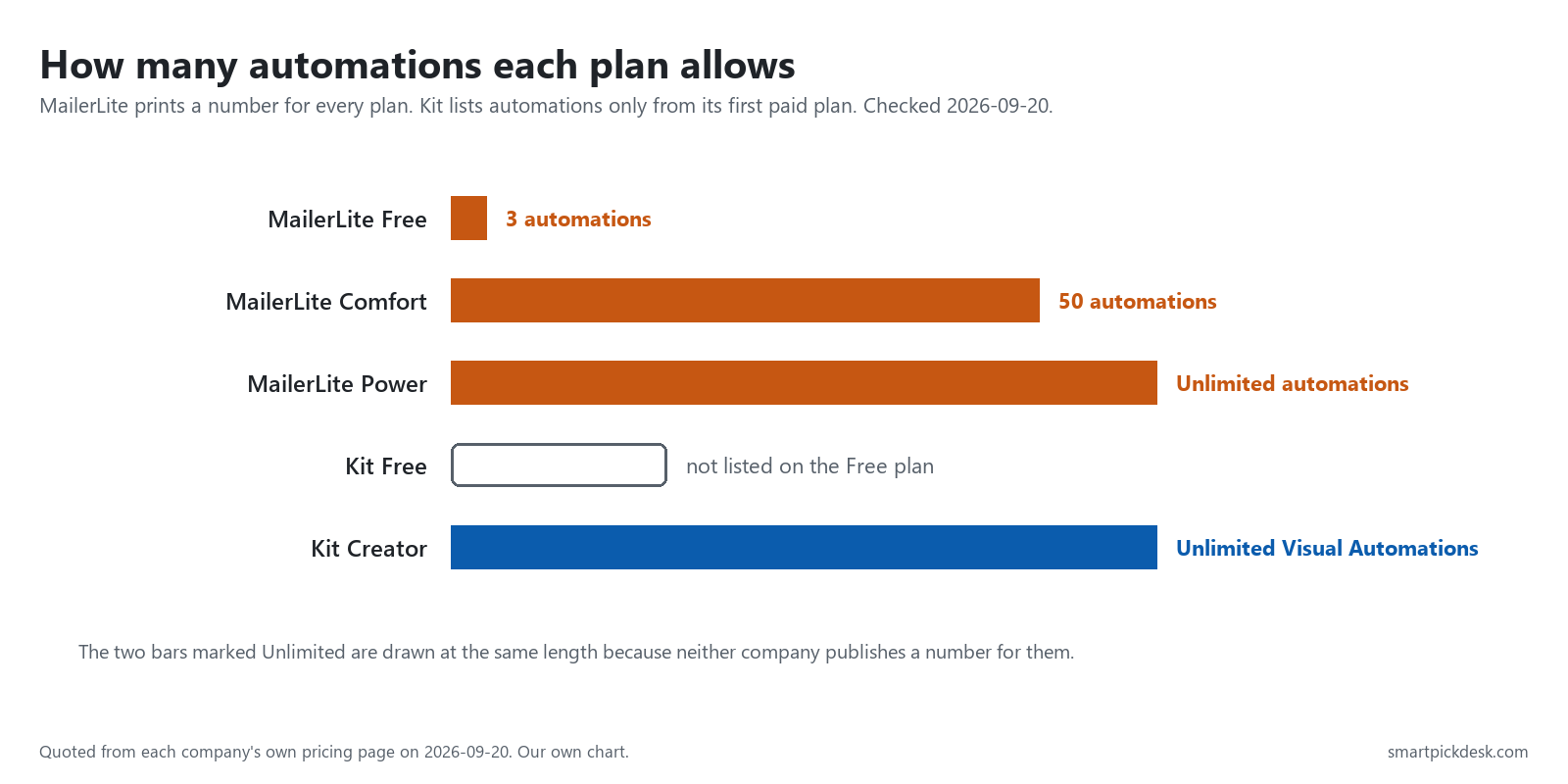
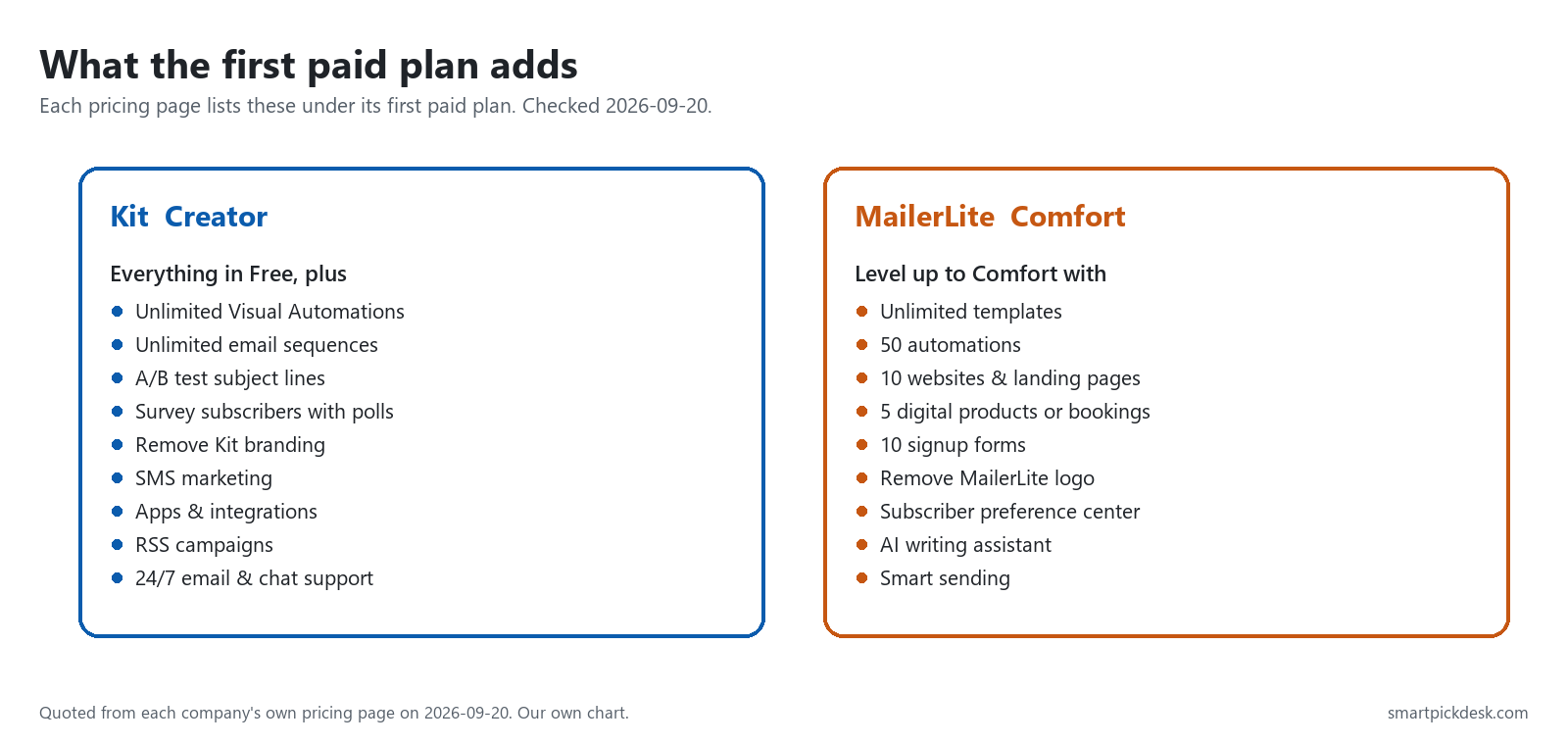
MailerLite publishes a number for every plan: 3 on Free, 50 on Comfort, unlimited on Power.[2] Kit does not list automations on its Free plan at all; “Unlimited Visual Automations” and “Unlimited email sequences” appear in the “Everything in Free, plus” list under Creator.[1]
This single line flips the whole comparison. If you do not need automation yet, Kit's free plan is hard to argue with. If you do, Kit's free plan is not really in the running, and you are comparing Kit's paid price against MailerLite's free plan — which is a much less flattering comparison for Kit.
What it costs as your list grows
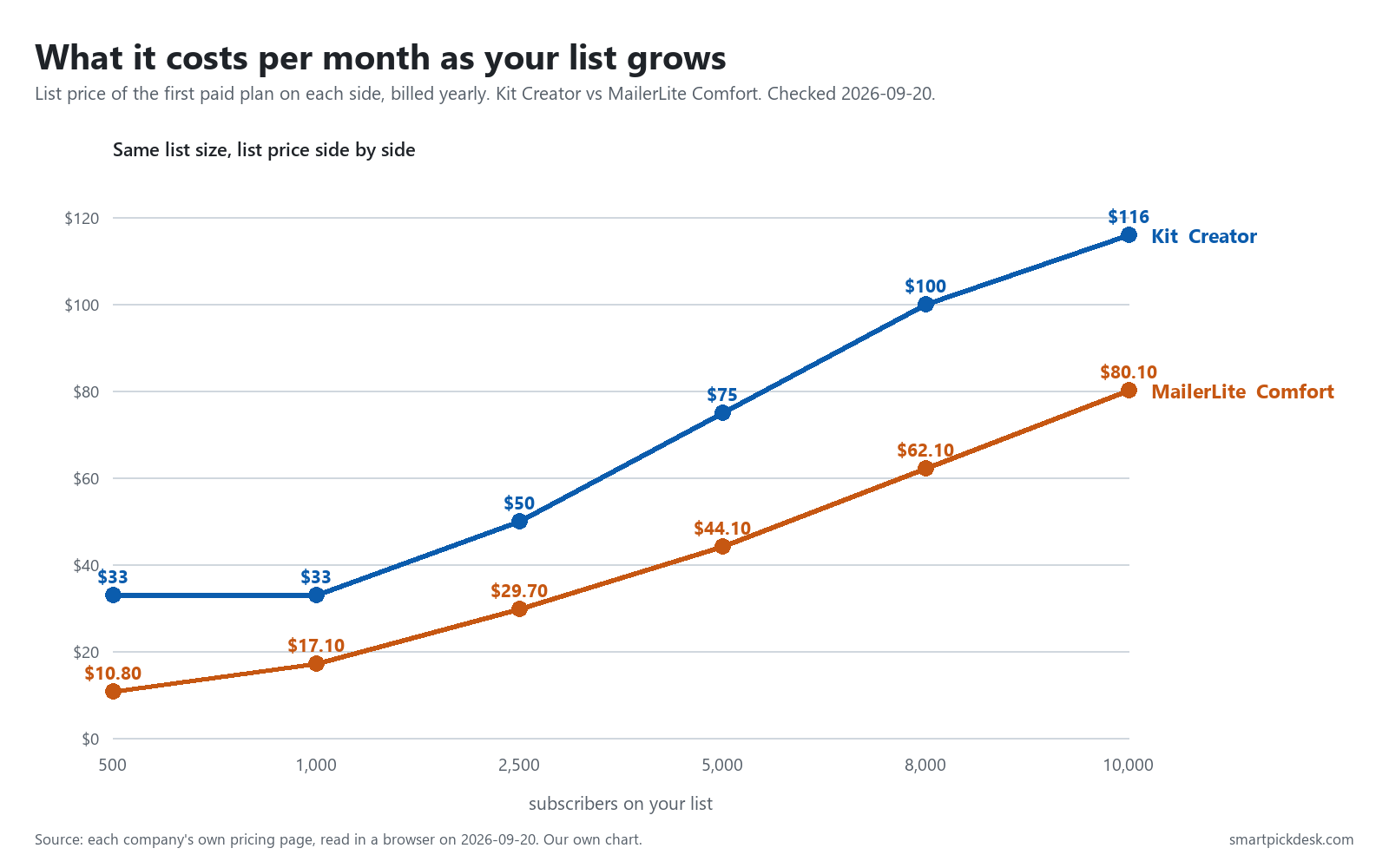
Neither pricing page shows you the other one. This is the comparison you would otherwise have to build by hand: the list price of each company's first paid plan, at the same list size, on the same day, billed yearly.
| Your list | Kit Creator, billed yearly | MailerLite Comfort, billed yearly | Difference per month |
|---|---|---|---|
| 500 | $33[1] | $10.80[2] | $22.20 |
| 1,000 | $33[1] | $17.10[2] | $15.90 |
| 2,500 | $50[1] | $29.70[2] | $20.30 |
| 5,000 | $75[1] | $44.10[2] | $30.90 |
| 8,000 | $100[1] | $62.10[2] | $37.90 |
| 10,000 | $116[1] | $80.10[2] | $35.90 |
Kit's slider has no step below 1,000 subscribers, so the $33 figure is what it shows for any list up to 1,000. Kit has no 2,500 step either: the $50 in that row is what its slider shows at 3,000, which is the tier a 2,500-person list falls into. MailerLite's smallest step is 500. The two plans are not feature-identical, so this is a price comparison, not a value judgement.
Two things worth noticing in that table. First, the gap is roughly constant in dollars but shrinking in proportion: Kit is about three times MailerLite's price at 500 subscribers and about 1.4 times at 10,000. Second, at 10,000 subscribers Kit still offers a free plan — so the $116 figure is what you pay for automation and the other Creator features, not for the list itself.
Monthly or yearly: the same plan at two prices
Both pricing pages open on the yearly price. If you switch to monthly billing, both numbers go up and nothing about the plan changes.
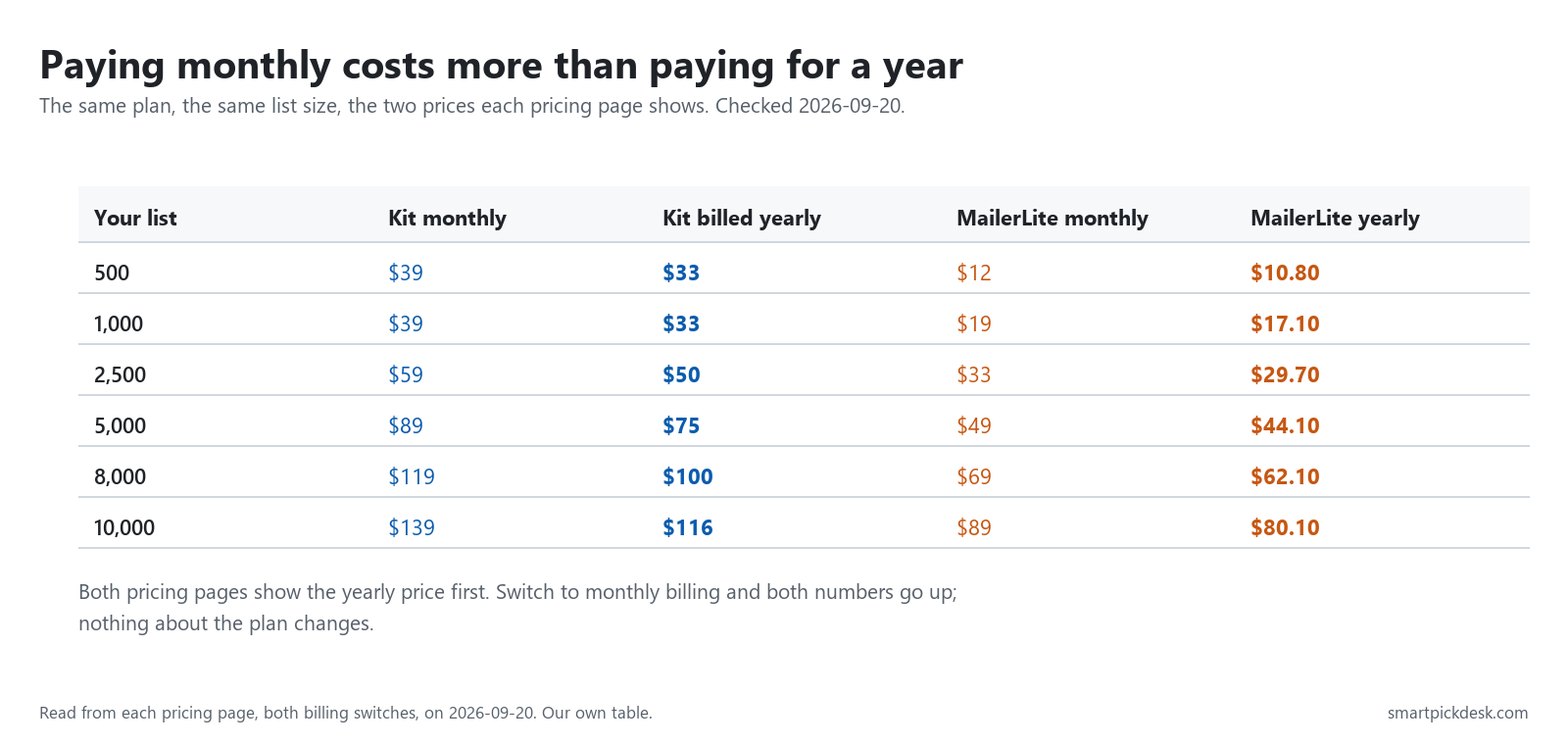
At 1,000 subscribers, Kit Creator is listed at $33 per month billed yearly ($390 for the year) and $39 per month if you pay monthly.[1] MailerLite Comfort at 500 subscribers is $10.80 per month billed yearly ($129.60 for the year) and $12 per month if you pay monthly.[2] MailerLite labels its yearly option “Save 10%”; Kit labels its own “Pay yearly—save 17%”.
The practical point is less about the discount and more about the default: a price you glanced at on either page was almost certainly the yearly one. If you were planning to pay month to month, the monthly figure is about 11% higher on MailerLite ($12 against $10.80) and about 18% higher on Kit ($39 against $33).
The moment free ends
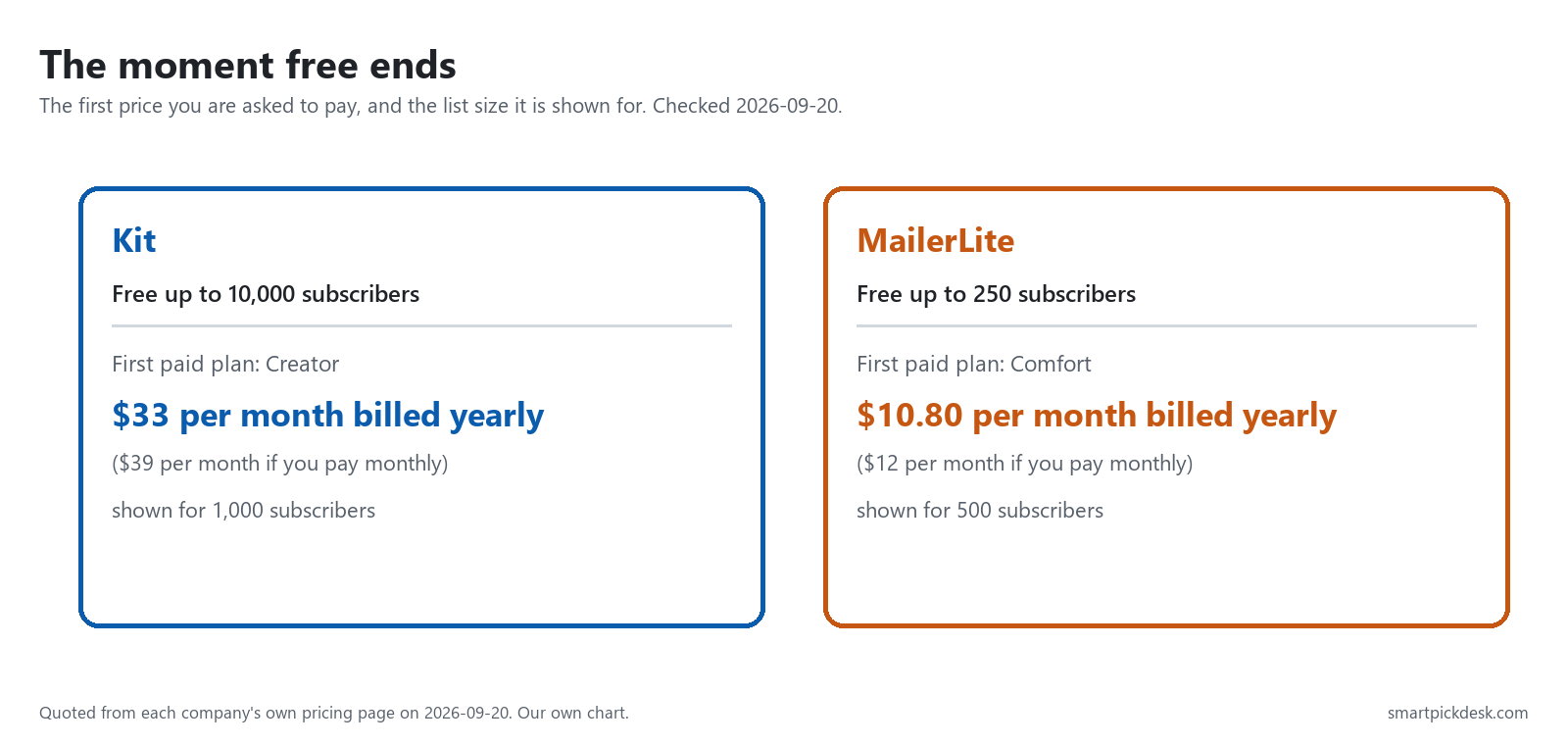
The two paths out of free look nothing alike. With MailerLite you will probably meet the paywall early — 250 subscribers arrives quickly — but the first step is small. With Kit you may never meet it at all while your list is under 10,000, unless you want automation, in which case you meet it on day one and the step is larger.
Forms, landing pages and somewhere to publish
If you do not already have a website, the tool has to host your sign-up page. Kit lists “Unlimited landing pages & forms” on its free plan.[1] MailerLite's free plan lists “1 website & 1 landing page” and “3 signup forms”; Comfort raises that to “10 websites & landing pages” and “10 signup forms”, and Power lists both as unlimited.[2]
The difference matters most if you plan to test. One landing page is enough to launch. It is not enough to run two versions of an offer at once, and on the free plan MailerLite's limit of one will stop that before it starts.
Selling digital products and paid subscriptions
Both list selling on the free plan, with different wording. Kit's free plan says “Sell digital products & subscriptions” with no number attached.[1] MailerLite's free plan says “1 digital product or booking”, Comfort says “5 digital products or bookings”, and Power lists them as unlimited.[2]
Neither pricing page prints a transaction-fee percentage for those sales, and we are not going to guess at one. If selling is the reason you are choosing, that is the number to go and find before you decide — it is usually larger than the difference in monthly price.
What we could not test — and what each page claims about it
Half of this comparison is beyond us. Whether an editor is pleasant to write in, whether the templates look modern, whether emails reach the inbox, whether support answers quickly — those need an account and months of real sending. Reviewers who run both products test exactly those things, and for that half of the question you should read one of them rather than us.
What we can show is which plan each company puts those features on, because that is printed on the pricing pages and it decides what you pay.
| Area we did not test | Where Kit lists it | Where MailerLite lists it |
|---|---|---|
| Support | “24/7 email & chat support” under Creator; “24/7 priority” under Pro[1] | “Community support” on Free; “24/7 Email support” on Comfort; “24/7 Live chat & email support” on Power[2] |
| Integrations and API | “Apps & integrations” under Creator[1] | “100+ integrations” on Free; the comparison table marks API, MCP Server and Webhooks as limited on Free[2] |
| Analytics and reporting | “Engagement analytics” and “Insights dashboard” under Pro[1] | “Comparative reporting”, “Click maps” and “List growth reporting” in the paid columns[2] |
| Deliverability | “Deliverability reporting” under Pro, the second paid plan[1] | “Smart sending” and “Deliver emails by timezone” in the paid columns[2] |
| Templates | not listed as a plan feature on the pricing page[1] | “Unlimited templates” from Comfort; newsletter templates marked limited on Free[2] |
Two things stand out even without touching either product. MailerLite prints a number or a limit for almost everything, including on its free plan; Kit's free column simply does not mention several of these areas at all. That is a difference in how much the page tells you before you sign up — not a claim about which product is better.
We also wanted third-party ratings here, with the review count and the date we read them. Both review sites we tried refused automated access on 2026-09-20, so there is nothing in this space rather than a number we could not verify.
Where each one is weaker
Kit: what to know before you commit
- No automation on the free plan. The feature most people want a mailing tool for is on the paid side of the line.[1]
- The first paid step is a big one. $33 per month billed yearly is the entry price at any list size up to 1,000 — there is no smaller step for a list of 200.[1]
- Seats and support are not spelled out for the free plan. They are not among the key features listed in the Free column, so that page alone does not tell you what you get.[1]
MailerLite: what to know before you commit
- 250 subscribers is a starting line, not a home. Any list that works will pass it within months.[2]
- Two ceilings on free, not one. 2,500 monthly emails can bind before the subscriber count does.[2]
- Automation counts are capped until the top plan. 3 on Free and 50 on Comfort are generous for most people but they are countable, and the page also lists “Automation steps” as 5 on Free against 100 on the paid plans.[2]
Who should pick which
| If you are… | Pick | Why | Watch out for |
|---|---|---|---|
| Starting a newsletter with no list and no automation yet | Kit | Free to 10,000 subscribers, unlimited broadcasts, unlimited landing pages and forms[1] | The day you want a welcome sequence, the price is $33/mo billed yearly, not $0 |
| Setting up a welcome sequence before you have subscribers | MailerLite | 3 automations are on the free plan[2] | 250 subscribers and 2,500 monthly emails arrive fast |
| Already paying and watching costs | MailerLite | Lower list price at every size we checked, from $10.80 to $80.10 per month[2] | Compare features, not only price — the plans are not equivalent |
| Mailing a small list very often | Kit | “Unlimited email broadcasts” on the free plan[1] | Still no automation until Creator |
| Planning to sell a digital product soon | Check the fees first | Both list selling on the free plan[1][2] | Neither pricing page states the transaction fee |
See Kit's own pricing page See MailerLite's own pricing page
Comparing a third option? See Kit vs beehiiv: the point where the cheaper one changes.
Looking at more than two? What “free” actually means on 8 email platforms compares every free plan we could read.
One company at a time: Kit pricing, checked and MailerLite pricing, checked go through each company's plans, billing and terms on its own.
Questions people ask
Is Kit really free up to 10,000 subscribers?
That is what the pricing page says: “Free—up to 10,000 subscribers”.[1] We also checked the plan comparison slider: the Free column offers sign-up up to 10,000 and reads “Max subscribers” from 15,000 upwards, which matches. Automations are not part of it.
Why is MailerLite's free plan only 250 subscribers?
That is the published limit, alongside 2,500 monthly emails.[2] What you get in exchange is a free plan that can actually automate: 3 automations, 1 website and 1 landing page, 3 signup forms, 100+ integrations.
Which one is cheaper once I am paying?
MailerLite, at every list size we checked — $17.10 against $33 per month at 1,000 subscribers, $80.10 against $116 at 10,000, both billed yearly.[1][2] The plans are not identical, so cheaper is not automatically better for you.
Does the price I see apply to my list?
Only if your list is the size shown on the slider. Both pages also default to the yearly price. Move the slider to your own number and check the billing switch before you compare anything.
Can I move from one to the other later?
Both companies publish migration help, and Kit's pricing page lists “Free migrations” next to its trial terms.[1] We have not run a migration, so we cannot tell you how it goes in practice.
Do you get paid if I sign up?
Not from this page — it has no affiliate links today. If that changes, it will say so at the top, and each link will be marked.
Sources and check log
| # | Source | URL | Checked | How |
|---|---|---|---|---|
| 1 | Kit, Pricing (plans, the “Compare plans and features” slider and the yearly/monthly switch) | kit.com/pricing | 2026-09-20 | Opened in a browser; every slider step and both billing positions recorded |
| 2 | MailerLite, Pricing (plans, the subscriber slider, the billing switch and the full plan comparison table) | mailerlite.com/pricing | 2026-09-20 | Opened in a browser; every slider step recorded and cross-checked against the price the page displayed |
Change log
- 2026-09-23 — Added a note under the price table: Kit's slider has no 2,500 step, so the $50 in that row is its 3,000 step. No number changed. On this date we also re-opened both pricing pages; the prices in their default view were the same as on 2026-09-20. The other slider steps were not re-read.
- 2026-09-23 — Corrected the worked example under the free plan table: 200 people mailed three times a week is about 2,600 emails a month (52 weeks ÷ 12), not about 2,400, which is over MailerLite’s 2,500 monthly emails. No limit or price changed.
- 2026-09-20 — First published. All prices and plan wording read from the two pricing pages on this date.
- Previous check: 2026-09-20 (first version).
- What we will re-check: the price at each slider step, the free plan limits, and whether either company changes its default billing view.
Who writes this
Smart Pick Desk is an independent site that compares tools for people who work online. We are not employed by, or partnered with, either company on this page, and we do not run either product in our own business. What we do is read what each company publishes, write down the date we read it, and say plainly which parts we could not check. More: who the editors are and how we check a page.
We do not promise results. Nothing here is a prediction about what a tool will do for your list.