What you can build on Systeme.io's free plan: a website, a blog, three funnels and a course, checked
Last updated 2026-10-04 · By Smart Pick Desk editors · Pricing page, terms and help centre read on 2026-10-04 · We have not used Systeme.io · How we checked ↓
The short answer
Our Systeme.io pricing page covers when you start paying. This page covers the other question: what you can actually put online on the Free plan before paying anything — and which single limit you will meet first.
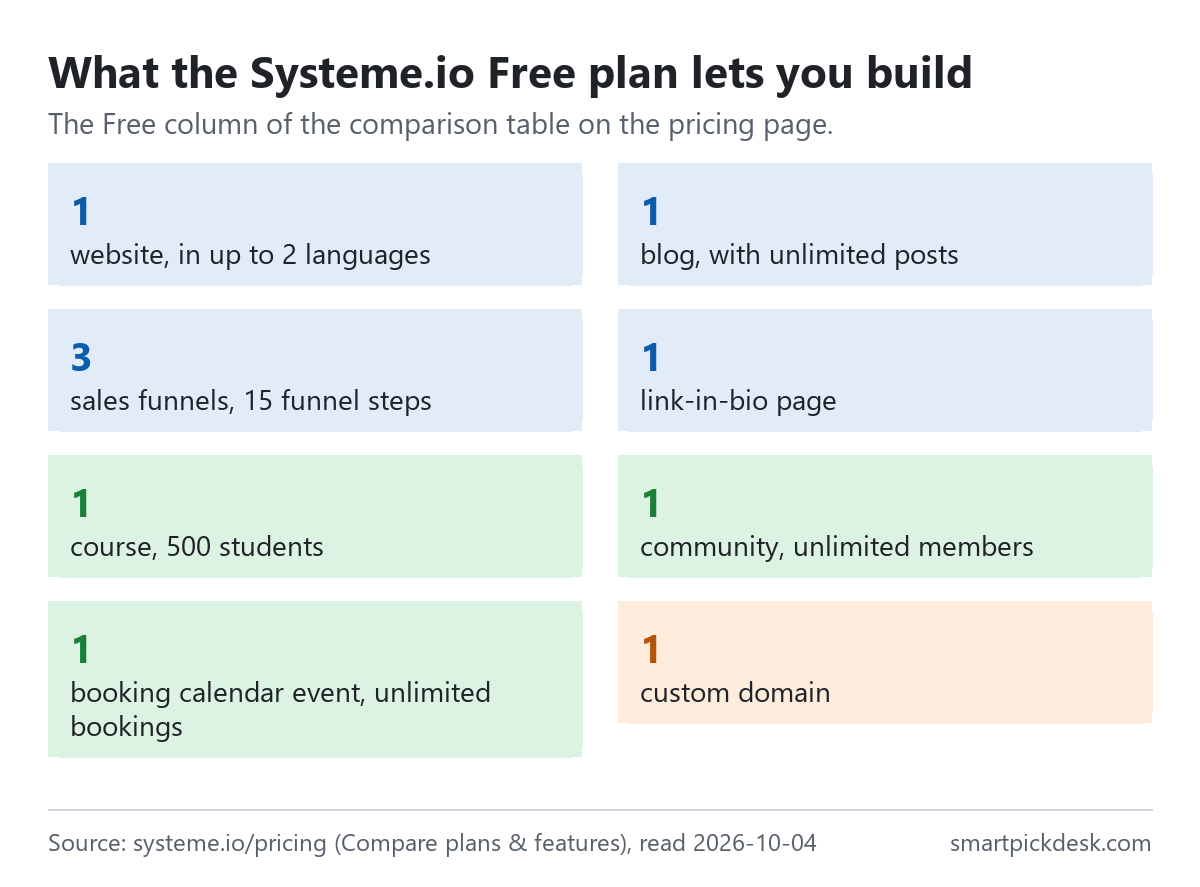
- One of each place to publish. The Free column lists 1 website, 1 blog with unlimited posts, 3 sales funnels with 15 funnel steps, 1 link-in-bio page, 1 course for 500 students, 1 community and 1 custom domain.[1]
Go to Systeme.io (paid ad)
- One of each automation. 1 automation rule, 1 workflow, 1 email campaign and 1 tag.[1] One rule is enough for a welcome email to new sign-ups, and not much more.
- Selling is allowed, up to a lifetime limit. Article 5a of the terms: “Accounts on the free plan are limited to USD 10,000 in lifetime sales revenue. Affiliate commissions are not included in this calculation.”[2]
If you want one sentence: the Free plan is enough to put one site, one blog and a sign-up page with a welcome email on your own domain, and the limits of one rule, one tag and one campaign are what will push you to a paid plan before the 2,000 contacts do.
On this page
At a glance
| What you build | Free plan | Next plan up (Startup) |
|---|---|---|
| Websites | 1 (up to 2 languages) | 5 (unlimited languages) |
| Blogs | 1, unlimited posts | 5, unlimited posts |
| Sales funnels | 3 | 10 |
| Sales funnel steps | 15 | 50 |
| Link-in-bio pages | 1 | 3 |
| Courses | 1, 500 students | 5, unlimited students |
| Communities | 1, unlimited members | 5, unlimited members |
| Booking calendar events | 1, unlimited bookings | 5, unlimited bookings |
| Custom domains | 1 | 3 |
| Contacts | 2,000 | 5,000 |
The “Compare plans & features” table on the pricing page, read on 2026-10-04.[1] The Free card reads: “Access all core features with limited usage: 3 funnels, 1 automation rule, 1 custom domain, and up to 2,000 contacts. Perfect for testing the platform”, with “No credit card required”.
Read down the Free column and a pattern stands out: the places to publish are each allowed once, while the things inside them are mostly unlimited — blog posts, community members, bookings, and email newsletters.[1] The count that matters on Free is how many separate things you build, not how much you put in each.
How we checked this (and what we did not check)
Last updated 2026-10-04 (first version). Every number and quotation here comes from Systeme.io's own pages. Limits change — confirm on Systeme.io's own page before you build.
What we did. On 2026-10-04 we opened systeme.io/pricing in a browser with no account and saved the page text, including the comparison table and the FAQ. The same day we saved the terms and conditions and thirteen help-centre articles: website methods, blogs, blog posts, funnels, opt-in forms, courses, connecting a domain, choosing a domain's homepage, automation rules, automatic emails, payments, linking to an external site, and cancelling. Wording in quotation marks is copied from those saved pages word for word, and a script checks every quotation against the saved text.
What we did not do. We have not used Systeme.io. There is no account, no screenshot of the editor and no view here on page speed, templates or deliverability. Every image is a chart or summary we drew from the saved text; none shows Systeme.io's logo or screens. The help article on website methods describes the blog route and the funnel route; we did not read a separate article on the Websites feature that the comparison table lists. Where the pricing page's table, cards and FAQ disagree, we say so and use the table.
What that leaves. What the Free plan's limits allow you to build, how Systeme.io's help centre says each piece is built, and the rules in the terms that apply to free accounts.
Two ways to make a website
The help centre gives two routes: “You can use either the blog or sales funnel feature to create your website.”[3]
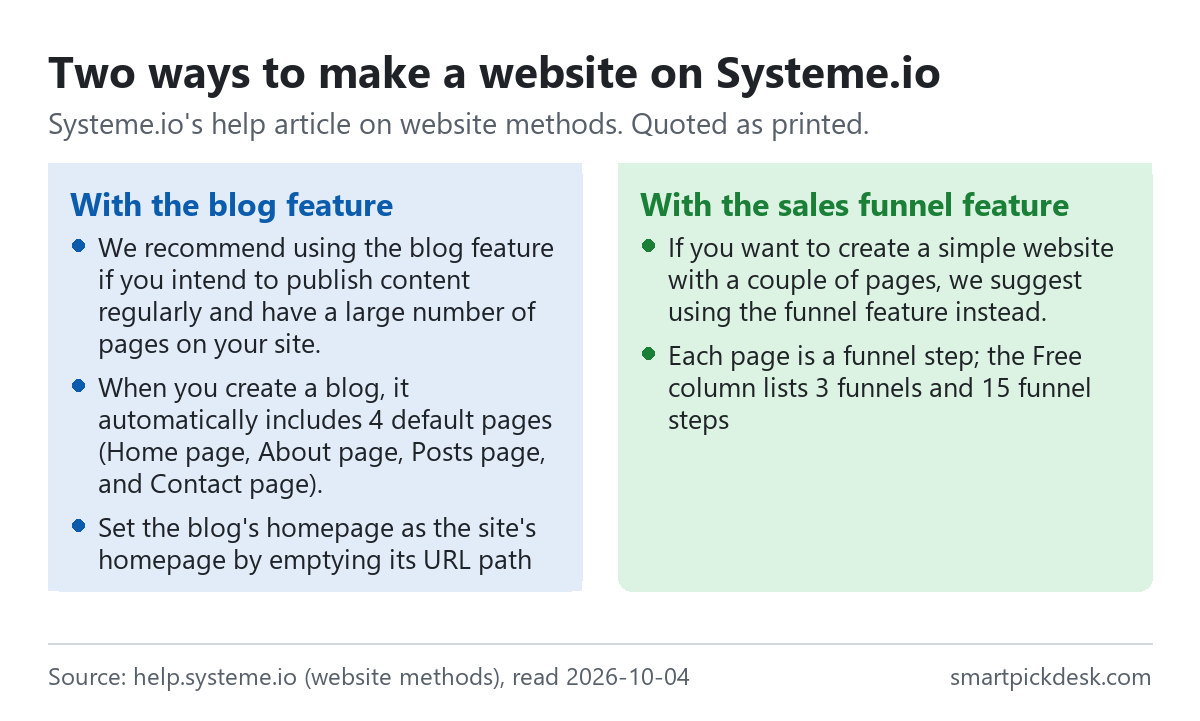
- The blog route: “We recommend using the blog feature if you intend to publish content regularly and have a large number of pages on your site.”[3] A new blog starts with pages already in place: “When you create a blog, it automatically includes 4 default pages (Home page, About page, Posts page, and Contact page).”[3]
- The funnel route: “If you want to create a simple website with a couple of pages, we suggest using the funnel feature instead.”[3]
Both routes in the article list the same first requirement: a custom domain previously connected to Systeme.io.[3] The Free plan has one custom domain, so whichever route you choose uses it. The blog route also has a menu built into the blog layout that appears on every blog page, and you can turn it off for a single page.[3]
Which route fits the Free plan better follows from the limits. The blog route spends your one blog and leaves the three funnels for sign-up and sales pages. The funnel route spends funnel steps on ordinary pages — and the Free column allows 15 steps — so a five-page site built from funnel steps uses a third of them.[1]
A blog on the free plan
To create one: Sites, Blogs, Create, then a name, the blog domain, a URL path and a template.[4] Two details from the help article:
- “When you create a blog, an RSS feed is automatically generated.” It updates with each new post, and the feed URL is in the blog settings.[4]
- “The Home page and Post list page cannot be deleted because they are essential to your blog's structure.”[4]
Each post has a title, a short description shown on listing pages, a URL path, a main image and categories.[5] A new post is not live straight away: “Once you've finished customizing the content, click on the three dots again and choose Activate” to display it.[5] The blog comes with some default posts, which you can edit or delete.
To make the blog the front page of your domain, the help article on homepages says to open the blog's settings and “Delete the text from the URL path field (leave the field empty)”.[9] The same article gives the same step for a website, a sales funnel page or a creator store, so whichever you build first can sit at the root of your domain.
On Free the blog limit is one blog with unlimited posts.[1] A single blog with categories is the intended shape; a second, separate blog needs a paid plan.
Three funnels, fifteen steps
A funnel in Systeme.io is a sequence of pages. To create one: Sites, Sales funnels, Create, then a name, a domain and a currency, and one of four types.[6]
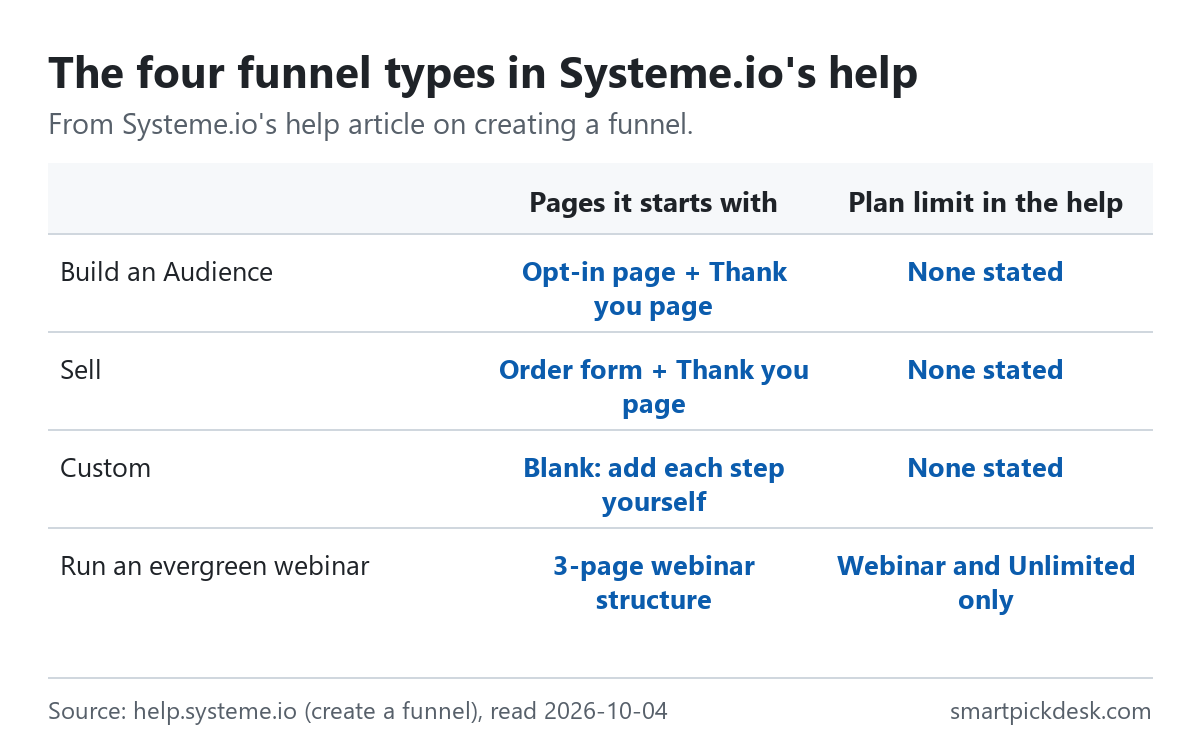
- Build an Audience: “This is the simplest funnel structure. It includes an Opt-in page and a Thank you page. Use this funnel primarily to grow your email list.”[6]
- Sell: “This funnel comes preset with an Order form and a Thank you page.”[6]
- Custom: a blank funnel where you add each step yourself.
- Run an evergreen webinar: “The Webinar option is only available on Webinar and Unlimited plans.”[6] The Free column lists 0 evergreen webinars.[1]
The Free column lists 3 sales funnels and 15 sales funnel steps.[1] The table does not say whether the 15 steps are per funnel or for the whole account, and the funnel article does not either. If it is the whole account, three two-page funnels (an opt-in page and a thank-you page each) use six of the fifteen.
A funnel can also sit behind a site you already have. The help article on external websites says to copy the URL of the funnel's first step (or any step) and paste it into a link or button on the other site.[11]
Collecting emails and sending a welcome email
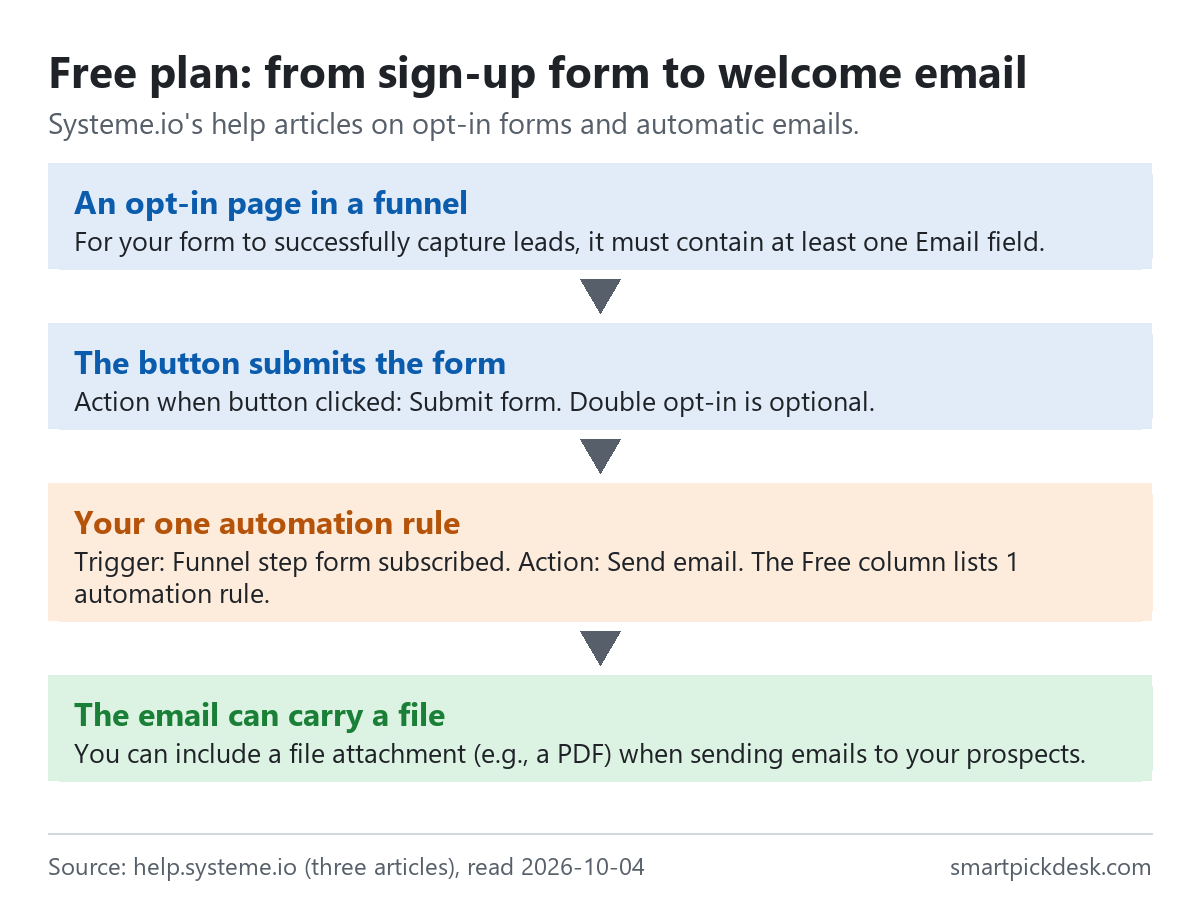
- A form on an opt-in page. “For your form to successfully capture leads, it must contain at least one Email field.”[7] The form can also sit in a popup.
- A button set to Submit form. After sign-up the visitor can go to the next step, to a custom URL, or stay on the page with a message.[7]
- Double opt-in, if you want it. Contacts get a confirmation email, and “If a contact does not click the link within 24 hours of receiving the email, they will be automatically deleted from your list.”[7]
- The welcome email is an automation rule: trigger Funnel step form subscribed, action Send email.[12] “You can include a file attachment (e.g., a PDF) when sending emails to your prospects.”, and the article adds that “we restrict the size of file attachments to 5 MB”.[12]
On Free that rule is the plan's only one: the Free column lists 1 automation rule and 1 workflow.[1] Two more lines from the automation rules article apply to it: “A trigger can only be activated a maximum of 20 times by the same contact.” and “Automation rule task history is stored for only one month.”[10]
So the Free plan covers the common first build — a sign-up page that delivers a PDF by email — with one rule. A second rule, for example tagging buyers or sending a different email from a second funnel, is the point where Free runs out.
Courses, communities, bookings and link-in-bio
The Free column lists one of each: 1 course, 1 community, 1 booking calendar event and 1 mobile-optimised link-in-bio page, with unlimited community members and unlimited bookings.[1]
A course. The help article builds a course from modules and lectures under Assets, Courses, with a domain, a URL path and a theme.[8] Lectures can be released over time: “Drip content: This means that your clients will access your lectures progressively, according to the delay you have defined.”[8] The article lists four access types — full, drip, partial, and partial with drip — and notes that the delay counts from the previous lecture, not the start of the course.
The student limit. The Free column lists 500 students for the course.[1] The pricing page also has an “All plans include” panel listing unlimited students, — see where the pricing page disagrees below.
The rest. We did not read help articles on communities, the booking calendar or link-in-bio pages, so we can give only the numbers in the table for those.
Your own domain on the free plan
The Free plan includes one custom domain.[1] The help article on connecting a domain sets two rules before the steps.
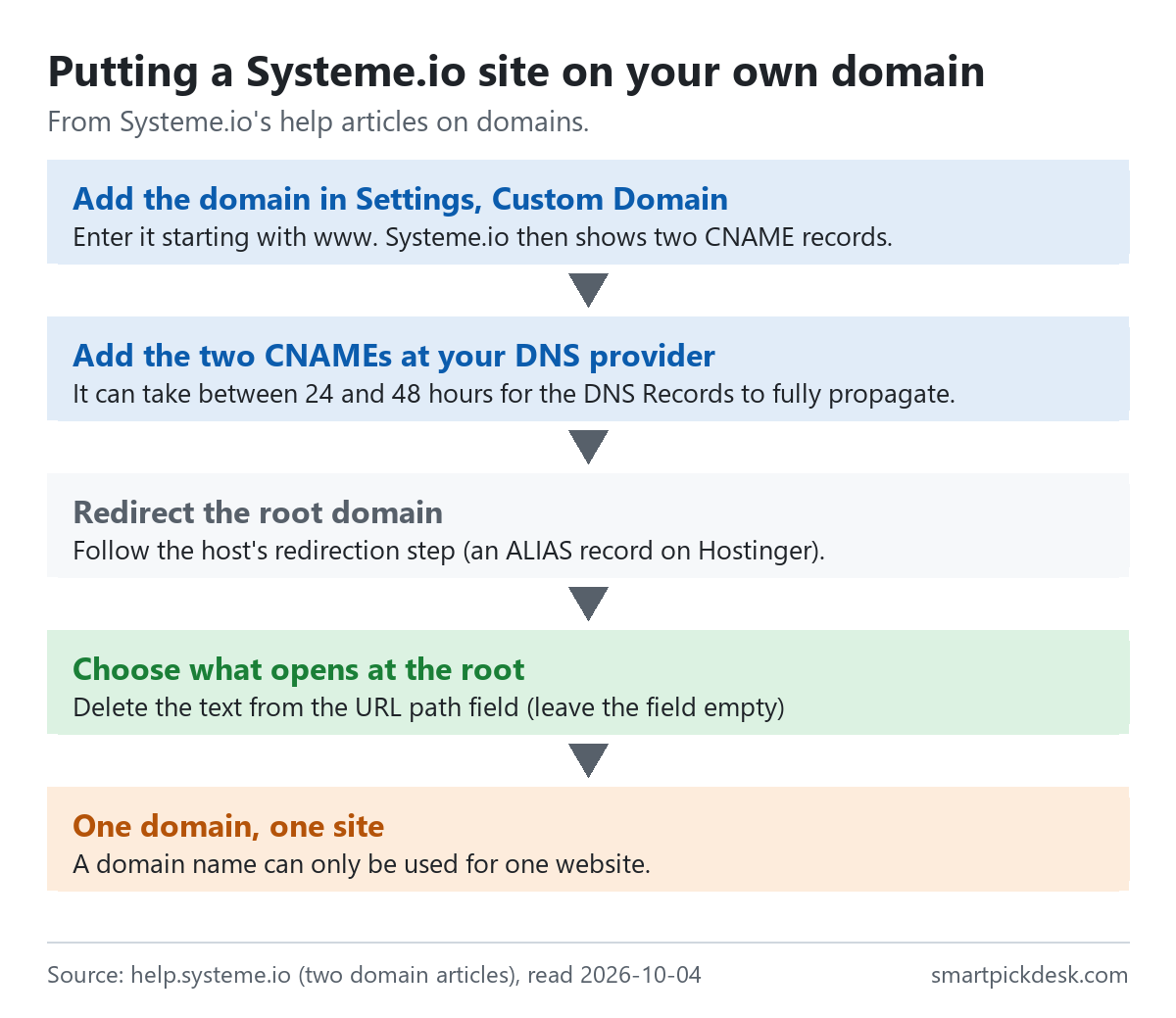
- “A domain name can only be used for one website.” If the domain already points to another site, it stops being available to that site once it is added to Systeme.io.[9]
- The domain is registered elsewhere; Systeme.io connects it rather than selling it.[9]
The steps: in Settings, Custom Domain, add the domain starting with www; Systeme.io then shows two CNAME records to add at your DNS provider. “It can take between 24 and 48 hours for the DNS Records to fully propagate.” Then set up a redirect for the root domain at your host (on Hostinger, an ALIAS record).[9]
On Free, this one domain carries everything: the blog, the funnels and the course all choose a domain when you create them.[4][6][8]
Selling on the free plan, and the one-of-each limits
The pricing page lists 0% transaction fees on every plan, including Free, and says “Accept payments using Stripe or PayPal at no extra cost”.[1] The help article on payments switches them on in a funnel's settings by ticking card payments and PayPal.[13] Stripe and PayPal charge their own fees, which the Systeme.io pages we read do not list.
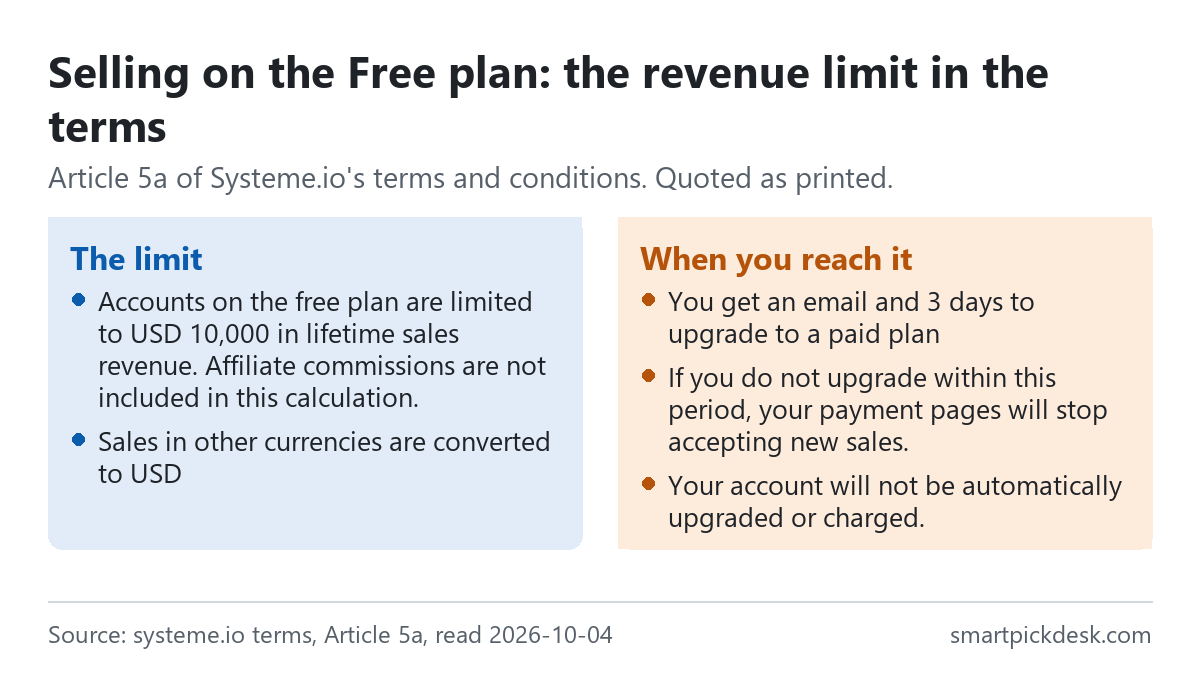
The lifetime sales limit. Article 5a: “Accounts on the free plan are limited to USD 10,000 in lifetime sales revenue. Affiliate commissions are not included in this calculation.” Near the limit, a notice appears on the dashboard; at the limit, you get an email and 3 days to upgrade. “If you do not upgrade within this period, your payment pages will stop accepting new sales.” And: “Your account will not be automatically upgraded or charged.”[2] The limit is lifetime, not monthly; sales in other currencies are converted to USD, and the article says exchange-rate changes can affect whether you reach it.
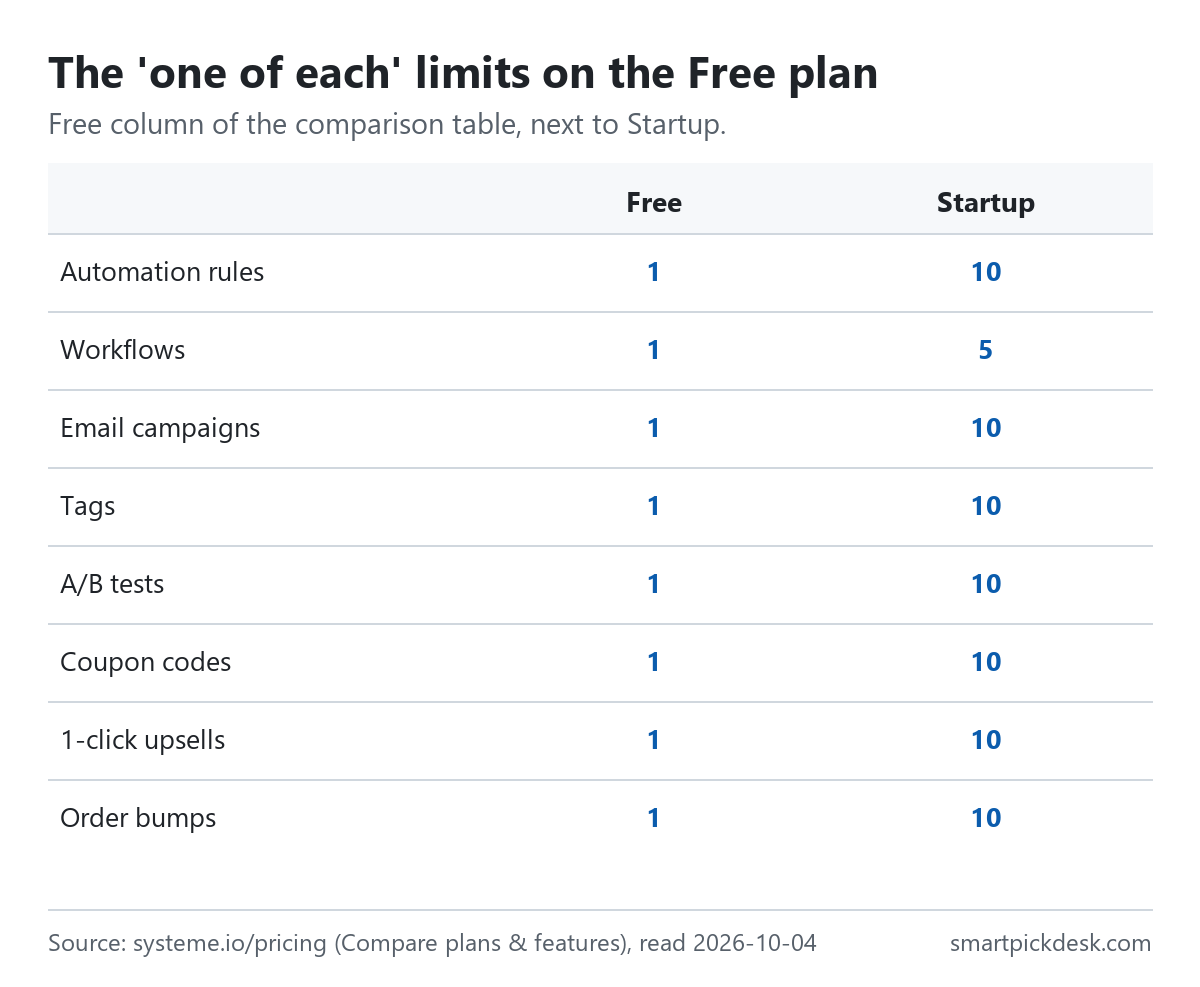
| Limit | Free | Startup | What one means in practice |
|---|---|---|---|
| Automation rules | 1 | 10 | One trigger-and-action, such as a welcome email |
| Workflows | 1 | 5 | One multi-step automation |
| Email campaigns | 1 | 10 | One sequence; newsletters stay unlimited |
| Tags | 1 | 10 | One way to label contacts |
| Order bumps, 1-click upsells, coupon codes | 1 each | 10 each | One extra offer of each kind |
| A/B tests | 1 | 10 | One test at a time |
From the comparison table.[1] The right-hand column is our reading of the numbers, not Systeme.io's wording.
Put together, a first product on Free can have a sales page, an order form with one bump and one upsell, and one coupon. The lifetime limit and the one-of-each limits are the two separate reasons a seller moves up.
Where the pricing page disagrees with itself on Free
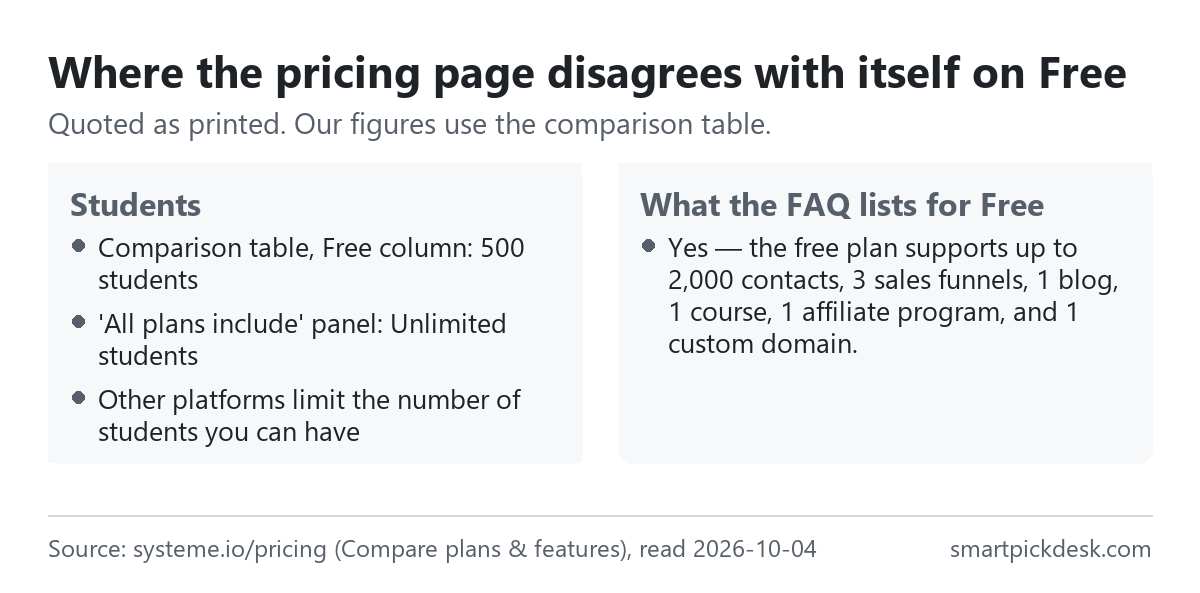
- Students. The comparison table lists 500 students on Free and unlimited on the paid plans.[1] Lower on the same page, the “All plans include” panel lists unlimited students, with the line “Other platforms limit the number of students you can have”.[1] We use the table's 500.
- What Free includes. The FAQ answers: “Free: 2,000 contacts, 3 sales funnels, 1 course, all features.” and, in another answer, “Yes — the free plan supports up to 2,000 contacts, 3 sales funnels, 1 blog, 1 course, 1 affiliate program, and 1 custom domain.”[1] Both agree with the table on these numbers. The table adds the limits the FAQ leaves out: 1 automation rule, 1 tag, 1 email campaign.
The FAQ section ends with “Last updated: April 2026”.[1] The terms' Article 5a, which the FAQ does not mention, was added later: our record of the terms from 2026-09-23 does not have it.
When you would pay, and what leaving looks like
The pricing page FAQ: “The free plan never expires and does not require a credit card.”[1] The next plan up, Startup, is $17 a month; our Systeme.io pricing page sets out the paid plans, yearly billing and the 3-day rule for going over a paid plan's limits.
- Refunds: Article 3 of the terms: “Please note that our subscription plans are not refundable.”[2]
- Cancelling a paid plan: “When a customer cancels one of his subscriptions, the cancellation will take effect on the next payment date.”[14]
- Back on Free with more than Free allows: the pricing FAQ says contacts above the limit are archived, not deleted.[1] It does not say what happens to a second blog or a fourth funnel built on a paid plan.
Because the Free plan has no time limit, the practical test is to build the one site and the one sign-up funnel you need on Free first, and pay only when a second rule, tag or campaign becomes necessary.
Go to Systeme.io (paid ad) Read Systeme.io's terms
Which situation fits the free plan
| If you want to… | On Free? | From Systeme.io's pages | Watch out for |
|---|---|---|---|
| Publish a blog on your own domain | Yes | 1 blog, unlimited posts, 1 custom domain[1] | A domain can only be used for one website[9] |
| Collect emails and send a welcome email with a PDF | Yes | Opt-in page plus 1 automation rule[1][12] | That uses your only rule; 5 MB attachment limit[12] |
| Sell one product | Yes | 0% transaction fees; Stripe or PayPal[1][13] | USD 10,000 lifetime sales limit[2] |
| Run an evergreen webinar | No | Webinar and Unlimited plans only[6] | — |
| Run a course | Yes, one | 1 course, 500 students in the table[1] | The page also says unlimited students[1] |
| Tag contacts several ways or send several sequences | Barely | 1 tag, 1 campaign, 1 workflow[1] | The usual reason to move to a paid plan |
Questions people ask
Can I build a website on the Systeme.io free plan?
The Free column lists 1 website in up to 2 languages, 1 blog with unlimited posts, 3 sales funnels and 1 custom domain, and the help centre describes building a site with the blog or funnel feature.[1][3]
Does the Systeme.io free plan expire?
The pricing FAQ says it never expires and needs no credit card.[1] The terms limit free accounts to USD 10,000 in lifetime sales.[2]
Can I send a welcome email on the Systeme.io free plan?
Yes, with the plan's one automation rule; the email can carry an attachment up to 5 MB.[1][12]
Can I use my own domain on the free plan?
One custom domain; two CNAME records; 24 to 48 hours to propagate; one domain per website.[1][9]
Can I sell on the Systeme.io free plan?
Yes, with 0% transaction fees, up to USD 10,000 in lifetime sales; after that you have 3 days to upgrade before payment pages stop taking new sales.[1][2]
Do you get paid if I sign up?
Yes, if you sign up through a link marked (paid ad): Systeme.io may pay us a commission at no extra cost to you. The limits and terms on this page are quoted from Systeme.io's own pages either way.
Sources and check log
| # | Source | URL | Checked | How |
|---|---|---|---|---|
| 1 | Systeme.io, Pricing (plan cards, the “Compare plans & features” table, the All plans include panel and the FAQ) | systeme.io/pricing | 2026-10-04 | Opened in a browser with no account; page text saved |
| 2 | Systeme.io, Terms and conditions (Articles 3, 5 and 5a) | systeme.io/terms-and-conditions | 2026-10-04 | Page text saved |
| 3 | Systeme.io help, What are the different methods to create a website? | help.systeme.io › website methods | 2026-10-04 | Page text saved |
| 4 | Systeme.io help, How to create a blog with systeme.io | help.systeme.io › create a blog | 2026-10-04 | Page text saved |
| 5 | Systeme.io help, How to create a blog post | help.systeme.io › blog post | 2026-10-04 | Page text saved |
| 6 | Systeme.io help, How to create a funnel | help.systeme.io › create a funnel | 2026-10-04 | Page text saved |
| 7 | Systeme.io help, How to build your contact list using a funnel | help.systeme.io › contact list | 2026-10-04 | Page text saved |
| 8 | Systeme.io help, How to create a course using systeme.io | help.systeme.io › create a course | 2026-10-04 | Page text saved |
| 9 | Systeme.io help, How to connect your domain to systeme.io; How to define your domain's homepage | help.systeme.io › connect your domain; domain homepage | 2026-10-04 | Page text saved |
| 10 | Systeme.io help, How automation rules work | help.systeme.io › automation rules | 2026-10-04 | Page text saved |
| 11 | Systeme.io help, How to link a sales funnel or a page to your external website | help.systeme.io › external website | 2026-10-04 | Page text saved |
| 12 | Systeme.io help, How to automatically send an email when a lead subscribes | help.systeme.io › automatic email | 2026-10-04 | Page text saved |
| 13 | Systeme.io help, How to activate payments by Stripe or Paypal | help.systeme.io › payments | 2026-10-04 | Page text saved |
| 14 | Systeme.io help, How to cancel systeme.io subscription | help.systeme.io › cancel | 2026-10-04 | Page text saved |
Change log
- 2026-10-04 — First version. Pricing page, terms and help articles read on 2026-10-04.
- Previous check: none for this page (our Systeme.io pricing page read the pricing page and terms on 2026-09-23).
- What we will re-check: the Free column of the comparison table, Article 5a of the terms, and the student numbers on the pricing page.
Who writes this
Smart Pick Desk is an independent site that compares tools for people who work online. We are not employed by Systeme.io, and we do not run it in our own business. We are in Systeme.io's affiliate programme: if you sign up through a link marked (paid ad), Systeme.io may pay us a commission. What we do is read what each company publishes, write down the date we read it, and say plainly which parts we could not check. More: who the editors are and how we check a page.
We do not promise results. Nothing here is a prediction about what a tool will do for your list or your sales.