Systeme.io funnels for Pinterest: the page order, delivering the file, and tracking sign-ups (not purchases) by pin
Last updated 2026-10-26 · By Smart Pick Desk editors · 24 help-centre articles, the pricing page and the terms read on 2026-10-26 · We have not used Systeme.io · How we checked ↓
The short answer
This guide covers three things: the order of a funnel's pages, how buyers receive a file, and which pin link a contact used to sign up. Prices are on our Systeme.io pricing page, plan limits on our free plan page.
- After the order form, the order is fixed. The help centre's example runs opt-in page, sales page, order form, upsell, downsell, thank-you page; we add a thank-you page and a welcome email after the opt-in. The help centre says: “The upsell page must be placed after the main order form, and the downsell page must follow the upsell page.”[16]
Go to Systeme.io (paid ad)
- On Free, one automation rule shapes how you deliver the file. The Free column lists 1 automation rule.[1] The help centre's email delivery methods use a rule triggered by a new sale; its third method, a download link on the thank-you page, has no email step.[17] If the rule sends your welcome email, the third method avoids a second rule. That is our reading; we have not tested it on Free.
- UTM parameters show which pin link brought a sign-up, not a purchase. The UTM article ends: “It is currently not possible to track purchases with UTM parameters on systeme.io”.[21]
If you want one sentence: build the pages in the order shown here, use the free plan's one rule for the welcome email and consider the thank-you page link for the file, and give every pin its own link so the export shows which link each sign-up used.
On this page
At a glance
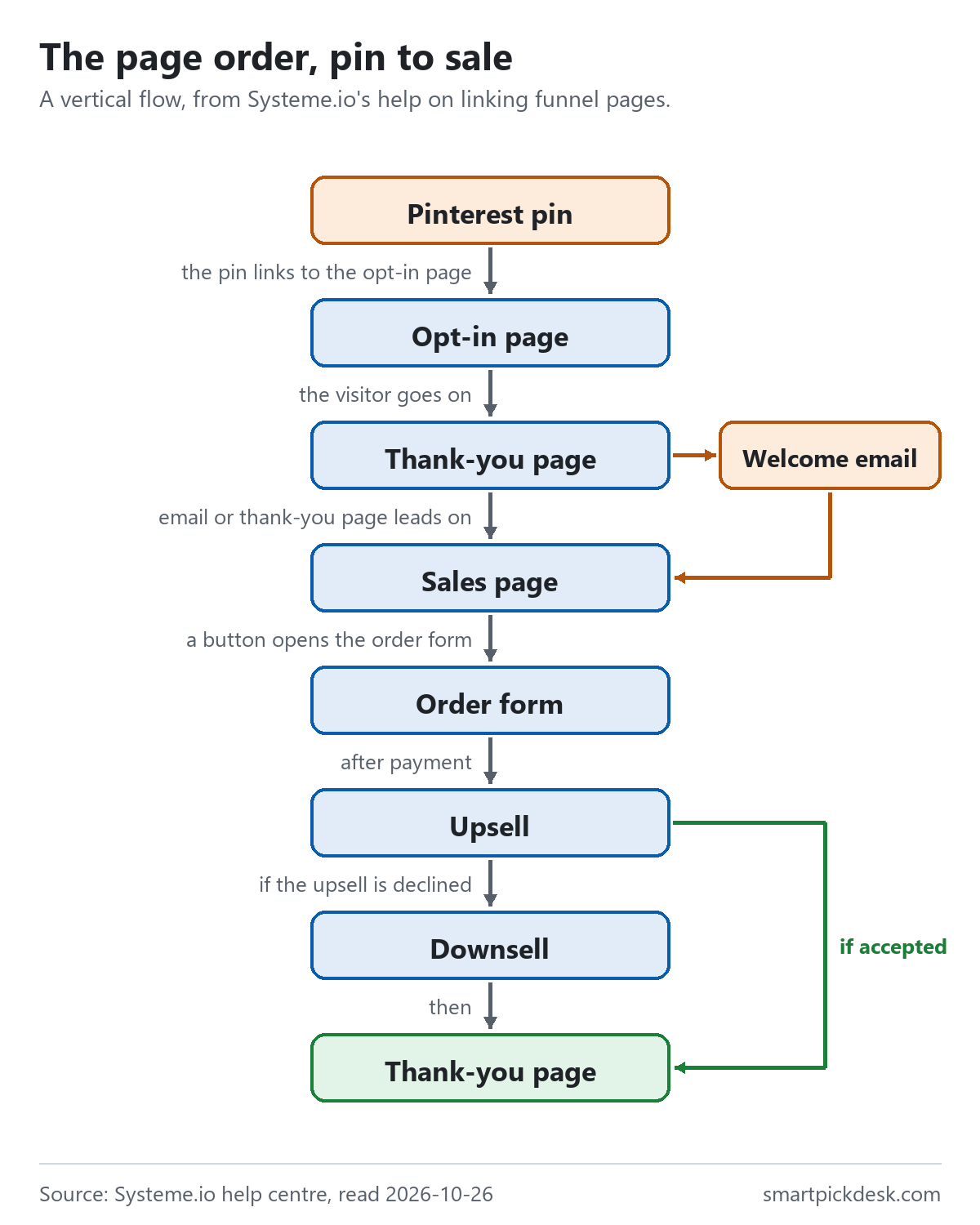
A funnel in Systeme.io is a list of pages, called steps, that a visitor moves through. The help article on linking pages uses this example sequence: opt-in page, sales page, order form, upsell, downsell, thank-you page.[19] For someone arriving from a pin, we add the two pieces that sit around it: a thank-you page after the opt-in, and the welcome email.
| Stage | Systeme.io step or feature | Help article | Free column |
|---|---|---|---|
| 1. The pin's link opens | Opt-in page | [5] | 3 funnels, 15 funnel steps[1] |
| 2. After sign-up | Thank you page (Opt-in category) | [6] | Counts as a step |
| 3. Welcome email | Automation rule: Funnel step form subscribed, then Send email | [8] [9] | 1 automation rule[1] |
| 4. The offer | Sales page | [10] | Counts as a step |
| 5. Payment | Order form with a price plan | [11] [12] | 0% Systeme.io transaction fees; third-party fees may apply[1][23] |
| 6. Extra offers (optional) | Upsell, downsell, order bump | [16] [14] [15] | 1 one-click upsell, 1 order bump[1] |
| 7. After payment | Thank you page (Sales category) | [6] | Counts as a step |
The Free column is from the “Compare plans & features” table on the pricing page, read on 2026-10-26.[1] The table has rows for one-click upsells and order bumps but no row for downsells.
How we checked this (and what we did not check)
Last updated 2026-10-26 (first version). Quotations come from Systeme.io's own pages; the seven-page outline and the free-plan combinations are ours, and we say where we interpret or have not tested. Help articles change — confirm on Systeme.io's own page before you build.
What we did. On 2026-10-26 we saved the text of 24 articles from Systeme.io's help centre, the pricing page (including the comparison table as it shows in a browser) and the terms and conditions, all without logging in. Wording in quotation marks is copied from those saved pages word for word, and a script checks every quotation against the saved text. Each help article shows its own last-updated date; we list them in the sources table.
What we did not do. We have not used Systeme.io. There is no account, no screenshot of the editor and no test purchase behind this page. We have not checked the statistics screens, the templates, or whether emails arrive. Every image is a diagram we drew from the saved text; none shows Systeme.io's logo or screens.
What the help centre does not settle. Whether Store UTM parameters is on the Free plan; whether Free's 15 funnel steps are per funnel or per account; and whether an order form can sell without the resource its guide tells you to specify. Each is marked where it matters.
Step 1: create the funnel and choose its type
To create a funnel: Sites, Sales funnels, Create, then a name, a domain and a currency, and one of four types.[2]
- Build an Audience: “This is the simplest funnel structure. It includes an Opt-in page and a Thank you page.”[2]
- Sell: starts with an order form and a thank-you page.[2]
- Custom: “It provides a blank canvas, allowing you to create any type of page you need from scratch.”[2]
- Run an evergreen webinar: “The Webinar option is only available on Webinar and Unlimited plans.”[2]
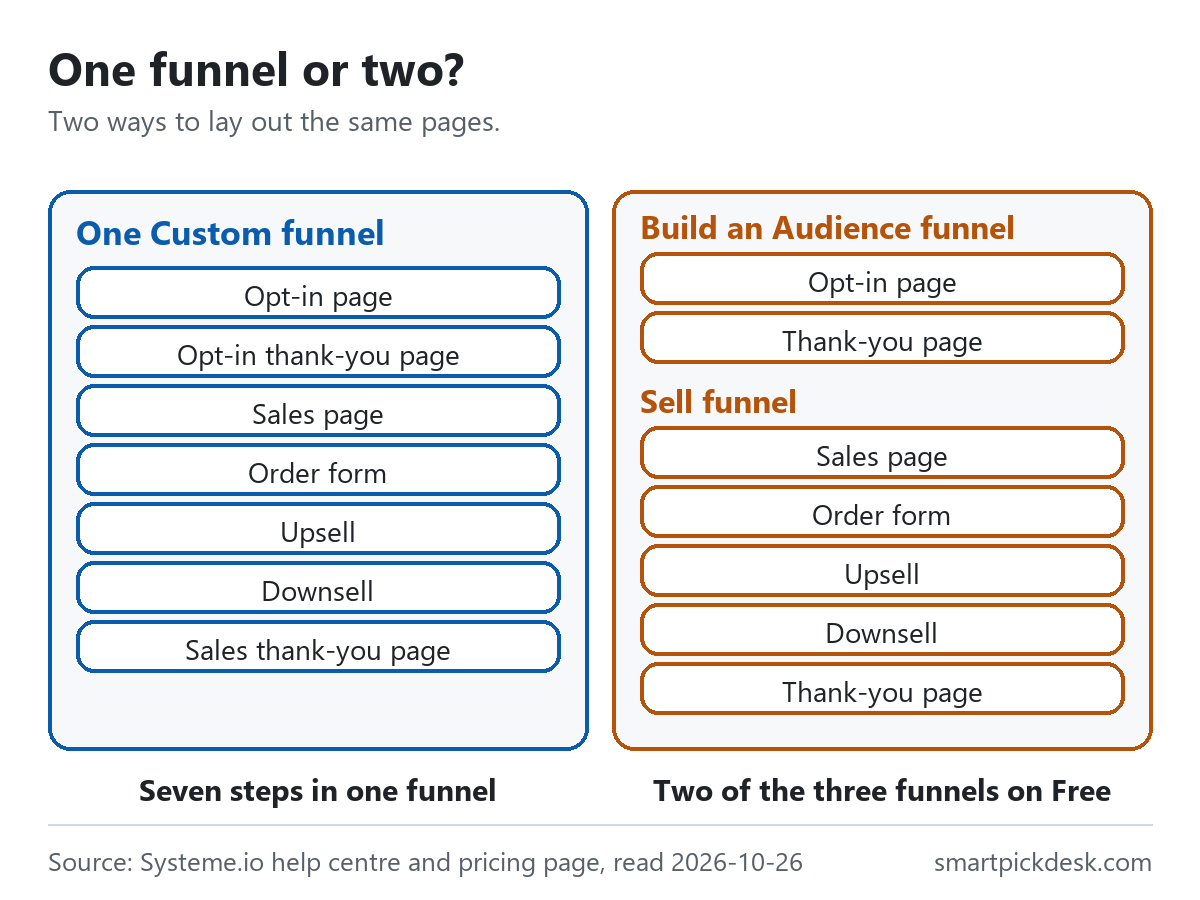
For a pin-to-sale path there are two layouts. One Custom funnel can hold every page in order. Or a Build an Audience funnel can hold the sign-up pages, and a Sell funnel the sales pages, with the welcome email linking from one to the other. The Free column lists 3 sales funnels and 15 sales funnel steps.[1] The full sequence above is seven steps either way. If the 15 steps are counted for the whole account — neither the table nor the funnel article says — two full sequences would use 14 of them.
Systeme.io also has a blog feature, and the help centre explains which to use when: “Use a blog to regularly publish content and improve your SEO, and opt for a sales funnel for direct conversions and simple websites.”[3] The pages in this guide are funnel steps; a blog is optional.
Step 2: the opt-in page and the thank-you page after it
The opt-in page is the page a pin's link opens. In the funnel, click Add step, choose Opt-in page as the type, pick a template or start from scratch, then edit the page.[4] The form on it has one firm rule: “For your form to successfully capture leads, it must contain at least one Email field.”[5]
The button under the form is what turns a visitor into a contact. The help article is direct about it: “The Action when button clicked option should always be set to Submit form to successfully capture leads in the contact list of your account.”[5] After sign-up the visitor can be sent to the next step, to a custom URL, or kept on the page with a message.[5]
Systeme.io has two kinds of thank-you page, and they are not interchangeable:
- Opt-in thank-you page: “Use this page type after a visitor subscribes or registers.”[6]
- Sales thank-you page: “Unlike the Opt-in version, this page appears after a purchase and can display an order summary.”[6]
If you switch on double opt-in, new contacts get a confirmation email first, and “If a contact does not click the link within 24 hours of receiving the email, they will be automatically deleted from your list.”[5] Building the sign-up page itself, with any tool, is covered step by step in how to start an email list without a website.
Step 3: the welcome email, and the free plan's one rule
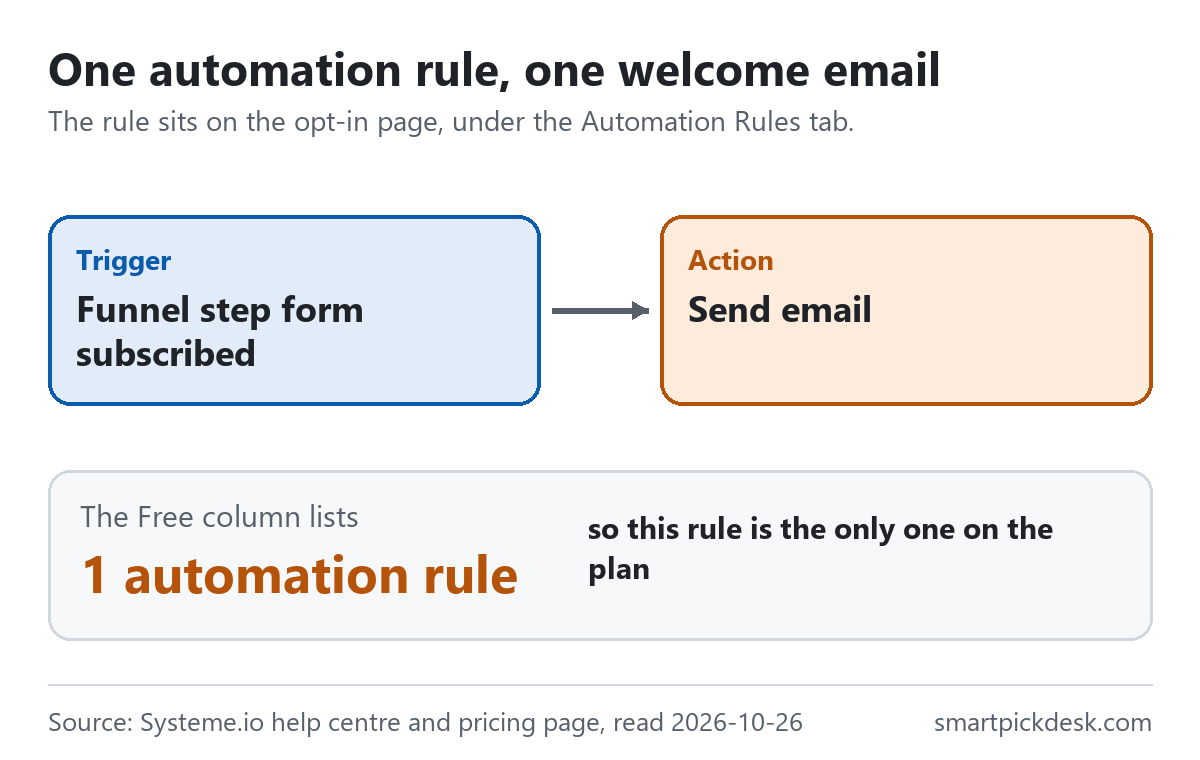
The welcome email is sent by an automation rule. On the opt-in page, open the Automation Rules tab, add a rule, choose the trigger Funnel step form subscribed and the action Send email, then write the email and save the rule.[8] Two lines from that help article matter here:
- “You can include a file attachment (e.g., a PDF) when sending emails to your prospects.”[8]
- “The form button's action must be set to Submit form for the automation rule to be triggered automatically after submission”.[8]
The Free column lists 1 automation rule and 1 workflow.[1] Once the welcome email rule exists, that is the plan's one rule. The general article on rules adds two limits that apply to it: “A trigger can only be activated a maximum of 20 times by the same contact.” and task history is kept for one month.[9]
Before any pin goes out: “We recommend testing your funnel by registering on your own opt-in page.”[8]
Step 4: the sales page and the order form
The sales page is a funnel step like the others: Add step, choose Sales page, pick a template, edit.[10] The order form, where payment happens, is added the same way with the type Order form.[11] It has more settings.
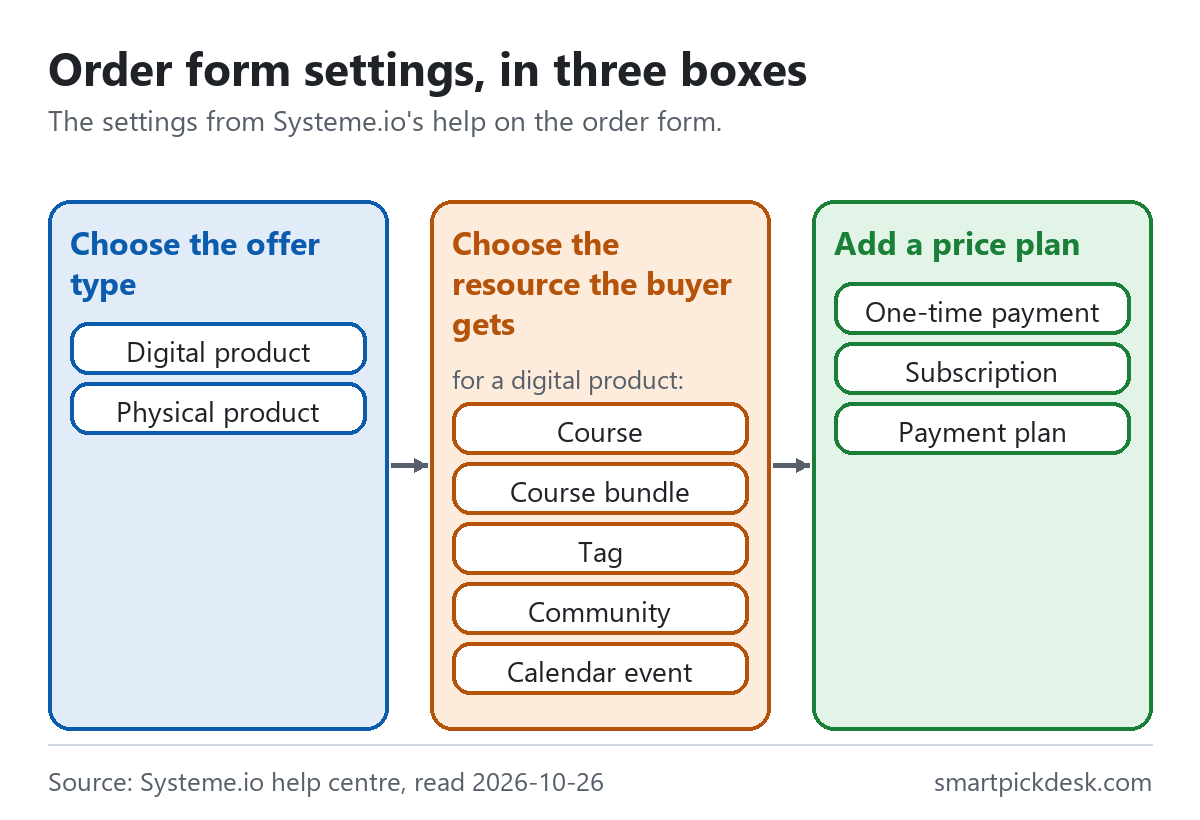
- Offer type. You must say “whether you are selling a digital product or a physical product”.[11]
- The resource the buyer gets. For a digital product the article lists five: courses, course bundles, tags, communities and calendar events. For example: “Courses: After successful payment, the customer will automatically have access to the course(s).”[11] For a physical product, “systeme.io does not handle shipping or fulfillment for physical products; you must manage these processes externally.”[11]
- A price plan. Three types: a one-time payment, a subscription with an optional trial period, or a payment plan, where “you must specify the total number of payments”.[12]
- Payments. In the funnel settings, tick credit or debit card and PayPal, then save.[13] The pricing page lists 0% transaction fees on every plan,[1] which is Systeme.io's own fee; the test-purchase guide warns of third-party fees,[23] and the pages we read give no Stripe or PayPal rates.
Not settled: the order form article says that after choosing the offer type “you will need to specify which resource(s) the customer will have access to after making the purchase”, and the eBook example uses a tag.[11][17] We have not checked whether the editor lets a form sell without one. If not, a PDF sold this way uses Free's 1 tag or 1 course.[1]
Step 5 (optional): upsell, downsell and order bump
The three extra offers differ in where they appear and how they are charged.
| Offer | Where it appears | How it is charged | Free column |
|---|---|---|---|
| Order bump | “An order bump is a promotional offer displayed as a small checkbox.” It sits on the order form, before payment[15] | “Both the main offer and the order bump will be charged, but they are processed as two separate transactions.”[14] | 1 order bump[1] |
| Upsell | A page after the order form; the buyer does not re-enter payment details[15] | “When a customer accepts an upsell or downsell offer, the charge is processed as a separate transaction from the main order.”[16] | 1 one-click upsell[1] |
| Downsell | A page after the upsell, shown if the upsell is declined[19] | Same as the upsell[16] | No row in the table[1] |
The upsell article sets the order in one line: “The upsell page must be placed after the main order form, and the downsell page must follow the upsell page.”[16] The page needs Accept and Decline buttons so the customer can take or refuse the offer, and “It is not possible to sell a Calendar Event on upsell or downsell pages.”[16]
The separate charges are worth telling buyers about. The upsell article says “The customer (and the seller) will see individual charges for each product instead of one single total.”[16] The order bump article adds that “the payment processor (like PayPal) may only show the price of the main offer in the payment window”, even though both are charged.[14] A line on the thank-you page saying each item is charged separately may help.
Step 6: three ways to hand over the file
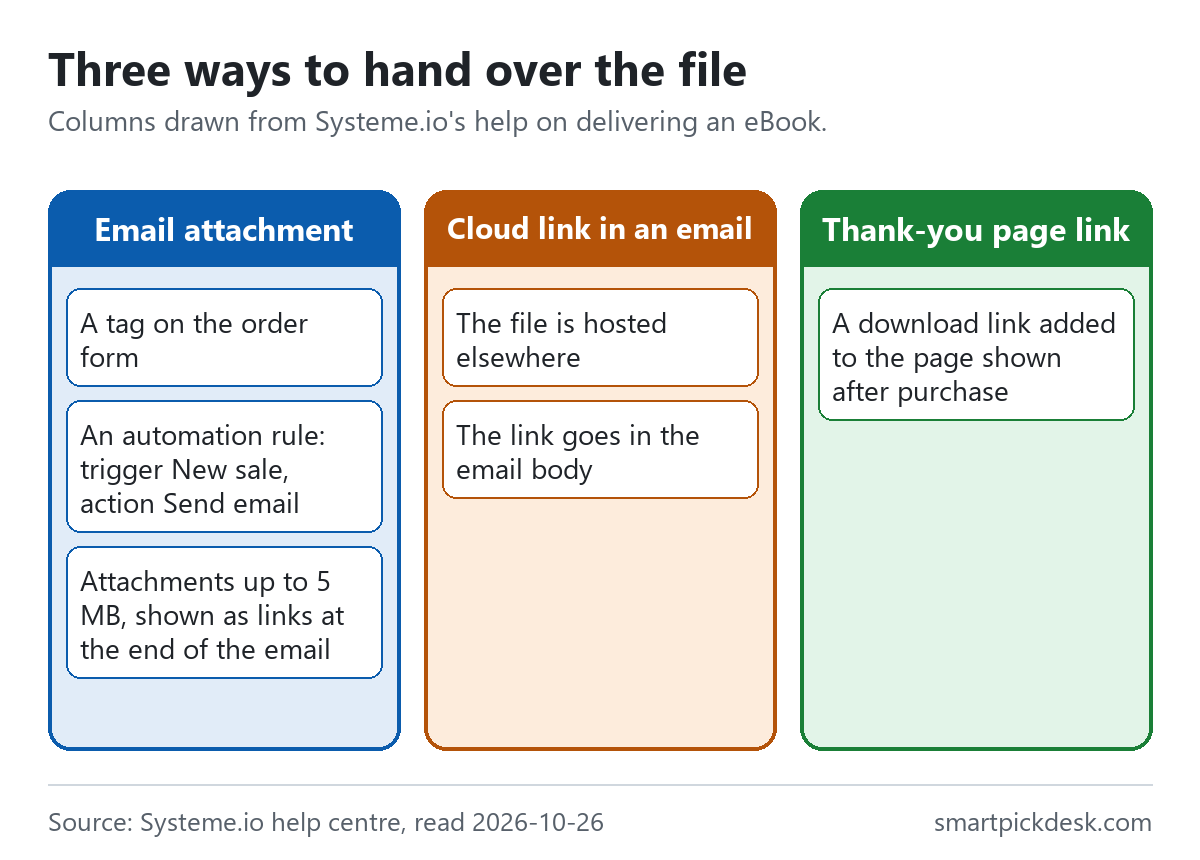
For a digital file such as a PDF, the help article on selling an eBook says “There are three ways to provide access to your eBook”.[17]
| Method | What the help centre says | What it uses on Free |
|---|---|---|
| 1. Email attachment | A tag as the order form's resource, then a rule with the trigger New Sale and the action Send email with the file attached. “Once set up, every customer who purchases through your payment page will automatically be assigned a tag and receive an email with your eBook attached.”[17] | 1 tag and 1 automation rule[1] |
| 2. Link in an email | Upload the file to a cloud storage service and put the link in the email; “this method improves email deliverability by keeping the email size small”[17] | An automation rule to send the email[1] |
| 3. Link on the thank-you page | “Finally, you can add a direct download link to the eBook on the thank-you page where customers are redirected after purchase.”[17] | No rule; a page you already have |
For the attachment route, the delivery article adds two details: “we restrict the size of file attachments to 5MB”, and “Attachments are displayed as links at the end of the email rather than being sent as direct files.”[18]
For the thank-you page route, the downloadable-file article adds a Text element, turns it into a link, uploads the file, then has you preview the page to check the download.[20]
How this fits the free plan — our reading. Methods 1 and 2 each send an email after the sale, and the help centre sends that email with an automation rule triggered by a new sale.[17][18] If the plan's one rule already sends your welcome email from Step 3, method 3 is the one that needs no second rule. We put this together from two help articles and the Free column; we have not built it, have not checked whether the plan's one workflow could send the sale email instead, and have not checked whether someone who has not bought can open the thank-you page.
Step 7: link the pages, switch the funnel on, and make a test purchase
The help article on linking pages sets out what you connect by hand and what Systeme.io connects for you.[19]
- Opt-in page to the next step: the form button's action is Submit form, with redirection set to the next step.
- Sales page to the order form: the button's action is Open URL, with the order form's URL.
- Everything after the order form is automatic. “Once payment is validated, the customer is automatically redirected to the Upsell page.” Accepting the upsell goes to the thank-you page; declining it goes to the downsell, then the thank-you page.[19]
Two more lines from the same article: “If your funnel does not have a custom Thank you page, the system displays the default version.” and “The funnel steps must be in the following order to work”.[19] An inactive funnel is switched on from the funnel list: filter by Inactive, open the three-dot menu, choose Activate, and confirm.[22]
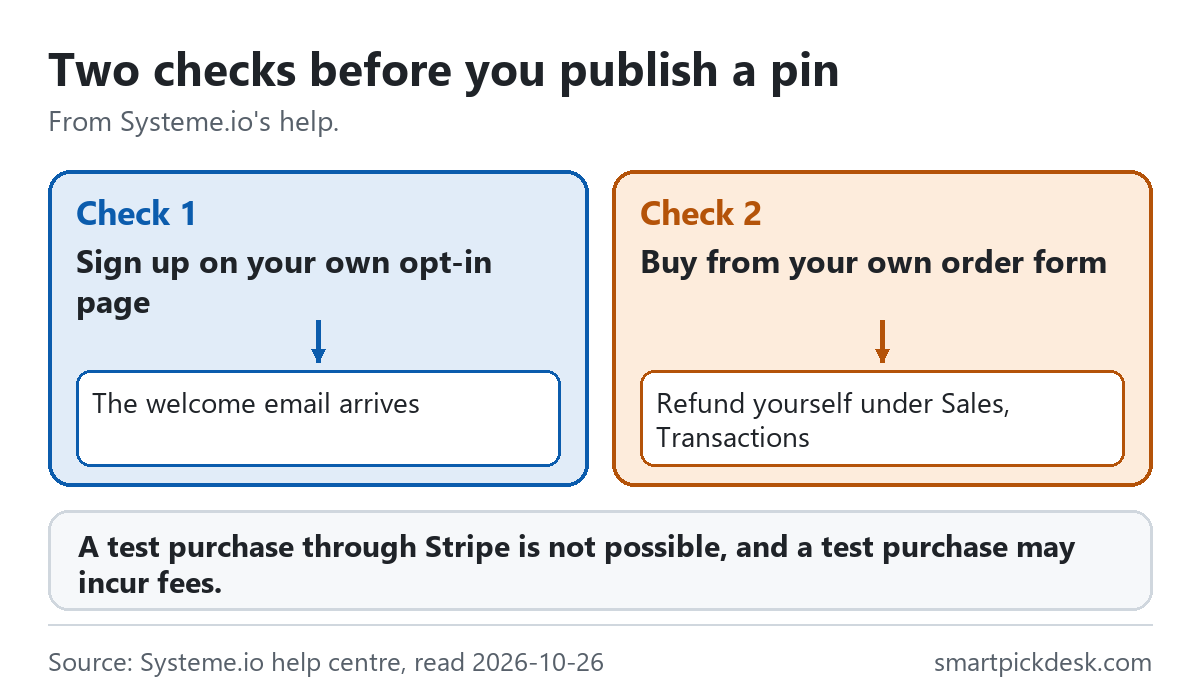
Then test the sale: “Since it is not possible to perform a test purchase via Stripe, the only way to ensure your sales funnel is working properly is to make the purchase yourself.”[23] You then refund yourself from the transactions list, and “A test purchase may incur additional fees.”[23] The article suggests a low test price to keep third-party fees down.
By this point you have every piece of the path from a pin to a sale. Seven pages are within the 15 funnel steps the Free column lists;[1] we have not verified the full setup on Free.
Go to Systeme.io (paid ad)
Which pin brought the sign-up: UTM parameters
If you post many pins to the same opt-in page, Systeme.io's contact list will not tell you which pin each person came from — unless each pin carries its own link. That is what UTM parameters do. The help article defines them: “UTM parameters are short codes added to a URL to track which traffic sources lead to your pages.” The data, it says, gives insight into your contacts, “helping you understand which links they used to opt in.”[21]
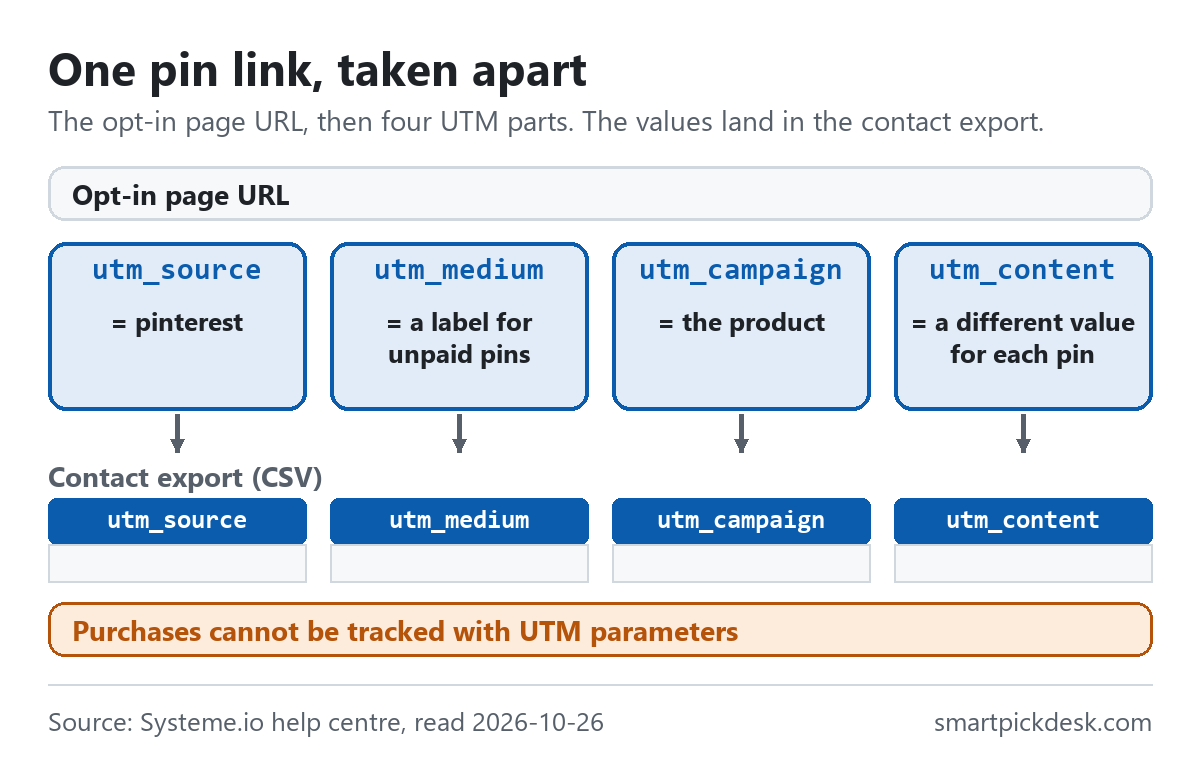
- Turn it on. “To collect the UTM parameters associated with your contacts, check the Store UTM parameters option on the Sales funnel settings page”.[21] Not settled: the article does not say which plans have this option; we have not checked it on Free.
- Build one link per pin. The article points to Google's Campaign URL Builder and its fields: source, medium, campaign name, and the optional term and content fields for details “such as keywords or ad variations”.[21] For pins, the content field is the natural place for a pin number, so that every pin's link differs only there. The article's own advice: “Remember to create unique URLs with appropriate UTM parameters for each marketing channel and campaign to ensure accurate tracking and reporting.”[21]
- Read the results. “When users click on the custom URL and opt in to one of your forms, the UTM parameters will be captured by systeme.io.” To see them, select contacts in the contacts dashboard, choose More actions, then Export, and tick the UTM parameters to include. “The UTM tracking data for your contacts will be available in your exported CSV for analysis.”[21]
The limit, in Systeme.io's words: “It is currently not possible to track purchases with UTM parameters on systeme.io”.[21] So UTM data shows how many sign-ups came through each pin's link; it does not track the purchase. The transactions list can be filtered by email address,[23] but we have not checked whether matching contacts to sales that way is practical.
Pin straight to the opt-in page, or to an article first?
On 2026-10-26 we looked at the 14 pins with links, posted in the last six months, in Pinterest's results for the search sales funnel for beginners. Seven led to Systeme.io (our own count, kept with our research notes): three went straight to a Systeme.io page, three went to a blog or site first, and one to a link-in-bio page. That is a count of what people post, not evidence that either way sells; none of those pins showed us any sales figure.
If a pin goes to an article first, the article links on to the funnel. The help centre's article on external websites says to copy the URL of the funnel's first step and paste it into a link or button on the other site, and “To link to a specific step inside the funnel (e.g., the order form), select that step and copy its URL”.[24] If the pin links to your article first, the help articles we read do not explain how each pin's UTM values would carry through to the opt-in form. We do not know which route works better, and the help centre does not say.
Testing two opt-in pages: the A/B test
Pins tell you which link brought people. An A/B test compares two versions of a page that lead to a shared goal page. Systeme.io's test runs inside one funnel.[25]
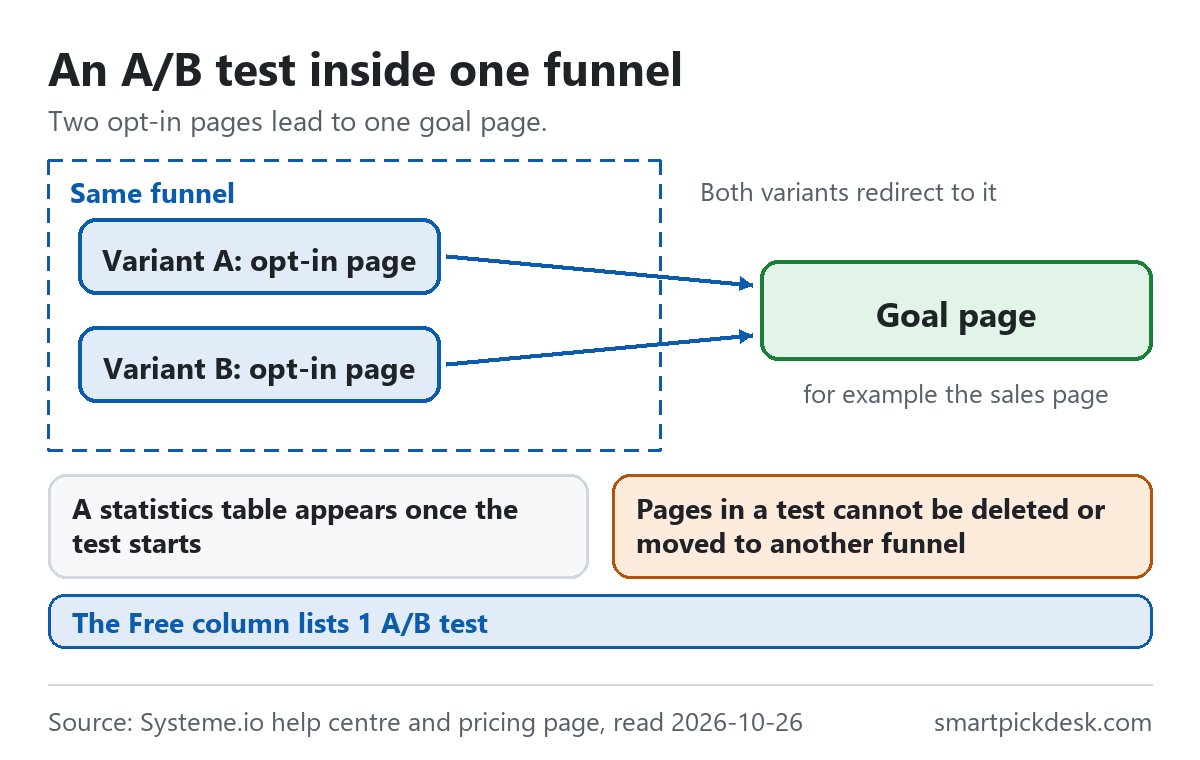
- Two pages in the same funnel. Both variants must exist in the funnel before you start.[25]
- A shared goal page. “The purpose of the Goal Page is to have a common page to which the variants in the A/B test lead.” In the help example, the goal is a sales page.[25]
- Results. “Once you've started the A/B test, you will see a statistics table that shows you the results of the test.”[25]
- A rule to know first: “Although pages in an A/B test can be duplicated, they cannot be deleted or moved to another funnel.”[25] Each variant also uses a funnel step.
The Free column lists 1 A/B test.[1] We have not seen the statistics table, so we cannot say what it counts beyond what the article says.
Where the free plan runs out on this funnel, and who it fits
This page does not repeat the plan limits in full; they are on our free plan page and our pricing page. For this funnel, the limits you meet are short to list:
- One automation rule, one tag, one workflow, one email campaign.[1] The welcome email uses the rule, so an email from a second rule, such as one after each sale, does not fit. The one tag can still be the order form's resource, assigned after payment.[11]
- One one-click upsell and one order bump.[1]
- A lifetime sales limit. Article 5a of the terms: “Accounts on the free plan are limited to USD 10,000 in lifetime sales revenue.” At the limit you get 3 days to upgrade before payment pages stop accepting new sales; the account is not upgraded or charged automatically.[26]
- Inactivity. The pricing FAQ says “The free plan never expires and does not require a credit card.” The page's structured data adds that “accounts with no login or activity for 6 months are deactivated”.[1][27] We have not checked how that is applied.
| If you want to… | Fits? | From Systeme.io's pages | Watch out for |
|---|---|---|---|
| Sell one PDF or course from a few pins | Within the listed limits | Seven pages, within Free's 3 funnels and 15 steps[1] | Full setup on Free not verified; the one rule goes to the welcome email[1] |
| See which pin brought each sign-up | Documented, with UTM links | Store UTM parameters and the contact export[21] | Availability on Free not stated[21] |
| See which pin brought each purchase | Not with UTM | “It is currently not possible to track purchases with UTM parameters on systeme.io”[21] | — |
| Sell a physical product | Selling yes, shipping no | Systeme.io does not handle shipping or fulfillment[11] | You arrange delivery yourself |
| Offer an upsell after the order | Yes, one | Upsell after the order form, downsell after the upsell[16] | Separate charges for each item[16] |
| Sell a calendar booking as an upsell | No | Not possible on upsell or downsell pages[16] | Sell it on the order form instead[11] |
If several rows on the right worry you, you do not have to sign up to keep reading: the terms and the help centre are public.
Go to Systeme.io (paid ad) Read Systeme.io's terms
Questions people ask
Can Systeme.io show which pin a purchase came from?
Not with UTM parameters: “It is currently not possible to track purchases with UTM parameters on systeme.io”. It can show which pin link a contact used to sign up.[21]
Can I sell a PDF and deliver it on the Systeme.io free plan?
The help centre gives three delivery methods: an attachment, a link in an email, or a link on the thank-you page.[17] With one automation rule on Free,[1] the thank-you page link is the one that needs no extra rule if the rule sends your welcome email. That is our reading; we have not built it.
Do I need a website to build this funnel?
No. The pages are funnel steps on Systeme.io, and a pin can link to the first one.[24]
Is an upsell added to the same charge as the main order?
No. An accepted upsell or downsell is a separate transaction, and so is an order bump.[14][16]
Can I test the funnel without paying?
The sign-up part, yes: register on your own opt-in page.[8] The sale part, no: you buy from your own order form and refund yourself, and a test purchase may incur additional fees.[23]
Do you get paid if I sign up?
Yes, if you sign up through a link marked (paid ad): Systeme.io may pay us a commission at no extra cost to you. The steps and limits on this page are quoted from Systeme.io's own pages either way.
Sources and check log
All read on 2026-10-26 with no account. The Updated column is the last-updated date printed on each help article that day.
| # | Source | URL | Checked | Updated |
|---|---|---|---|---|
| 1 | Systeme.io, Pricing (the “Compare plans & features” table as shown in a browser, and the FAQ) | systeme.io/pricing | 2026-10-26 | — |
| 2 | How to create a funnel | help/147 | 2026-10-26 | February 24, 2026 |
| 3 | When to use the sales funnel feature and the blog feature | help/1005 | 2026-10-26 | June 23, 2026 |
| 4 | How to create an opt-in page | help/152 | 2026-10-26 | January 8, 2026 |
| 5 | How to build your contact list using a funnel | help/1602 | 2026-10-26 | February 12, 2026 |
| 6 | How to create a thank you page | help/321 | 2026-10-26 | January 9, 2026 |
| 7 | How to share a sales funnel with other accounts | help/148 | 2026-10-26 | January 12, 2026 |
| 8 | How to automatically send an email when a lead subscribes | help/280 | 2026-10-26 | April 27, 2026 |
| 9 | How automation rules work | help/140 | 2026-10-26 | May 15, 2026 |
| 10 | How to create a sales page | help/287 | 2026-10-26 | March 31, 2026 |
| 11 | How to create an order form/payment page | help/252 | 2026-10-26 | March 23, 2026 |
| 12 | How to create and configure a price plan | help/153 | 2026-10-26 | March 6, 2026 |
| 13 | How to activate payments by Stripe or Paypal | help/307 | 2026-10-26 | January 27, 2026 |
| 14 | How to add an order bump to an order form/payment page | help/154 | 2026-10-26 | August 27, 2026 |
| 15 | The difference between an upsell and an order bump | help/315 | 2026-10-26 | December 31, 2025 |
| 16 | How to create an upsell and a downsell | help/243 | 2026-10-26 | August 27, 2026 |
| 17 | How to sell your eBook | help/155 | 2026-10-26 | April 13, 2026 |
| 18 | How to deliver digital products via email after a sale | help/294 | 2026-10-26 | April 8, 2026 |
| 19 | How to configure links between funnel pages | help/330 | 2026-10-26 | March 23, 2026 |
| 20 | How to add a downloadable file | help/340 | 2026-10-26 | December 29, 2025 |
| 21 | How to set up UTM tracking in systeme.io | help/2092 | 2026-10-26 | May 18, 2026 |
| 22 | How to activate a funnel | help/277 | 2026-10-26 | December 30, 2025 |
| 23 | How to make a test purchase | help/151 | 2026-10-26 | April 14, 2026 |
| 24 | How to link a sales funnel or a page to your external website | help/231 | 2026-10-26 | May 8, 2026 |
| 25 | How to set up an A/B test for your pages | help/218 | 2026-10-26 | May 21, 2026 |
| 26 | Systeme.io, Terms and conditions (Article 5a) | systeme.io/terms-and-conditions | 2026-10-26 | — |
| 27 | Systeme.io, Pricing, structured data in the page code (the machine-readable FAQ; not part of the text a visitor sees) | systeme.io/pricing | 2026-10-26 | — |
Source 7 explains a link type seen on Pinterest: “Sales funnel-sharing links are affiliate links.”[7]
Change log
- 2026-10-26 — First version. Twenty-four help articles, the pricing page and the terms read on 2026-10-26.
- What we will re-check: the UTM, upsell, order bump and eBook articles, and the Free column of the comparison table.
Who writes this
Smart Pick Desk is an independent site that compares tools for people who work online. We are not employed by Systeme.io, and we do not run it in our own business. We are in Systeme.io's affiliate programme: if you sign up through a link marked (paid ad), Systeme.io may pay us a commission. What we do is read what each company publishes, write down the date we read it, and say plainly which parts we could not check. More: who the editors are and how we check a page.
We do not promise results. Nothing here is a prediction about how many sign-ups or sales a pin or a funnel will bring.