GetResponse pricing, checked: the free plan, Starter, Marketer and Creator at every list size
Last updated 2026-10-04 · By Smart Pick Desk editors · Prices read on GetResponse's pricing page at every list-size step on 2026-10-04; help centre read the same day · We have not used GetResponse · How we checked ↓
The short answer
GetResponse lists a Free account and three paid plans, Starter, Marketer and Creator, priced by list size. You pay for contacts, not for emails sent — and GetResponse counts contacts more strictly than the slider suggests.
- Free: 500 contacts and 2,500 newsletters a month, with premium features only for the first 14 days. After day 14, autoresponders, automation messages and the website builder stop until you upgrade.[4]
- Starter starts at $19 a month, or $15.58 a month on the yearly plan, for up to 1,000 contacts, with 1 automation workflow. Marketer is $59 or $48.38; Creator is $69 or $56.58.[1]
- The rules behind the price are strict. Removed and unconfirmed contacts count on Free, contacts added during the month count on paid plans even if deleted, going over adds a monthly fee, and there are no refunds.[3][4][8][9]
If you want one sentence: GetResponse's price is easy to read on the slider, but what you actually pay depends on how many contacts you add in a month and on lists you might be double-counting, so read the counting rules before you choose a step.
On this page
At a glance
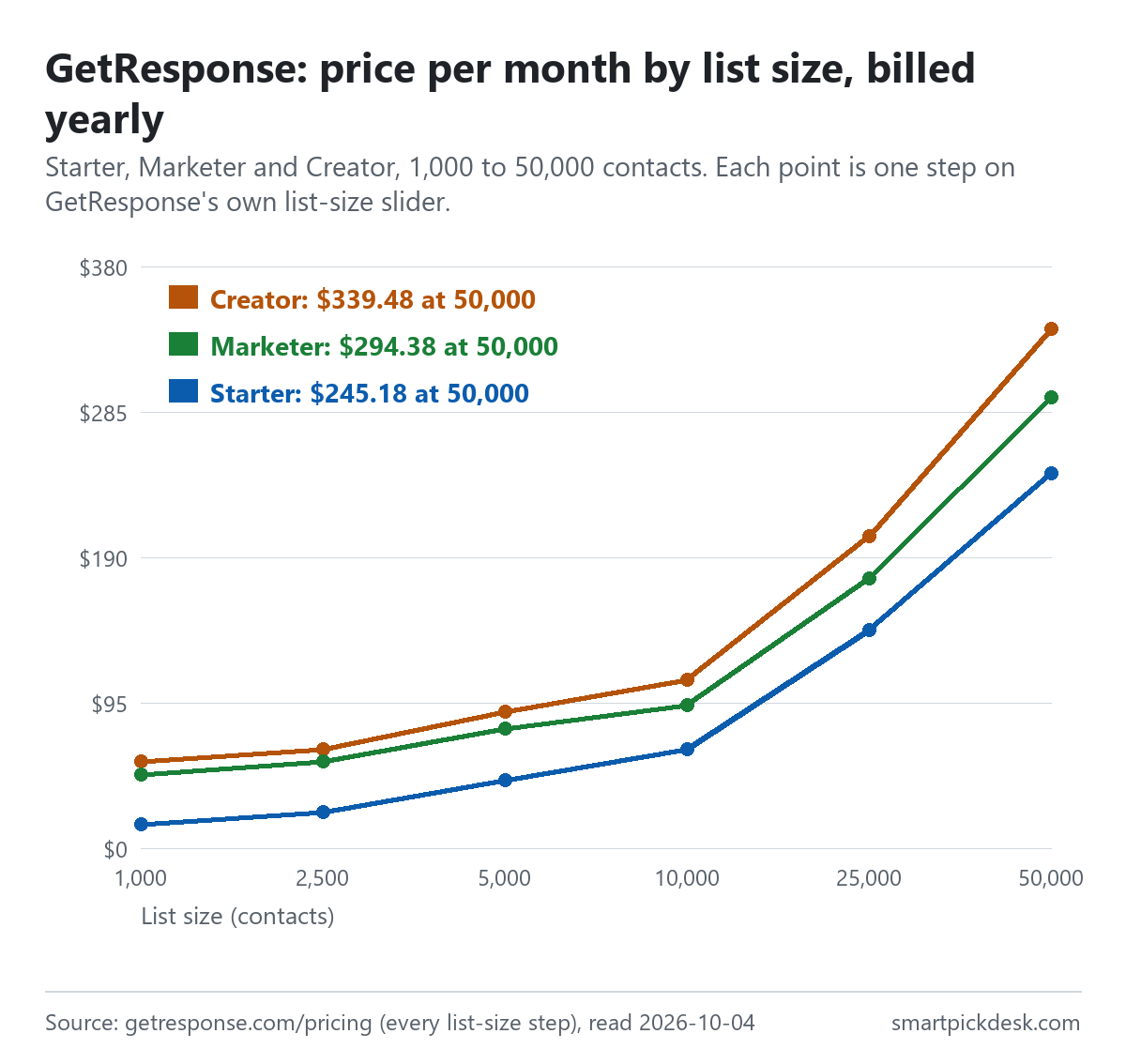
| List size | Starter, monthly | Starter, yearly plan (per month) | Marketer, monthly | Marketer, yearly plan (per month) | Creator, monthly | Creator, yearly plan (per month) |
|---|---|---|---|---|---|---|
| 1,000 | $19 | $15.58 | $59 | $48.38 | $69 | $56.58 |
| 2,500 | $29 | $23.78 | $69 | $56.58 | $79 | $64.78 |
| 5,000 | $54 | $44.28 | $95 | $77.90 | $109 | $89.38 |
| 10,000 | $79 | $64.78 | $114 | $93.48 | $134 | $109.88 |
| 25,000 | $174 | $142.68 | $215 | $176.30 | $249 | $204.18 |
| 50,000 | $299 | $245.18 | $359 | $294.38 | $414 | $339.48 |
| 100,000 | $539 | $441.98 | $599 | $491.18 | $690 | $565.80 |
Every step of GetResponse's list-size slider, read on 2026-10-04. The page prints both prices at once at each step: the monthly price, and the yearly plan's price per month with “Paid annually” under it.[1] The slider's last position is labelled 100,000+ and showed the same prices as 100,000. Enterprise is “Custom pricing”. The page adds: “Prices above are net amounts.”[1]
Two patterns are visible in the table. First, the plans overlap: Marketer at 2,500 contacts costs the same as Creator at 1,000 ($69 monthly, $56.58 on the yearly plan), so a small list can reach Creator's features for what a slightly larger list pays for Marketer. Second, the gap between Starter and Marketer is widest at the bottom: $40 a month at 1,000 contacts ($59 against $19) but $35 at 10,000 ($114 against $79).
How we checked this (and what we did not check)
Last updated 2026-10-04 (first version). Every number and quotation here comes from GetResponse's own pages. Prices change — confirm on GetResponse's own page before you sign up.
What we did. On 2026-10-04 we opened getresponse.com/pricing in a browser with no account, moved the list-size slider one step at a time, and saved the page text at each of its eight positions. The same day we saved nine help-centre articles on pricing, the Free account, upgrades, going over the list size, refunds and cancelling; for three of them we opened the collapsed sections first so their full text was saved. Wording in quotation marks is copied from those saved pages word for word, and a script checks every quotation against the saved text.
What we did not do. We have not used GetResponse. There is no account, no screenshot of the product and no view here on the editor, deliverability or support. Every image is a chart or summary we drew from the saved text; none shows GetResponse's logo or screens. We did not open the “Compare all plans” table, so plan features below come from the plan cards and the help centre.
What that leaves. GetResponse's prices at every step, what its Free account allows before and after 14 days, and its billing, counting, refund and cancellation rules, as published.
The Free account: 14 days of premium features, then a smaller account
The pricing page opens with “Try free for 14 days. No credit card required. Upgrade when you're ready.”[1] Behind that is a Free account that does not end, but changes after two weeks. The Free account help article lists what it allows from the start:[4]
- “add up to 500 contacts (the unconfirmed and removed contacts do count toward the list size)”
- “send up to 2500 newsletters per month”
- “create and publish 1 landing page”
- “collect leads with various types of GetResponse forms and store them in queue for 32 days”
And about the 500: “It is not possible to reset the limit.”[4] Because removed contacts count, deleting people does not make room on a Free account.
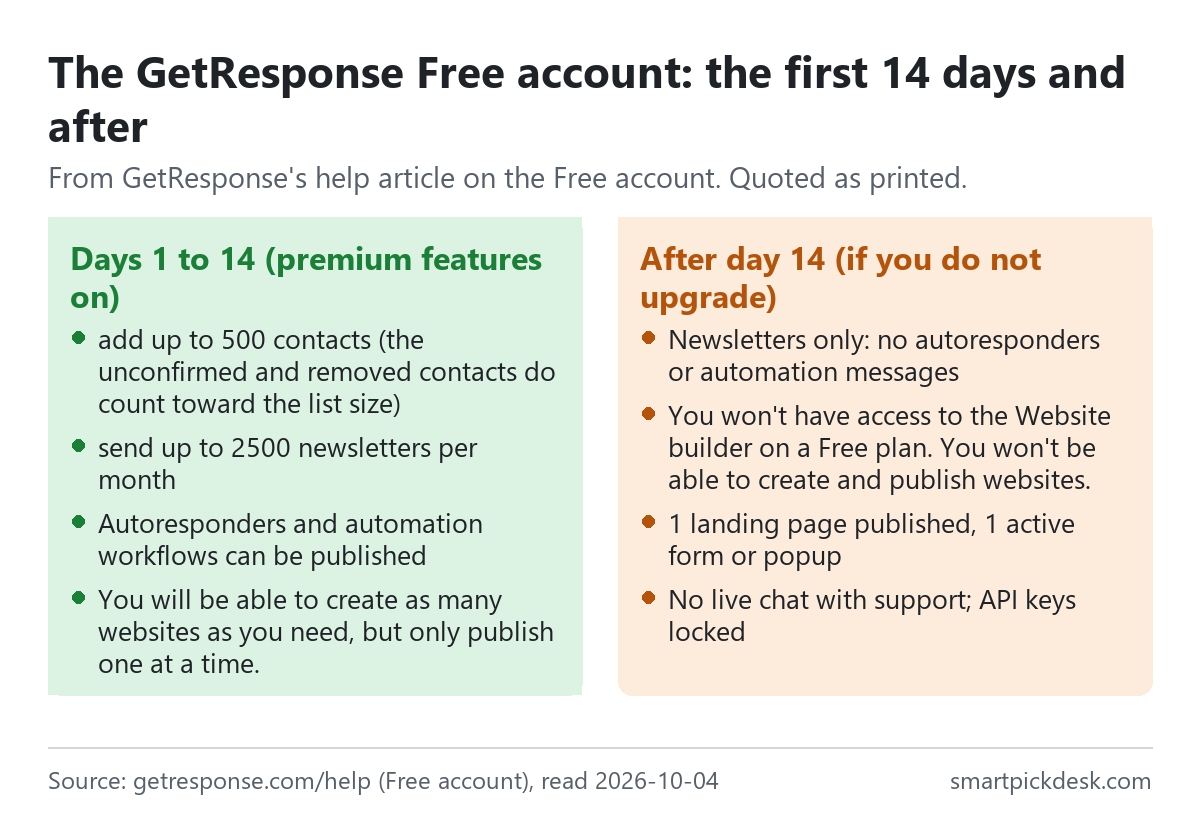
The first 14 days. Premium features are switched on, with limits. Webinars are capped at 10 people; messages carry a badge — “The GetResponse badge will be added to every message you send from the Free account.” — and for websites, “You will be able to create as many websites as you need, but only publish one at a time.”[4] Landing pages have a visit cap: “Free accounts are limited to 1000 unique visits for all landing pages in the account. Once the limit is reached, your landing pages won't be available online anymore.”[4]
After day 14, if you do not upgrade. The same article lists what stops. You will not be able to “send any messages except newsletters (which means autoresponders, automation messages, RSS-to-Email messages and webinar invitations) to your contacts until you upgrade”, or “publish any workflows unless you upgrade”.[4] On websites: “You won't have access to the Website builder on a Free plan. You won't be able to create and publish websites.” On forms: “You will be able to keep 1 active form or popup.” On support: “You won't be able to open up the chat window to talk to the Customer Success Team.” On the API: “Your API keys will be locked and unusable until you upgrade.”[4] One landing page can stay published.
In practice, the long-term Free account is for sending newsletters by hand to a list under 500. A welcome email that goes out automatically when someone joins is an autoresponder, and that is on the list of things that stop after day 14.
What each paid plan lists
The help centre describes the three plans and says “All plans include options for the list sizes: 1k, 2.5k, 5k, 10k, 25k, 50k, and 100k.”[2] The plan cards on the pricing page list what each adds.
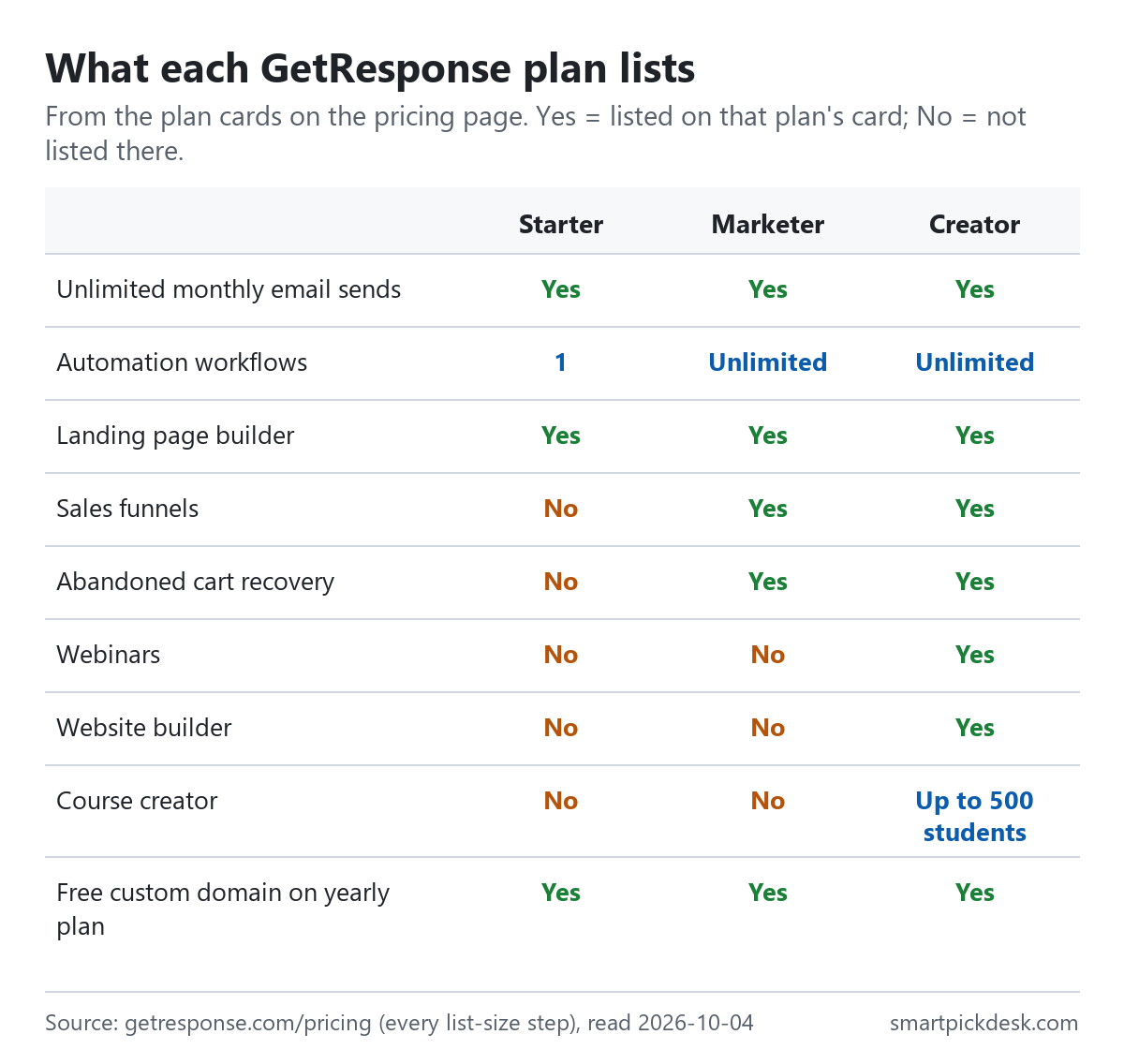
| On the plan card | Starter | Marketer | Creator |
|---|---|---|---|
| Monthly email sends | Unlimited | Unlimited | Unlimited |
| Automation workflows | 1 custom workflow | Unlimited | Unlimited |
| Landing page builder, signup forms and popups | Listed | Listed | Listed |
| Sales funnels, abandoned cart recovery, promo codes | Not listed | Listed | Listed |
| Webinars, website builder, course creator | Not listed | Not listed | Listed (course creator up to 500 students) |
| Users | 3 (help centre) | Up to 5 (help centre) | Up to 5 (help centre) |
Plan cards on the pricing page,[1] with user numbers from the pricing plans article.[2]
- Starter. The help centre: “Every account created within this package allows for 3 users, provides access to ecommerce integrations, and includes 1 automation workflow. AI tools are limited to 3 uses.”[2] The card's line is “1 custom automation workflow”.[1]
- Marketer. Unlimited automation and ecommerce tools, unlimited landing pages, and up to 5 users.[2]
- Creator. Everything in Marketer plus webinars, the website builder, a course creator with “Up to 500 students” and premium newsletter subscriptions.[1]
- All three, on the yearly plan: “Free custom domain on yearly plan”.[1]
One more line affects some readers: add-ons such as extra users and bigger webinars are paid extras on Starter and Marketer, but “North American accounts may not have access to purchase or enable add-ons.”[3] The help article says those features are still available by moving up to Marketer or Creator.
How contacts are counted (the part that decides your bill)
GetResponse does not charge for sending: “We don't impose limits on how many emails you send during the billing period.”[3] It charges for contacts, and the pricing help sets out two counting rules.
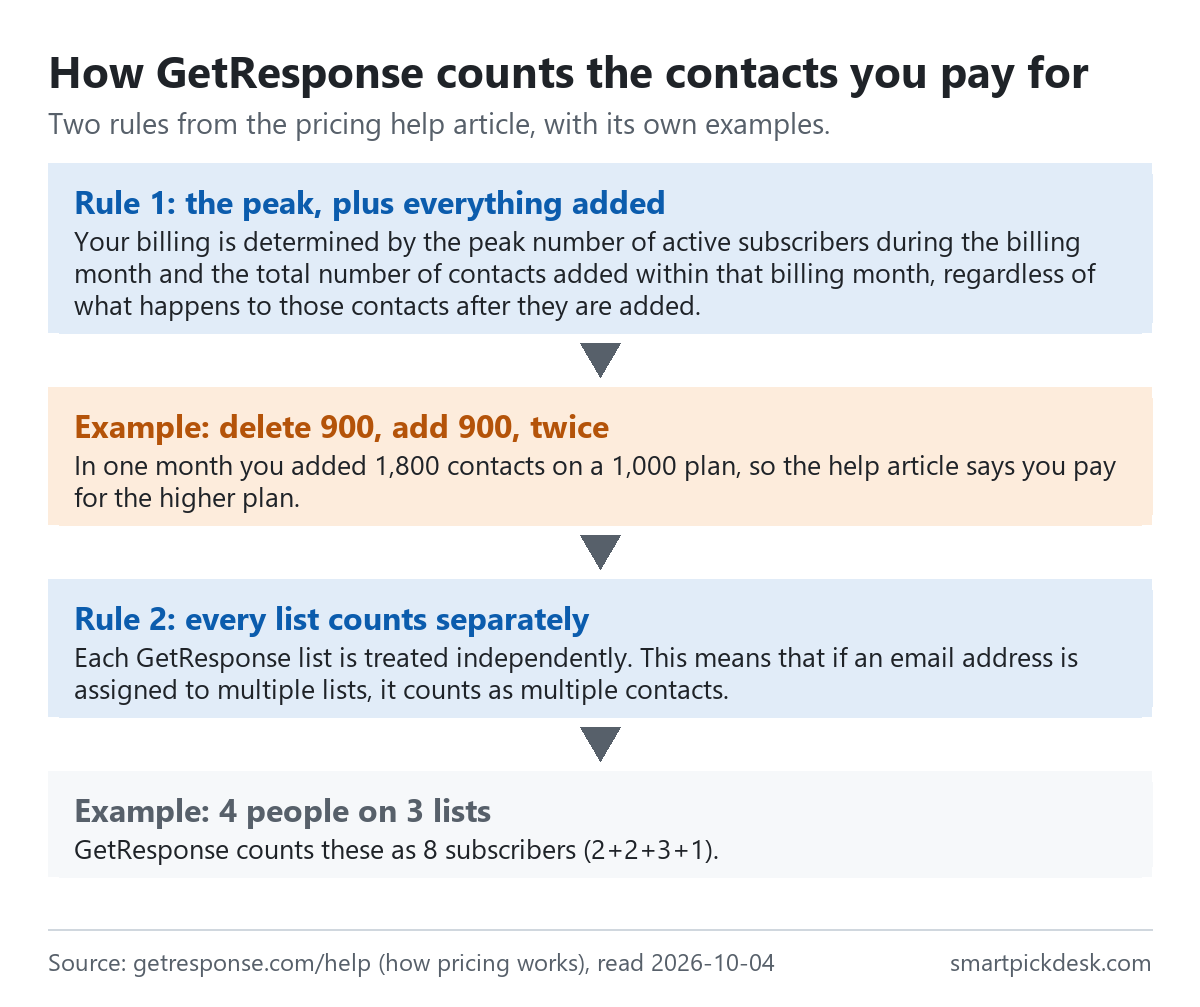
- The peak, plus everything added. “Your billing is determined by the peak number of active subscribers during the billing month and the total number of contacts added within that billing month, regardless of what happens to those contacts after they are added.”[3] GetResponse's own example: on a 1,000-contact plan, deleting 900 contacts and adding 900 new ones twice in the same month adds 1,800 contacts, and you pay for the higher plan.
- Every list counts separately. “Each GetResponse list is treated independently. This means that if an email address is assigned to multiple lists, it counts as multiple contacts.”[3] In its example, four people spread across three lists come to eight: “GetResponse counts these as 8 subscribers (2+2+3+1).”[3]
What this means for planning. If you keep one master list and copy people into topic lists, each copy is a paid contact. If you clean your list by deleting and re-importing, the re-import counts as new additions for that month. And a list that crosses a step boundary for one day is billed at the higher step: the help article's example moves from $19 to $29 when the peak reaches 1,200.[3]
Monthly or yearly: 18% off, paid in one go
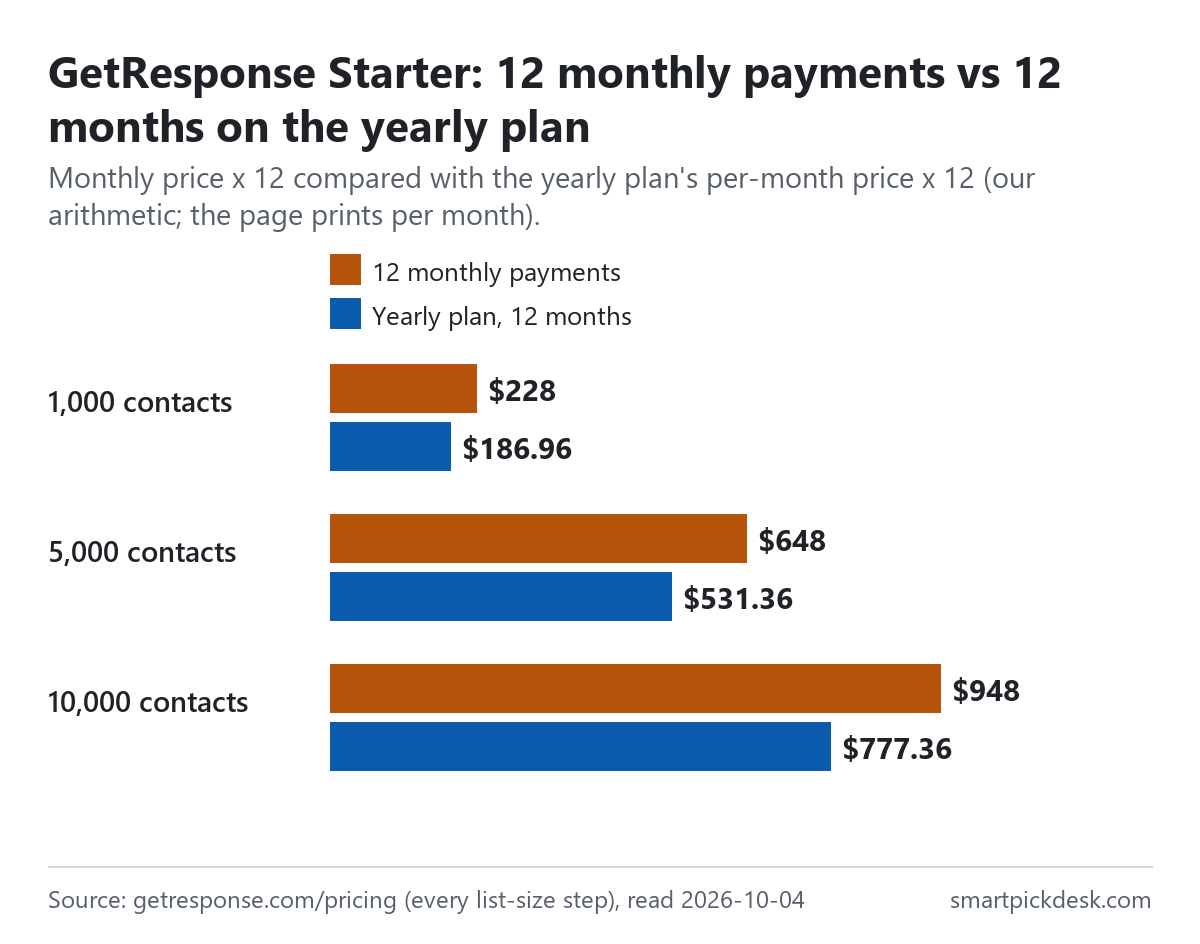
The pricing page shows a “-18%” label on yearly billing, and the upgrade help lists the choice as monthly billing or “12-month prepay with 18% discount”.[1][6] At each step the page prints the yearly plan as a per-month price with “Paid annually” under it; it does not print the yearly total, so the totals below are our arithmetic (12 × the per-month price).
| Plan and list size | Monthly price | 12 monthly payments | Yearly plan, 12 months | Less over a year |
|---|---|---|---|---|
| Starter, 1,000 | $19 | $228 | $186.96 | $41.04 |
| Starter, 5,000 | $54 | $648 | $531.36 | $116.64 |
| Starter, 10,000 | $79 | $948 | $777.36 | $170.64 |
| Marketer, 1,000 | $59 | $708 | $580.56 | $127.44 |
| Marketer, 10,000 | $114 | $1,368 | $1,121.76 | $246.24 |
| Creator, 1,000 | $69 | $828 | $678.96 | $149.04 |
| Creator, 10,000 | $134 | $1,608 | $1,318.56 | $289.44 |
Monthly and per-month yearly prices from the pricing page;[1] the 12-month and difference columns are our arithmetic. The page's own saving line rounds the same difference to whole dollars, for example “Paid annually, save up to $41 a year” for Starter at 1,000.
Three billing rules sit in the help centre rather than on the pricing page. Renewals: the refund policy says the system “automatically renews your account every 30 days, (every 360 days if you choose the annual plan,) and charges the appropriate amount to your credit card.”[9] Tax: “All prices displayed on our Pricing page are net prices.” and “Outside the EU: Customers outside the EU are not charged VAT. However, some U.S. states may apply a state sales tax.”[3] And a yearly plan does not shield you from monthly overage charges, which is the next section.
Going over your list size: the List extension fee
If your list grows past your step, two things can happen. During an import, GetResponse offers to upgrade, to import only up to the limit, or to cancel the import. In other cases — sign-ups through forms and landing pages, integrations, the API, manual adds, copying contacts to lists — it charges a List extension fee.[8]
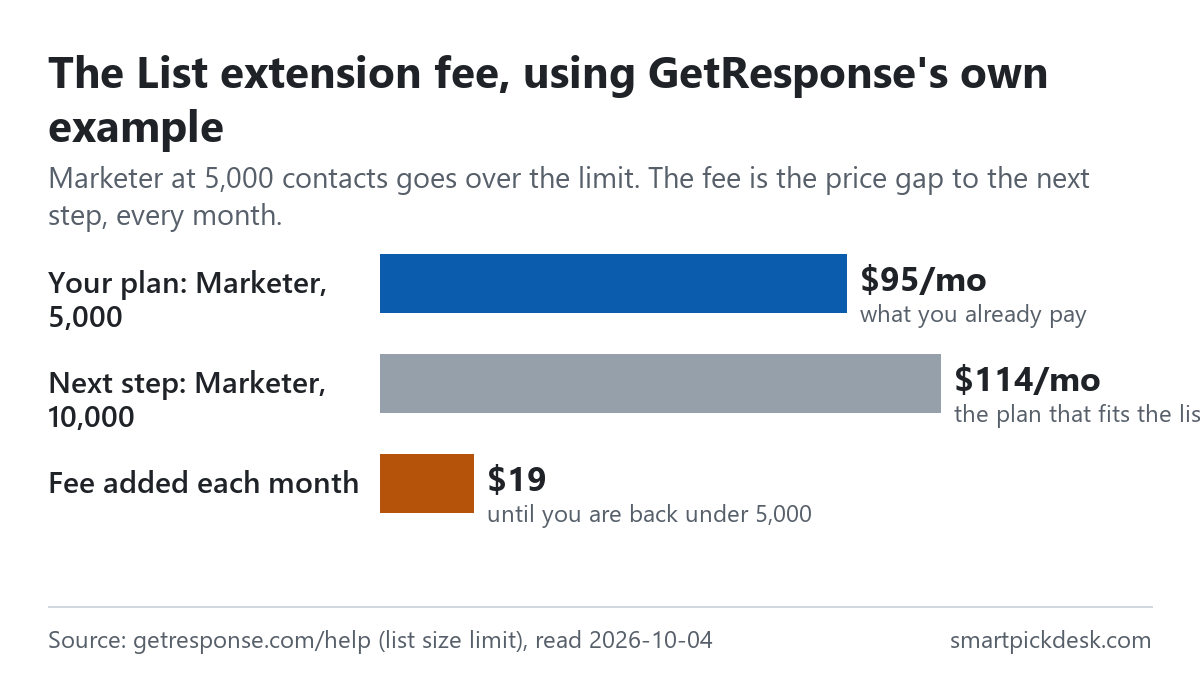
- How it is calculated. “The fee is the difference between the price of your current plan and the plan that accommodates your actual list size.”[8] GetResponse's example: Marketer at 5,000 contacts is $95 a month; the list grows past 5,000; the next step is $114; the fee is $114 – $95, so $19 is added on top of the $95.
- How long it lasts. “This is not a one-time fee, which means that we'll continue to charge you at the end of each billing cycle until you remove excess contacts/students.”[8]
- On a yearly plan too. “Note: The charges are applied every month, even if you've signed up for an annual subscription plan.”[8]
- Above 100,000. “The maximum list size for Starter, Marketer, and Creator plans is 100,000 contacts. If you go over this limit, you'll be charged $4.00 for every 1,000 contacts you start adding.” Its example: “You've added 2,507 contacts above the limit. This means that $12.00 will be added to your balance every month.”[8]
The arithmetic of the example is worth noticing: the fee equals the price of moving up a step, but you keep the lower plan. If your list will stay above the step, upgrading costs the same per month and resets the billing cycle; if the overage is temporary, removing contacts before the cycle ends stops the fee.
Upgrading and downgrading
- Upgrading is self-serve: “An upgrade takes place immediately and your billing cycle always starts anew.” The unused part of your old plan is subtracted from the new price, and the exact amount is shown before you confirm.[7]
- Downgrading is not: “Downgrades can only be performed by Support Team as per your request.” That covers moving to a lower plan and moving from yearly to monthly billing.[7]
- Back to Free is not possible: “No, it's not possible to downgrade your paid plan to GetResponse Free plan again.”[5]
So the order you try things in matters. Use the Free account's 14 days to test the features you would pay for, because once you upgrade, the Free account is gone.
Cancelling and refunds
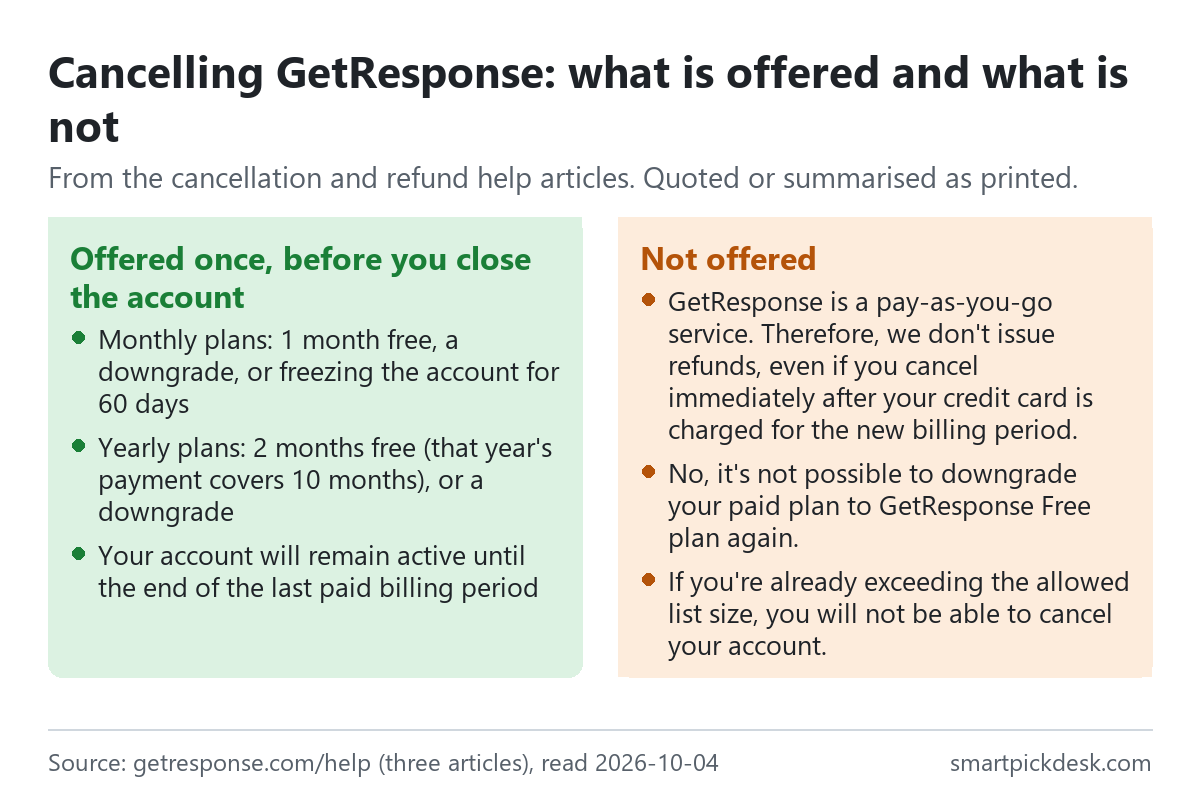
- No refunds. “GetResponse is a pay-as-you-go service. Therefore, we don't issue refunds, even if you cancel immediately after your credit card is charged for the new billing period.” And: “We treat all customers equally, so we don't make exceptions to this policy.”[9] The example in the policy: charged on August 10, cancelled on August 15, you still pay for the whole month or year.
- When the account closes. “Your account will remain active until the end of the last paid billing period”, with all features until then.[10]
- What you are offered first. Before closing, GetResponse offers once: on monthly plans, one month free, a downgrade, or “freezing your account for 60 days.”; on yearly plans, two months free (the next payment covers 10 months instead of 12) or a downgrade.[10]
- When you cannot cancel. With unpaid charges, or over your list size: “If you're already exceeding the allowed list size, you will not be able to cancel your account.” The List extension fee is charged on the last day of the period first.[10]
- Where to cancel. “You can only cancel your subscription using a browser, you will not be able to close your account in the mobile app.”[10]
Together with the counting rules, this makes a yearly plan a firmer commitment than the 18% suggests: there is no refund if you stop early, and monthly overage fees can still be added during the year.
Where GetResponse's pages disagree
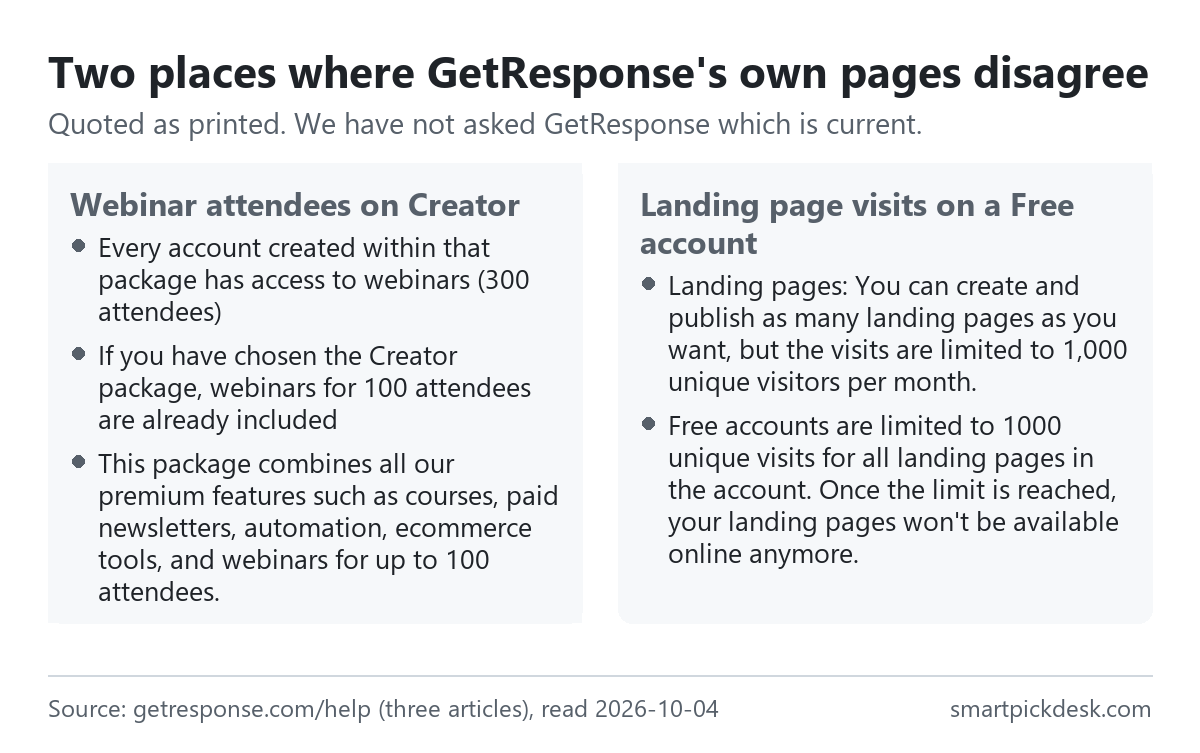
- Webinar attendees on Creator. The pricing help says “Every account created within that package has access to webinars (300 attendees)”, and a few paragraphs later on the same page, “If you have chosen the Creator package, webinars for 100 attendees are already included”.[3] The pricing plans article describes “webinars for up to 100 attendees”.[2] Two places say 100 and one says 300.
- Landing page visits on Free. One article: “Landing pages: You can create and publish as many landing pages as you want, but the visits are limited to 1,000 unique visitors per month.”[2] The other: “Free accounts are limited to 1000 unique visits for all landing pages in the account.”, with no mention of a month.[4] One reads as a monthly allowance, the other as a total.
We have not asked GetResponse which wording is current. If either number matters to you, ask GetResponse before you rely on it.
Which plan fits which situation
| If you are… | Look at | Why, from GetResponse's pages | Watch out for |
|---|---|---|---|
| Sending a newsletter by hand to under 500 people | Free | 500 contacts, 2,500 newsletters a month[4] | Removed contacts count; no autoresponders after day 14[4] |
| Wanting one welcome sequence and a landing page | Starter, from $15.58 a month on the yearly plan | 1 custom automation workflow, landing page builder[1] | One workflow only; AI tools limited to 3 uses[2] |
| Running several automations or selling products | Marketer, from $48.38 | Unlimited workflows, sales funnels, abandoned cart recovery[1] | No website builder or webinars on this plan[1][2] |
| Running webinars, a course or a website | Creator, from $56.58 | Webinars, website builder, course creator up to 500 students[1] | The webinar size is printed as 100 and as 300[2][3] |
| Keeping people on several lists | Any plan | Unlimited sends[3] | Each list counts the same person again[3] |
| Thinking of paying yearly | Any plan | 18% off[6] | No refunds; overage fees still monthly[8][9] |
See GetResponse's own pricing page
Comparing it with other price lists: Kit pricing, checked and MailerLite pricing, checked lay their plans out the same way, and our free-plan comparison sets several free plans side by side.
Questions people ask
Is GetResponse free?
There is a Free account with no credit card required: up to 500 contacts and up to 2,500 newsletters a month, with premium features for the first 14 days. After that, autoresponders, automation messages and the website builder stop until you upgrade.[4]
How much is GetResponse per month?
At 1,000 contacts: Starter $19 monthly or $15.58 a month on the yearly plan; Marketer $59 or $48.38; Creator $69 or $56.58.[1] See the full table.
Does GetResponse charge by emails sent?
No. It charges by contacts — the monthly peak of active subscribers plus contacts added that month — and counts an address once per list.[3]
What happens if I go over my GetResponse list size?
A List extension fee equal to the price gap to the step that fits your list, charged every month (even on a yearly plan) until you are back under.[8]
Can I get a refund from GetResponse?
The refund policy says no refunds, even right after a renewal charge, with no exceptions. Cancelling stops future charges.[9]
Can I go back to the Free account after paying?
No; downgrades between paid plans go through the support team.[5][7]
Do you get paid if I sign up?
Not from this page — it has no affiliate links today. If that changes, it will say so at the top, and each link will be marked.
Sources and check log
| # | Source | URL | Checked | How |
|---|---|---|---|---|
| 1 | GetResponse, Pricing (plan cards at every list-size step) | getresponse.com/pricing | 2026-10-04 | Opened in a browser with no account; page text saved at all eight slider positions |
| 2 | GetResponse help, GetResponse Pricing Plans | getresponse.com/help › pricing plans | 2026-10-04 | Page text saved with collapsed sections opened |
| 3 | GetResponse help, How does GetResponse pricing work? | getresponse.com/help › how pricing works | 2026-10-04 | Page text saved |
| 4 | GetResponse help, Can I try GetResponse before I buy? (the Free account) | getresponse.com/help › Free account | 2026-10-04 | Page text saved with collapsed sections opened |
| 5 | GetResponse help, Does GetResponse offer a free trial? | getresponse.com/help › free trial | 2026-10-04 | Page text saved |
| 6 | GetResponse help, How to upgrade my Free account? | getresponse.com/help › upgrade | 2026-10-04 | Page text saved |
| 7 | GetResponse help, How to change my subscription plan? | getresponse.com/help › change plan | 2026-10-04 | Page text saved |
| 8 | GetResponse help, What happens when I go over my list size limit? | getresponse.com/help › list size limit | 2026-10-04 | Page text saved with collapsed sections opened |
| 9 | GetResponse help, What is the GetResponse refund policy? | getresponse.com/help › refund policy | 2026-10-04 | Page text saved |
| 10 | GetResponse help, How to cancel my paid account? | getresponse.com/help › cancel | 2026-10-04 | Page text saved |
Change log
- 2026-10-04 — First version. Every slider step and nine help articles read on 2026-10-04.
- Previous check: none for this page.
- What we will re-check: every slider step, the Free account's limits before and after day 14, the List extension fee, and the two places where the help centre disagrees with itself.
Who writes this
Smart Pick Desk is an independent site that compares tools for people who work online. We are not employed by, or partnered with, GetResponse, and we do not run GetResponse in our own business. What we do is read what each company publishes, write down the date we read it, and say plainly which parts we could not check. More: who the editors are and how we check a page.
We do not promise results. Nothing here is a prediction about what a tool will do for your list.