Framer pricing, checked: the Free plan, Basic and Pro at every credit option, monthly vs yearly, and editor seats
Last updated 2026-10-04 · By Smart Pick Desk editors · Prices read on Framer's pricing page with yearly and with monthly billing, at every credit option, on 2026-10-04; help centre read the same day · We have not used Framer · How we checked ↓
The short answer
Framer is a website builder for designers and small teams, with hosting, a content system (CMS) and AI tools built in. You pay per site, with two paid site plans, Basic and Pro, plus a Free plan. Basic starts at $10 a month per site billed yearly ($15 billed monthly) and Pro at $30 ($45) — but each plan has a menu of monthly AI credits, and picking more credits raises the price.
- Free: a site on a Framer domain, 500 AI credits to try, 1 GB of bandwidth; Framer calls it ideal for non-commercial use.[1]
- Basic, from $10 a month billed yearly: your own domain, 30 pages, 2 CMS collections, 50 GB of bandwidth and 1,000 credits a month at the first option.[1]
- Pro, from $30 a month billed yearly: 150 pages, 10 collections, 100 GB, staging and redirects, and add-ons when you outgrow the limits.[1]
If you want one sentence: Framer's bill is the site plan at the credit amount you choose, plus paid editor seats if more than one person edits, and yearly billing takes a third off the monthly price.
On this page
At a glance
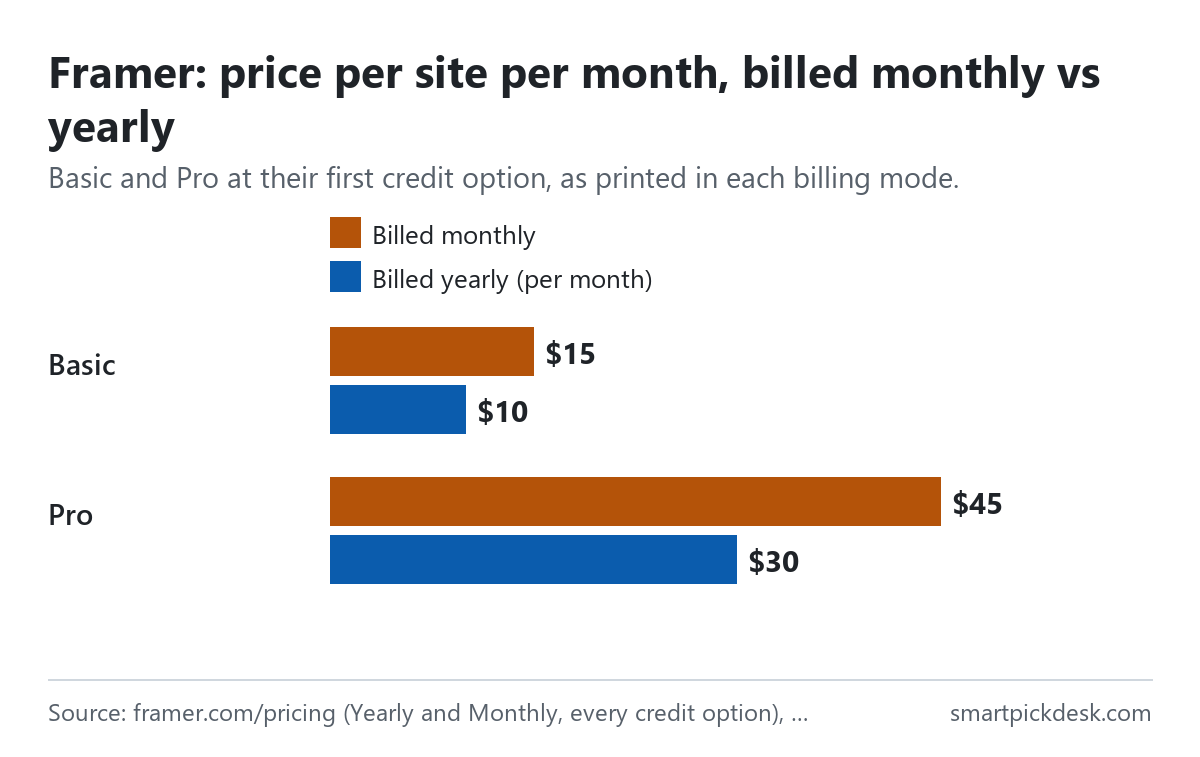
| Plan | Billed monthly (per site) | Billed yearly (per month) | Credits a month | Pages | Bandwidth |
|---|---|---|---|---|---|
| Free | $0 | $0 | 500 to try | 1,000 (FAQ) | 1 GB |
| Basic | $15 to $225 | $10 to $150 | 1,000 to 15,000 | 30 | 50 GB |
| Pro | $45 to $1,500 | $30 to $1,000 | 3,000 to 100,000 | 150 | 100 GB |
| Enterprise | Custom | Custom | Custom | Custom | |
Framer's pricing page, read on 2026-10-04 with Yearly billing and with Monthly billing, choosing each credit option in turn.[1] The ranges run from the smallest to the largest credit option.
Under the plans the page says “All prices are monthly and billed according to the billing cycle selected at checkout.” and that sales tax is added at checkout based on your location.[1] So the yearly figure is a per-month price that you pay as one charge for the year.
How we checked this (and what we did not check)
Last updated 2026-10-04 (first version). Every number and quotation here comes from Framer's own pages. Prices change — confirm on Framer's own page before you sign up.
What we did. On 2026-10-04 we opened framer.com/pricing in a browser with no account and saved the page text. With yearly billing selected, and again with monthly billing, we chose each of the seven credit options for Basic and for Pro and saved the text visible on screen each time (28 saves in all). The same day we saved ten help-centre articles on subscriptions and charges, refunds, cancelling, downgrading, upgrading, the billing cycle, site plans, editor billing, the new billing system and legacy plans. Wording in quotation marks is copied from those saved pages word for word, and a script checks every quotation against the saved text.
What we did not do. We have not used Framer. There is no account, no screenshot of the product and no view here on its design tools, AI agents or hosting speed. Every image is a chart or summary we drew from the saved text; none shows Framer's logo or screens. We did not price the Enterprise plan, which is quoted on request, and we did not check how many credits a given AI task uses.
What that leaves. Framer's Free plan, both paid site plans at every credit option in both billing modes, editor and add-on prices, and the refund and billing rules, as published.
The Free plan
Framer's Free plan has no end date. The pricing page FAQ is direct about who it is for: “Our Free plan is ideal for non-commercial use.”[1]
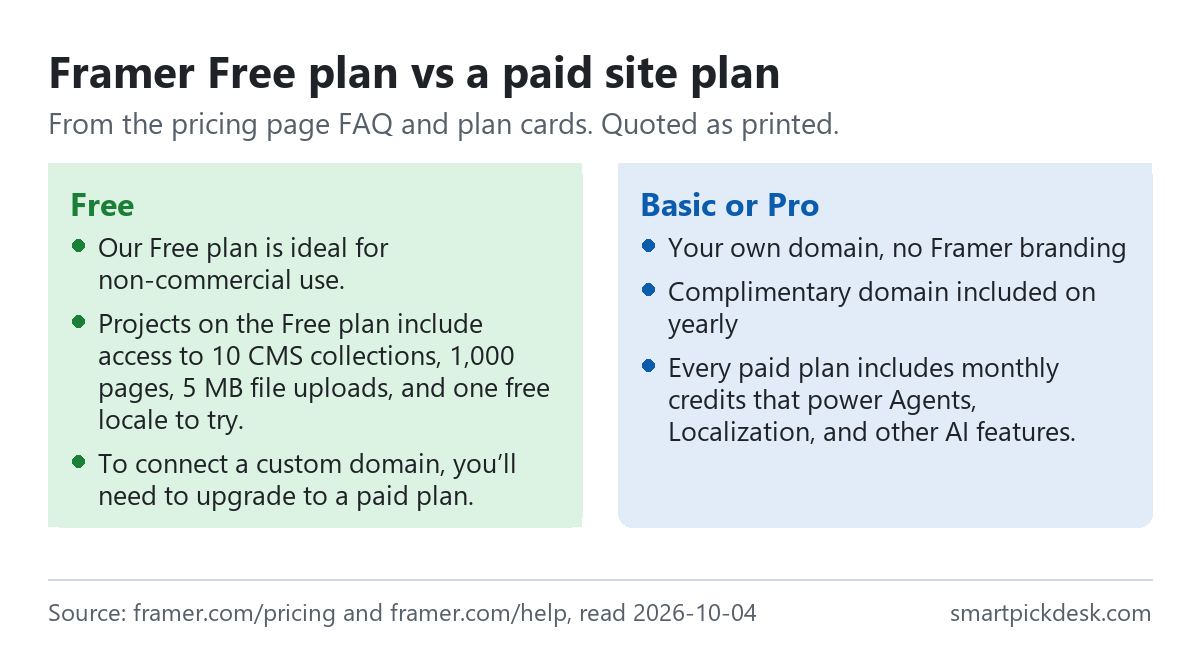
- What a Free project includes. “Projects on the Free plan include access to 10 CMS collections, 1,000 pages, 5 MB file uploads, and one free locale to try.” The Free card adds a free Framer domain, 1 GB of bandwidth and 500 AI credits to try.[1]
- Your own domain needs a paid plan. “To connect a custom domain, you’ll need to upgrade to a paid plan.”[1]
- Credits on Free. A footnote says a workspace with no active subscriptions receives 500 credits to try the AI agents.[1]
- Collaboration. Workspaces without a subscription can have up to three editors.[1]
The Free plan is generous for designing and testing, and the FAQ itself suggests using it as a design tool or for templates. What it does not give you is a site on your own address, which is what most businesses need before going live.
Credits and the price menu
This is the part of Framer's pricing that is easy to miss. Each paid card has a drop-down of monthly credit amounts, and the price on the card changes with your choice. The FAQ explains: “Every paid plan includes monthly credits that power Agents, Localization, and other AI features.” Credits are shared across the workspace and its editors.[1]
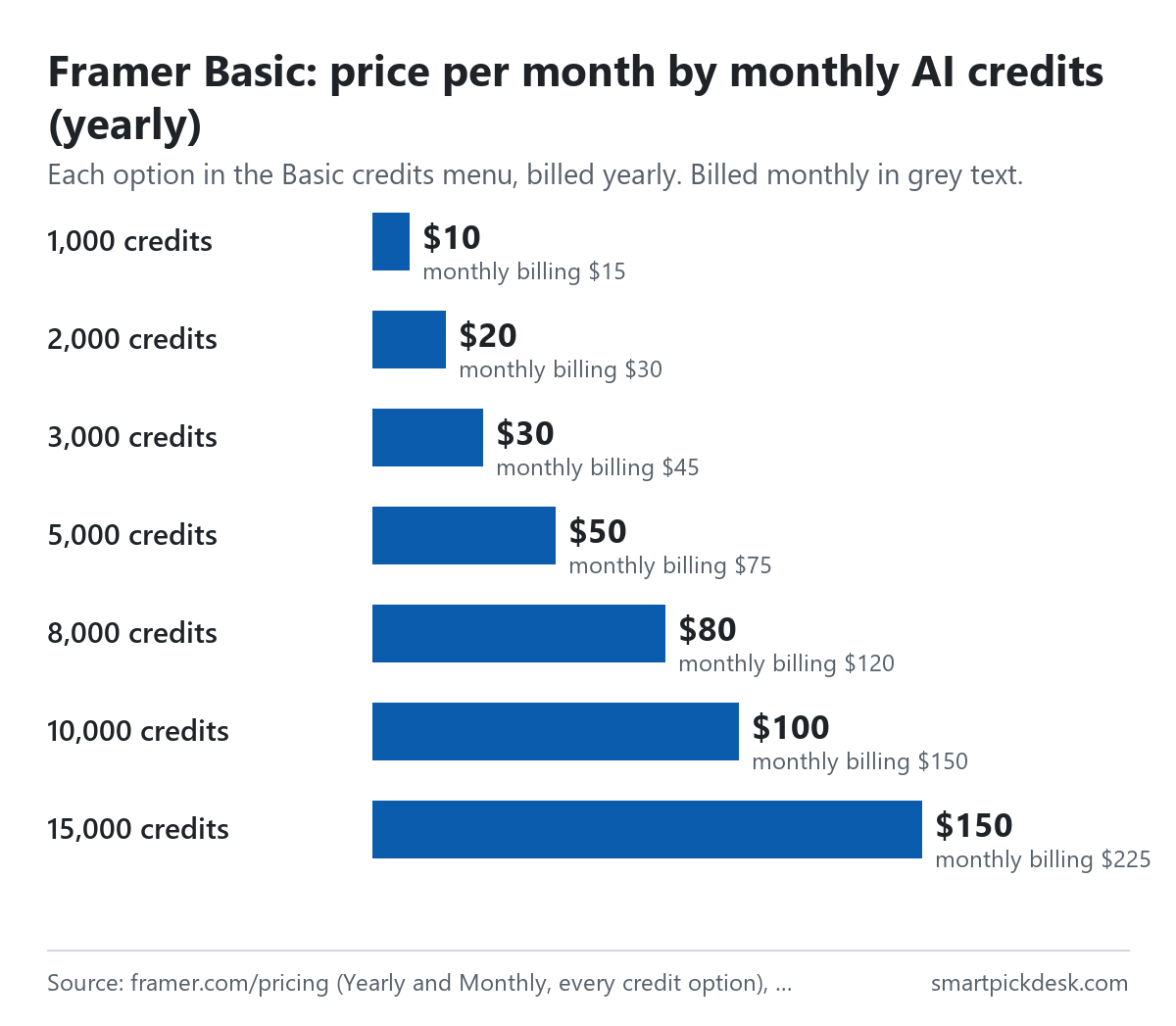
| Basic, credits a month | Billed yearly (per month) | Billed monthly |
|---|---|---|
| 1,000 | $10 | $15 |
| 2,000 | $20 | $30 |
| 3,000 | $30 | $45 |
| 5,000 | $50 | $75 |
| 8,000 | $80 | $120 |
| 10,000 | $100 | $150 |
| 15,000 | $150 | $225 |
Each option of the Basic credits menu on the pricing page, in each billing mode.[1]
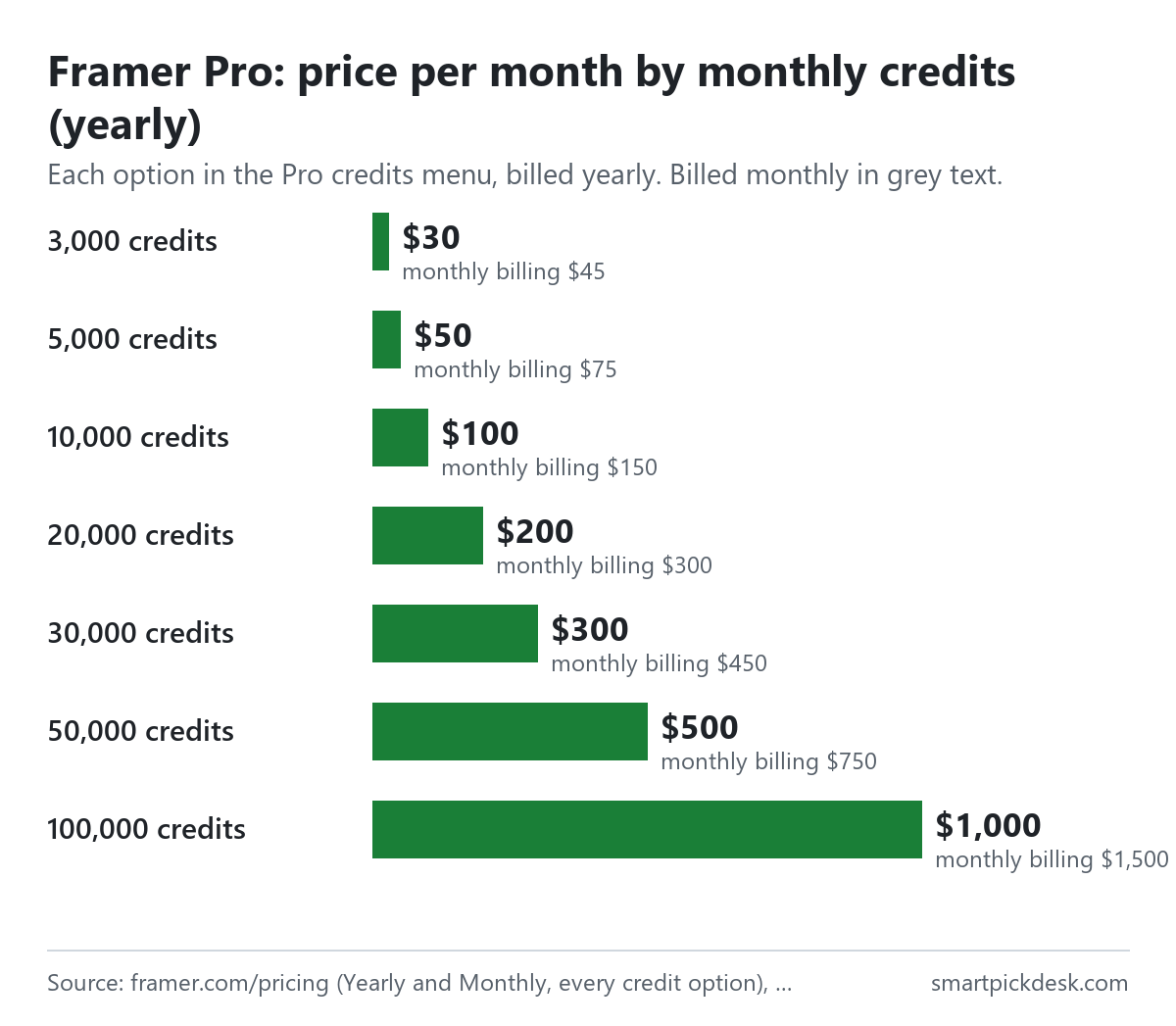
| Pro, credits a month | Billed yearly (per month) | Billed monthly |
|---|---|---|
| 3,000 | $30 | $45 |
| 5,000 | $50 | $75 |
| 10,000 | $100 | $150 |
| 20,000 | $200 | $300 |
| 30,000 | $300 | $450 |
| 50,000 | $500 | $750 |
| 100,000 | $1,000 | $1,500 |
Each option of the Pro credits menu on the pricing page, in each billing mode.[1]
Two patterns stand out in the tables. The price grows in step with the credits — by our arithmetic $1 a month per 100 credits on yearly billing at every option on both plans. And at the same credit amount the two plans cost the same: 3,000 credits is $30 on Basic and on Pro, 5,000 is $50 on both. The plan decides the site's limits and features; the credit choice decides most of the price above the lowest option. If you do not plan to use the AI features much, the lowest option keeps the bill at $10 or $30.
The cards also say “2× credits first month”, and the Compare table adds “add credits anytime”. Pro Experts, Framer's partner designers, “save 50%” on agent credits according to the same table.[1]
Basic vs Pro: the fixed limits
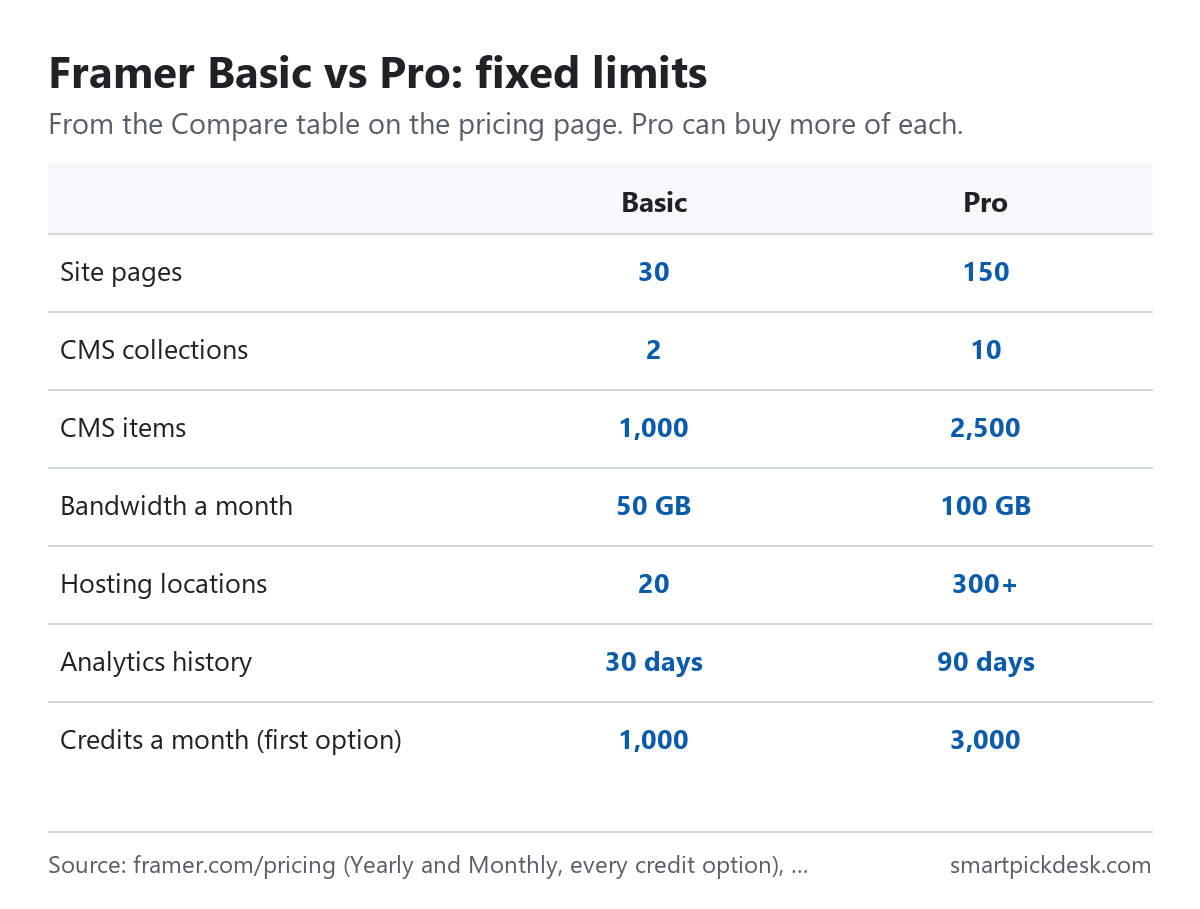
| Limit | Basic | Pro |
|---|---|---|
| Site pages | 30 | 150, then more by add-on (700 max) |
| CMS collections | 2 | 10, then more (40 max) |
| CMS items | 1,000 | 2,500, then more (40,000 max) |
| Bandwidth a month | 50 GB | 100 GB, then more (2 TB max) |
| Hosting locations | 20 | 300+ |
| Analytics history | 30 days | 90 days |
| Editors (seats) | Up to 10 | Up to 10 |
Compare table on the pricing page.[1] The table labels Basic's limits “Fixed” and Pro's “Flexible”, meaning Pro can buy more of each.
Pro also lists site redirects, a staging environment and branching with previews, and it is the plan on which the A/B testing and advanced hosting add-ons are offered.[1] The help article on site plans adds that every paid plan includes hosting and lets you publish without Framer branding.[8]
Monthly or yearly
Yearly billing is a third lower than monthly at every credit option: $10 against $15, $30 against $45, and so on (33.3% by our arithmetic). The paid cards also note a “Complimentary domain included on yearly”.[1]
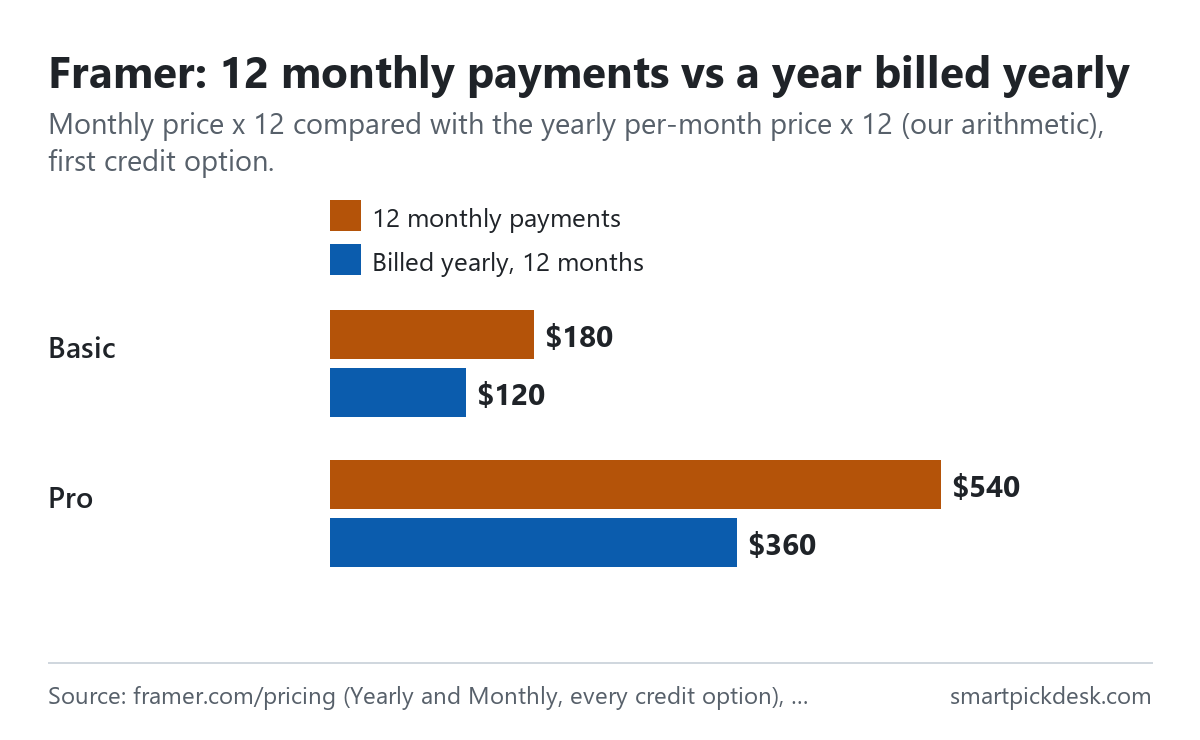
| Plan and credits | Monthly price | 12 monthly payments | Billed yearly, 12 months | Less over a year |
|---|---|---|---|---|
| Basic, 1,000 credits | $15 | $180 | $120 | $60 |
| Basic, 3,000 credits | $45 | $540 | $360 | $180 |
| Pro, 3,000 credits | $45 | $540 | $360 | $180 |
| Pro, 10,000 credits | $150 | $1,800 | $1,200 | $600 |
Per-month prices from the pricing page in each billing mode;[1] the 12-month columns and the difference are our arithmetic.
The billing cycle article states the trade-off in Framer's own words: “Monthly billing typically costs more than the equivalent monthly cost of an annual subscription.” It also says annual plans renew automatically on their anniversary date and are billed upfront for the whole year.[7][2]
Editor seats
Besides the site plan, Framer charges for the people who edit. “Admin, Editor, and Content Editor roles are paid, while Viewer roles are free.”[2]
- The first admin is free. “The first admin in every workspace is free and counts as the first editor.” Billed editors are the total minus one.[9]
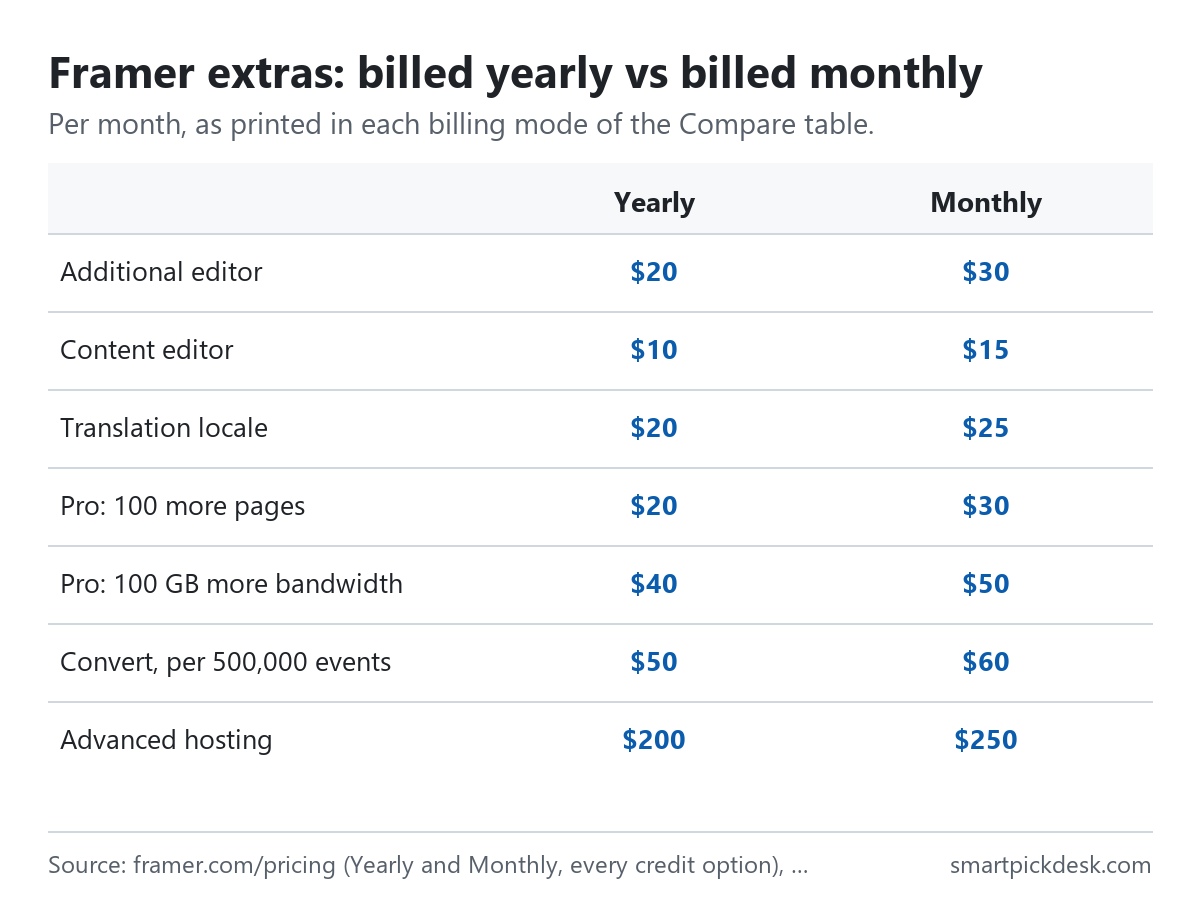
- The price per editor is $20 a month with yearly billing selected and $30 with monthly billing; content editors, who update content but do not design, are $10 or $15.[1]
- Editors are billed monthly. “Added editors are billed monthly for easier management, regardless of the initial subscription type.”[2]
- One price on every plan. Under the new billing system, “Full Editor seats now have the same price across all plans.”[10]
- Stopping editor charges. Editor subscriptions end only when the last site subscription in the workspace is cancelled.[4]
A small studio with three people editing one site therefore pays the site plan plus two editor seats. By our arithmetic, on Basic at the first credit option with yearly billing selected, that is $10 + 2 × $20 = $50 a month.
Add-ons and going over a limit
| Add-on (Pro unless noted) | With yearly billing | With monthly billing |
|---|---|---|
| 100 more pages | $20 | $30 |
| 10 more CMS collections | $40 | $50 |
| 10,000 more CMS items | $20 | $30 |
| 100 GB more bandwidth | $40 | $50 |
| Translation locale (Basic or Pro) | $20 | $25 |
| Convert (A/B testing), per 500,000 events | $50 | $60 |
| Advanced hosting | $200 | $250 |
Compare table on the pricing page in each billing mode, per month.[1]
Going over a limit is handled two ways. The FAQ: when you reach certain limits Framer asks you to upgrade, and “For other limits, like bandwidth, we allow you to exceed your limit for one month.” You get an email so you can upgrade.[1] Add-ons are billed as part of the billing cycle of the plan they belong to, and since the new billing system “Sites and add-ons are now billed separately rather than being combined into a single invoice.”[1][10]
Upgrading, downgrading and switching cycles
- Upgrades can be made at any time; Framer credits the unused part of the current plan against the new price, so you pay the difference.[6]
- Downgrades turn the unused part into account credit: “This credit is non-refundable and will automatically apply to future invoices, reducing the amount due for upcoming billing cycles.”[5]
- Monthly to yearly is a switch in the project's plan settings and takes effect immediately.[7]
- Yearly to monthly is not self-serve: “Annual-to-monthly billing changes are not currently available through the Framer interface.” Support handles it, and unused annual value becomes account credit.[7]
- Legacy plans. “Plans purchased before October 9, 2025, are considered legacy plans.” Their price stays the same while you keep them; editors and locales added after that date use current pricing, and once you switch you cannot go back.[11]
Cancelling and refunds
- Cancelling. From the workspace settings. “Your plan benefits will remain active until the end of the current billing cycle.”[4]
- Unused time. “Refunds are not provided for unused time remaining in an active subscription term.”[3]
- The refund window. The refund policy article lists “Within 7 days of the initial purchase” for everyone, and within 14 days for the European Union and Turkey.[3]
- Add-ons. Each add-on has its own refund window from the date it was bought, and “Usage-based add-ons, such as bandwidth or credits, are non-refundable once any part of them has been consumed, even if the request falls within the refund window.”[3]
- How to ask. Through Framer support, with details of the subscription and purchase date. Payments are processed through Stripe, or Stripe or Paddle according to the charges article.[3][2]
Where Framer's pages disagree
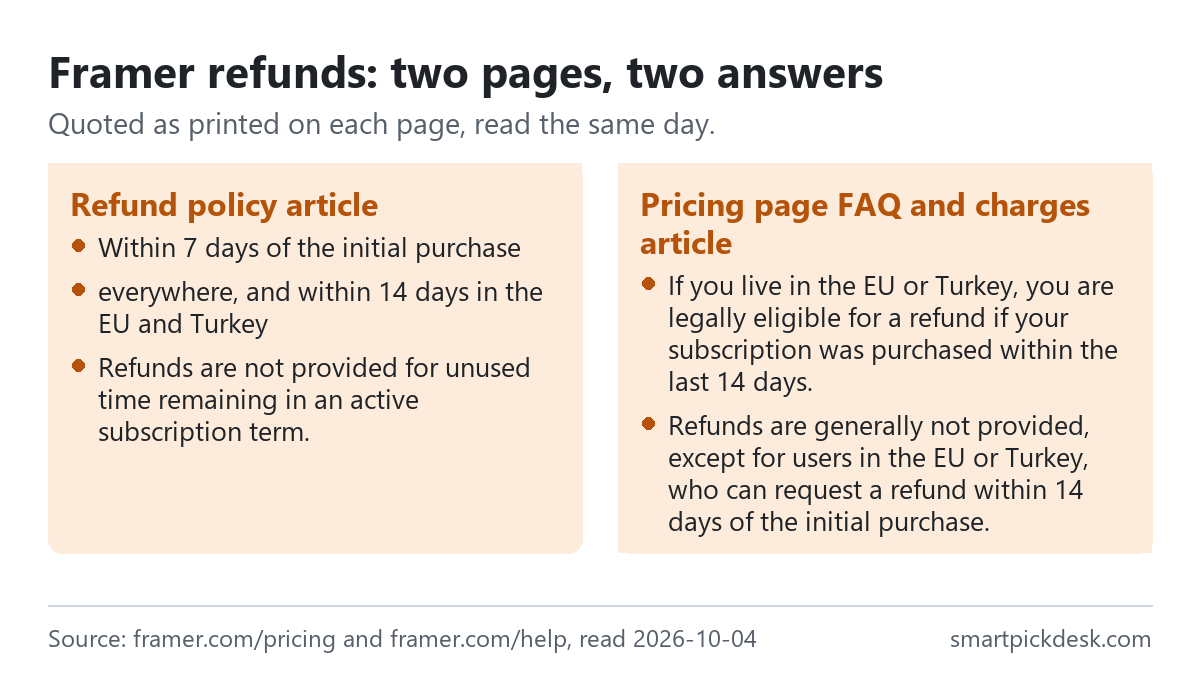
- Who can get a refund. The refund policy article gives a 7-day window to everyone and 14 days in the EU and Turkey.[3] The pricing page FAQ only says “If you live in the EU or Turkey, you are legally eligible for a refund if your subscription was purchased within the last 14 days.”[1] And the charges article, lower down, says “Refunds are generally not provided, except for users in the EU or Turkey, who can request a refund within 14 days of the initial purchase.”[2] The same charges article also lists the 7-day window further up. If you are outside the EU and Turkey, the dedicated refund policy page is the more generous reading; we have not asked Framer which is current.
- Free plan limits next to paid ones. The FAQ says a Free project includes 10 CMS collections and 1,000 pages,[1] while the paid Basic plan lists 2 collections and 30 pages. These may count different things (a project to design in versus a published site), but the page does not explain the difference.
Which plan fits which situation
| If you are… | Look at | Why, from Framer's pages | Watch out for |
|---|---|---|---|
| Designing or testing, not selling | Free | No end date; ideal for non-commercial use[1] | No custom domain[1] |
| A personal site or small portfolio | Basic, $10 a month billed yearly | Your own domain, 30 pages, 50 GB[1] | Limits are fixed on Basic[1] |
| A business site with a blog or catalogue | Pro, $30 | 150 pages, 10 collections, staging, add-ons[1] | Add-ons raise the bill[1] |
| Using the AI agents a lot | A larger credit option | Credits power agents and localization[1] | Price rises with credits[1] |
| A team of editors | Any paid plan plus seats | First admin free; viewers free[9][2] | $20 or $30 per extra editor[1] |
| Thinking of paying yearly | Any paid plan | A third lower than monthly[1] | Switching back needs support[7] |
Related pages on this site: Carrd pricing, checked covers a much simpler one-page site builder with yearly plans, and Ghost(Pro) pricing, checked covers a publishing platform with a website and newsletter.
Questions people ask
Is Framer free?
Yes, there is a Free plan for non-commercial use on a Framer domain.[1]
How much does Framer cost?
Basic from $10 a month per site billed yearly ($15 monthly), Pro from $30 ($45), rising with the credits you choose.[1] See the credit tables.
What are Framer credits?
Monthly credits for Framer's AI features, shared across the workspace.[1]
Do I pay for Framer editors?
The first admin is free; extra editors are $20 or $30 a month each, viewers free.[9][1]
Can I get a refund from Framer?
Within 7 days of the first purchase per the refund policy article (14 days in the EU and Turkey); unused time is not refunded.[3]
Can I switch Framer from yearly to monthly?
Only through support; unused value becomes account credit.[7]
Do you get paid if I sign up?
Not from this page — it has no affiliate links today. If that changes, it will say so at the top, and each link will be marked.
Sources and check log
| # | Source | URL | Checked | How |
|---|---|---|---|---|
| 1 | Framer, Pricing (plan cards at every credit option in both billing modes, Compare table, FAQ) | framer.com/pricing | 2026-10-04 | Opened in a browser with no account; visible text saved for each option and billing mode |
| 2 | Framer help, Subscriptions and charges | framer.com/help › subscriptions and charges | 2026-10-04 | Page text saved |
| 3 | Framer help, Refund policy | framer.com/help › refund policy | 2026-10-04 | Page text saved |
| 4 | Framer help, Cancel your Framer subscription | framer.com/help › cancel | 2026-10-04 | Page text saved |
| 5 | Framer help, Downgrade your Site plan | framer.com/help › downgrade | 2026-10-04 | Page text saved |
| 6 | Framer help, Upgrade your Framer subscription | framer.com/help › upgrade | 2026-10-04 | Page text saved |
| 7 | Framer help, Change your billing cycle | framer.com/help › billing cycle | 2026-10-04 | Page text saved |
| 8 | Framer help, Site plans overview | framer.com/help › site plans | 2026-10-04 | Page text saved |
| 9 | Framer help, Check the total and billed editors in your workspace | framer.com/help › billed editors | 2026-10-04 | Page text saved |
| 10 | Framer help, Learn about Framer's new billing system | framer.com/help › new billing system | 2026-10-04 | Page text saved |
| 11 | Framer help, Legacy plans | framer.com/help › legacy plans | 2026-10-04 | Page text saved |
Change log
- 2026-10-04 — First version. The pricing page at every credit option in both billing modes and ten help articles read on 2026-10-04.
- Previous check: none for this page.
- What we will re-check: the credit menus and prices in both modes, the editor and add-on prices, and the refund wording on the three pages.
Who writes this
Smart Pick Desk is an independent site that compares tools for people who work online. We are not employed by, or partnered with, Framer, and we do not run Framer in our own business. What we do is read what each company publishes, write down the date we read it, and say plainly which parts we could not check. More: who the editors are and how we check a page.
We do not promise results. Nothing here is a prediction about what a tool will do for your site or your sales.