WordPress.com pricing, checked: the free plan, Personal to Commerce, first-term vs renewal prices, 1 to 3 years, and the refund windows
Last updated 2026-10-05 · By Smart Pick Desk editors · Prices read on WordPress.com's pricing page for all four payment periods on 2026-10-05; support guides read the same day · We have not used WordPress.com · How we checked ↓
The short answer
WordPress.com is a hosted website service: it runs the WordPress software for you, so you build a blog, site or shop without managing a server. It has a free plan and four paid plans, and the price depends on how long you pay for at once. On monthly billing, Personal is $9 a month, Premium $18, Business $40 and Commerce $70. On yearly billing the first year is $4, $8, $25 and $45 a month, and the plan then renews at $5, $9, $28 and $50.
- Free: a .wordpress.com address, ads shown to visitors, 1 GB of media storage, no plugins.[2]
- Personal and Premium, from $4 and $8 a month for the first year: no ads, a free domain for a year, more storage; Premium adds payment buttons and video uploads.[1]
- Business and Commerce, from $25 and $45 a month for the first year: priority support, backups, developer tools; Commerce adds WooCommerce for a full shop.[1]
If you want one sentence: the lowest monthly figures are first-term prices that rise at renewal, and a paid year can be refunded only in the first 14 days.
On this page
At a glance
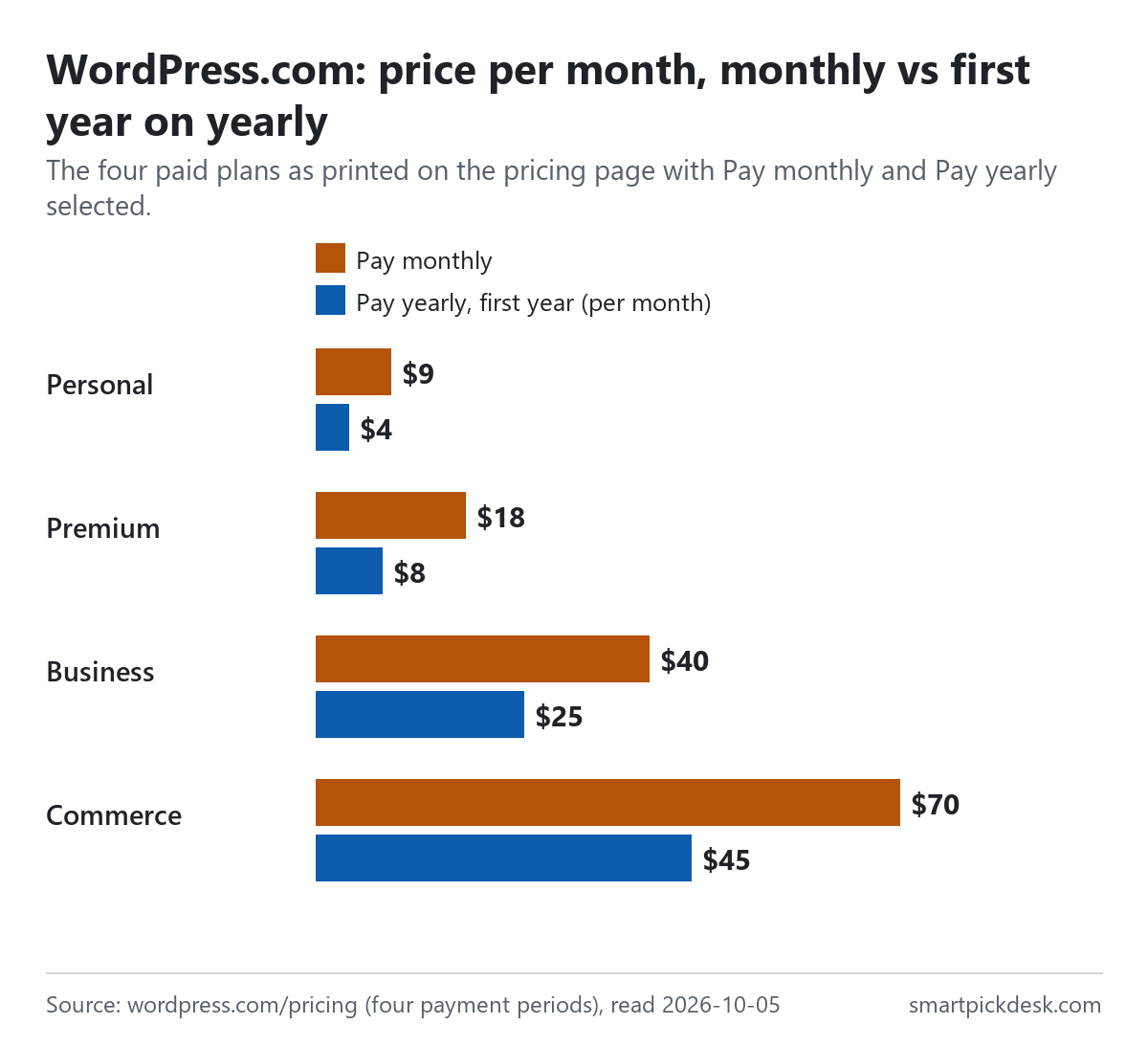
| Plan | Pay monthly | Pay yearly, first year (per month) | Yearly renews at (per month) | Storage |
|---|---|---|---|---|
| Free | No charge | No charge | – | 1 GB |
| Personal | $9 | $4 | $5 | 6 GB |
| Premium | $18 | $8 | $9 | 13 GB |
| Business | $40 | $25 | $28 | 50 GB |
| Commerce | $70 | $45 | $50 | 50 GB |
WordPress.com's pricing page, read on 2026-10-05 with Pay monthly and with Pay yearly selected,[1] and the free storage figure from the guide on cancelling.[2] Prices exclude tax.
Each yearly card shows the monthly price next to the first-year price, a “Save” percentage, and a line such as “Auto-renews at $5 per month. Billed every 12 months, excl. taxes.”[1] That last line is the one to read: it is the price from the second year on.
How we checked this (and what we did not check)
Last updated 2026-10-05 (first version). Every number and quotation here comes from WordPress.com's own pages. Prices change — confirm on WordPress.com's own page before you sign up.
What we did. On 2026-10-05 we opened wordpress.com/pricing in a browser with no account and saved the page text. The page has a menu for the payment period with four choices: Pay monthly, Pay yearly, Pay every 2 years and Pay every 3 years. We chose each one and saved the visible text. The same day we saved eight support guides: refunds, managing purchases, cancelling or removing a subscription, upgrading, downgrading, tax, the free domain, and domain prices. Wording in quotation marks is copied from those saved pages word for word, and a script checks every quotation against the saved text.
What we did not do. We have not used WordPress.com. There is no account, no screenshot of the product and no view here on speed, support or how well its editor works. Every image is a chart or summary we drew from the saved text; none shows WordPress.com's logo or screens. We did not read the Enterprise or 100-year plans beyond what the refund guide says, or the agency programme. Prices on WordPress.com can be shown in local currencies; we were shown US dollars.
What that leaves. The four paid plans in four payment periods, the first-term and renewal prices, the free plan's limits, and the refund, cancellation, upgrade, downgrade and domain rules, as published.
The free plan
The pricing page offers it in one line: “Choose a plan today and unlock a powerful bundle of features. Or start with our free plan.”[1] The clearest description of what a free site is comes from the guide on cancelling, which explains what a site goes back to.
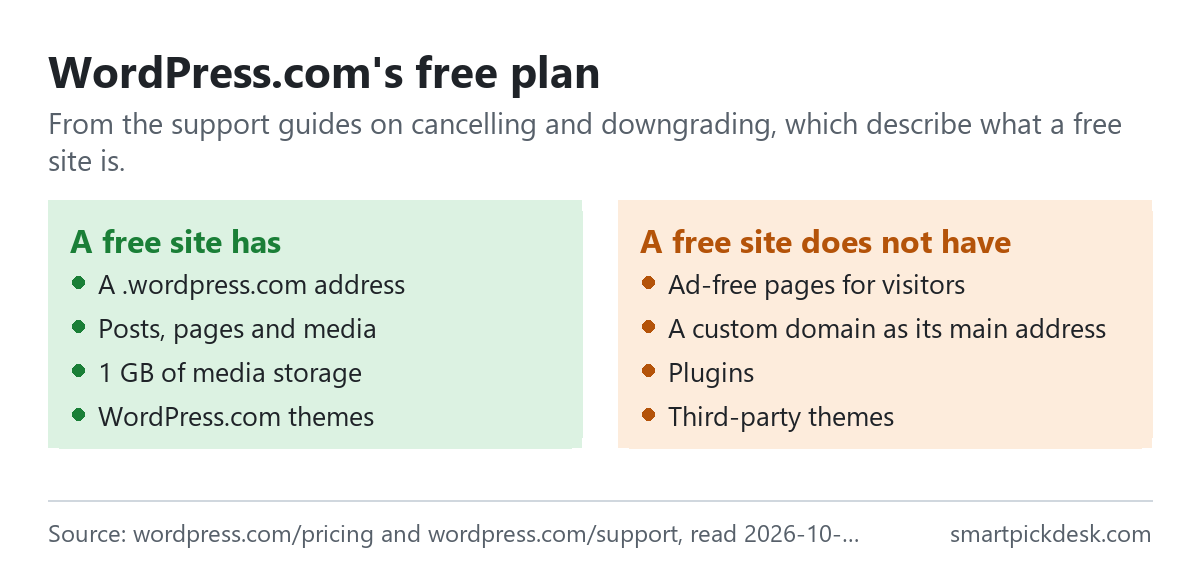
- Ads. “Free WordPress.com sites display ads, so your site will show ads again once your plan is removed or expires.”[2]
- Address. Free sites use a .wordpress.com address as their main address.[2][5]
- Storage. “Free sites include 1 GB of media storage (3 GB for sites created before March 31, 2022).”[2]
- Themes and plugins. “Third-party themes are not supported on the free plan and are therefore removed.” Plugins need a paid plan that includes them.[1][2]
In everyday terms: the free plan suits a personal blog or a test site where ads and a .wordpress.com address are acceptable. Paying is mainly about removing the ads and using your own domain. Other free tiers are on Free plans.
What each paid plan adds
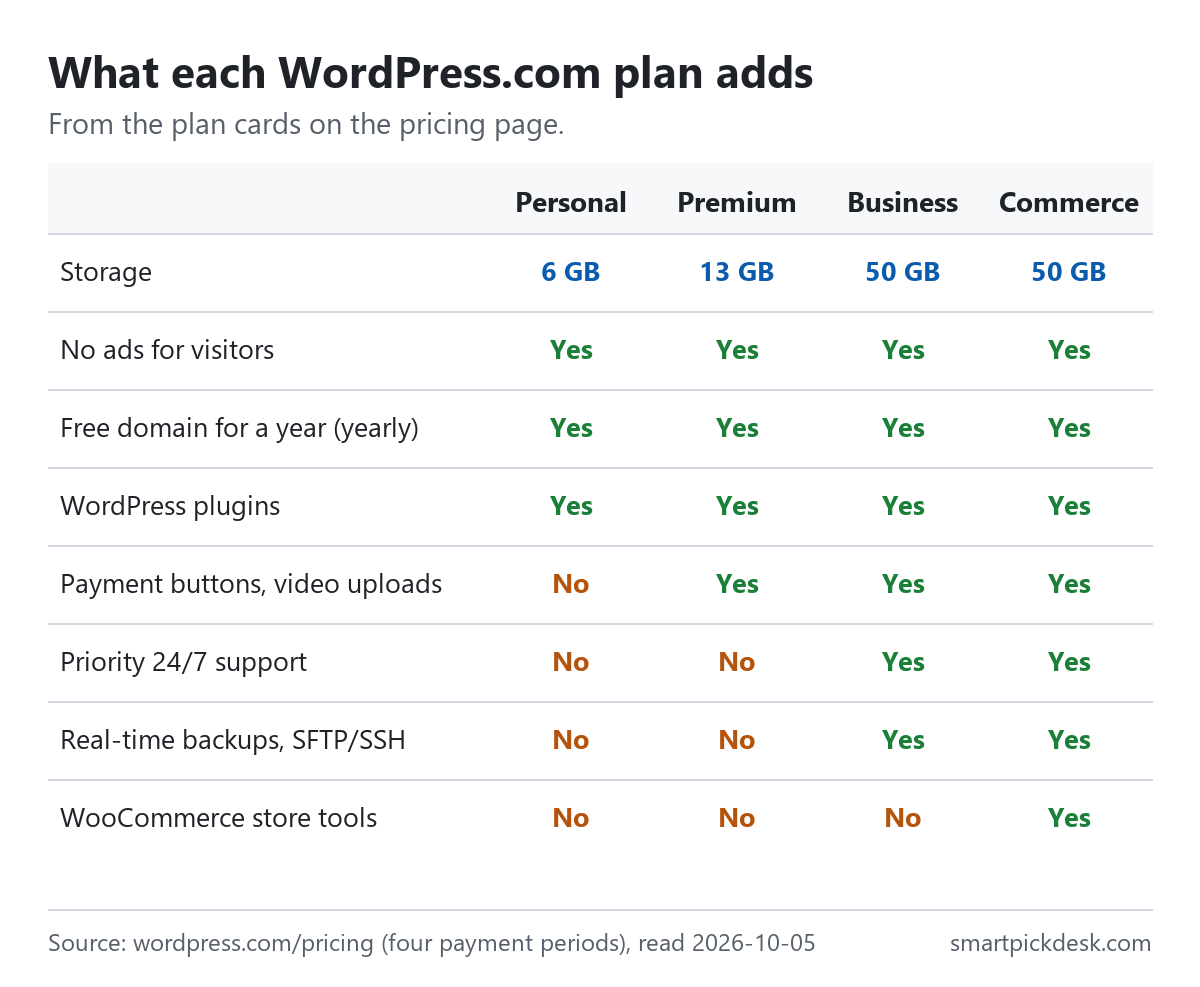
| Feature | Personal | Premium | Business | Commerce |
|---|---|---|---|---|
| Storage | 6 GB | 13 GB | 50 GB | 50 GB |
| No ads for visitors | Yes | Yes | Yes | Yes |
| Free domain for one year (yearly plans) | Yes | Yes | Yes | Yes |
| WordPress plugins | Yes | Yes | Yes | Yes |
| Payment buttons, video uploads | No | Yes | Yes | Yes |
| Priority 24/7 support | No | No | Yes | Yes |
| Real-time backups, SFTP/SSH | No | No | Yes | Yes |
| WooCommerce store tools | No | No | No | Yes |
The plan cards on the pricing page, read on 2026-10-05.[1]
The cards list “Extend your site with WordPress plugins” on all four paid plans.[1] Business and Commerce add a built-in site assistant, a free business email account for one year, email marketing and “Free advertising credits worth $200”.[1] The downgrade guide puts the plans in order: “From highest to lowest, these are Commerce, Business, Premium, and Personal.”[5]
The step from Personal to Premium is about earning on the site: payment buttons, premium themes and video. The step to Business is about running a business site with priority support, backups and developer access. Commerce is for a full online shop. For a form without a paid plan, Tally pricing, checked covers a free form builder.
First-term prices and renewal prices
WordPress.com's longer billing periods start at a lower price than they renew at. The renewal price is printed on every card.
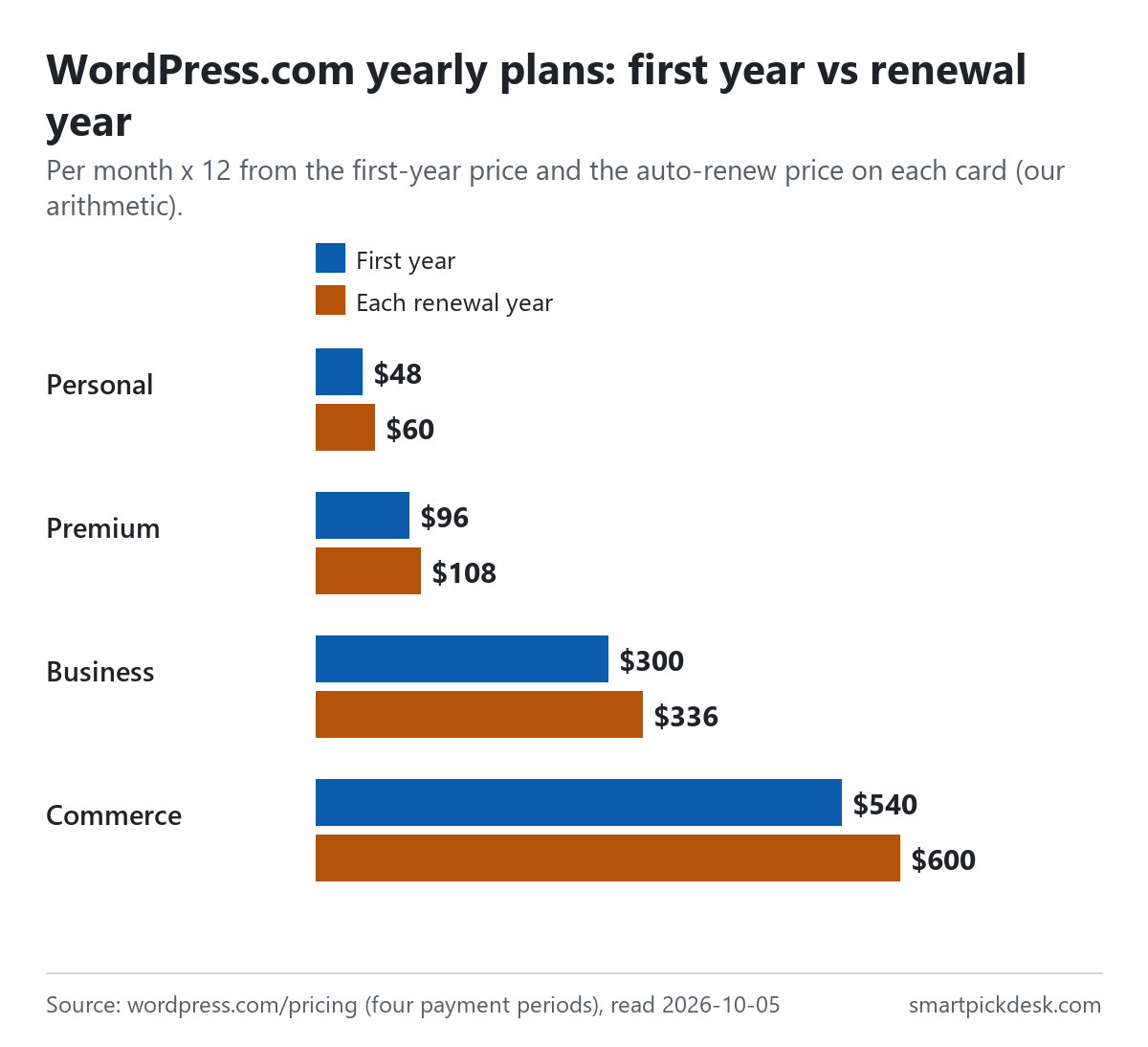
| Plan, yearly | Monthly price | 12 monthly payments | Second year onward (renewal) | Less over a year |
|---|---|---|---|---|
| Personal | $9 | $108 | $60 | $48 |
| Premium | $18 | $216 | $108 | $108 |
| Business | $40 | $480 | $336 | $144 |
| Commerce | $70 | $840 | $600 | $240 |
Monthly prices and the renewal prices per month on the yearly cards;[1] the 12-month columns and the difference are our arithmetic. This table compares a year on monthly billing with a renewal year on yearly billing.
The first year is lower still: $48 for Personal, $96 for Premium, $300 for Business and $540 for Commerce, by our arithmetic from the first-year prices on the cards.[1] So for Personal the first year costs $48 and the second $60; for Business, $300 and then $336.
The “Save” percentages on the cards compare the first-term price with the monthly price: “Save 55%” on Personal and Premium, 37% on Business and 35% on Commerce for one year.[1] They do not describe the renewal price. In everyday terms: budget for the renewal line, not the headline.
Monthly, yearly or several years
The two-year and three-year options lower the first-term price further, and they also renew at a lower rate than the yearly plan.
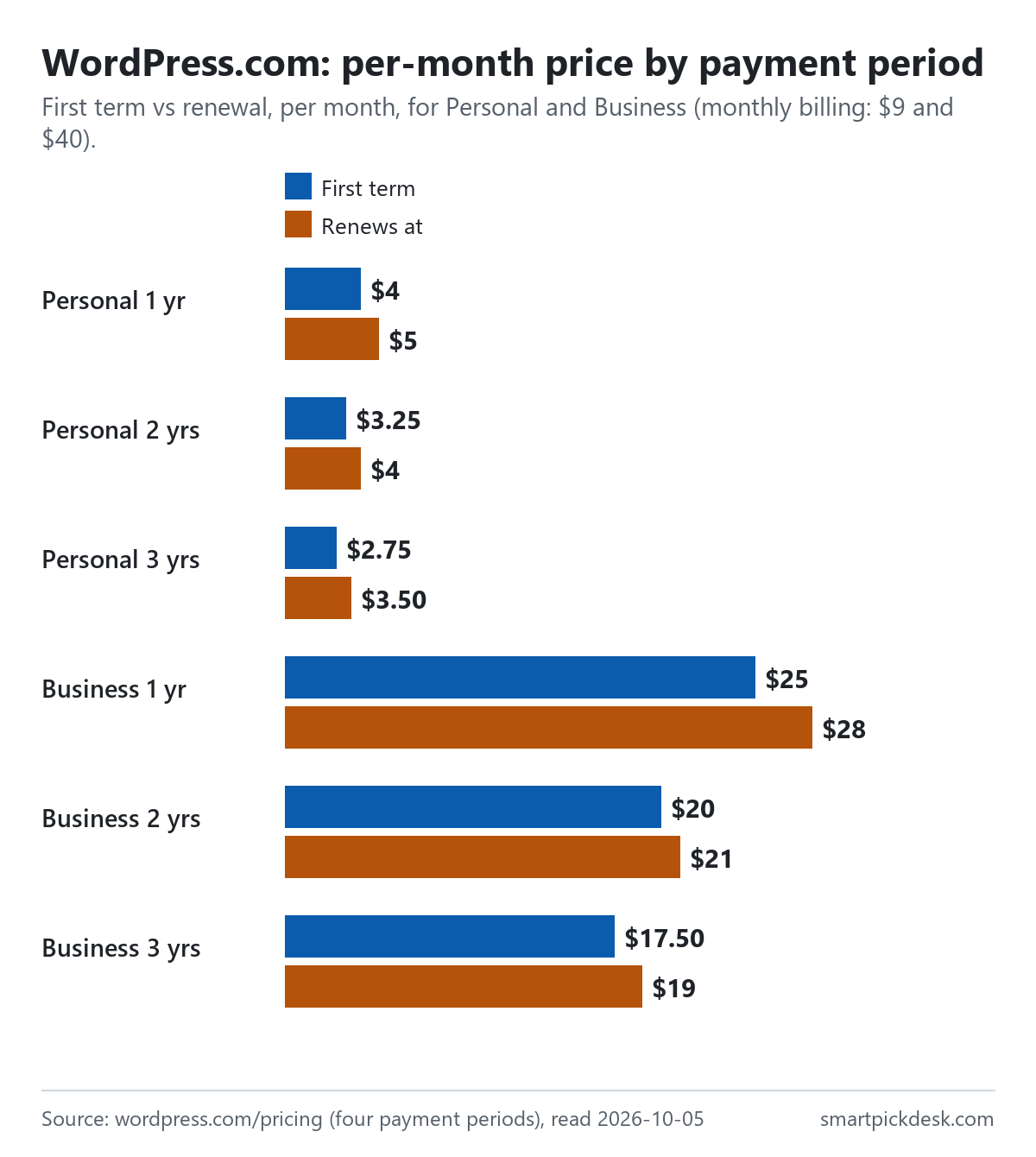
| Plan and period | First term, per month | First term, total | Renews at, per month | Renewal term, total |
|---|---|---|---|---|
| Personal, 1 year | $4 | $48 | $5 | $60 |
| Personal, 2 years | $3.25 | $78 | $4 | $96 |
| Personal, 3 years | $2.75 | $99 | $3.50 | $126 |
| Business, 1 year | $25 | $300 | $28 | $336 |
| Business, 2 years | $20 | $480 | $21 | $504 |
| Business, 3 years | $17.50 | $630 | $19 | $684 |
Per-month prices and renewal prices from the pricing page in each payment period;[1] the totals are our arithmetic (per month × 12, 24 or 36). Each card says it is billed every 12, 24 or 36 months, excluding taxes.
For comparison, 36 months of Personal on monthly billing would be $324, against $99 for the first three-year term, by our arithmetic. The longer the period, the more is paid at once and the longer the money is committed: refunds on multi-year plans have the same 14-day window as yearly plans (below).
- Switching up is easy. “Monthly to annual or multi-year: Change from monthly billing to annual or multi-year billing at any time.”[6]
- Switching down is not. “If you want to switch from an annual or multi-year plan to a monthly plan, contact support for assistance.”[6]
- When yearly plans renew. “If automatic renewal is enabled for your plan, yearly plans renew one month before the expiration date”, so the refund window for a renewal closes about two weeks before the plan expires.[3]
The free domain and domain prices
- Annual plans only. “When you purchase a new annual plan for your WordPress.com site, your subscription includes a free domain for one year.” “Monthly plans do not come with a free domain credit.”[7]
- After the first year. “After the first year, the domain renews at the standard price.”[7] The domain price list shows .com at $13.00, .net at $14.00, .org at $12.00 and .blog at $22.00 a year.[8]
- The credit can wait. “The credit doesn’t expire, so you can use it immediately or save it until you’ve found exactly the right name for your site.”[7]
- Domains and refunds. A domain can be refunded within 96 hours of registration or renewal. If you claim a plan refund after that, “we will credit the difference between the cost of the plan and the cost of the domain name”, and you keep the domain.[3]
- Expired domains. The redemption fee for an expired domain is US$80 and is not refundable unless the redemption fails.[3]
A domain bought on its own, without a plan, is charged at those standard prices from the first year. The price list adds that renewal prices for existing domains may differ depending on the price in effect when they were first registered or transferred, so a domain you already hold may not renew at today's listed figure.[8]
So the free domain is free for one year, and from the second year it adds its own price to the plan's renewal price.
Refund windows
WordPress.com refunds plans in full within a set number of days, and not at all after.
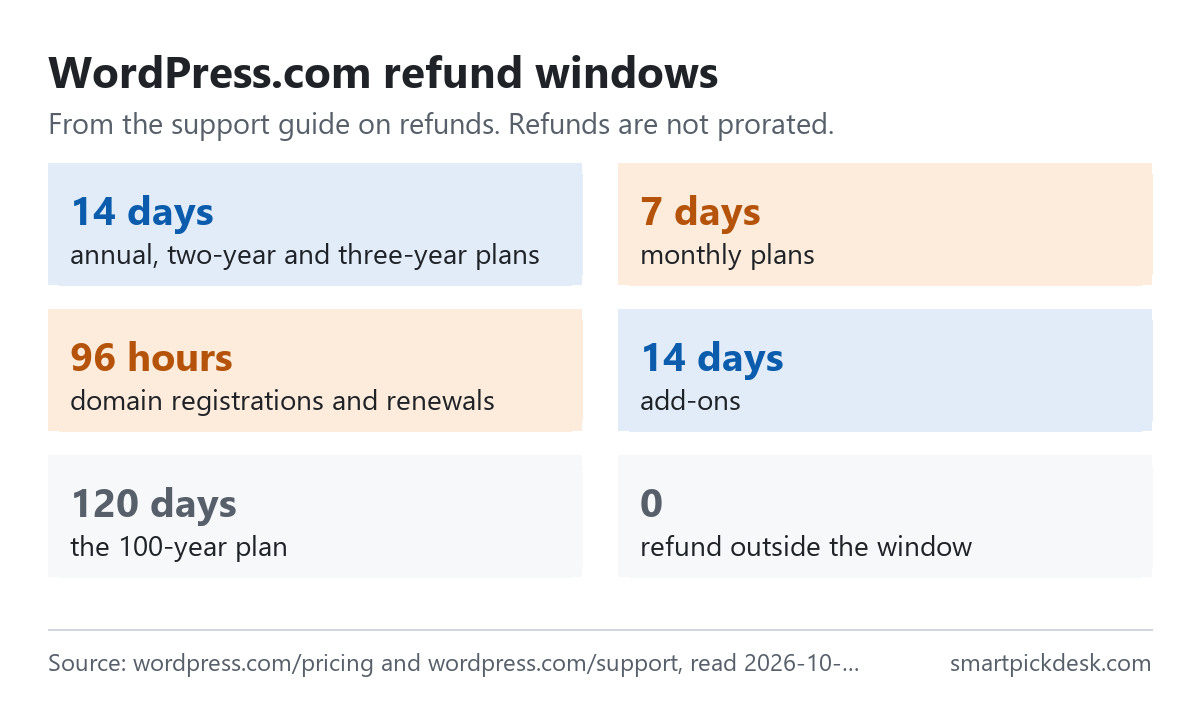
- Plans. “WordPress.com annual, two-year, and three-year plans are refundable within 14 days of purchase or renewal.” “WordPress.com monthly plans are refundable within 7 days of purchase or renewal.”[3]
- All or nothing. “Refunds are not prorated.” Inside the window you get the full amount back; outside it, none.[3]
- Cancelling alone is not enough. “Canceling a subscription does not issue a refund on its own.” You cancel and then remove the subscription.[3]
- How long it takes. “After processing, refunds usually take about seven to ten business days to appear on your bank or credit card statement.”[3]
- Downgrading inside the window. “You can downgrade to a lower-tier plan within the refund period, and the price difference is refunded automatically.”[3]
Cancelling, removing and what your site keeps
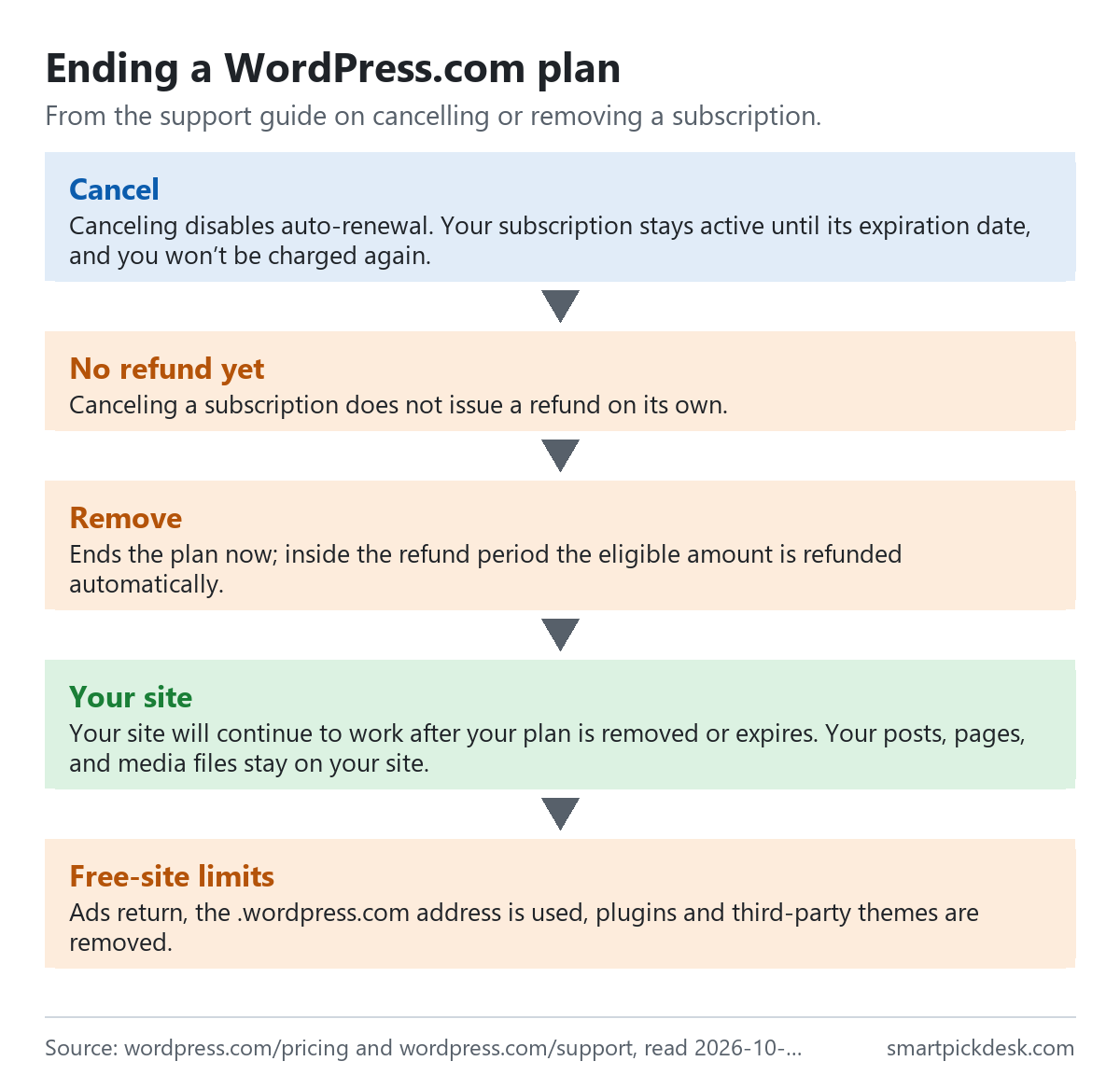
- Cancel. “Canceling disables auto-renewal. Your subscription stays active until its expiration date, and you won’t be charged again.”[2]
- Remove. Removing ends the plan immediately and “forfeits any remaining time on the subscription”; within the refund period, the eligible amount is refunded automatically.[2]
- Your content. “Your site will continue to work after your plan is removed or expires. Your posts, pages, and media files stay on your site.”[2]
- Plugins. “If you remove a plan immediately, all plugins and content created with those plugins are removed right away.” If you cancel, they stay until the plan expires.[2]
- Changing your mind. While a cancelled plan is still active, you can turn auto-renewal back on; after it expires, you buy it again.[2]
Before cancelling a plan with plugins, the guide suggests downloading a backup or exporting your content.[2]
Upgrading, downgrading and tax
- Upgrade credit. When you upgrade, “WordPress.com applies any unused time on your current plan as a prorated upgrade credit, which reduces the amount you pay at checkout.” “Upgrade credit is not a refund.”[6]
- New renewal date. After an upgrade the plan runs for one full term from the upgrade date.[6]
- Downgrading later. After the refund period, a downgrade is scheduled for the renewal date; “After the refund period, the unused time on your current plan is not refunded and does not become credit toward the lower plan.”[5]
- Losing Business features. Moving down from Business or Commerce removes backups, SFTP/SSH, database access, staging and site monitoring.[5]
- Tax. “When making a purchase on WordPress.com, you are charged the relevant tax based on your billing address.” Tax-registered businesses can enter a VAT or GST ID to avoid it on future purchases.[9]
Where WordPress.com's pages disagree
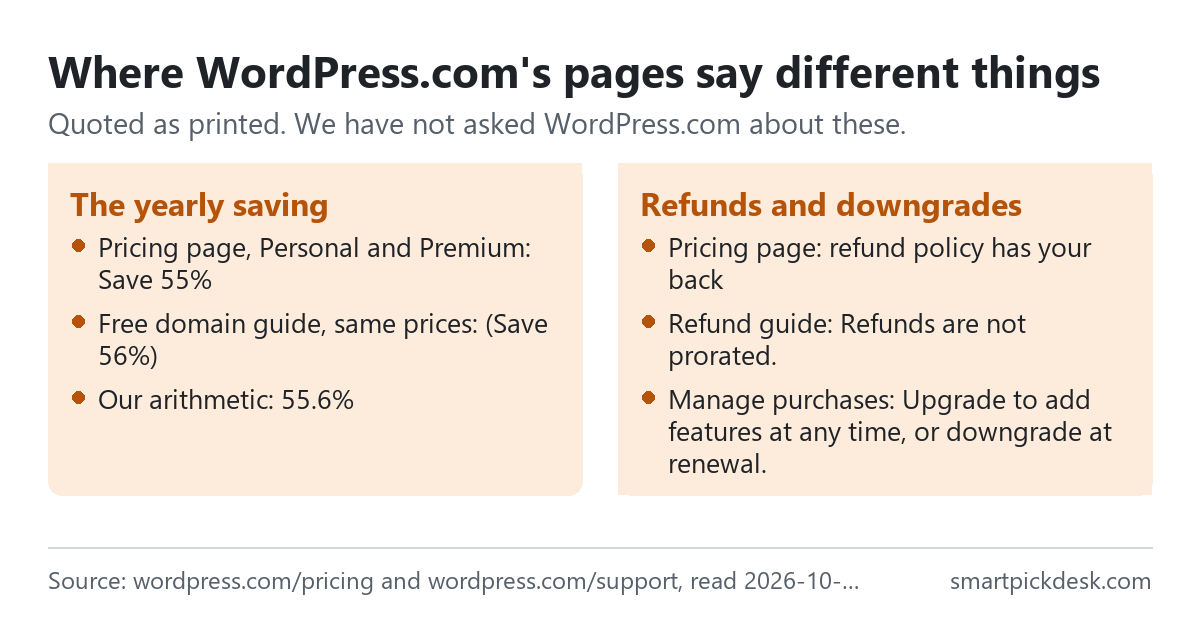
- The yearly saving. On the pricing page, the yearly Personal and Premium cards say “Save 55%”.[1] The plan box inside the free domain guide shows the same $4 and $8 prices with “(Save 56%)”.[7] By our arithmetic, $4 against $9 is 55.6% and $8 against $18 is 55.6%, so the two pages round the same figure differently.
- How generous refunds are. The pricing page describes its refund policy as one that “has your back” with no questions asked.[1] The refund guide sets fixed windows of 7 or 14 days and says “Refunds are not prorated.”[3] Both can be true at once: no questions within the window, nothing after it.
- When a downgrade happens. The guide to managing purchases sums it up as “Upgrade to add features at any time, or downgrade at renewal.”[4] The downgrade guide adds that inside the refund period the switch is immediate and the price difference is refunded.[5] The short version leaves out that case.
We have not asked WordPress.com about these. The prices on the plan cards are what we used throughout.
Which plan fits which situation
| If you are… | Look at | Why, from WordPress.com's pages | Watch out for |
|---|---|---|---|
| Starting a personal blog | Free | No charge, posts and pages kept[2] | Ads and a .wordpress.com address[2] |
| Wanting your own domain, no ads | Personal, yearly | $4 a month first year, free domain[1][7] | Renews at $5; domain at its own price[1][7] |
| Selling a few things or showing videos | Premium | Payment buttons, video uploads[1] | $9 a month from the second year[1] |
| A business site with backups | Business | Priority support, backups, SFTP[1] | Losing them if you downgrade[5] |
| An online shop | Commerce | WooCommerce tools[1] | $50 a month from the second year[1] |
| Not sure yet | Monthly billing | 7-day refund window[3] | No free domain on monthly plans[7] |
See WordPress.com's own pricing page
Related pages on this site: Framer pricing, checked and Carrd pricing, checked cover two other website builders, and Ghost pricing, checked covers a publishing platform with newsletters. If the newsletter matters more than the site, Substack pricing, checked and beehiiv pricing, checked cover two newsletter tools; every price guide is on Pricing.
Questions people ask
Is WordPress.com free?
Yes; free sites show ads and use a .wordpress.com address.[2]
How much does WordPress.com cost?
Monthly: $9, $18, $40 or $70. Yearly first year: $4, $8, $25 or $45 a month.[1] See the table.
Why does the WordPress.com price go up at renewal?
Longer periods start at a lower first-term price; each card shows the renewal price.[1]
Can I get a refund from WordPress.com?
Within 14 days for yearly and multi-year plans, 7 days for monthly.[3]
Does WordPress.com include a free domain?
For the first year on annual and multi-year plans only.[7]
What happens to my site if I cancel WordPress.com?
It reverts to a free site; content stays, plugins go.[2]
Do you get paid if I sign up?
Not from this page — it has no affiliate links today. If that changes, it will say so at the top, and each link will be marked.
Sources and check log
| # | Source | URL | Checked | How |
|---|---|---|---|---|
| 1 | WordPress.com, Pricing (four payment periods) | wordpress.com/pricing | 2026-10-05 | Opened in a browser with no account; visible text saved for each payment period |
| 2 | WordPress.com support, Cancel or remove a subscription | wordpress.com/support › cancel a purchase | 2026-10-05 | Page text saved |
| 3 | WordPress.com support, Refund a WordPress.com purchase | wordpress.com/support › refunds | 2026-10-05 | Page text saved |
| 4 | WordPress.com support, Manage purchases | wordpress.com/support › manage purchases | 2026-10-05 | Page text saved |
| 5 | WordPress.com support, Downgrade your plan | wordpress.com/support › downgrade | 2026-10-05 | Page text saved |
| 6 | WordPress.com support, Upgrade your plan | wordpress.com/support › upgrade | 2026-10-05 | Page text saved |
| 7 | WordPress.com support, Register a free domain | wordpress.com/support › free domain | 2026-10-05 | Page text saved |
| 8 | WordPress.com support, Domain pricing and available TLDs | wordpress.com/support › domain pricing | 2026-10-05 | Page text saved |
| 9 | WordPress.com support, VAT, GST and other taxes | wordpress.com/support › taxes | 2026-10-05 | Page text saved |
Change log
- 2026-10-05 — First version. The pricing page in four payment periods and eight support guides read on 2026-10-05.
- Previous check: none for this page.
- What we will re-check: the first-term and renewal prices in each period, the Save percentages, the refund windows, and the domain prices.
Who writes this
Smart Pick Desk is an independent site that compares tools for people who work online. We are not employed by, or partnered with, WordPress.com or Automattic, and we do not run WordPress.com in our own business. What we do is read what each company publishes, write down the date we read it, and say plainly which parts we could not check. More: who the editors are and how we check a page.
We do not promise results. Nothing here is a prediction about what a tool will do for your site or sales.