Flodesk pricing, checked: the Free plan, Lite, Pro and Everything at every subscriber count
Last updated 2026-10-04 · By Smart Pick Desk editors · Prices read on Flodesk's pricing page at all 32 subscriber steps, in both billing modes, on 2026-10-04; help centre read the same day · We have not used Flodesk · How we checked ↓
The short answer
Flodesk has a Free plan and three paid plans, Lite, Pro and Everything, priced by how many active subscribers you have. The Free plan collects subscribers but does not send email — sending starts at Lite.
- Free: forms, landing pages and link-in-bio pages, with no email sending. A separate free trial lets you try the paid features without a card; when it ends, you move to the Free plan unless you pick a paid one.[1]
- Lite starts at $25 a month, or $19 a month on annual billing, for up to 1,000 subscribers. Pro is $28 or $25; Everything is $54 or $49. Lite stops at 25,000 subscribers; Pro and Everything go to 255,000.[1]
- The rules behind the price are mild on counting and firm on growth. Unsubscribed, unconfirmed and bounced contacts are not counted, but when your list passes a tier, Flodesk upgrades you automatically — even during a scheduled cancellation on an annual plan.[2][6]
If you want one sentence: Flodesk is free while you are only building a list, and the bill starts when you want to email it, so the useful questions are how many active subscribers you will have and whether you will pay monthly or for the year.
On this page
At a glance
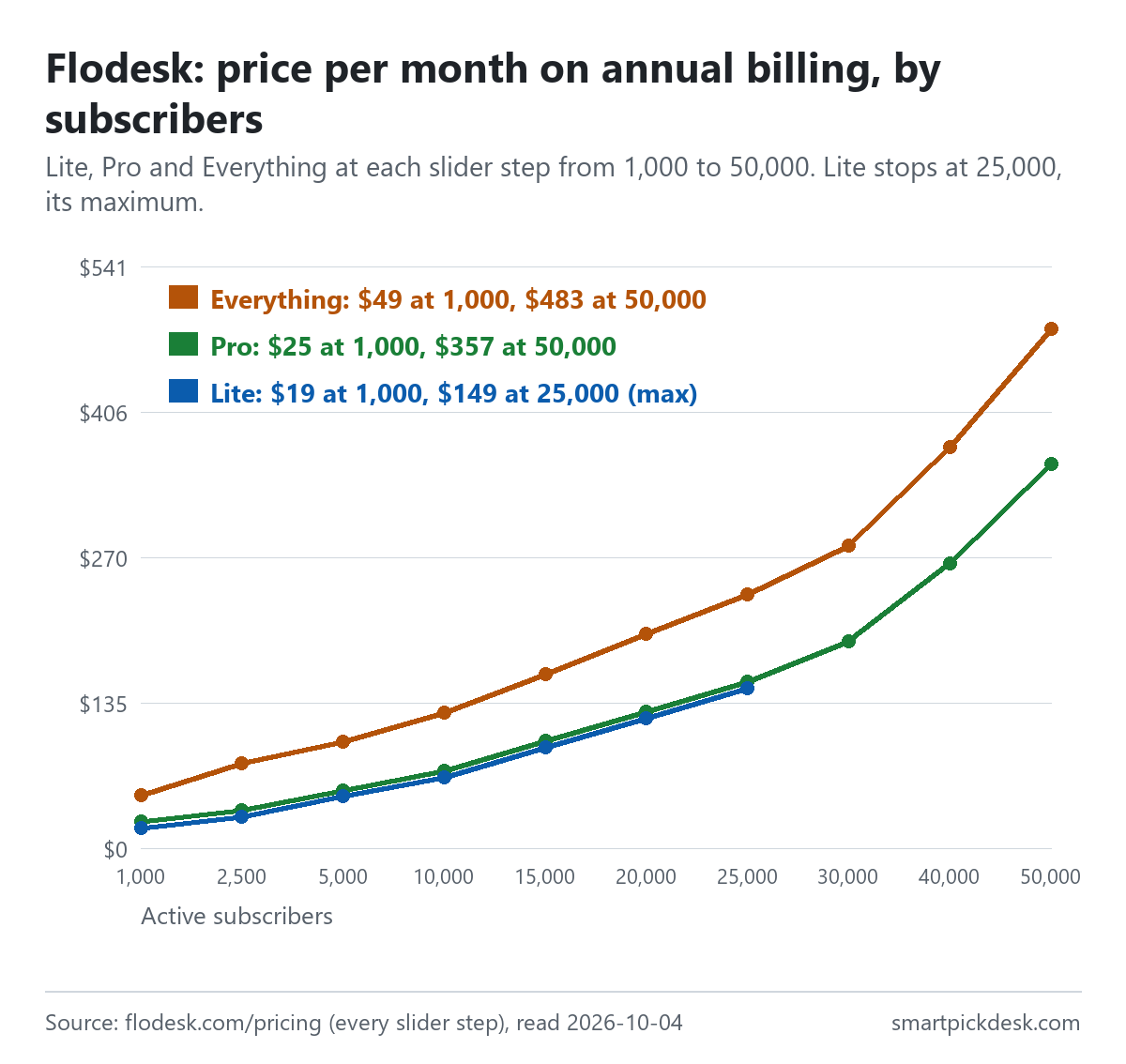
| Active subscribers | Lite, monthly | Lite, annual (per month) | Pro, monthly | Pro, annual (per month) | Everything, monthly | Everything, annual (per month) |
|---|---|---|---|---|---|---|
| 1,000 | $25 | $19 | $28 | $25 | $54 | $49 |
| 2,500 | $32 | $29 | $39 | $35 | $87 | $79 |
| 5,000 | $52 | $48 | $59 | $54 | $107 | $99 |
| 10,000 | $72 | $66 | $79 | $72 | $137 | $126 |
| 15,000 | $102 | $94 | $109 | $100 | $177 | $162 |
| 20,000 | $132 | $121 | $139 | $127 | $217 | $199 |
| 25,000 | $162 | $149 | $169 | $155 | $257 | $236 |
| 30,000 | — | — | $209 | $192 | $307 | $281 |
| 50,000 | — | — | $389 | $357 | $527 | $483 |
| 75,000 | — | — | $509 | $467 | $667 | $611 |
| 105,000 | — | — | $689 | $632 | $877 | $804 |
| 155,000 | — | — | $989 | $907 | $1,227 | $1,125 |
| 205,000 | — | — | $1,289 | $1,182 | $1,577 | $1,446 |
| 255,000 | — | — | $1,589 | $1,457 | $1,927 | $1,766 |
Fourteen of the 32 positions on Flodesk's subscriber slider, read on 2026-10-04 in both billing modes. The slider runs from 1,000 to 255,000 in steps of 1,500 to 10,000; above 25,000 the Lite card still shows its 25,000 price with “Max of 25,000 subscribers” and an “Over the limit” label, so we left those cells empty.[1] On annual billing the card shows a price “/mo”; the page does not print a yearly total.
Two patterns stand out. First, Lite and Pro are close in price at every size where both exist: $3 a month apart at 1,000 on monthly billing, $7 apart at 2,500 to 25,000. Second, Everything costs roughly twice Lite at the small end ($54 against $25 monthly at 1,000), and less than twice at the top of Lite's range ($257 against $162 at 25,000).
How we checked this (and what we did not check)
Last updated 2026-10-04 (first version). Every number and quotation here comes from Flodesk's own pages. Prices change — confirm on Flodesk's own page before you sign up.
What we did. On 2026-10-04 we opened flodesk.com/pricing in a browser with no account and moved the subscriber slider from one end to the other, saving the text visible on screen at each of its 32 positions, once with Annual selected and once with Monthly. The price digits on that page are animated, so we saved only the text actually displayed, not the page's hidden lists of numbers. We opened the pricing FAQ's collapsed answers and saved them, and the same day saved eleven help-centre articles on pricing, upgrades, downgrades, billing, cancelling, tax, sign-up, team seats and account setup (nine are cited below), and the terms of service page. Wording in quotation marks is copied from those saved pages word for word, and a script checks every quotation against the saved text.
What we did not do. We have not used Flodesk. There is no account, no screenshot of the product and no view here on its templates, editor or deliverability. Every image is a chart or summary we drew from the saved text; none shows Flodesk's logo or screens. The terms of service page lists its sections as collapsed headings, and we did not open them; the billing section is cited here only where the help centre points to it.
What that leaves. Flodesk's prices at every subscriber step in both billing modes, what its Free plan and trial include, and its counting, upgrade, downgrade, cancellation and refund rules, as published.
The Free plan and the free trial are two different things
Flodesk uses the word free twice, and they mean different things. The FAQ on the pricing page says Flodesk offers both a Free plan and a free trial, and describes the plan this way: “The Free plan lets you build forms, landing pages, and link-in-bio pages to start growing your subscriber list at no cost. It does not include email sending or workflow automations.”[1]
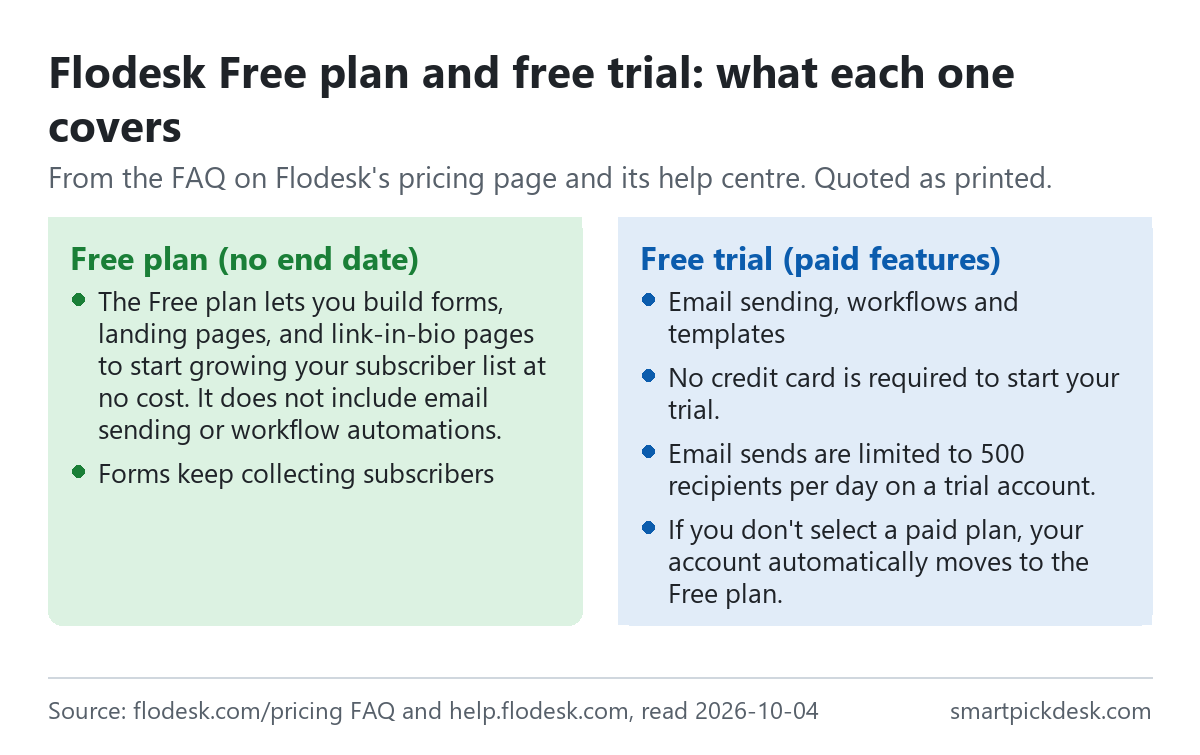
- The trial. It gives access to the paid features, including email sending, workflows and templates, and “No credit card is required to start your trial.”[1] One limit sits in the setup article rather than on the pricing page: “Email sends are limited to 500 recipients per day on a trial account.”[9] We did not find the trial's length printed on the pages we saved.
- When the trial ends. “If you don't select a paid plan, your account automatically moves to the Free plan.”[1] The cancellation article lists what that changes: one-off emails and workflows stop sending and checkouts are deactivated, while forms stay active and keep collecting subscribers.[6]
- The Free plan itself. The plan card lists forms and landing pages, designer templates and audience segmentation, with email sending crossed out. The comparison table lists its active subscribers as “No limit”.[1]
So the Free plan is a place to collect a list before you are ready to write to it. If you sign people up on the Free plan and never upgrade, nothing goes out to them, including a welcome email.
What each paid plan adds
The pricing FAQ says Flodesk has “three paid plans with unlimited email sends based on your active subscriber count”, and the plan cards list what each adds over the one below it.[1]
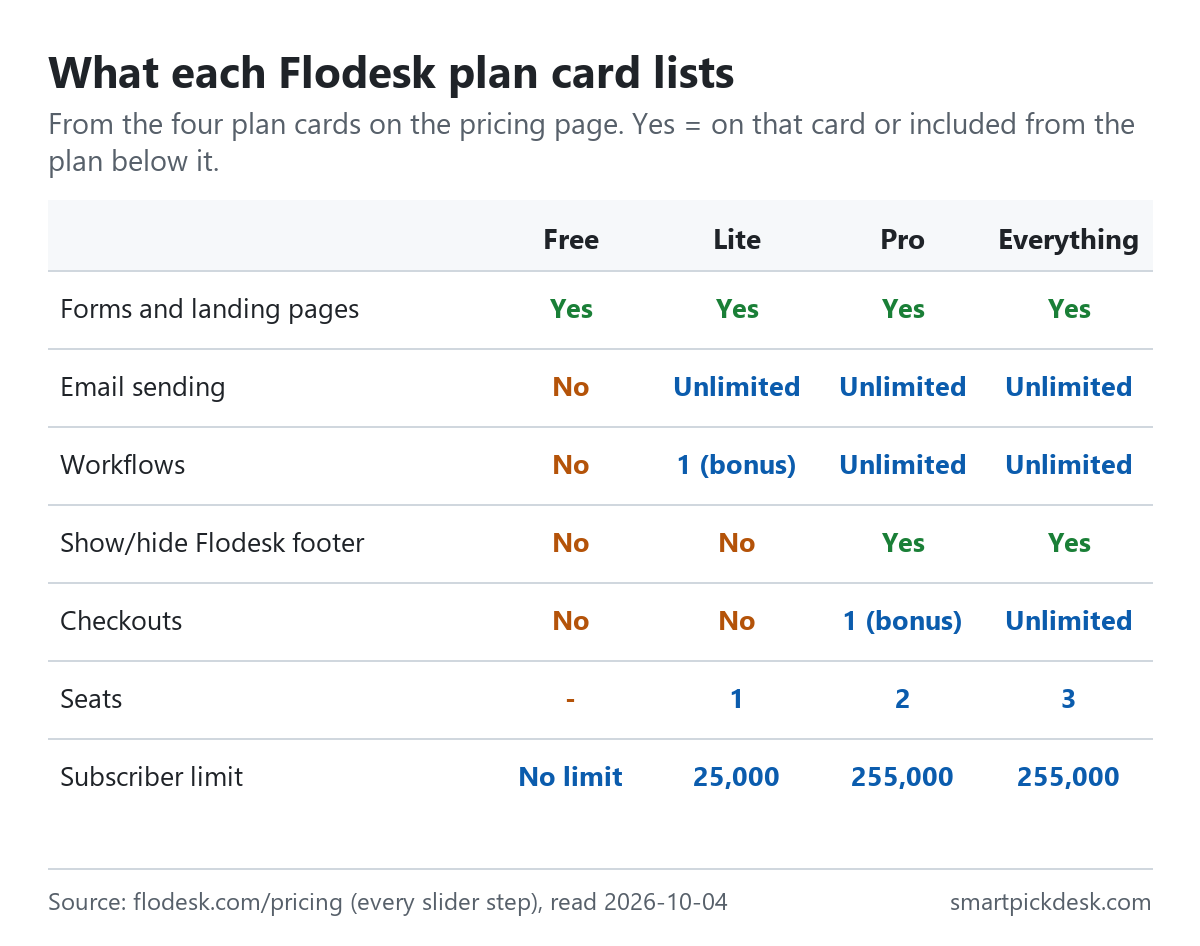
| On the plan card | Lite | Pro | Everything |
|---|---|---|---|
| Email sends | Unlimited | Unlimited | Unlimited |
| Workflows | “Limited time bonus: 1 workflow” | Unlimited | Unlimited |
| Checkouts | Not listed | “Limited time bonus: 1 checkout” | Unlimited integrated checkouts |
| Flodesk footer | Shown | Show/hide | Show/hide |
| Seats | 1 | 2 | 3 |
| Subscribers | “Max of 25,000 subscribers” | Up to 255,000 | Up to 255,000 |
Plan cards on the pricing page; subscriber ranges from its comparison table.[1]
- Lite adds email sending and email analytics to the Free plan. Its one workflow is labelled a limited-time bonus, so the number of workflows on Lite may change.
- Pro adds unlimited workflows, advanced analytics and reporting, the option to hide the Flodesk footer and a second seat. Its one checkout is also labelled a limited-time bonus.[1]
- Everything adds unlimited checkouts, sales pages and funnels, subscriptions and payment plans, abandoned cart automations and a third seat.[1]
- On every paid plan: “All integrations and API access are included on every paid plan at no extra cost.”[1]
Because Lite and Pro are only a few dollars apart, the choice between them usually comes down to automation. A welcome sequence plus a separate sequence for a freebie is two workflows, which is more than Lite's one.
Which contacts you pay for
Flodesk prices by active subscribers, and its help centre spells out which statuses count.[2]
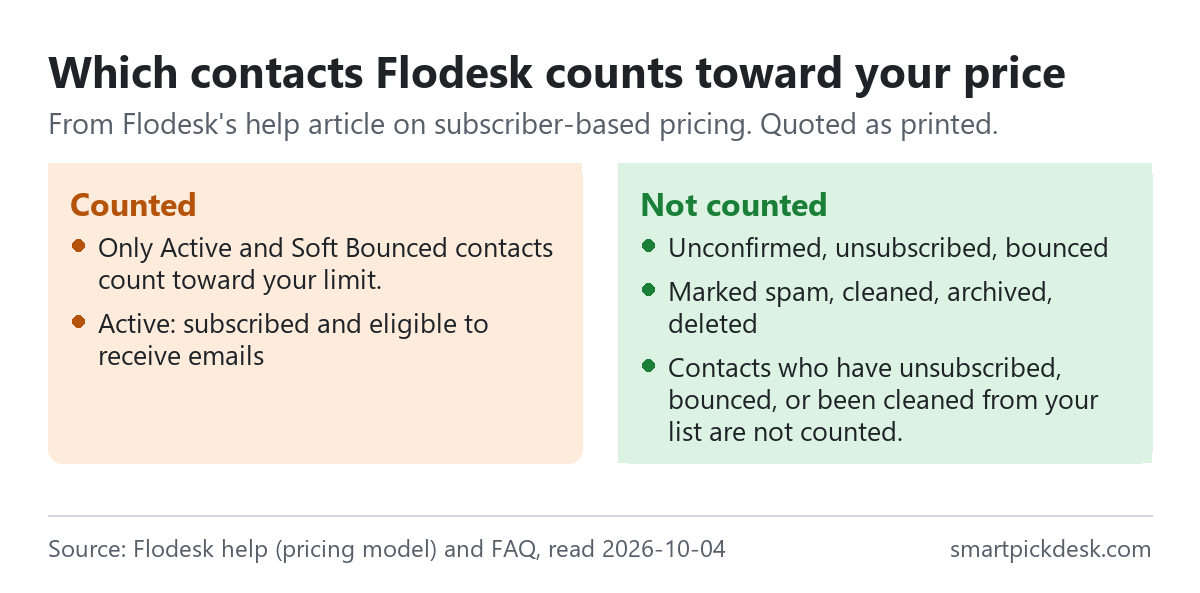
- What counts. “Only Active and Soft Bounced contacts count toward your limit.”[2]
- What does not. The help article's table lists unconfirmed, unsubscribed, bounced, marked spam, cleaned, archived and deleted contacts as not counting. The pricing FAQ puts it more briefly: “Contacts who have unsubscribed, bounced, or been cleaned from your list are not counted.”[1][2]
- Where to see your count. The help article says you can check it under Account settings, Plan + billing.[2]
Two practical consequences. If you use double opt-in, people who never confirm do not raise your bill. And archiving inactive subscribers takes them out of the count, so a periodic clean-up can keep you in a lower tier — which matters most just below a step such as 10,000 or 25,000.
Monthly or annual: what the annual price works out to
The billing switch on the pricing page is labelled Annual “(1 month free)” and Monthly, and the help centre describes annual billing as “12 months for the price of 11”.[1][5] On annual billing, the cards print a per-month price; the yearly totals below are our arithmetic (12 × that price).
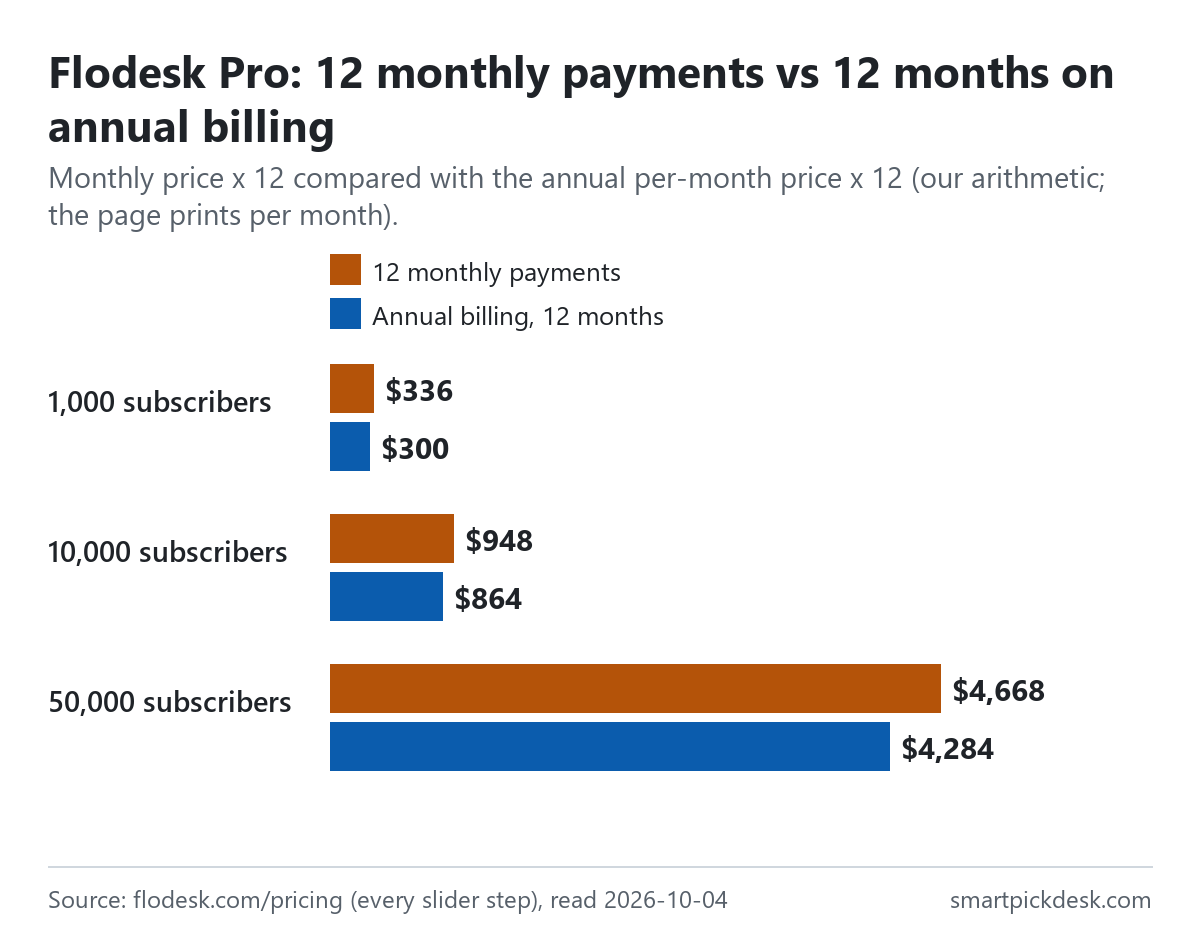
| Plan and subscribers | Monthly price | 12 monthly payments | Annual billing, 12 months | Less over a year |
|---|---|---|---|---|
| Lite, 1,000 | $25 | $300 | $228 | $72 |
| Lite, 25,000 | $162 | $1,944 | $1,788 | $156 |
| Pro, 1,000 | $28 | $336 | $300 | $36 |
| Pro, 10,000 | $79 | $948 | $864 | $84 |
| Pro, 50,000 | $389 | $4,668 | $4,284 | $384 |
| Everything, 1,000 | $54 | $648 | $588 | $60 |
| Everything, 10,000 | $137 | $1,644 | $1,512 | $132 |
Monthly and annual per-month prices from the pricing page;[1] the 12-month and difference columns are our arithmetic, assuming your subscriber tier does not change during the year.
The saving is not the same share at every step. At 1,000 subscribers, annual Lite comes to $228 against $300 paid monthly, while annual Pro comes to $300 against $336. In other words, at 1,000 subscribers annual Lite costs $72 less than annual Pro over the year, while on monthly billing the two are only $3 a month apart.
Two billing rules sit in the help centre. Switching between monthly and annual is done by emailing Flodesk's support team rather than in the account, and the switch “starts immediately” with unused time prorated.[5] And tax: “Note that depending on your location, sales tax may apply.”[2]
When your list passes your tier: automatic upgrades
Since December 2, 2025, Flodesk matches you to a subscriber tier automatically. The pricing FAQ: “Your emails will never stop sending. If your active subscriber count exceeds your current tier, Flodesk automatically upgrades you to the next tier at your next billing date”.[1]
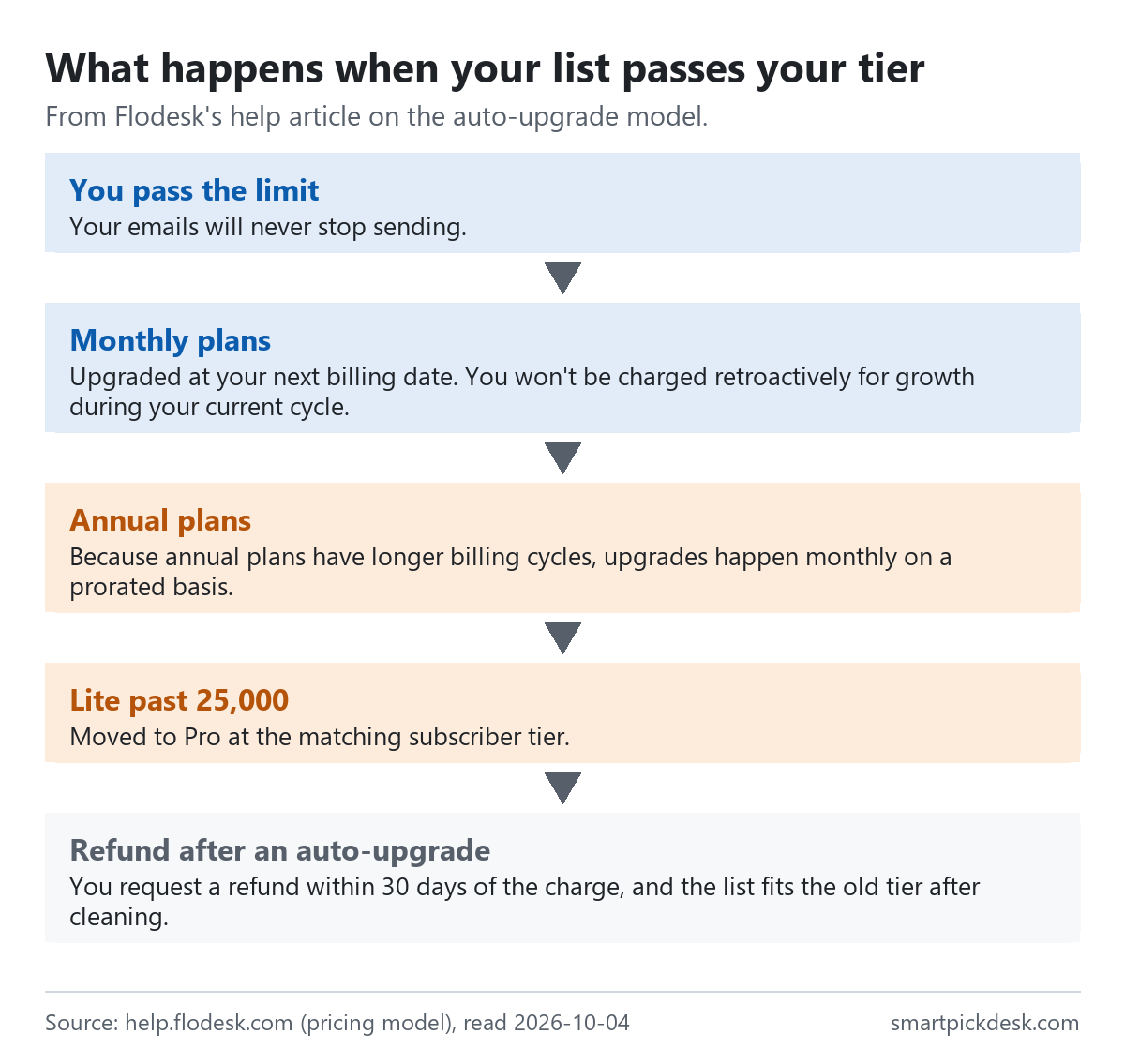
- Monthly plans. You move up at the next billing date, and “You won't be charged retroactively for growth during your current cycle.” The help article's example: pass the limit on January 12 with a January 10 billing date, and the new tier starts February 10.[2]
- Annual plans. “Because annual plans have longer billing cycles, upgrades happen monthly on a prorated basis.” You are billed the difference for the remaining months of your term.[2]
- Warnings. Notifications go out at 90%, 95% and 100% of your limit, by email and in the app.[1][2]
- Lite at 25,000. If a Lite account passes 25,000, it is moved to Pro at the matching subscriber tier.[2]
- Very large lists. “If your list exceeds 255,000 subscribers, you'll maintain full sending capabilities, but further automatic upgrades will pause.” Flodesk says it will contact you about custom billing.[2]
The design keeps campaigns running, which is the point Flodesk makes. The trade-off is that the bill can rise without a decision from you. A separate help article explains how to stop new sign-ups from forms and integrations if you need to cap growth: delete or unpublish forms, remove embed codes, and switch off integrations on both sides.[10]
Downgrading and the Lite limit
- Within the same plan, automatically. If your count falls below your tier, monthly plans move down at the next billing date and “Annual plans: downgrade takes effect at subscription renewal (not mid-term)”.[2]
- Between plans, by hand. Moving from Pro to Lite, or from Everything to a lower plan, is done in Plan + billing, and takes effect at the end of the current billing cycle.[1][4]
- What you have to undo first. The downgrade article lists the conditions: reduce subscribers to 25,000 or fewer for Lite, remove extra team members, unpublish checkout pages and extra workflows, and cancel active checkout subscriptions. On that last point: “Canceling active Checkout subscriptions is permanent and cannot be undone.”[4]
- A guard rail. If you schedule a downgrade to Lite and then pass 25,000 subscribers, Flodesk changes the scheduled downgrade to Pro instead.[4]
Upgrades are the opposite: they take effect immediately, and you are charged a prorated amount for the rest of the billing cycle at the new plan's rate.[3]
Cancelling, refunds and deleting your account
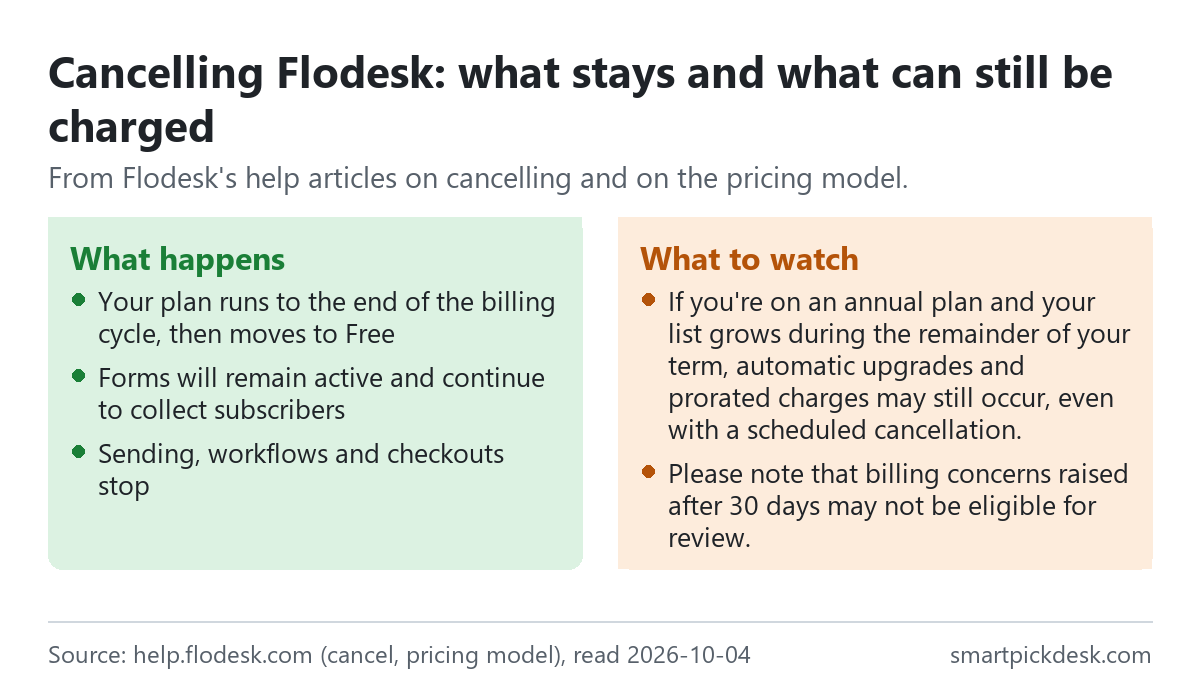
- When it ends. A cancelled paid plan stays active until the end of the billing cycle, then moves to the Free plan. Your emails, forms and workflows remain in the account, and you can resubscribe later.[6]
- Growth during a cancellation. “If you're on an annual plan and your list grows during the remainder of your term, automatic upgrades and prorated charges may still occur, even with a scheduled cancellation.”[2] The way to avoid that is to stop forms and integrations from adding people, as in the section above.
- Refunds. The cancellation article asks you to raise a question about a charge within 30 days of the billing date, and adds: “Please note that billing concerns raised after 30 days may not be eligible for review.”[6] After an automatic upgrade, the pricing-model article describes a manual refund if two conditions hold: “You request a refund within 30 days of the charge” and your list fits the previous tier after cleaning.[2]
- Deleting everything. Full deletion is done by emailing Flodesk's support team, and the article warns that it erases emails, workflows, forms, subscribers, analytics and settings and cannot be undone.[6]
Compared with tools that close the account on cancellation, Flodesk keeps your list and forms on the Free plan, so cancelling a paid plan is a pause in sending rather than an exit.
Checkout, tax and other costs
- Selling through Flodesk Checkout. Checkout is on Pro (one) and Everything (unlimited) at no extra platform fee, and “Flodesk does not add any transaction fees on top of Stripe's processing costs.”[1] The FAQ lists Checkout as available for businesses in the US, Canada, the UK, Australia, New Zealand and Euro Area countries.
- Currency. The FAQ says pricing is the same for all members and listed in USD.[1]
- Sales tax. Calculated from your billing address and shown at checkout before you pay; Flodesk collects it in certain US states.[7]
- Discounts. “At this time, Flodesk does not offer additional nonprofit-specific discounts on our paid plans.”[8]
- Sending domain. The setup article notes that paid plans may require custom domain email authentication for sending, which means adding DKIM, SPF and DMARC records at your domain provider.[9] That needs a domain of your own; Flodesk's pages we saved do not sell one.
- Legacy plans. “Flodesk's original flat-rate unlimited plan was retired for new members on December 2, 2025.” Members who subscribed before then keep it while they stay subscribed; upgrading from it moves them to the subscriber-based plans.[1][3]
Where Flodesk's pages disagree
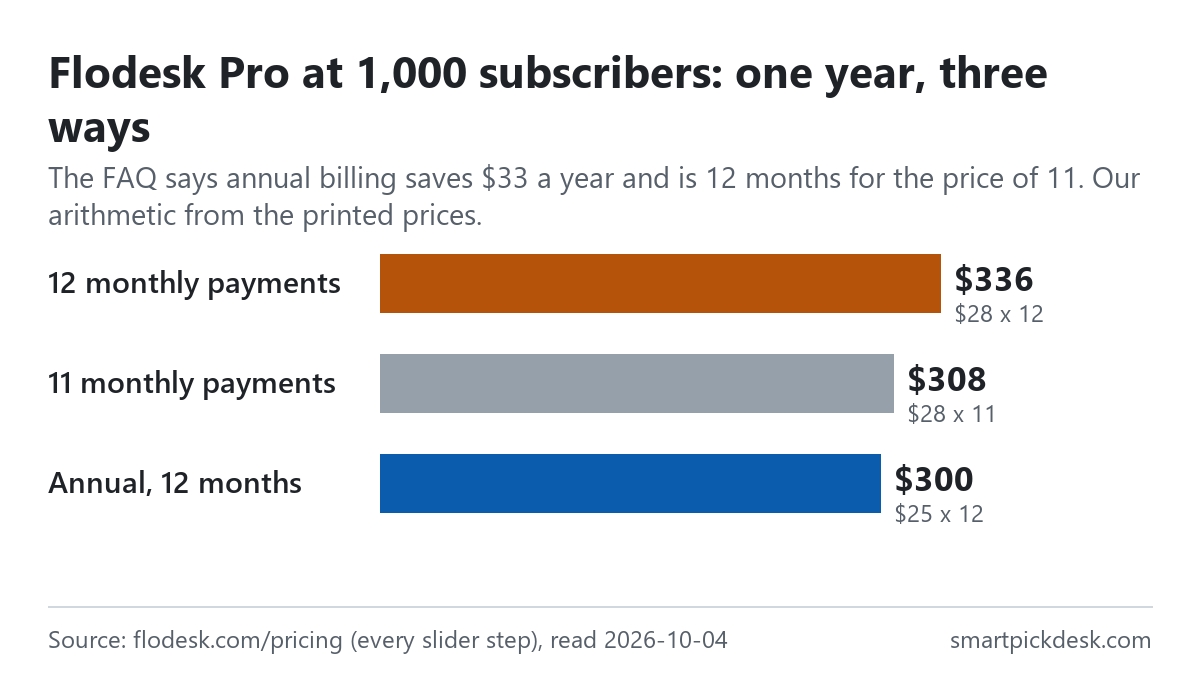
- “1 month free” and the printed prices. The FAQ says: “When you choose annual billing, you get one month free compared to paying monthly—that means you pay for 11 months instead of 12.”[1] The printed prices do not follow that rule exactly. Pro at 1,000: eleven months at $28 is $308, while twelve months at the annual $25 is $300. Lite at 1,000: eleven months at $25 is $275, while the annual $19 comes to $228. Pro at 50,000 goes the other way: eleven months at $389 is $4,279, and twelve at the annual $357 is $4,284. This is our arithmetic from the printed numbers; Flodesk may round or bill differently.
- The $33 example. The same FAQ gives one worked example: “For example, the Pro plan at 1,000 subscribers is $28/month on monthly billing, or $25/month on annual billing—saving you $33 over the year.”[1] Twelve months at each printed price differ by $36, and the “11 months” reading gives $28. We could not reproduce $33 from the numbers on the page.
- Which bounces count. The FAQ says bounced contacts are not counted; the help article agrees for hard bounces but says soft-bounced contacts do count.[1][2] These fit together if “bounced” in the FAQ means hard bounces only, but the FAQ does not say so.
We have not asked Flodesk which figure is current. If the yearly total matters to your decision, check the amount shown at checkout before you confirm.
Which plan fits which situation
| If you are… | Look at | Why, from Flodesk's pages | Watch out for |
|---|---|---|---|
| Collecting sign-ups before you are ready to email | Free | Forms, landing pages, link-in-bio; no subscriber limit[1] | No email sending at all, not even a welcome email[1] |
| Sending a newsletter with one welcome sequence | Lite, from $19 a month on annual billing | Unlimited sends; one workflow as a bonus[1] | 25,000 maximum; the workflow is a limited-time bonus[1] |
| Running several automations | Pro, from $25 | Unlimited workflows, footer can be hidden[1] | Only $3 more than Lite monthly at 1,000, but the gap differs on annual billing[1] |
| Selling products or courses by email | Everything, from $49 | Unlimited checkouts, sales pages, payment plans[1] | Checkout only in the listed countries; Stripe's fees still apply[1] |
| Expecting fast list growth | Any paid plan | Sending never stops at the limit[1] | Automatic upgrades, including during a scheduled cancellation on annual plans[2] |
| Thinking of paying for a year | Any paid plan | Lower per-month price[1] | Switching billing is done through support; growth is billed monthly, prorated[2][5] |
See Flodesk's own pricing page
Comparing it with other price lists: Kit pricing, checked, MailerLite pricing, checked and GetResponse pricing, checked lay their plans out the same way, and our free-plan comparison sets several free plans side by side.
Questions people ask
Is Flodesk free?
There is a Free plan for forms, landing pages and link-in-bio pages, but it does not send email or run workflows. A separate free trial of the paid features needs no credit card.[1]
How much is Flodesk per month?
At 1,000 active subscribers: Lite $25 monthly or $19 a month on annual billing; Pro $28 or $25; Everything $54 or $49.[1] See the full table.
Which contacts does Flodesk charge for?
Active and soft-bounced contacts. Unconfirmed, unsubscribed, bounced, cleaned, archived and deleted contacts do not count.[2]
What happens if my list grows past my Flodesk tier?
Sending continues and Flodesk upgrades you: at the next billing date on monthly plans, or monthly with a prorated charge on annual plans.[2]
Can I get a refund from Flodesk?
Raise a billing concern within 30 days of the charge. After an automatic upgrade, a manual refund is possible within 30 days if your list fits the old tier after cleaning.[2][6]
Is Flodesk still unlimited?
Not for new members since December 2, 2025. Earlier subscribers keep their legacy plan while they stay subscribed.[1]
Do you get paid if I sign up?
Not from this page — it has no affiliate links today. If that changes, it will say so at the top, and each link will be marked.
Sources and check log
| # | Source | URL | Checked | How |
|---|---|---|---|---|
| 1 | Flodesk, Pricing plans (plan cards at every slider step, comparison table and FAQ) | flodesk.com/pricing | 2026-10-04 | Opened in a browser with no account; visible text saved at all 32 slider positions in both billing modes; FAQ answers opened and saved |
| 2 | Flodesk help, How Flodesk's new subscriber-based pricing and auto-upgrade model work | help.flodesk.com › pricing model | 2026-10-04 | Page text saved |
| 3 | Flodesk help, How to Upgrade Your Flodesk Plan | help.flodesk.com › upgrade | 2026-10-04 | Page text saved |
| 4 | Flodesk help, How to downgrade your Flodesk plan | help.flodesk.com › downgrade | 2026-10-04 | Page text saved |
| 5 | Flodesk help, How to Switch Between Monthly and Annual Plans | help.flodesk.com › monthly or annual | 2026-10-04 | Page text saved |
| 6 | Flodesk help, How to Cancel Your Flodesk Subscription or Delete Your Account | help.flodesk.com › cancel | 2026-10-04 | Page text saved |
| 7 | Flodesk help, Will I be charged sales tax on my Flodesk subscription? | help.flodesk.com › sales tax | 2026-10-04 | Page text saved |
| 8 | Flodesk help, Does Flodesk offer a non-profit discount? | help.flodesk.com › non-profit | 2026-10-04 | Page text saved |
| 9 | Flodesk help, Setting up your Flodesk account | help.flodesk.com › account setup | 2026-10-04 | Page text saved |
| 10 | Flodesk help, Prevent automatic subscriber tier increases by disabling forms and integrations | help.flodesk.com › prevent tier increases | 2026-10-04 | Page text saved |
Change log
- 2026-10-04 — First version. All 32 slider steps in both billing modes, the pricing FAQ and eleven help articles read on 2026-10-04.
- Previous check: none for this page.
- What we will re-check: every slider step, the two limited-time bonuses on Lite and Pro, the “1 month free” wording against the printed prices, and the refund and auto-upgrade rules.
Who writes this
Smart Pick Desk is an independent site that compares tools for people who work online. We are not employed by, or partnered with, Flodesk, and we do not run Flodesk in our own business. What we do is read what each company publishes, write down the date we read it, and say plainly which parts we could not check. More: who the editors are and how we check a page.
We do not promise results. Nothing here is a prediction about what a tool will do for your list.