Cal.com pricing, checked: the free plan, Teams and Organizations per user, monthly vs yearly, seat billing and SMS credits
Last updated 2026-10-05 · By Smart Pick Desk editors · Prices read on Cal.com's pricing page in its default state and after switching the billing toggle on 2026-10-05; help pages, FAQ and terms read the same day · We have not used Cal.com · How we checked ↓
The short answer
Cal.com is an online booking tool: people choose a time from your availability, and the meeting appears in your calendar. It has a free plan for individuals and paid plans priced per user for teams. The free plan is for one person; Teams showed $12 per user per month on yearly billing and $16 on monthly billing, and Organizations $28 and $37.
- Free, for one user: unlimited event types and calendars, email and SMS notifications, Stripe and PayPal payments, and more than 100 apps.[1]
- Teams, $12 or $16 per user a month: round-robin and collective events, routing forms, no Cal.com branding, and a 14-day free trial.[1]
- Organizations, $28 or $37 per user a month: sub-teams, a company subdomain, single sign-on, and compliance features.[1]
If you want one sentence: one person can schedule for free; a team pays for each member, counted at the busiest point of the month on some plans, and money already paid is not refunded.
On this page
At a glance
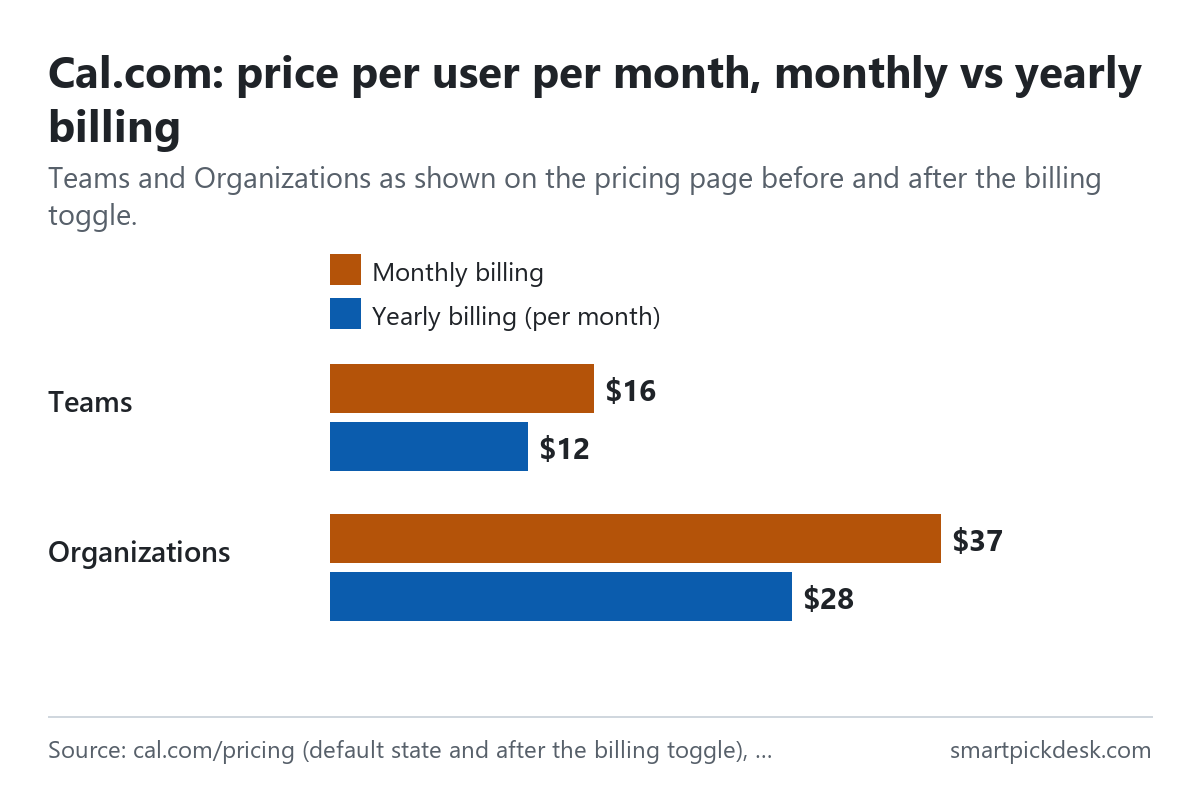
| Plan | Monthly billing (per user) | Yearly billing (per user, per month) | Users | Trial |
|---|---|---|---|---|
| Free | No charge | No charge | 1 | – |
| Teams | $16 | $12 | Per member | 14 days |
| Organizations | $37 | $28 | Per member | 14 days |
| Enterprise | Custom, annual pricing | Per agreement | – | |
Cal.com's pricing page, read on 2026-10-05 in its default state (yearly) and after pressing the billing toggle (monthly).[1]
Both paid cards carry the label “Save 25%” next to the price.[1] The free card is marked “*Free forever”, and both paid cards “*14 day free trial”.[1] The pricing page also describes the free plan in one line: “Everything you could need for scheduling as an individual.”[1]
How we checked this (and what we did not check)
Last updated 2026-10-05 (first version). Every number and quotation here comes from Cal.com's own pages. Prices change — confirm on Cal.com's own page before you sign up.
What we did. On 2026-10-05 we opened cal.com/pricing in a browser with no account and saved the page text. The plan cards open with a small “YEARLY” label next to the price. Pressing that toggle changed the prices on the two paid cards from $12 and $28 to $16 and $37; we saved the visible text before and after. We read the default state as yearly billing and the second as monthly, which fits the “Save 25%” label, but the label next to the price still read YEARLY after the switch, so this reading is ours. The same day we saved two help pages on billing (seat billing and the credit system), the FAQ page and the terms of service. Wording in quotation marks is copied from those saved pages word for word, and a script checks every quotation against the saved text.
What we did not do. We have not used Cal.com. There is no account, no screenshot of the product and no view here on how well its scheduling, video or AI phone agent work. Every image is a chart or summary we drew from the saved text; none shows Cal.com's logo or screens. The feature comparison table on the pricing page uses icons to show which plan has which feature; the saved text does not keep them, so we only use the feature lists on the plan cards. Cal.com's code is also available to run on your own server; this page covers the hosted service only.
What that leaves. The free plan, Teams and Organizations per user in both billing modes, how seats and credits are counted, and the trial, renewal and refund terms, as published.
The free plan
Cal.com's free plan is unusually broad for a booking tool, with one limit that matters most: it is for one user.
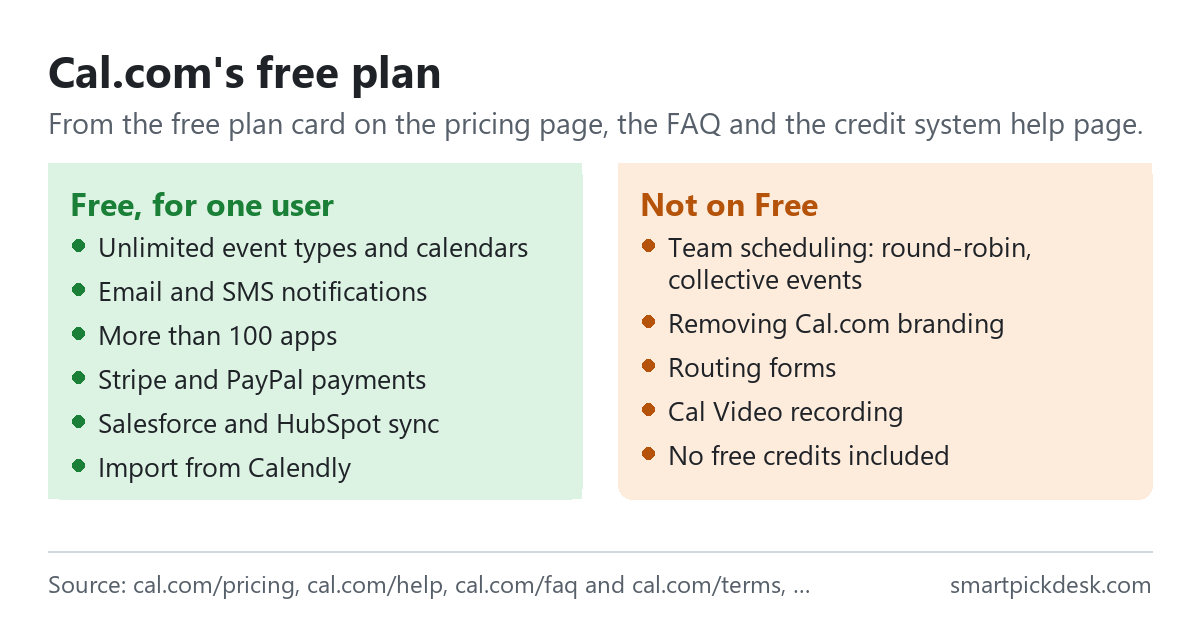
- What it includes. One user, unlimited event types and calendars, email and SMS notifications, more than 100 apps, Stripe and PayPal payments, two-way Salesforce and HubSpot sync, and a one-click import of Calendly events.[1]
- How much of the product. “Free Cal.com users have access to over 90% of all our features.”[3]
- The opening line. “Start scheduling for free, with no usage limits.”[1]
- Not on Free. Team scheduling, removing Cal.com branding and routing forms are on the Teams card.[1] Cal Video recording is on every tier except the free one, according to the FAQ.[3]
- Messaging credits. Free users get “No free credits included”; SMS outside the free allowance is paid with credits you buy.[2]
In everyday terms: a freelancer or consultant taking bookings alone can use the free plan without a time limit. The first reason to pay is usually a second person, or taking the Cal.com name off the booking page. Other tools with a free tier are listed on Free plans.
What Teams and Organizations add
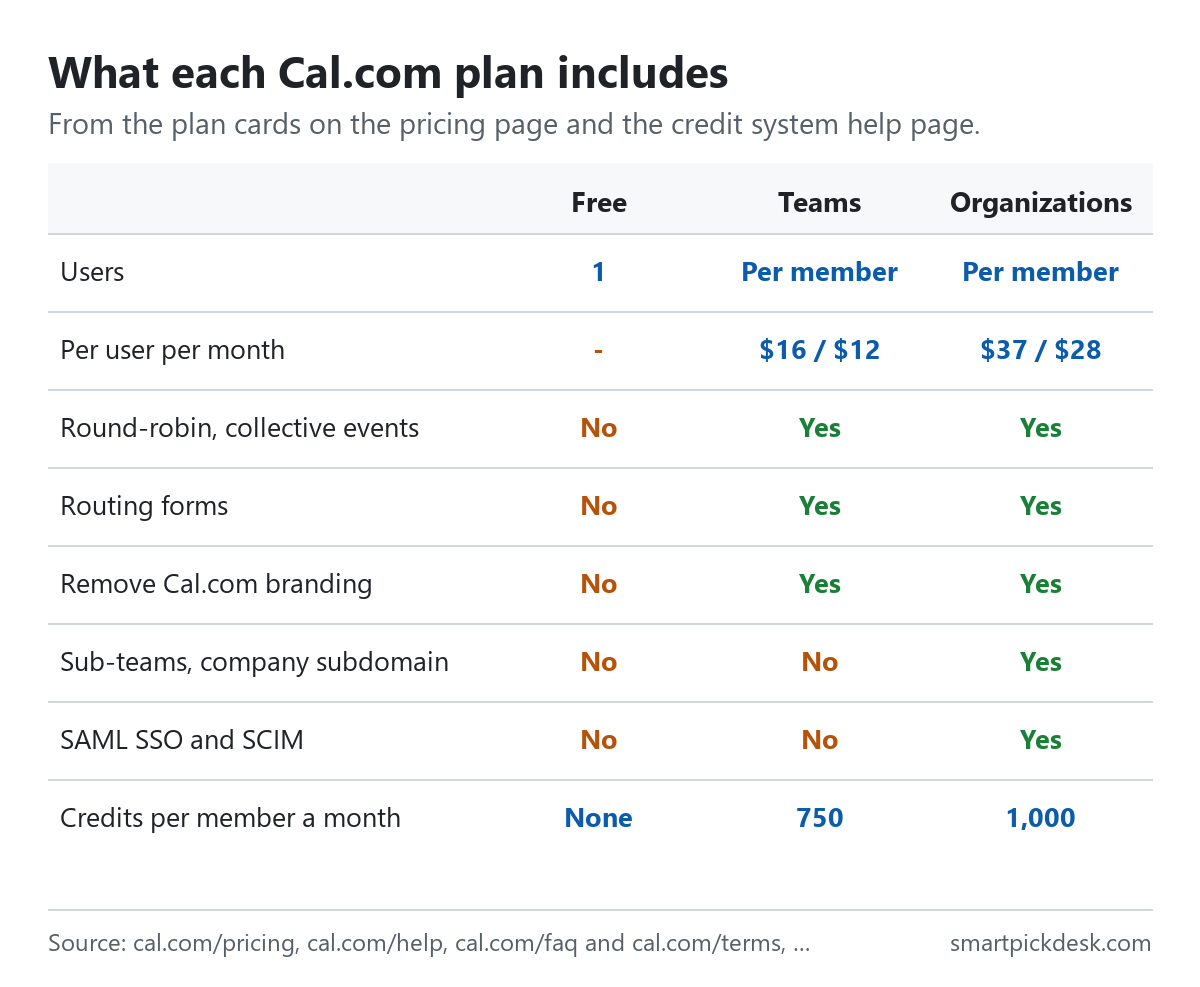
| Feature | Free | Teams | Organizations |
|---|---|---|---|
| Users | 1 | Per member | Per member |
| Event types and calendars | Unlimited | Unlimited | Unlimited |
| Round-robin, collective and managed events | No | Yes | Yes |
| Routing forms | No | Yes | Yes |
| Remove Cal.com branding | No | Yes | Yes |
| Sub-teams, company subdomain | No | No | Yes |
| SAML SSO and SCIM | No | No | Yes |
| Messaging credits per member a month | None | 750 | 1,000 |
The plan cards on the pricing page[1] and the credit system help page.[2]
The Teams card adds shared availability for one team, round-robin scheduling, managed and collective event types, recurring events, customizable notifications, branding removal, routing forms, booking analytics and custom APIs.[1] The Organizations card adds unlimited sub-teams, routing by custom variables, a company subdomain such as yourcompany.cal.com, SAML SSO and SCIM, compliance certifications, instant meetings and role-based permissions.[1]
One detail from the FAQ changes who needs Teams: “Luckily, a team doesn't have to be more than a single individual.”[3] So a one-person business that wants its booking page without Cal.com's branding pays for Teams with one member, at $12 a month on yearly billing.
The step from Free to Teams is about sharing meetings between people; the step to Organizations is about running Cal.com across a company with central control and security requirements. The FAQ suggests an enterprise licence for organizations “with 30 or more members” that value customization and white labeling.[3]
Monthly or yearly
For one user, yearly billing is $4 a month lower on Teams and $9 a month lower on Organizations, by our arithmetic.
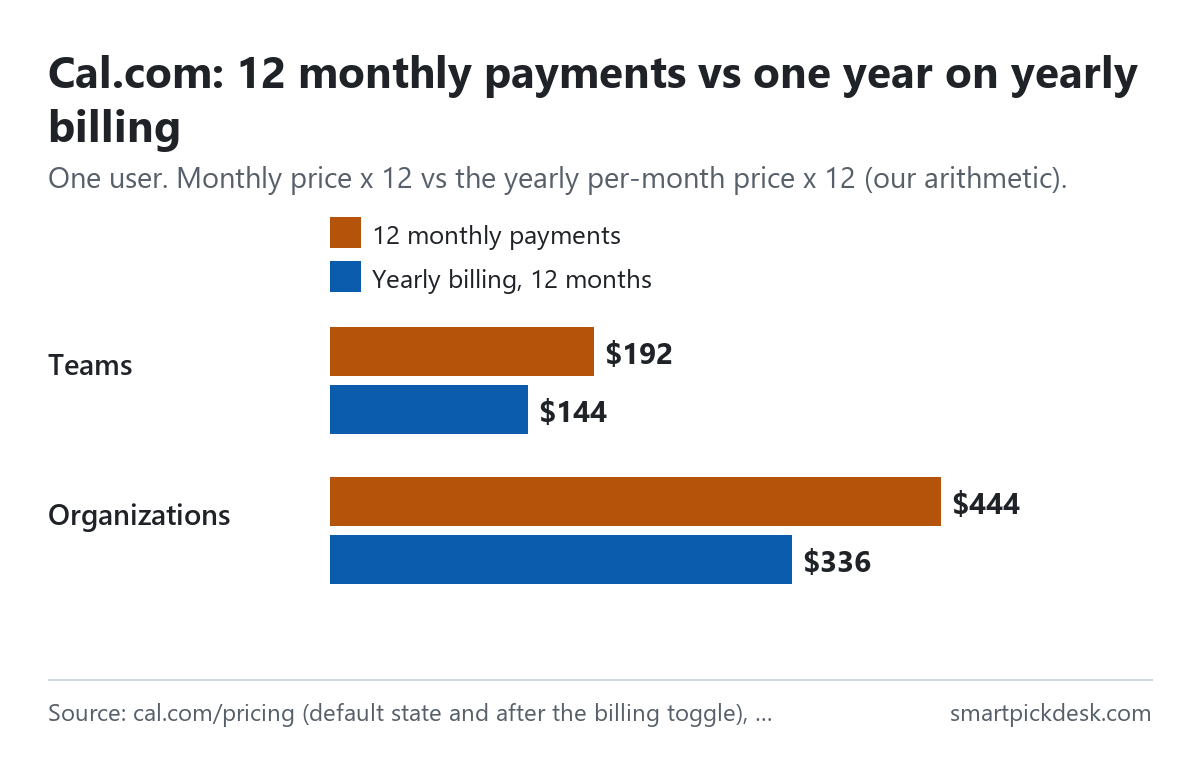
| Plan (one user) | Monthly price | 12 monthly payments | Yearly billing, 12 months | Less over a year |
|---|---|---|---|---|
| Teams | $16 | $192 | $144 | $48 |
| Organizations | $37 | $444 | $336 | $108 |
Per-user prices from the pricing page in each state of the billing toggle;[1] the 12-month columns and the difference are our arithmetic. The page shows the yearly price per user per month, not a yearly total.
By our arithmetic the saving is 25.0% on Teams, matching the label, and 24.3% on Organizations. For a team the difference multiplies: five people on Teams pay $80 a month on monthly billing ($960 over a year) or $60 a month on yearly billing ($720), a difference of $240 a year. That is before counting how seats are measured, which the next section covers.
The terms set out the cycle: “You will be billed in advance on a recurring and periodic basis”, and the terms call each period a Billing Cycle. Cycles are monthly or annual, depending on the plan you choose.[4]
How seats are counted
The seat billing help page explains that Cal.com uses one of two methods, depending on your plan. Which one applies is shown on your billing page.[5]
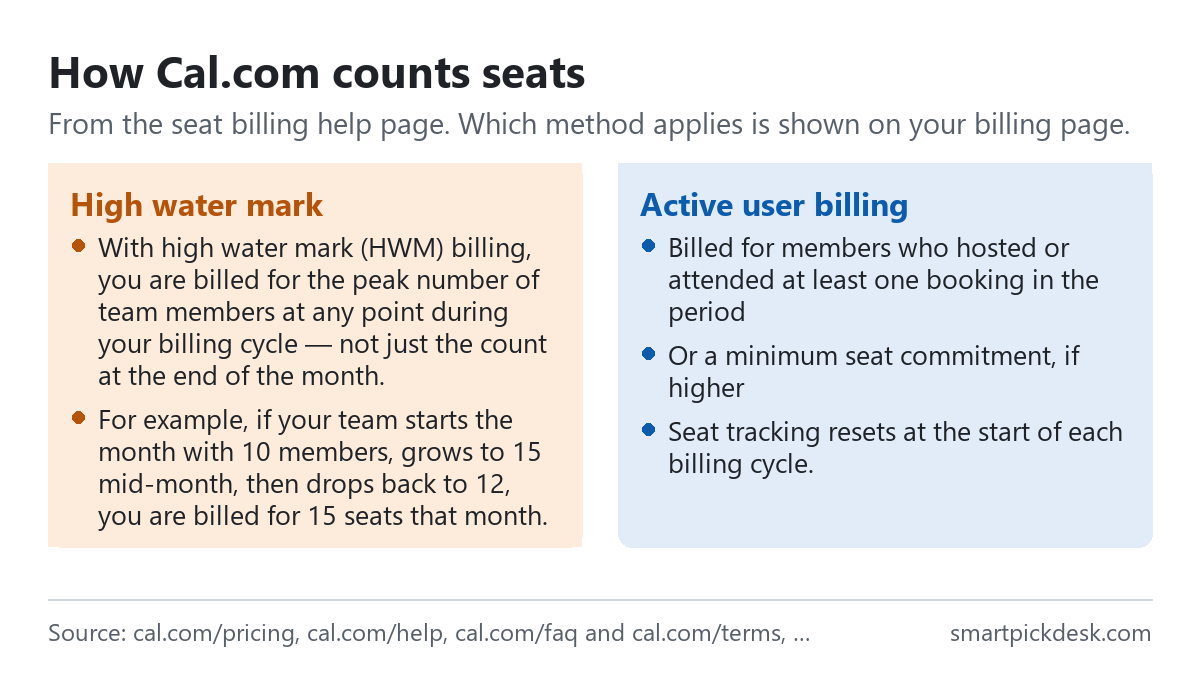
- High water mark. “With high water mark (HWM) billing, you are billed for the peak number of team members at any point during your billing cycle — not just the count at the end of the month.”[5]
- The page's example. “For example, if your team starts the month with 10 members, grows to 15 mid-month, then drops back to 12, you are billed for 15 seats that month.”[5] On Teams at the monthly price, by our arithmetic, that is $240 for the month instead of $192 for 12 seats.
- Active user billing. Billed for members who hosted or attended at least one booking in the period, or a minimum seat commitment if your plan has one and it is higher.[5]
- When the count resets. “Seat tracking resets at the start of each billing cycle.”[5]
Put together: under high water mark billing, adding a temporary helper for a week costs a full month of that seat. Removing someone mid-month does not lower that month's bill. If your team changes size often, check which billing method your account shows.
SMS, WhatsApp and AI call credits
Text messages and Cal.com's AI phone agent are paid with credits on smaller plans. The help page calls credits “a prepaid way to power messaging, especially on smaller plans.”[2]
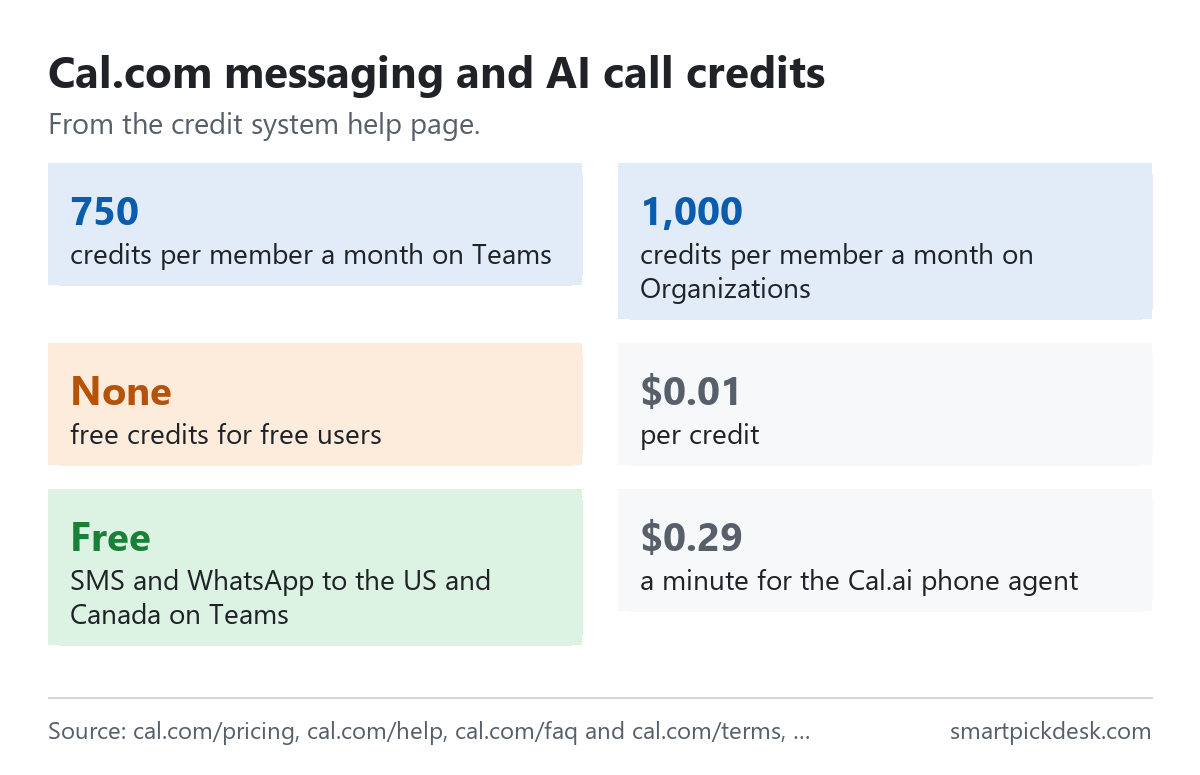
- Allowances. Teams get 750 credits per team member per month, reset each billing cycle; Organizations 1,000; Enterprise unlimited; free users none.[2]
- United States and Canada. “SMS and WhatsApp messages are free on the Teams Plan in these regions”, with no credits deducted.[2]
- Other countries. “One credit = $0.01 USD”. The cost is the Twilio rate for the country plus “A standard 80% processing fee”; the page's example turns a $0.05 SMS into $0.09, or 9 credits.[2]
- Long messages. Credits are charged per segment of up to 160 characters, or 70 with emojis or special characters.[2]
- AI phone agent. “The cost is 29 credits per minute, which equals $0.29 per minute.”[2]
- Running out. “If credits run out, SMS/WhatsApp messages will automatically stop” and Cal.com falls back to email.[2]
A worked example of the allowance, by our arithmetic: a team of three on Teams has 2,250 credits a month. At the help page's own example rate of 9 credits per SMS segment, that covers 250 single-segment texts a month to a country priced like that example. Texts to the United States and Canada on Teams do not use the allowance at all. A team that sends reminders mostly abroad, or uses the AI phone agent, is the one to check the balance; the agent alone would use the whole 2,250 credits in about 77 minutes of calls.[2]
Messaging is the one part of Cal.com's pricing that depends on how you use it rather than on the plan. The help page lists SMS, WhatsApp, the Cal.ai phone agent and AI agent interactions as the things credits pay for; email is not on that list, and when credits run out Cal.com falls back to email for the affected messages.[2] If text reminders are optional for you, relying on email keeps this part of the bill at zero. If the booking needs extra questions answered first, Tally pricing, checked covers a form builder whose free plan accepts unlimited submissions under a fair use policy.
Trials, renewals and fee changes
- The trial. Teams and Organizations each show a 14-day free trial on the pricing page.[1]
- What the terms say about trials. You may be asked for billing information to start one, and “On the last day of Free Trial period, unless you cancelled your Subscription, you will be automatically charged the applicable Subscription fees for the type of Subscription you have selected.”[4]
- Renewal. “At the end of each Billing Cycle, your Subscription will automatically renew under the exact same conditions unless you cancel it or Cal.com, Inc. cancels it.”[4]
- Price changes. Cal.com may change subscription fees; “Any Subscription fee change will become effective at the end of the then-current Billing Cycle.” The terms promise reasonable prior notice so you can cancel first.[4]
- Failed payments. If automatic billing fails, Cal.com issues an electronic invoice to pay manually by a deadline.[4]
The trial terms are the part to note before starting one: if you entered a card, the trial turns into a charge on its last day unless you cancel.
Cancelling and refunds
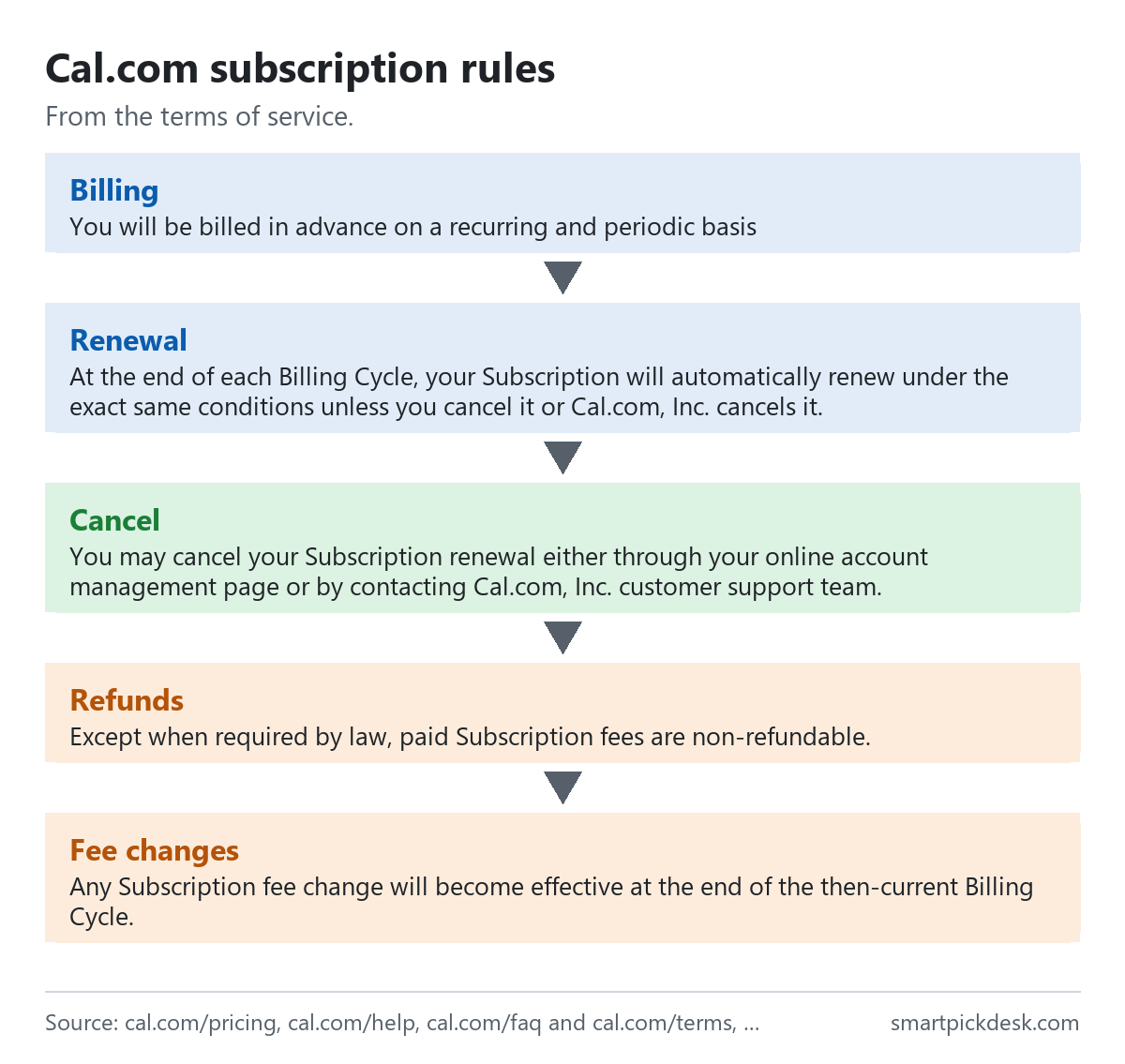
- How to cancel. “You may cancel your Subscription renewal either through your online account management page or by contacting Cal.com, Inc. customer support team.”[4]
- Managing billing. The seat billing page says the Billing portal opens Stripe, where you can update the payment method, view invoices or change the subscription.[5]
- Refunds. “Except when required by law, paid Subscription fees are non-refundable.”[4]
Put together: on yearly billing, cancelling stops the next renewal, but the year already paid is generally not returned. If you are not sure the team will keep using Cal.com, monthly billing limits what is at stake to one month, at $4 more per user per month on Teams.
Other costs and payment
- Premium usernames. Short usernames on cal.com are rented: “you will be prompted to upgrade to premium for $29 a month.”[3]
- Payment methods. The FAQ says: “We have multiple payment options, credit card, bank transfer, etc. We absorb the fees.”[3] The terms mention credit card or PayPal.[4]
- Who pays. “The person handling billing needs to be added as the owner of the team.”[3]
- Apps. Most apps in Cal.com's app store install for free, but some need a paid account with the other service, such as Zoom.[3]
- Payments from clients. Taking payment at booking through Stripe or PayPal is on the free plan;[1] those processors charge their own fees, which are not on Cal.com's pricing page.
Where Cal.com's pages disagree
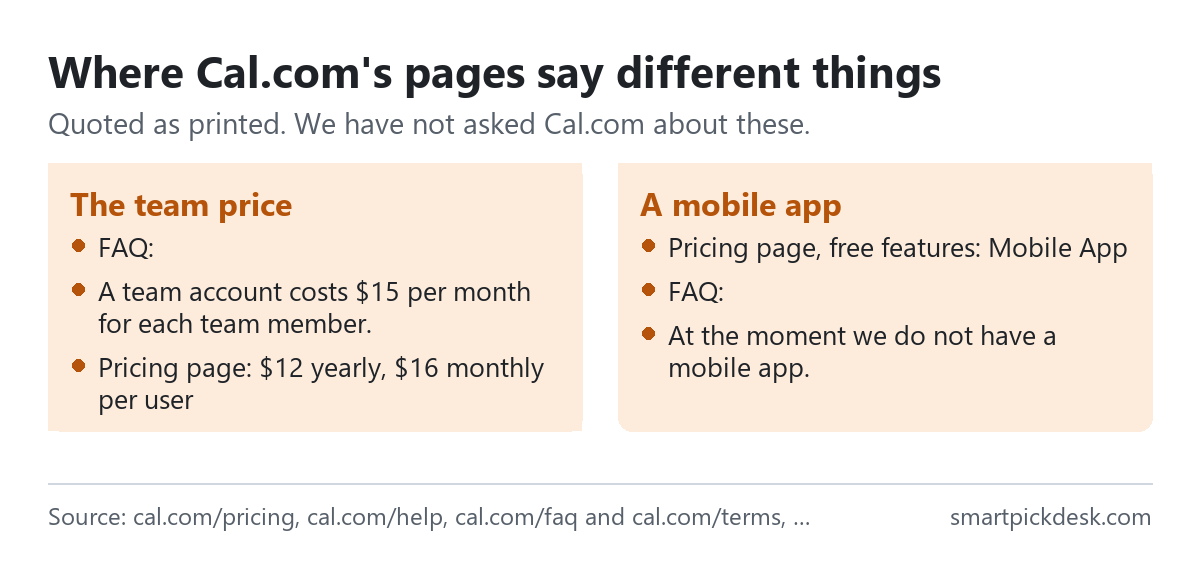
- The team price. The FAQ says: “A team account costs $15 per month for each team member.”[3] The pricing page showed $12 on yearly billing and $16 on monthly billing.[1] We used the pricing page.
- A mobile app. The free plan's list on the pricing page includes “Mobile App”.[1] The FAQ says: “At the moment we do not have a mobile app.”[3] We read the FAQ answer as older than the pricing page, but neither page is dated in the text we saved.
- The yearly saving. “Save 25%” on both cards; 25.0% on Teams and 24.3% on Organizations by our arithmetic.[1]
- The billing label. After switching the toggle, the prices changed but the small label next to them still read YEARLY, which is why the monthly reading on this page is ours.[1]
We have not asked Cal.com about these.
Which plan fits which situation
| If you are… | Look at | Why, from Cal.com's pages | Watch out for |
|---|---|---|---|
| One person taking bookings | Free | Unlimited event types, payments[1] | Cal.com branding stays[3] |
| One person who wants no branding | Teams, $12 a month yearly | A team can be one person[3] | No refunds once paid[4] |
| A small team sharing meetings | Teams | Round-robin, routing forms[1] | Seats may be billed at the monthly peak[5] |
| Clients outside the US and Canada by text | Teams with credits | 750 credits per member a month[2] | 80% processing fee on SMS rates[2] |
| A company with SSO rules | Organizations | SAML SSO and SCIM[1] | $28 to $37 per user a month[1] |
| Not sure yet | The 14-day trial | Shown on both paid cards[1] | Charged at the end if a card is on file[4] |
See Cal.com's own pricing page
Related pages on this site: Calendly pricing, checked covers another booking tool priced per seat. For a one-page site to put a booking link on, see Carrd pricing, checked; every price guide is on Pricing.
Questions people ask
Is Cal.com free?
Yes, for one user, with no time limit.[1]
How much does Cal.com Teams cost?
$12 per user a month on yearly billing, $16 on monthly billing.[1] See the table.
How does Cal.com count seats?
By the peak number of members in the period, or by active users, depending on the plan.[5]
Can I get a refund from Cal.com?
Paid fees are non-refundable except when the law requires it.[4]
Are text message reminders free on Cal.com?
On Teams, to the US and Canada; elsewhere they use credits.[2]
Can I remove Cal.com branding on my own?
Yes, with a team plan of one person.[3]
Do you get paid if I sign up?
Not from this page — it has no affiliate links today. If that changes, it will say so at the top, and each link will be marked.
Sources and check log
| # | Source | URL | Checked | How |
|---|---|---|---|---|
| 1 | Cal.com, Pricing (default state and after the billing toggle) | cal.com/pricing | 2026-10-05 | Opened in a browser with no account; visible text saved before and after the toggle |
| 2 | Cal.com help, Credit System | cal.com/help › credit system | 2026-10-05 | Page text saved |
| 3 | Cal.com, FAQ | cal.com/faq | 2026-10-05 | Page text saved |
| 4 | Cal.com, Terms of Service | cal.com/terms | 2026-10-05 | Page text saved |
| 5 | Cal.com help, Seat billing | cal.com/help › seat billing | 2026-10-05 | Page text saved |
Change log
- 2026-10-05 — First version. The pricing page in both states of the billing toggle, two help pages, the FAQ and the terms read on 2026-10-05.
- Previous check: none for this page.
- What we will re-check: the per-user prices in both billing modes, the billing label after the toggle, the seat billing methods, the credit allowances and the refund wording.
Who writes this
Smart Pick Desk is an independent site that compares tools for people who work online. We are not employed by, or partnered with, Cal.com, and we do not run Cal.com in our own business. What we do is read what each company publishes, write down the date we read it, and say plainly which parts we could not check. More: who the editors are and how we check a page.
We do not promise results. Nothing here is a prediction about what a tool will do for your bookings or sales.