Buttondown pricing, checked: free for the first 100 subscribers, the price at every list size, monthly vs yearly, and the add-ons
Last updated 2026-10-05 · By Smart Pick Desk editors · Prices read on Buttondown's pricing page at every position of its subscriber slider on 2026-10-05; help pages read the same day · We have not used Buttondown · How we checked ↓
The short answer
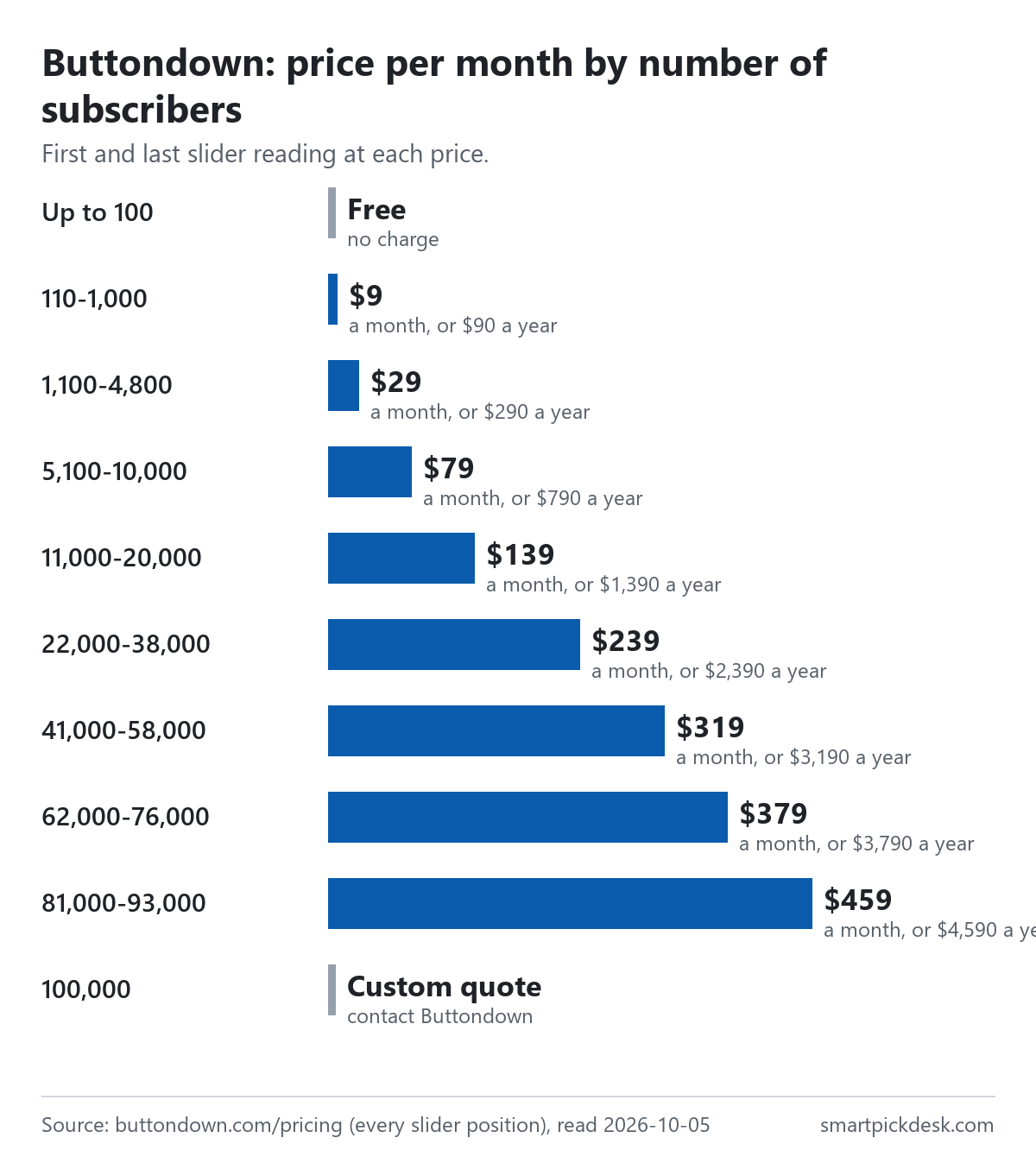
Buttondown is a newsletter tool: you write emails in a plain editor or in Markdown, send them to your subscribers, and keep a public archive of past issues. There are no named plans on its pricing page. You set a slider to your number of subscribers and the page shows one price. The first 100 subscribers are free; from there it showed $9 a month or $90 a year up to 1,000 subscribers, and $29 or $290 from 1,100.
- Free up to 100 subscribers, with the editor, a custom sending domain, hosted archives, and paid features as $9 to $79 monthly add-ons.[1]
- 110 to 1,000 subscribers, $9 or $90 a year: tagging, paid subscriptions, analytics, RSS-to-email and more included; a few larger features still add-ons.[1]
- From 5,100 subscribers, $79 or $790 a year and up: every feature on the page included, with no add-ons left.[1]
If you want one sentence: the list size sets one price, small lists pay extra for a few features that larger lists get included, and if you charge readers, Buttondown takes no share of that money.
On this page
At a glance
| Subscribers (as read on the slider) | Per month | Per year | Add-ons still charged |
|---|---|---|---|
| Up to 100 | No charge | No charge | Most paid features |
| 110–1,000 | $9 | $90 | 5 features |
| 1,100–4,800 | $29 | $290 | 2 features |
| 5,100 and up | From $79 | From $790 | None |
| 100,000 | Contact for a custom quote | None | |
Buttondown's pricing page, read on 2026-10-05 at each position of the subscriber slider.[1] The full list of sizes is in the next sections.
The page's own summary at the bottom of the scale is “Absolutely nothing for your first 100 subscribers.”[1] Every paid price comes with a yearly alternative, labelled “(18% off!)” at every size we read.[1]
How we checked this (and what we did not check)
Last updated 2026-10-05 (first version). Every number and quotation here comes from Buttondown's own pages. Prices change — confirm on Buttondown's own page before you sign up.
What we did. On 2026-10-05 we opened buttondown.com/pricing in a browser with no account and saved the page text. The page has a slider for the number of subscribers with 101 positions. We moved it through every position and saved the visible text each time it changed: 99 readings, from 100 subscribers to 100,000. The same day we saved six help pages: paid subscriptions, teams, managing your account, account review, recovering deleted data, and the features page on paid subscriptions, plus the terms of service. Wording in quotation marks is copied from those saved pages word for word, and a script checks every quotation against the saved text.
What we did not do. We have not used Buttondown. There is no account, no screenshot of the product and no view here on deliverability or how well its editor works. Every image is a chart or summary we drew from the saved text; none shows Buttondown's logo or screens. The slider moves in steps, so we know the price at the sizes it showed, such as 1,000 and 1,100, but not at sizes in between. We did not find a help page on cancelling a paid Buttondown plan or on refunds, so this page does not describe either. The features page shows a calculator comparing Buttondown with other newsletter tools; we did not use its figures.
What that leaves. The price at each slider position in both billing modes, what is included or charged as an add-on at each size, and the rules on subscribers, paid newsletters, account review, snoozing and deleting, as published.
Free for the first 100
At the bottom of the slider the page shows no price at all, and a short list of what is included.
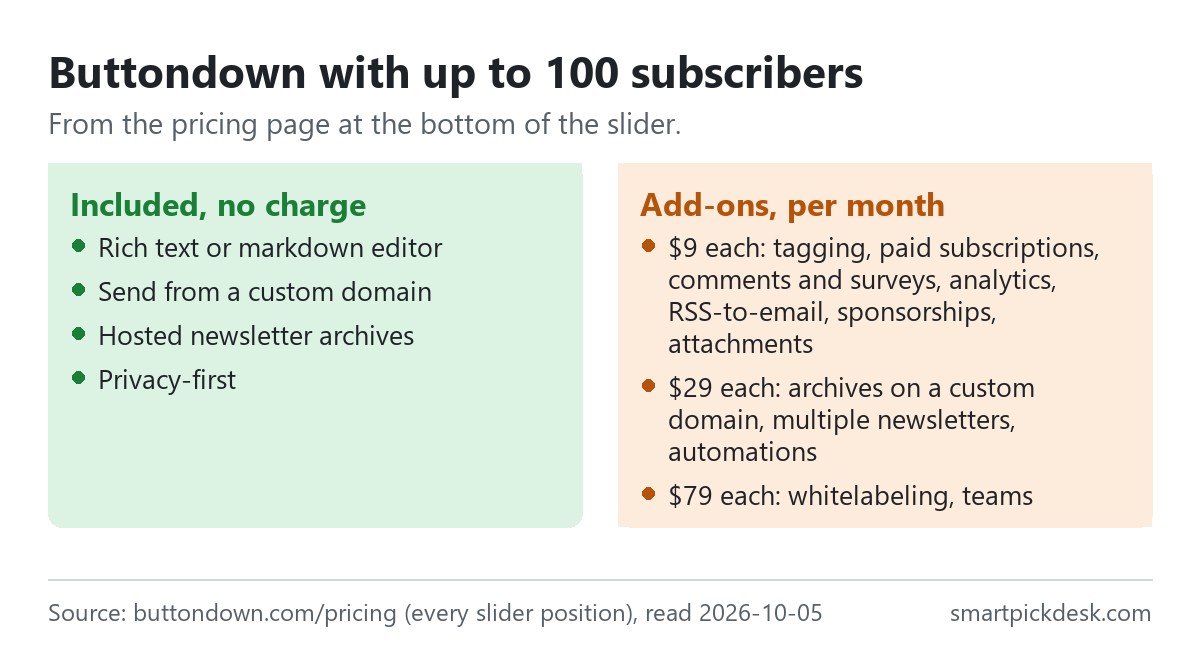
- Included: the rich text or Markdown editor, sending from a custom domain, hosted newsletter archives, and what the page calls “Privacy-first”.[1]
- $9 a month each: tagging and segmentation, paid subscriptions, comments and surveys, analytics, RSS-to-email, sponsorships and email attachments.[1]
- $29 a month each: archives on a custom domain, multiple newsletters and automations.[1]
- $79 a month each: whitelabeling and teams.[1]
In everyday terms: a first newsletter of up to 100 readers costs nothing if the basic set is enough. Adding one $9 feature costs the same as the whole paid price at 110 subscribers, where that feature is included, so for a small list that wants analytics or tagging the paid price is the lower path. Other email tools draw the free line elsewhere: our free-plan comparison sets eight of them side by side, and Free plans lists the other free tiers we have read.
The price at every list size
The slider shows one price for each size. These are the sizes at which the price changed, with the first and last size we saw at each price.
| Subscribers (first and last reading at this price) | Per month | Per year |
|---|---|---|
| 100 | No charge | No charge |
| 110–1,000 | $9 | $90 |
| 1,100–4,800 | $29 | $290 |
| 5,100–10,000 | $79 | $790 |
| 11,000–20,000 | $139 | $1,390 |
| 22,000–38,000 | $239 | $2,390 |
| 41,000–58,000 | $319 | $3,190 |
| 62,000–76,000 | $379 | $3,790 |
| 81,000–93,000 | $459 | $4,590 |
| 100,000 | “Contact us for a custom quote.” | |
Buttondown's pricing page at each slider position, read on 2026-10-05.[1] The slider jumps between readings (for example from 4,800 to 5,100), so the exact size at which a price starts may fall between two readings.
The steps are uneven. The first paid step covers sizes up to 1,000 for $9; the next step more than triples the price at 1,100, to $29. Above 5,100 each step adds between $60 and $100 a month, by our arithmetic.
Where the step falls matters more than the price of any one step. A newsletter at 900 subscribers that grows to 1,100 moves from $9 to $29 a month, on the slider readings; over a year on monthly billing that is the difference between $108 and $348, by our arithmetic. The same list on yearly billing pays $90 or $290. So if your list sits just below a step, the timing of a yearly payment is worth thinking about: paying for a year at the lower step just before crossing it, or at the higher step just after, gives very different totals. The pages we read do not say how Buttondown handles a yearly plan when the list crosses a step during the year, which is the question to ask before paying ahead.
The pricing questions also set a sending assumption: “All of these prices assume that you're sending at most one email a day to your entire subscriber base.” Sending more than that is a conversation with Buttondown about usage-based pricing.[1]
Monthly or yearly
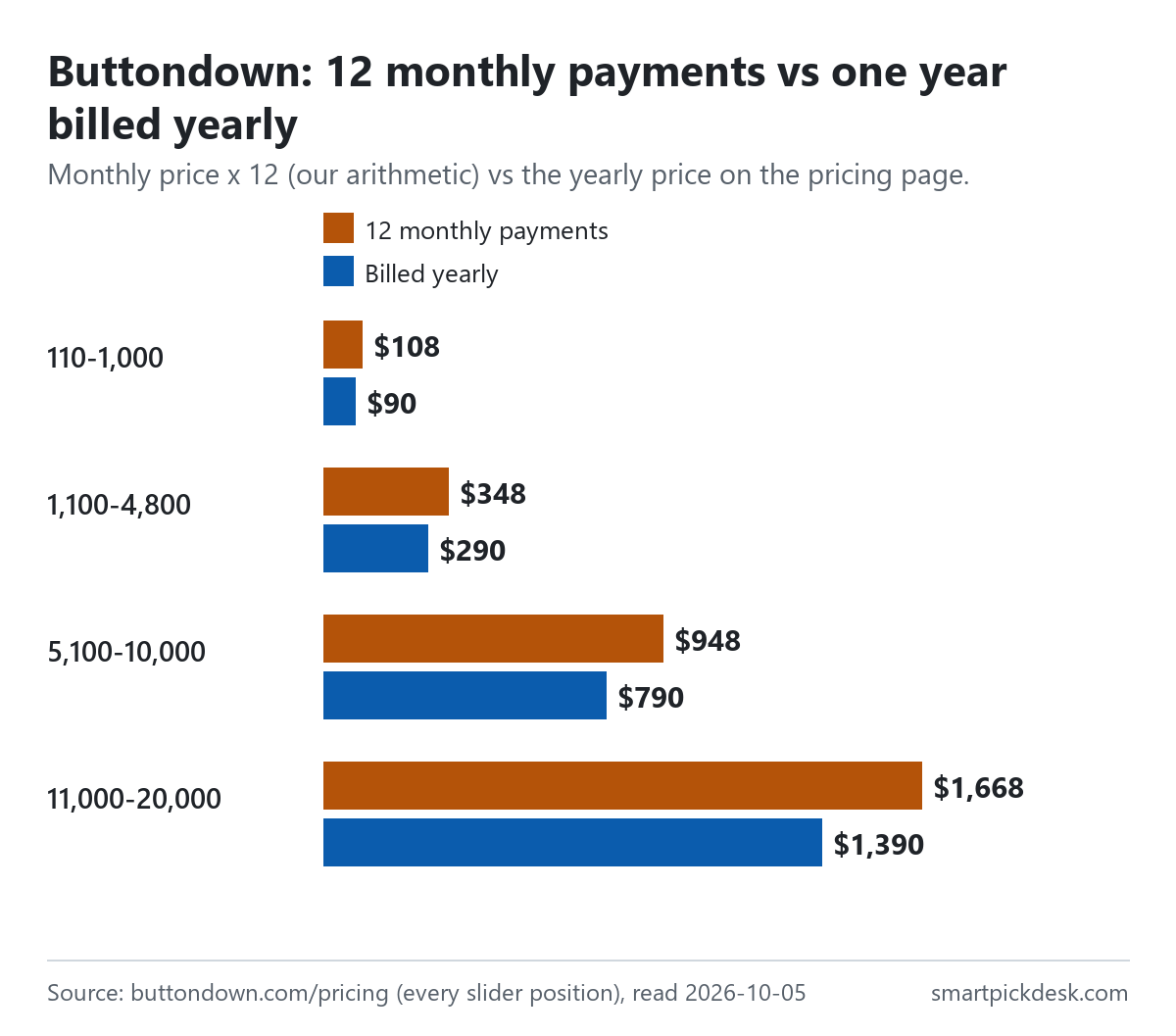
Every paid size has a yearly price exactly ten times the monthly one.
| Subscribers | Monthly price | 12 monthly payments | Billed yearly | Less over a year |
|---|---|---|---|---|
| 110–1,000 | $9 | $108 | $90 | $18 |
| 1,100–4,800 | $29 | $348 | $290 | $58 |
| 5,100–10,000 | $79 | $948 | $790 | $158 |
| 11,000–20,000 | $139 | $1,668 | $1,390 | $278 |
| 22,000–38,000 | $239 | $2,868 | $2,390 | $478 |
Monthly and yearly prices from the pricing page;[1] the 12-month column and the difference are our arithmetic.
A yearly price of ten months is two months free, which by our arithmetic is 16.7% off. The page labels it “(18% off!)” at every size.[1] The dollar figures are the ones to rely on.
One practical point for a growing list: the yearly price is set by the size you choose. The pages we read do not say what happens to a yearly price if your list crosses into the next step during the year, so it is worth asking before paying a year in advance.
What is included and what is an add-on
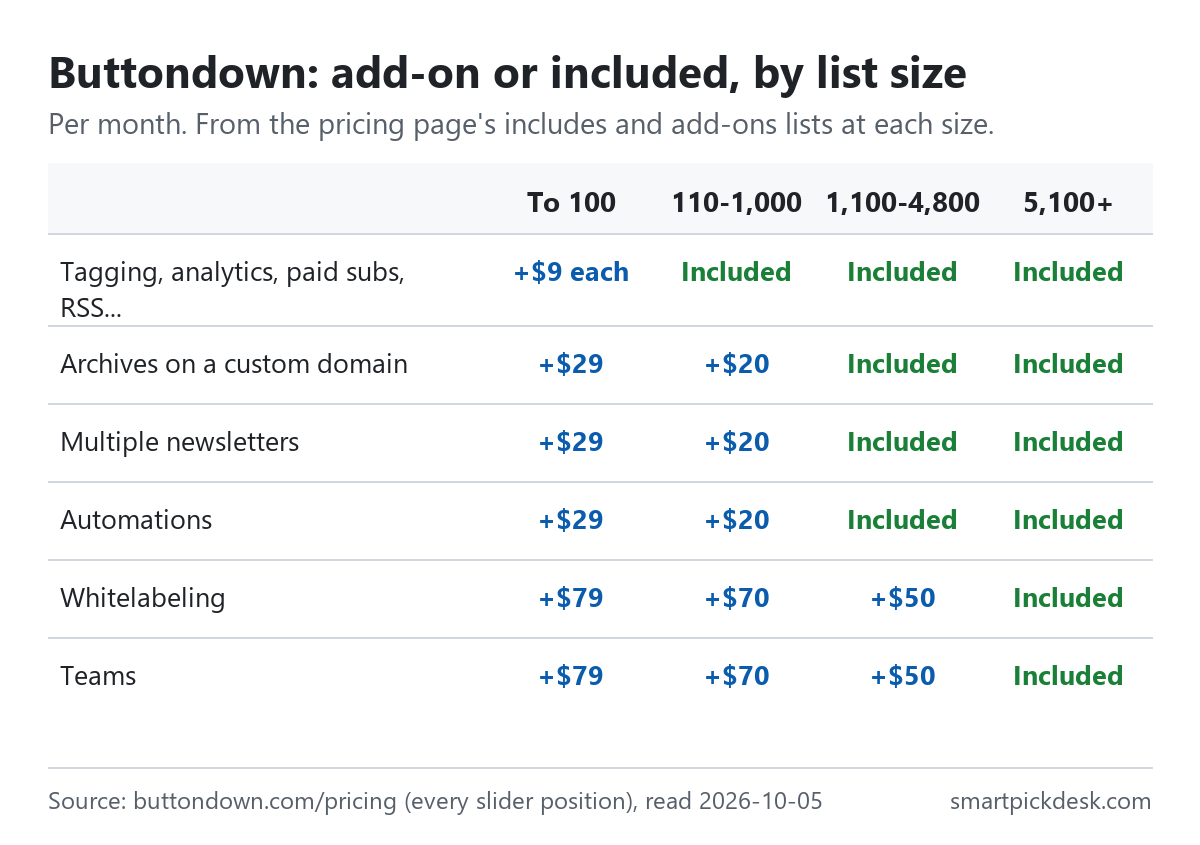
The same features move from add-on to included as the list grows. This is the part of Buttondown's pricing that most changes the real bill for a small list.
| Feature | Up to 100 | 110–1,000 | 1,100–4,800 | 5,100 and up |
|---|---|---|---|---|
| Tagging, paid subscriptions, analytics, comments, RSS, sponsorships, attachments | +$9 each | Included | Included | Included |
| Archives on a custom domain | +$29 | +$20 | Included | Included |
| Multiple newsletters | +$29 | +$20 | Included | Included |
| Automations | +$29 | +$20 | Included | Included |
| Whitelabeling | +$79 | +$70 | +$50 | Included |
| Teams | +$79 | +$70 | +$50 | Included |
The “That price includes” and “Add-ons” lists on the pricing page at each slider position, read on 2026-10-05.[1] Add-on prices are per month.
A worked example, by our arithmetic: a newsletter with 500 subscribers that wants a second person on the account pays $9 for the size plus $70 for Teams, so $79 a month — the same as the price at 5,100 subscribers, where Teams is included. Twelve months of that is $948. Before choosing add-ons, it is worth checking whether the feature is really needed at that size.
The help pages call the teammate feature unlimited: “There is no limit to the number of teammates you can have collaborating” on a newsletter.[3] Teammates can be given access to subscribers, emails, sending, styling, automations, surveys or settings separately.[3]
Who counts as a subscriber
The slider asks for subscribers, and the pricing questions define them: “We charge for active subscribers — you only pay for the people who are actively receiving your emails.”[1]
- Active, not every address ever added. The page contrasts this with providers that charge “for your unused subscribers”.[1]
- One email a day. The prices assume at most one send a day to your whole list.[1]
- Non-profits. Registered non-profits “can get a 50% discount on your plan” by emailing proof of registration.[1]
- Migration. From 110 subscribers the included list adds “Free migration by us”, help with moving from another tool.[1]
Buttondown explains its approach in the same section: it says it charges “only for active subscribers” and lets you “use features à la carte”, which is the add-on model in the table above.[1] The same answer gives Buttondown's reasons for its prices; we report them as Buttondown's own description, not as a comparison we have made.
In everyday terms: if a few hundred old addresses have unsubscribed, they do not push you into a higher step. The help pages we read do not define the exact rule for when an address stops being active. Kit and MailerLite publish their own counting rules, which Kit pricing, checked and MailerLite pricing, checked quote.
Charging your readers
Paid subscriptions are included from 110 subscribers and a $9 add-on below that.[1] On what Buttondown takes from the money readers pay, the features page answers its own question “Does Buttondown take a cut of my revenue?” with: “No. You keep all of the money you make after credit card fees.”[5]
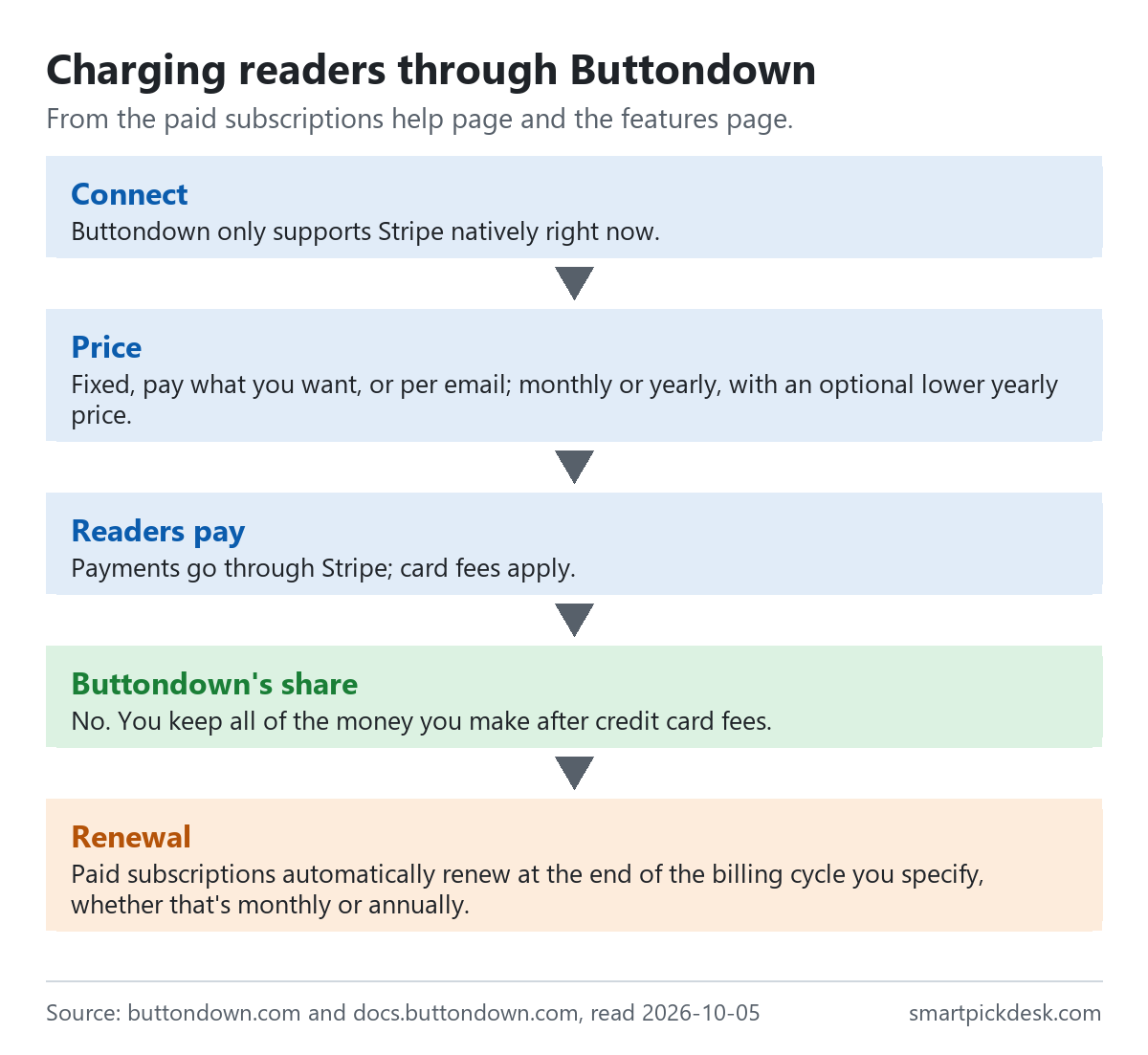
- Stripe only. “Buttondown only supports Stripe natively right now.”[2] Card fees are Stripe's, not Buttondown's.
- Three ways to price. Fixed, pay what you want, or per email, monthly or yearly, with an optional lower yearly price.[2]
- Price changes. New prices apply to new subscribers; existing ones keep theirs unless you move them, and the change “isn't pro-rated and takes effect at the end of each subscriber's current billing period.”[2]
- Renewal. “Paid subscriptions automatically renew at the end of the billing cycle you specify, whether that's monthly or annually.”[2]
- Testing. Stripe's test mode is not supported; the help page suggests charging a small amount on a real card and refunding it.[2]
- Tax. The help page says Stripe reports and collects taxes for a paid newsletter, and that you may also need to register with your local tax authority.[2]
Account review before you send
New accounts cannot send straight away. “All new accounts go through an initial review before they can start sending.”[4]
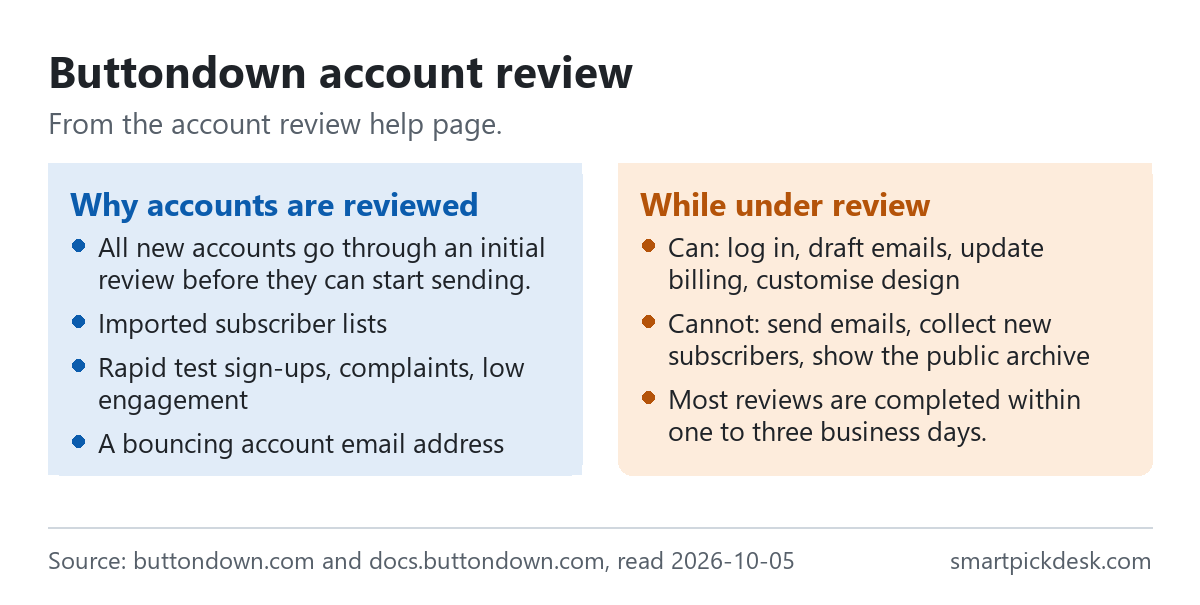
- How long. “Most reviews are completed within one to three business days.”[4]
- Other triggers. Importing subscribers, rapid test sign-ups, complaints, low engagement or a bouncing account address can also start a review.[4]
- What waits. During review you can draft and design, but not send emails, collect new subscribers or show the public archive.[4]
Imports are the trigger most likely to affect someone moving from another tool. The page says Buttondown verifies all new subscriber lists to make sure the addresses are valid and that you have permission to email them, so a large import can mean another wait before the first send from the new account.[4]
For pricing this matters in one way: if you pay on day one, the first days may be spent waiting for the review. Filling in the verification form, which the page recommends above anything else to speed things up, shortens that.[4]
Snoozing, deleting and recovery
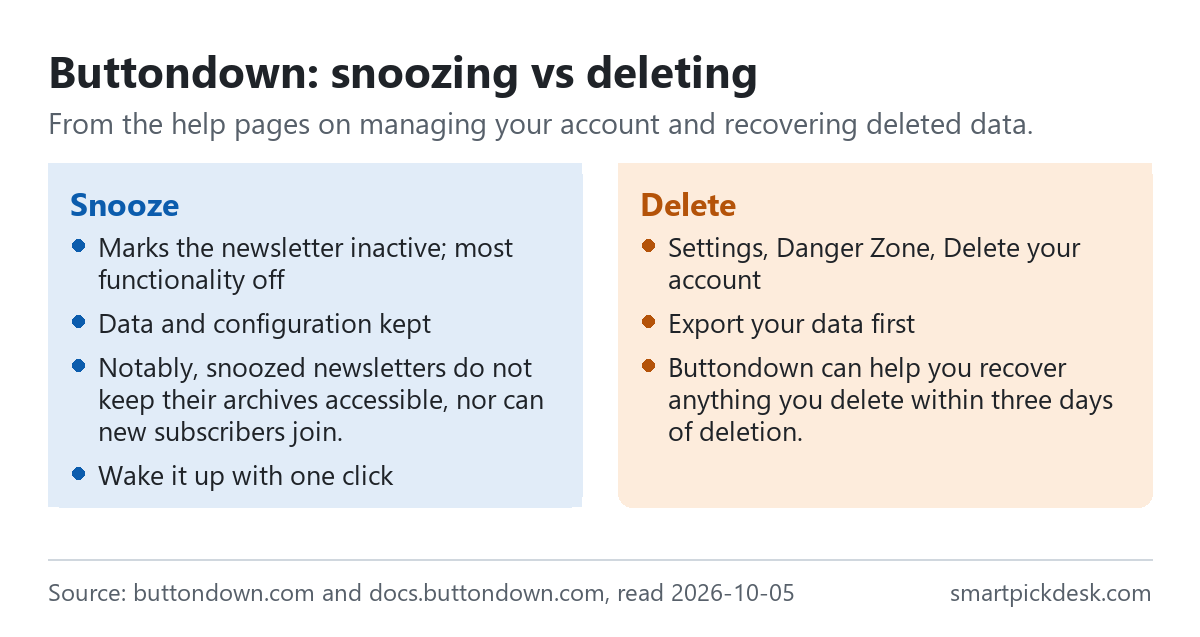
- Snoozing. Snoozing marks a newsletter as inactive and turns off most functionality “without having to actually delete your data or change any major configurations.” “Notably, snoozed newsletters do not keep their archives accessible, nor can new subscribers join.”[6]
- Deleting. “You can delete your Buttondown account quickly and completely.” The help page advises exporting your data first.[6]
- Recovery. “Buttondown can help you recover anything you delete within three days of deletion.” After that it is gone.[7]
The pages we read do not say whether snoozing stops or reduces the bill, and we did not find a page on cancelling a paid plan or on refunds. If you plan a break, ask Buttondown how a snoozed newsletter is billed before relying on it.
Where Buttondown's pages disagree
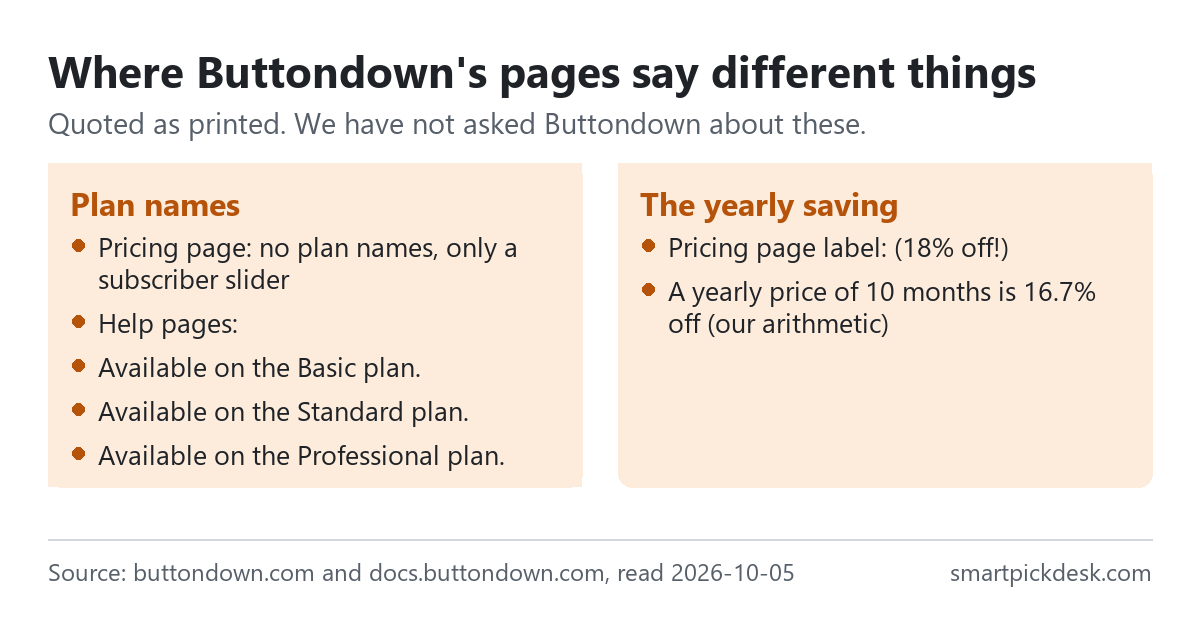
- Plan names. The pricing page has no plan names. The help pages do: paid subscriptions are “Available on the Basic plan.”, adding another newsletter is “Available on the Standard plan.” and teams are “Available on the Professional plan.”[2][3][6] The pages do not say which sizes those names match. On the pricing page, teams are an add-on below 5,100 subscribers rather than tied to a plan.[1]
- The yearly saving. “(18% off!)” against 16.7% by our arithmetic for a yearly price of ten months.[1]
- The top of the scale. At the last slider position the page shows 100,000+ subscribers and a custom quote; the pricing questions describe usage-based pricing for heavier sending, without figures.[1]
We have not asked Buttondown about these. The prices on the pricing page are what we used throughout.
Which size fits which situation
| If you are… | Look at | Why, from Buttondown's pages | Watch out for |
|---|---|---|---|
| Starting a newsletter | Free, up to 100 | No charge, custom domain sending[1] | Most features are add-ons[1] |
| A few hundred readers wanting analytics | 110–1,000, $9 | Analytics and tagging included[1] | Automations still +$20[1] |
| Charging readers | Any paid size | No cut of revenue[5] | Stripe only; card fees apply[2] |
| A small team | Compare +$70 with the next size | Unlimited teammates[3] | Teams is an add-on below 5,100[1] |
| Sending more than daily | Ask Buttondown | Usage-based pricing above one a day[1] | No published figures[1] |
| Taking a break | Snooze | Data kept, one-click wake-up[6] | Billing effect not stated[6] |
See Buttondown's own pricing page
Related pages on this site: Substack pricing, checked, Ghost pricing, checked and beehiiv pricing, checked cover other newsletter tools. For a wider choice of email platform, start with how to choose an email marketing platform.
Questions people ask
Is Buttondown free?
Yes, for the first 100 subscribers.[1]
How much does Buttondown cost for 1,000 subscribers?
$9 a month or $90 a year at 1,000; $29 or $290 at 1,100.[1] See every size.
Does Buttondown take a cut of paid newsletter subscriptions?
No; you keep the money after card fees.[5]
What are Buttondown's add-ons?
Features charged monthly on small lists and included on larger ones; none are left from 5,100 subscribers.[1]
Does Buttondown charge for unsubscribed contacts?
No; it charges for active subscribers.[1]
Can I pause a Buttondown newsletter?
You can snooze it; the pages do not say how that affects billing.[6]
Do you get paid if I sign up?
Not from this page — it has no affiliate links today. If that changes, it will say so at the top, and each link will be marked.
Sources and check log
| # | Source | URL | Checked | How |
|---|---|---|---|---|
| 1 | Buttondown, Pricing (every slider position) | buttondown.com/pricing | 2026-10-05 | Opened in a browser with no account; visible text saved at each slider position |
| 2 | Buttondown docs, Paid subscriptions | docs.buttondown.com › paid subscriptions | 2026-10-05 | Page text saved |
| 3 | Buttondown docs, Adding people to your team | docs.buttondown.com › teams | 2026-10-05 | Page text saved |
| 4 | Buttondown docs, Account review | docs.buttondown.com › account review | 2026-10-05 | Page text saved |
| 5 | Buttondown, Paid Subscriptions (features page) | buttondown.com › features › paid subscriptions | 2026-10-05 | Page text saved; calculator figures not used |
| 6 | Buttondown docs, Managing your account | docs.buttondown.com › account | 2026-10-05 | Page text saved |
| 7 | Buttondown docs, Recovering deleted data | docs.buttondown.com › recovering deleted data | 2026-10-05 | Page text saved |
Change log
- 2026-10-05 — First version. The pricing page at every slider position and six help and feature pages read on 2026-10-05.
- Previous check: none for this page.
- What we will re-check: the price and add-ons at each size, the yearly prices, the free limit, and whether a page on cancelling and refunds has been published.
Who writes this
Smart Pick Desk is an independent site that compares tools for people who work online. We are not employed by, or partnered with, Buttondown, and we do not run Buttondown in our own business. What we do is read what each company publishes, write down the date we read it, and say plainly which parts we could not check. More: who the editors are and how we check a page.
We do not promise results. Nothing here is a prediction about what a tool will do for your newsletter or income.